

Satoshi Bro
224 Posts

Satoshi Bro
Report
Block User
Open Trade

AVA Holder
Frequent Trader
3.6 Months
0 Following
17 Followers
8 Liked
Posts
Portfolio
All
Videos
·
--
Myth vs fact: "This coin is only $0.001, so it's cheap and has way more room to run than BTC" 🧐
❌ Myth: low price per coin = cheap coin.
✅ Fact: price per coin tells you nothing on its own. What matters is market cap = price x circulating supply.
A token at $0.001 with 500 trillion coins in circulation is already a $500 billion project. For it to 10x, $4.5 trillion of new value has to show up.
Before you call anything "cheap", check market cap, circulating supply and the unlock schedule. New supply hitting the market dilutes every holder.
Which "cheap coin" taught you this the hard way? 👇
#crypto #CryptoEducation #altcoins #Binance
Myth vs fact: "This coin is only $0.001, so it's cheap and has way more room to run than BTC" 🧐
❌ Myth: low price per coin = cheap coin.
✅ Fact: price per coin tells you nothing on its own. What matters is market cap = price x circulating supply.
A token at $0.001 with 500 trillion coins in circulation is already a $500 billion project. For it to 10x, $4.5 trillion of new value has to show up.
Before you call anything "cheap", check market cap, circulating supply and the unlock schedule. New supply hitting the market dilutes every holder.
Which "cheap coin" taught you this the hard way? 👇
#crypto #CryptoEducation #altcoins #Binance
❌ Myth: low price per coin = cheap coin.
✅ Fact: price per coin tells you nothing on its own. What matters is market cap = price x circulating supply.
A token at $0.001 with 500 trillion coins in circulation is already a $500 billion project. For it to 10x, $4.5 trillion of new value has to show up.
Before you call anything "cheap", check market cap, circulating supply and the unlock schedule. New supply hitting the market dilutes every holder.
Which "cheap coin" taught you this the hard way? 👇
#crypto #CryptoEducation #altcoins #Binance
18
·
--
Article
Binance Cross Margin vs Isolated Margin in Worked ExamplesTwo traders put $1,000 each into the same two margin trades, one coin halves, and they end the week in very different places, only because they picked different margin modes. Cross margin on Binance pools everything in your Cross Margin account as shared collateral for all your positions, with one margin level for the whole account. Isolated margin gives each trading pair its own small account with its own collateral and its own margin level, so a liquidation stays inside that pair.
👉 [Sign up on Binance with code 20LESSFEES for 20% lower Spot and Futures fees](https://www.binance.com/join?ref=20LESSFEES)
Neither mode is safer by default. Each one moves the danger to a different place, and the numbers below show where.
What does cross margin actually share?
You get exactly one Cross Margin account. Every coin you move into it backs every loan and every position in it, and you can trade all pairs offered on Binance Margin from that one account.
Binance tracks the health of the whole account with a single number, the margin level:
Formula: Margin level = total asset value in the account / (total borrowed + outstanding interest).Leverage setting: In Cross Margin Classic, leverage is set for the whole account at 3x or 5x. A higher-leverage Pro version of cross margin was phased out on 5 February 2026.Margin call zone: At 3x you get a margin call when the level sits between 1.1 and 1.3. At 5x that zone is between 1.1 and 1.16.Liquidation line: At a margin level of 1.1 or lower, in both 3x and 5x, the system starts selling collateral to repay the loans and interest.Transfers out: Moving coins out of the account is only possible while the margin level stays above 2.
The key word is total. A coin that is doing fine still counts as collateral for a coin that is collapsing, and in a liquidation both can be sold.
The ML reading next to the leverage button is that account-wide margin level. With no loans open it shows a very high number, and it starts to fall as soon as you borrow.
How is an isolated margin account different?
Isolated margin splits your margin trading into separate boxes, one per pair. A BTC/USDC isolated account can only hold, receive and borrow BTC and USDC, and nothing else.
Own collateral: Only the coins inside that pair's account back its loans. Your Cross Margin account and other isolated accounts are never pulled in automatically.Own margin level: Same formula as cross, but calculated per pair. A bad trade in one pair does not change the number in another.Leverage by pair: Eligible pairs go as high as 10x. Leverage is tiered, so the more you borrow in a pair, the lower the maximum leverage becomes, stepping down toward 5x on the largest tiers.Liquidation lines: They depend on the leverage class of the pair. Binance lists 1.05 for 10x pairs, 1.15 for 5x and 1.18 for 3x.Partial liquidation: When a pair hits its line, collateral is sold until the level climbs back to the margin call ratio in most cases. In extreme moves the whole position can be closed.
Adding margin to a struggling isolated position is a manual job. You transfer coins into that specific pair's account yourself.
How do the two modes line up point by point?
Cross margin, feature by feature:
Collateral: Everything in the one Cross Margin account.Accounts: One, covering all margin pairs.Leverage: 3x or 5x for the whole account (Classic).Liquidation: Margin level 1.1 or lower, checked across the whole account.Blast radius: A liquidation can sell any collateral in the account.
Isolated margin, the same features:
Collateral: Only the two coins of that pair.Accounts: As many as you open, one per pair.Leverage: Set per pair, tiered, as high as 10x on eligible pairs.Liquidation: Per pair, between 1.05 and 1.18 depending on the pair's leverage class.Blast radius: Limited to the coins in that one pair's account.
The Isolated tab asks you to transfer funds before a pair can be used, because each pair is its own account that starts empty.
What happens to $1,000 when one trade goes wrong?
Here is the scenario from the opening, worked out. All figures are illustrations that ignore interest, trading fees and slippage.
Cross trader: Moves 1,000 USDT into Cross Margin at 3x, borrows another 1,000 USDT and buys 1,000 USDT of coin A and 1,000 USDT of coin B.
Start: Assets 2,000, debt 1,000, margin level 2.0.Coin A falls 50%: Assets 500 + 1,000 = 1,500, margin level 1.5. No margin call, both positions still open, 500 USDT down on paper.Coin A falls 70%: Assets 1,300, margin level 1.3. The margin call arrives.Coin A falls 90%: Assets 1,100, margin level 1.1. Liquidation, and coin B is sold too, even though it never moved.
Isolated trader: Puts 500 USDT into an A/USDT isolated account and 500 USDT into a B/USDT one, borrows 500 USDT in each and buys 1,000 USDT of each coin. Assume both are 10x pairs with a 1.05 liquidation line.
Start: Each account has assets 1,000, debt 500, margin level 2.0.Coin A falls 47.5%: The A account holds 525 against 500 of debt, margin level 1.05. Liquidation starts and only about 25 USDT of equity is left there, before the 2% liquidation fee on the debt repaid.Coin B account: Still at 2.0. Untouched.
So after the same 50% drop, both traders are roughly 500 USDT down. The difference is what comes next. If coin A bounces, the cross trader still holds it and recovers part of the loss, while the isolated trader was closed near the low. If coin A keeps sliding toward zero, the cross trader can lose the whole 1,000, while the isolated trader's loss stops at the 500 in that pair.
What if the whole market drops at once?
Here is a surprise for many people. When both coins fall by the same percentage, the margin level math comes out the same in both modes.
Both down 30%: Cross has 1,400 of assets against 1,000 of debt, margin level 1.4. Each isolated account has 700 against 500, also 1.4.Both down 45%: Cross sits at 1.1 and is liquidated. Each isolated account sits at 1.1 too, just above its 1.05 line in this example.
In a broad selloff, isolation buys you almost nothing. The real gap between the two modes shows up when your positions move in different directions or by very different amounts.
How much does borrowing interest move the margin level?
Margin loans accrue interest every hour, and that interest is added to the bottom of the margin level formula. Rates are variable and shown in the Borrow window.
As an illustration, an hourly rate of 0.0005% on 1,000 USDT adds about 0.005 USDT per hour, roughly 0.12 USDT a day. That is tiny for a two-day trade and noticeable on a loan left open for months while the price drifts against you.
Closing a trade does not automatically clear the loan either. Unless you use the Repay trading method or the automatic repay option, the debt stays open and keeps accruing.
Does Futures use the same cross and isolated idea?
Yes, with its own rules. On the Futures order panel the first button reads Cross by default, next to the leverage button that may show something like 20x.
Default mode: All contracts start in Cross. You click Cross to switch a contract to Isolated, and the change applies only to that contract.Timing: You cannot change the margin mode while you have open orders or positions on that contract. Pick the mode first.What cross shares: Margin is shared among positions that use the same margin asset, for example all USDT-margined contracts draw on the USDT in your USDⓈ-M Futures wallet.Liquidation with profits: Cross liquidation is triggered when the shared margin balance falls below the maintenance margin. A big loser can take down the account even while another position shows a profit.Isolated leverage: On an open isolated position you can raise the leverage but not lower it.Multi-Assets Mode: It only supports Cross, so isolated positions must be switched before you turn it on.
A rough illustration: with 1,000 USDT in the Futures wallet you open a 2,000 USDT long at 20x, which needs about 100 USDT of initial margin. In Isolated, only that 100 is on the line, and a move of a little under 5% against you is enough to liquidate it. In Cross, the whole 1,000 backs the position, so it survives a much bigger move, but if the move comes you can lose far more than 100. The maintenance margin, fees and funding shift these figures, and this guide to [mark price and funding on perpetual futures](https://www.binance.com/en/square/post/381971268831170) covers how liquidation prices are worked out.
Which mode should a beginner pick first?
Isolated, in most cases. It turns the question "how much can I lose?" into a number you choose before the trade.
Start isolated, one pair: Put in only the amount you are ready to lose on that idea and nothing else.Use low leverage: The fact that a pair allows 10x does not mean you should borrow that much. At 2x the liquidation line is much further away than at 8x.Move to cross later: Cross makes sense once you run several positions that offset each other, such as a long in one coin and a short in a related one, and you want one buffer instead of topping up each pair by hand.Futures follows the same logic: Switch the contract to Isolated before your first order, size the margin you are willing to lose, then pick the leverage.
Which mistakes wipe out margin accounts?
Using Cross Margin as storage: Coins you meant to hold long term become collateral the moment they sit in the Cross Margin account.Thinking isolated means safe: A 10x isolated position can be liquidated on a small move. Isolation limits how far the damage spreads, not how fast it arrives.Feeding a losing pair: Topping up an isolated account again and again turns a capped loss into an open-ended one.Doubling the same bet: Holding ETH as collateral in cross and also opening a leveraged ETH long means one price drop hits both sides of the margin level formula.Forgetting the loan: Selling the coin with the Normal method leaves the debt open and interest keeps adding up.Clicking order first, mode second: In Futures the mode cannot be changed once an order or position is open on that contract.
Which edge cases catch experienced traders?
Gaps past the margin call: In a fast market the margin level can drop from the margin call zone straight to liquidation, before any top-up lands.Locked transfers: In cross, profits cannot be moved out while the margin level is 2 or lower, even if you want to use them elsewhere.Haircuts on collateral: In Cross Margin Classic, collateral haircuts reduce how much you can borrow and transfer out, though they are not part of the margin level itself.Frozen during liquidation: While a liquidation runs you cannot change the margin positions involved.Tier changes as you borrow: Borrowing more in an isolated pair can push it into a lower leverage tier with a higher initial risk ratio.
How do you keep the margin level healthy?
Watch the ML number: It sits on the order panel. Decide in advance what level makes you reduce the position, for example 1.5 in cross.Use exit orders: The margin order panel offers Limit, Market, OCO and Stop-limit. Our walkthrough on [setting a Binance stop loss with stop-limit, OCO and trailing stops](https://www.binance.com/en/square/post/381732956220471) shows each one.Keep spare funds outside: A stablecoin reserve in your Spot wallet can be moved in on purpose, rather than sitting in cross where it is exposed.Repay as you close: Pick the Repay method or the automatic repay option when you exit so interest stops.Run the Calculator: The panel has a Calculator link. Check the liquidation price before you open, not after.
What are the risks either way?
Leverage cuts both ways: Borrowing magnifies losses exactly as much as gains, and a liquidation can remove most of the collateral involved.Fees on top: Binance charges a 2% liquidation fee on the debt repaid, plus hourly interest and trading fees.Market speed: Prices can move faster than any alert or manual top-up.Rule changes: Leverage limits, tiers and thresholds can change. Check the current values on Binance before you trade.
This article is for education only and is not financial advice. Margin and futures trading with leverage can lead to liquidation and the loss of your full collateral.
If you are setting up a new account for this, code 20LESSFEES takes a flat 20% off your Spot and Futures trading fees, and the [Binance welcome bonus page for new users](https://www.binance.com/en/events/BESTBONUS) lists the current tasks and terms.
Cross or isolated, quick questions
Can I hold cross and isolated positions at the same time?
Yes. You have one Cross Margin account and can open separate isolated accounts for different pairs alongside it. Each keeps its own margin level.
Does isolated margin cap my loss at what I put into the pair?
Your other accounts are not pulled in, so the damage stays inside that pair. Treat the whole amount in the pair as at risk, because fast moves can close it at worse prices than you expected.
Is the margin level the same thing as leverage?
No. Leverage is the maximum you are allowed to borrow, while the margin level shows how far your current assets cover your current debt and interest.
Why does the Isolated tab ask me to transfer first?
Every pair is a separate account that starts empty. Until you move collateral into it, there is nothing to borrow against.
Why can I not move coins out of Cross Margin?
Transfers out are blocked while the account's margin level is 2 or lower. Repay part of the loan or add collateral to lift it above 2.
Disclosure: this article includes a Binance sign-up link with the code 20LESSFEES. Leveraged trading can lead to liquidation. This is not financial advice.
Binance Cross Margin vs Isolated Margin in Worked Examples
Two traders put $1,000 each into the same two margin trades, one coin halves, and they end the week in very different places, only because they picked different margin modes. Cross margin on Binance pools everything in your Cross Margin account as shared collateral for all your positions, with one margin level for the whole account. Isolated margin gives each trading pair its own small account with its own collateral and its own margin level, so a liquidation stays inside that pair.
👉 Sign up on Binance with code 20LESSFEES for 20% lower Spot and Futures fees
Neither mode is safer by default. Each one moves the danger to a different place, and the numbers below show where.
What does cross margin actually share?
You get exactly one Cross Margin account. Every coin you move into it backs every loan and every position in it, and you can trade all pairs offered on Binance Margin from that one account.
Binance tracks the health of the whole account with a single number, the margin level:
Formula: Margin level = total asset value in the account / (total borrowed + outstanding interest).Leverage setting: In Cross Margin Classic, leverage is set for the whole account at 3x or 5x. A higher-leverage Pro version of cross margin was phased out on 5 February 2026.Margin call zone: At 3x you get a margin call when the level sits between 1.1 and 1.3. At 5x that zone is between 1.1 and 1.16.Liquidation line: At a margin level of 1.1 or lower, in both 3x and 5x, the system starts selling collateral to repay the loans and interest.Transfers out: Moving coins out of the account is only possible while the margin level stays above 2.
The key word is total. A coin that is doing fine still counts as collateral for a coin that is collapsing, and in a liquidation both can be sold.
The ML reading next to the leverage button is that account-wide margin level. With no loans open it shows a very high number, and it starts to fall as soon as you borrow.
How is an isolated margin account different?
Isolated margin splits your margin trading into separate boxes, one per pair. A BTC/USDC isolated account can only hold, receive and borrow BTC and USDC, and nothing else.
Own collateral: Only the coins inside that pair's account back its loans. Your Cross Margin account and other isolated accounts are never pulled in automatically.Own margin level: Same formula as cross, but calculated per pair. A bad trade in one pair does not change the number in another.Leverage by pair: Eligible pairs go as high as 10x. Leverage is tiered, so the more you borrow in a pair, the lower the maximum leverage becomes, stepping down toward 5x on the largest tiers.Liquidation lines: They depend on the leverage class of the pair. Binance lists 1.05 for 10x pairs, 1.15 for 5x and 1.18 for 3x.Partial liquidation: When a pair hits its line, collateral is sold until the level climbs back to the margin call ratio in most cases. In extreme moves the whole position can be closed.
Adding margin to a struggling isolated position is a manual job. You transfer coins into that specific pair's account yourself.
How do the two modes line up point by point?
Cross margin, feature by feature:
Collateral: Everything in the one Cross Margin account.Accounts: One, covering all margin pairs.Leverage: 3x or 5x for the whole account (Classic).Liquidation: Margin level 1.1 or lower, checked across the whole account.Blast radius: A liquidation can sell any collateral in the account.
Isolated margin, the same features:
Collateral: Only the two coins of that pair.Accounts: As many as you open, one per pair.Leverage: Set per pair, tiered, as high as 10x on eligible pairs.Liquidation: Per pair, between 1.05 and 1.18 depending on the pair's leverage class.Blast radius: Limited to the coins in that one pair's account.
The Isolated tab asks you to transfer funds before a pair can be used, because each pair is its own account that starts empty.
What happens to $1,000 when one trade goes wrong?
Here is the scenario from the opening, worked out. All figures are illustrations that ignore interest, trading fees and slippage.
Cross trader: Moves 1,000 USDT into Cross Margin at 3x, borrows another 1,000 USDT and buys 1,000 USDT of coin A and 1,000 USDT of coin B.
Start: Assets 2,000, debt 1,000, margin level 2.0.Coin A falls 50%: Assets 500 + 1,000 = 1,500, margin level 1.5. No margin call, both positions still open, 500 USDT down on paper.Coin A falls 70%: Assets 1,300, margin level 1.3. The margin call arrives.Coin A falls 90%: Assets 1,100, margin level 1.1. Liquidation, and coin B is sold too, even though it never moved.
Isolated trader: Puts 500 USDT into an A/USDT isolated account and 500 USDT into a B/USDT one, borrows 500 USDT in each and buys 1,000 USDT of each coin. Assume both are 10x pairs with a 1.05 liquidation line.
Start: Each account has assets 1,000, debt 500, margin level 2.0.Coin A falls 47.5%: The A account holds 525 against 500 of debt, margin level 1.05. Liquidation starts and only about 25 USDT of equity is left there, before the 2% liquidation fee on the debt repaid.Coin B account: Still at 2.0. Untouched.
So after the same 50% drop, both traders are roughly 500 USDT down. The difference is what comes next. If coin A bounces, the cross trader still holds it and recovers part of the loss, while the isolated trader was closed near the low. If coin A keeps sliding toward zero, the cross trader can lose the whole 1,000, while the isolated trader's loss stops at the 500 in that pair.
What if the whole market drops at once?
Here is a surprise for many people. When both coins fall by the same percentage, the margin level math comes out the same in both modes.
Both down 30%: Cross has 1,400 of assets against 1,000 of debt, margin level 1.4. Each isolated account has 700 against 500, also 1.4.Both down 45%: Cross sits at 1.1 and is liquidated. Each isolated account sits at 1.1 too, just above its 1.05 line in this example.
In a broad selloff, isolation buys you almost nothing. The real gap between the two modes shows up when your positions move in different directions or by very different amounts.
How much does borrowing interest move the margin level?
Margin loans accrue interest every hour, and that interest is added to the bottom of the margin level formula. Rates are variable and shown in the Borrow window.
As an illustration, an hourly rate of 0.0005% on 1,000 USDT adds about 0.005 USDT per hour, roughly 0.12 USDT a day. That is tiny for a two-day trade and noticeable on a loan left open for months while the price drifts against you.
Closing a trade does not automatically clear the loan either. Unless you use the Repay trading method or the automatic repay option, the debt stays open and keeps accruing.
Does Futures use the same cross and isolated idea?
Yes, with its own rules. On the Futures order panel the first button reads Cross by default, next to the leverage button that may show something like 20x.
Default mode: All contracts start in Cross. You click Cross to switch a contract to Isolated, and the change applies only to that contract.Timing: You cannot change the margin mode while you have open orders or positions on that contract. Pick the mode first.What cross shares: Margin is shared among positions that use the same margin asset, for example all USDT-margined contracts draw on the USDT in your USDⓈ-M Futures wallet.Liquidation with profits: Cross liquidation is triggered when the shared margin balance falls below the maintenance margin. A big loser can take down the account even while another position shows a profit.Isolated leverage: On an open isolated position you can raise the leverage but not lower it.Multi-Assets Mode: It only supports Cross, so isolated positions must be switched before you turn it on.
A rough illustration: with 1,000 USDT in the Futures wallet you open a 2,000 USDT long at 20x, which needs about 100 USDT of initial margin. In Isolated, only that 100 is on the line, and a move of a little under 5% against you is enough to liquidate it. In Cross, the whole 1,000 backs the position, so it survives a much bigger move, but if the move comes you can lose far more than 100. The maintenance margin, fees and funding shift these figures, and this guide to mark price and funding on perpetual futures covers how liquidation prices are worked out.
Which mode should a beginner pick first?
Isolated, in most cases. It turns the question "how much can I lose?" into a number you choose before the trade.
Start isolated, one pair: Put in only the amount you are ready to lose on that idea and nothing else.Use low leverage: The fact that a pair allows 10x does not mean you should borrow that much. At 2x the liquidation line is much further away than at 8x.Move to cross later: Cross makes sense once you run several positions that offset each other, such as a long in one coin and a short in a related one, and you want one buffer instead of topping up each pair by hand.Futures follows the same logic: Switch the contract to Isolated before your first order, size the margin you are willing to lose, then pick the leverage.
Which mistakes wipe out margin accounts?
Using Cross Margin as storage: Coins you meant to hold long term become collateral the moment they sit in the Cross Margin account.Thinking isolated means safe: A 10x isolated position can be liquidated on a small move. Isolation limits how far the damage spreads, not how fast it arrives.Feeding a losing pair: Topping up an isolated account again and again turns a capped loss into an open-ended one.Doubling the same bet: Holding ETH as collateral in cross and also opening a leveraged ETH long means one price drop hits both sides of the margin level formula.Forgetting the loan: Selling the coin with the Normal method leaves the debt open and interest keeps adding up.Clicking order first, mode second: In Futures the mode cannot be changed once an order or position is open on that contract.
Which edge cases catch experienced traders?
Gaps past the margin call: In a fast market the margin level can drop from the margin call zone straight to liquidation, before any top-up lands.Locked transfers: In cross, profits cannot be moved out while the margin level is 2 or lower, even if you want to use them elsewhere.Haircuts on collateral: In Cross Margin Classic, collateral haircuts reduce how much you can borrow and transfer out, though they are not part of the margin level itself.Frozen during liquidation: While a liquidation runs you cannot change the margin positions involved.Tier changes as you borrow: Borrowing more in an isolated pair can push it into a lower leverage tier with a higher initial risk ratio.
How do you keep the margin level healthy?
Watch the ML number: It sits on the order panel. Decide in advance what level makes you reduce the position, for example 1.5 in cross.Use exit orders: The margin order panel offers Limit, Market, OCO and Stop-limit. Our walkthrough on setting a Binance stop loss with stop-limit, OCO and trailing stops shows each one.Keep spare funds outside: A stablecoin reserve in your Spot wallet can be moved in on purpose, rather than sitting in cross where it is exposed.Repay as you close: Pick the Repay method or the automatic repay option when you exit so interest stops.Run the Calculator: The panel has a Calculator link. Check the liquidation price before you open, not after.
What are the risks either way?
Leverage cuts both ways: Borrowing magnifies losses exactly as much as gains, and a liquidation can remove most of the collateral involved.Fees on top: Binance charges a 2% liquidation fee on the debt repaid, plus hourly interest and trading fees.Market speed: Prices can move faster than any alert or manual top-up.Rule changes: Leverage limits, tiers and thresholds can change. Check the current values on Binance before you trade.
This article is for education only and is not financial advice. Margin and futures trading with leverage can lead to liquidation and the loss of your full collateral.
If you are setting up a new account for this, code 20LESSFEES takes a flat 20% off your Spot and Futures trading fees, and the Binance welcome bonus page for new users lists the current tasks and terms.
Cross or isolated, quick questions
Can I hold cross and isolated positions at the same time?
Yes. You have one Cross Margin account and can open separate isolated accounts for different pairs alongside it. Each keeps its own margin level.
Does isolated margin cap my loss at what I put into the pair?
Your other accounts are not pulled in, so the damage stays inside that pair. Treat the whole amount in the pair as at risk, because fast moves can close it at worse prices than you expected.
Is the margin level the same thing as leverage?
No. Leverage is the maximum you are allowed to borrow, while the margin level shows how far your current assets cover your current debt and interest.
Why does the Isolated tab ask me to transfer first?
Every pair is a separate account that starts empty. Until you move collateral into it, there is nothing to borrow against.
Why can I not move coins out of Cross Margin?
Transfers out are blocked while the account's margin level is 2 or lower. Repay part of the loan or add collateral to lift it above 2.
Disclosure: this article includes a Binance sign-up link with the code 20LESSFEES. Leveraged trading can lead to liquidation. This is not financial advice.
👉 Sign up on Binance with code 20LESSFEES for 20% lower Spot and Futures fees
Neither mode is safer by default. Each one moves the danger to a different place, and the numbers below show where.
What does cross margin actually share?
You get exactly one Cross Margin account. Every coin you move into it backs every loan and every position in it, and you can trade all pairs offered on Binance Margin from that one account.
Binance tracks the health of the whole account with a single number, the margin level:
Formula: Margin level = total asset value in the account / (total borrowed + outstanding interest).Leverage setting: In Cross Margin Classic, leverage is set for the whole account at 3x or 5x. A higher-leverage Pro version of cross margin was phased out on 5 February 2026.Margin call zone: At 3x you get a margin call when the level sits between 1.1 and 1.3. At 5x that zone is between 1.1 and 1.16.Liquidation line: At a margin level of 1.1 or lower, in both 3x and 5x, the system starts selling collateral to repay the loans and interest.Transfers out: Moving coins out of the account is only possible while the margin level stays above 2.
The key word is total. A coin that is doing fine still counts as collateral for a coin that is collapsing, and in a liquidation both can be sold.
The ML reading next to the leverage button is that account-wide margin level. With no loans open it shows a very high number, and it starts to fall as soon as you borrow.
How is an isolated margin account different?
Isolated margin splits your margin trading into separate boxes, one per pair. A BTC/USDC isolated account can only hold, receive and borrow BTC and USDC, and nothing else.
Own collateral: Only the coins inside that pair's account back its loans. Your Cross Margin account and other isolated accounts are never pulled in automatically.Own margin level: Same formula as cross, but calculated per pair. A bad trade in one pair does not change the number in another.Leverage by pair: Eligible pairs go as high as 10x. Leverage is tiered, so the more you borrow in a pair, the lower the maximum leverage becomes, stepping down toward 5x on the largest tiers.Liquidation lines: They depend on the leverage class of the pair. Binance lists 1.05 for 10x pairs, 1.15 for 5x and 1.18 for 3x.Partial liquidation: When a pair hits its line, collateral is sold until the level climbs back to the margin call ratio in most cases. In extreme moves the whole position can be closed.
Adding margin to a struggling isolated position is a manual job. You transfer coins into that specific pair's account yourself.
How do the two modes line up point by point?
Cross margin, feature by feature:
Collateral: Everything in the one Cross Margin account.Accounts: One, covering all margin pairs.Leverage: 3x or 5x for the whole account (Classic).Liquidation: Margin level 1.1 or lower, checked across the whole account.Blast radius: A liquidation can sell any collateral in the account.
Isolated margin, the same features:
Collateral: Only the two coins of that pair.Accounts: As many as you open, one per pair.Leverage: Set per pair, tiered, as high as 10x on eligible pairs.Liquidation: Per pair, between 1.05 and 1.18 depending on the pair's leverage class.Blast radius: Limited to the coins in that one pair's account.
The Isolated tab asks you to transfer funds before a pair can be used, because each pair is its own account that starts empty.
What happens to $1,000 when one trade goes wrong?
Here is the scenario from the opening, worked out. All figures are illustrations that ignore interest, trading fees and slippage.
Cross trader: Moves 1,000 USDT into Cross Margin at 3x, borrows another 1,000 USDT and buys 1,000 USDT of coin A and 1,000 USDT of coin B.
Start: Assets 2,000, debt 1,000, margin level 2.0.Coin A falls 50%: Assets 500 + 1,000 = 1,500, margin level 1.5. No margin call, both positions still open, 500 USDT down on paper.Coin A falls 70%: Assets 1,300, margin level 1.3. The margin call arrives.Coin A falls 90%: Assets 1,100, margin level 1.1. Liquidation, and coin B is sold too, even though it never moved.
Isolated trader: Puts 500 USDT into an A/USDT isolated account and 500 USDT into a B/USDT one, borrows 500 USDT in each and buys 1,000 USDT of each coin. Assume both are 10x pairs with a 1.05 liquidation line.
Start: Each account has assets 1,000, debt 500, margin level 2.0.Coin A falls 47.5%: The A account holds 525 against 500 of debt, margin level 1.05. Liquidation starts and only about 25 USDT of equity is left there, before the 2% liquidation fee on the debt repaid.Coin B account: Still at 2.0. Untouched.
So after the same 50% drop, both traders are roughly 500 USDT down. The difference is what comes next. If coin A bounces, the cross trader still holds it and recovers part of the loss, while the isolated trader was closed near the low. If coin A keeps sliding toward zero, the cross trader can lose the whole 1,000, while the isolated trader's loss stops at the 500 in that pair.
What if the whole market drops at once?
Here is a surprise for many people. When both coins fall by the same percentage, the margin level math comes out the same in both modes.
Both down 30%: Cross has 1,400 of assets against 1,000 of debt, margin level 1.4. Each isolated account has 700 against 500, also 1.4.Both down 45%: Cross sits at 1.1 and is liquidated. Each isolated account sits at 1.1 too, just above its 1.05 line in this example.
In a broad selloff, isolation buys you almost nothing. The real gap between the two modes shows up when your positions move in different directions or by very different amounts.
How much does borrowing interest move the margin level?
Margin loans accrue interest every hour, and that interest is added to the bottom of the margin level formula. Rates are variable and shown in the Borrow window.
As an illustration, an hourly rate of 0.0005% on 1,000 USDT adds about 0.005 USDT per hour, roughly 0.12 USDT a day. That is tiny for a two-day trade and noticeable on a loan left open for months while the price drifts against you.
Closing a trade does not automatically clear the loan either. Unless you use the Repay trading method or the automatic repay option, the debt stays open and keeps accruing.
Does Futures use the same cross and isolated idea?
Yes, with its own rules. On the Futures order panel the first button reads Cross by default, next to the leverage button that may show something like 20x.
Default mode: All contracts start in Cross. You click Cross to switch a contract to Isolated, and the change applies only to that contract.Timing: You cannot change the margin mode while you have open orders or positions on that contract. Pick the mode first.What cross shares: Margin is shared among positions that use the same margin asset, for example all USDT-margined contracts draw on the USDT in your USDⓈ-M Futures wallet.Liquidation with profits: Cross liquidation is triggered when the shared margin balance falls below the maintenance margin. A big loser can take down the account even while another position shows a profit.Isolated leverage: On an open isolated position you can raise the leverage but not lower it.Multi-Assets Mode: It only supports Cross, so isolated positions must be switched before you turn it on.
A rough illustration: with 1,000 USDT in the Futures wallet you open a 2,000 USDT long at 20x, which needs about 100 USDT of initial margin. In Isolated, only that 100 is on the line, and a move of a little under 5% against you is enough to liquidate it. In Cross, the whole 1,000 backs the position, so it survives a much bigger move, but if the move comes you can lose far more than 100. The maintenance margin, fees and funding shift these figures, and this guide to mark price and funding on perpetual futures covers how liquidation prices are worked out.
Which mode should a beginner pick first?
Isolated, in most cases. It turns the question "how much can I lose?" into a number you choose before the trade.
Start isolated, one pair: Put in only the amount you are ready to lose on that idea and nothing else.Use low leverage: The fact that a pair allows 10x does not mean you should borrow that much. At 2x the liquidation line is much further away than at 8x.Move to cross later: Cross makes sense once you run several positions that offset each other, such as a long in one coin and a short in a related one, and you want one buffer instead of topping up each pair by hand.Futures follows the same logic: Switch the contract to Isolated before your first order, size the margin you are willing to lose, then pick the leverage.
Which mistakes wipe out margin accounts?
Using Cross Margin as storage: Coins you meant to hold long term become collateral the moment they sit in the Cross Margin account.Thinking isolated means safe: A 10x isolated position can be liquidated on a small move. Isolation limits how far the damage spreads, not how fast it arrives.Feeding a losing pair: Topping up an isolated account again and again turns a capped loss into an open-ended one.Doubling the same bet: Holding ETH as collateral in cross and also opening a leveraged ETH long means one price drop hits both sides of the margin level formula.Forgetting the loan: Selling the coin with the Normal method leaves the debt open and interest keeps adding up.Clicking order first, mode second: In Futures the mode cannot be changed once an order or position is open on that contract.
Which edge cases catch experienced traders?
Gaps past the margin call: In a fast market the margin level can drop from the margin call zone straight to liquidation, before any top-up lands.Locked transfers: In cross, profits cannot be moved out while the margin level is 2 or lower, even if you want to use them elsewhere.Haircuts on collateral: In Cross Margin Classic, collateral haircuts reduce how much you can borrow and transfer out, though they are not part of the margin level itself.Frozen during liquidation: While a liquidation runs you cannot change the margin positions involved.Tier changes as you borrow: Borrowing more in an isolated pair can push it into a lower leverage tier with a higher initial risk ratio.
How do you keep the margin level healthy?
Watch the ML number: It sits on the order panel. Decide in advance what level makes you reduce the position, for example 1.5 in cross.Use exit orders: The margin order panel offers Limit, Market, OCO and Stop-limit. Our walkthrough on setting a Binance stop loss with stop-limit, OCO and trailing stops shows each one.Keep spare funds outside: A stablecoin reserve in your Spot wallet can be moved in on purpose, rather than sitting in cross where it is exposed.Repay as you close: Pick the Repay method or the automatic repay option when you exit so interest stops.Run the Calculator: The panel has a Calculator link. Check the liquidation price before you open, not after.
What are the risks either way?
Leverage cuts both ways: Borrowing magnifies losses exactly as much as gains, and a liquidation can remove most of the collateral involved.Fees on top: Binance charges a 2% liquidation fee on the debt repaid, plus hourly interest and trading fees.Market speed: Prices can move faster than any alert or manual top-up.Rule changes: Leverage limits, tiers and thresholds can change. Check the current values on Binance before you trade.
This article is for education only and is not financial advice. Margin and futures trading with leverage can lead to liquidation and the loss of your full collateral.
If you are setting up a new account for this, code 20LESSFEES takes a flat 20% off your Spot and Futures trading fees, and the Binance welcome bonus page for new users lists the current tasks and terms.
Cross or isolated, quick questions
Can I hold cross and isolated positions at the same time?
Yes. You have one Cross Margin account and can open separate isolated accounts for different pairs alongside it. Each keeps its own margin level.
Does isolated margin cap my loss at what I put into the pair?
Your other accounts are not pulled in, so the damage stays inside that pair. Treat the whole amount in the pair as at risk, because fast moves can close it at worse prices than you expected.
Is the margin level the same thing as leverage?
No. Leverage is the maximum you are allowed to borrow, while the margin level shows how far your current assets cover your current debt and interest.
Why does the Isolated tab ask me to transfer first?
Every pair is a separate account that starts empty. Until you move collateral into it, there is nothing to borrow against.
Why can I not move coins out of Cross Margin?
Transfers out are blocked while the account's margin level is 2 or lower. Repay part of the loan or add collateral to lift it above 2.
Disclosure: this article includes a Binance sign-up link with the code 20LESSFEES. Leveraged trading can lead to liquidation. This is not financial advice.
22
·
--
🚨 Security tip: real Binance support will never DM you first.
The scam usually goes like this:
👉 You post about a stuck withdrawal
👉 Minutes later a "support agent" messages you on Telegram or X
👉 They ask for your 2FA code, a screen share, or to "verify" your wallet on a link
Real support doesn't open DMs and never asks for codes or seed phrases.
What to do instead:
✅ Use the in-app Chat support only
✅ Check any contact with Binance Verify
✅ Never type a 2FA code or seed phrase for anyone
Has a fake agent ever slid into your DMs? 👇
#ScamAlert #CryptoSecurity #crypto #Binance
🚨 Security tip: real Binance support will never DM you first.
The scam usually goes like this:
👉 You post about a stuck withdrawal
👉 Minutes later a "support agent" messages you on Telegram or X
👉 They ask for your 2FA code, a screen share, or to "verify" your wallet on a link
Real support doesn't open DMs and never asks for codes or seed phrases.
What to do instead:
✅ Use the in-app Chat support only
✅ Check any contact with Binance Verify
✅ Never type a 2FA code or seed phrase for anyone
Has a fake agent ever slid into your DMs? 👇
#ScamAlert #CryptoSecurity #crypto #Binance
The scam usually goes like this:
👉 You post about a stuck withdrawal
👉 Minutes later a "support agent" messages you on Telegram or X
👉 They ask for your 2FA code, a screen share, or to "verify" your wallet on a link
Real support doesn't open DMs and never asks for codes or seed phrases.
What to do instead:
✅ Use the in-app Chat support only
✅ Check any contact with Binance Verify
✅ Never type a 2FA code or seed phrase for anyone
Has a fake agent ever slid into your DMs? 👇
#ScamAlert #CryptoSecurity #crypto #Binance
1
·
--
Article
Binance Invitation Code 2026 for 20% Lower Spot FeesWhat does a code typed into one small box at sign-up actually change? On Binance, quite a lot. Enter THEBESTCODE while you create your account and every Spot trade you make on it is charged a flat 20% less in trading fees. The welcome bonus of up to $19,800 for eligible users comes on top as a separate, task-based extra.
👉 [Create your Binance account with THEBESTCODE](https://www.binance.com/join?ref=THEBESTCODE)
Most guides stop at "enter the code and you're done". That covers the first ten minutes and skips everything after it. This one follows a new account from the sign-up screen through the first trades, the welcome tasks and the habits that decide how much the 20% is really worth over a year. Read it in order, or jump to the level you've already reached.
Why put a code on the account at all?
Lower fees on every Spot trade: The standard Spot rate for a regular user is 0.100% per side. With THEBESTCODE it drops by a flat 20%, to the equivalent of 0.080%. That isn't a ceiling or a teaser rate; it applies to the account's Spot trades.Nothing to lose: The code costs nothing, adds no subscription and doesn't change the prices you see in the order book.The welcome bonus is still there: Eligible users get the same new-user task program whichever code they use, with rewards up to $19,800. The code doesn't shrink it or replace it.It only works at the start: The code attaches to the account while it is being created. Skip it and there's no settings page where you can add it later.
That last point is the reason this whole guide starts at the sign-up screen and not at your first trade.
Level one is the first ten minutes
This part takes less time than making a coffee, and it is the only part you can't redo.
Open the sign-up page: Use the link above, or open the Binance app and pick Sign Up. The link fills in the code for you.Enter your email or phone number: Use an address you check often, because the verification code arrives there within a minute or two.Check the code line before anything else: On the web form it sits under the email field and may be folded away behind a small arrow. It should read THEBESTCODE. If it's empty, type it in by hand, letter by letter, in capitals.Tap Register and confirm: Enter the verification code, set a strong password and finish.
Step three is where people lose the 20%. Autofill in some browsers clears the field, and a few people paste the code with a stray space. Ten seconds of checking saves you from contacting support about something support usually can't change.
One more habit from level one: write down the date you registered. The welcome tasks run on a clock that starts around then, and you'll want to know how many days you have left without guessing.
Level two is your first week of trades
Before any trading, Binance asks you to verify your identity. Have a government ID and a few minutes of good light for the selfie step. Verification often clears within the hour, though busy periods can stretch it to a day or longer.
Once you're verified, fund the account. Common routes are a card purchase, a bank deposit where your country supports one, or a crypto transfer from another wallet. Each route has its own costs, so compare them before moving a large amount.
Now the first trade, and the first chance to see the code at work. Take a $1,000 market buy of BTC on the Spot market:
Standard regular-user fee: $1,000 × 0.100% = $1.00With the code: $1,000 × 0.080% = $0.80Difference on this one order: $0.20
Twenty cents looks like nothing, and on a single order it is nothing. Every position you open, you'll also close, though, so the real unit is the round trip: $2.00 in fees at the standard rate against $1.60 with the code. The gap grows from there, which is what level four is about.
A tip most beginners miss: after your first trade, open your trade history and look at the fee column. You want to see what was charged with your own eyes rather than trust any article, this one included.
THEBESTCODE covers Spot trading. If you also plan to trade Futures, check that part of the fee table separately, because the 20% on this code is a Spot benefit.
Level three is working through the welcome tasks
The welcome program is a list of tasks with rewards attached, not a lump sum that lands on day one. Each tier usually asks for some mix of a net deposit, a trading volume target and a deadline counted in days. Finish the tier inside the window and the listed reward is credited, usually as a voucher or token reward rather than spendable cash.
Three details trip people up:
Net deposit means net: If you deposit $500 and withdraw $200 a week later, the program may count $300. Plan withdrawals around the task window if you're chasing a tier.Volume targets can push you to overtrade: Trading more than you planned only to hit a number can cost more in spreads and bad entries than the reward is worth. Pick the tier that fits the trading you were going to do anyway.Eligibility varies: Rewards are for eligible users, and your country, verification status and account history all play a part. The task page on your own account is the final word.
If you're unsure whether the bonus or the lower fee matters more for your style, our comparison of the [Binance welcome bonus against a 20% Spot fee cut](https://www.binance.com/en/square/post/382587824863014) walks through both from the point of view of a small and a larger account.
The bonus and the code are separate things. The bonus ends when the task window closes. The 20% on Spot fees stays with the account. Only one of them depends on what you type at sign-up.
Level four is the habits that make the 20% grow
Once the welcome window has closed, the fee cut is the part of the deal that keeps working. Here is what it adds up to at a few monthly Spot volumes, using the regular-user rate:
$5,000 a month: $5.00 in fees at the standard rate, $4.00 with the code, $1 kept each month and $12 over a year.$20,000 a month: $20 against $16, so $4 a month and $48 a year.$100,000 a month: $100 against $80, so $20 a month and $240 a year.
These figures are fees only, with no prediction about trading results. Prices can fall and trades can lose money whatever the fee rate. For a longer order-by-order version of this math, see our breakdown of [Binance fee savings worked out trade by trade](https://www.binance.com/en/square/post/382706745306481).
A few habits squeeze more out of the same rate:
Fewer, larger orders: Ten $100 orders and one $1,000 order cost the same in percentage fees, but the larger order gets one fill and less slippage on thin pairs.Know maker from taker: A limit order that rests on the book is a maker order, and a market order is a taker order. At the regular tier the Spot rate is the same for both, but the gap opens at higher tiers, so the habit is worth building early.The BNB fee setting is a separate switch: Binance lets you settle fees in BNB at a lower listed rate, 0.075% in the regular row of the fee table. That option belongs to Binance's own fee schedule and isn't part of the code. Check your trade history after switching it on to see what you're actually charged.Look at the fee column once a month: It takes a minute and confirms the rate on your account is what you expect.
Mistakes that cost new users the 20%
Signing up in a hurry on mobile: The app's sign-up flow puts the code line in a small field that's easy to scroll past. Slow down on that one screen.Opening a second account to add a code: Binance allows one account per verified person. A duplicate account can be restricted, and the code won't move to your old one.Trusting a code from a random chat: Some posts dress up a stranger's code as a special deal. If the page you land on asks for anything beyond the normal sign-up details, close it.Mixing up the bonus and the fee cut: The bonus is temporary and task-based. The 20% stays. People who only chase the bonus often forget why the code was there in the first place.Skipping the fee check: If something went wrong at sign-up, the first trade history entry is where you'll spot it. Better to know in week one than in month six.
Questions people ask before signing up
I already have an account: The code can't be added to an existing account, and a second account for yourself isn't allowed. If someone in your household is opening their own account, they can enter the code on theirs.
Is it safe to use a code at all: The code is a standard field on Binance's own sign-up form. It gives nobody access to your account, funds or personal data. Use the official site or app, and never share your password or 2FA codes with anyone.
Can I add it after I register: No. That's why level one matters so much. Check the field before you tap Register.
Does the code change the price I buy at: No. Prices come from the order book and are the same for everyone. Only the trading fee on your Spot orders changes.
Which level are you at today?
If you haven't registered yet, you're at level one, and that's the only level with a deadline that can't be undone. Open the sign-up page, make sure THEBESTCODE is in the code line and finish the form. The rest of this guide will still be here for the first trade, the welcome tasks and the monthly check.
👉 Sign up on Binance with THEBESTCODE for 20% lower Spot fees.
Tasks, tiers and rewards change from time to time, so before planning around them, [check the current Binance welcome bonus campaign](https://www.binance.com/en/events/BESTBONUS) and read the rules shown for your account.
FAQ
Does the code expire?
The 20% applies to the account's Spot trading fees once the code is attached at sign-up. Binance can change its programs, so check your fee records from time to time.
Does the code work in the Binance app as well as the website?
Yes. Both sign-up flows have a code field. In the app it can sit lower on the screen, so scroll before tapping the final button.
What if the code field is greyed out or missing?
Close the page and open the sign-up link again in a fresh browser tab, or update the app. If the field still won't take the code, don't finish registering until it does, since it can't be added afterwards.
Do I have to finish the welcome tasks to keep the lower fee?
No. The fee cut and the welcome tasks are independent. You can ignore the tasks completely and still trade Spot at 20% less.
Does a lower fee mean I'll make money trading?
No. A lower fee only reduces costs. Crypto prices can fall, and any trade can lose money.
Disclosure: this article includes a Binance sign-up link with the code THEBESTCODE. Crypto prices can fall. This is not financial advice.
Binance Invitation Code 2026 for 20% Lower Spot Fees
What does a code typed into one small box at sign-up actually change? On Binance, quite a lot. Enter THEBESTCODE while you create your account and every Spot trade you make on it is charged a flat 20% less in trading fees. The welcome bonus of up to $19,800 for eligible users comes on top as a separate, task-based extra.
👉 Create your Binance account with THEBESTCODE
Most guides stop at "enter the code and you're done". That covers the first ten minutes and skips everything after it. This one follows a new account from the sign-up screen through the first trades, the welcome tasks and the habits that decide how much the 20% is really worth over a year. Read it in order, or jump to the level you've already reached.
Why put a code on the account at all?
Lower fees on every Spot trade: The standard Spot rate for a regular user is 0.100% per side. With THEBESTCODE it drops by a flat 20%, to the equivalent of 0.080%. That isn't a ceiling or a teaser rate; it applies to the account's Spot trades.Nothing to lose: The code costs nothing, adds no subscription and doesn't change the prices you see in the order book.The welcome bonus is still there: Eligible users get the same new-user task program whichever code they use, with rewards up to $19,800. The code doesn't shrink it or replace it.It only works at the start: The code attaches to the account while it is being created. Skip it and there's no settings page where you can add it later.
That last point is the reason this whole guide starts at the sign-up screen and not at your first trade.
Level one is the first ten minutes
This part takes less time than making a coffee, and it is the only part you can't redo.
Open the sign-up page: Use the link above, or open the Binance app and pick Sign Up. The link fills in the code for you.Enter your email or phone number: Use an address you check often, because the verification code arrives there within a minute or two.Check the code line before anything else: On the web form it sits under the email field and may be folded away behind a small arrow. It should read THEBESTCODE. If it's empty, type it in by hand, letter by letter, in capitals.Tap Register and confirm: Enter the verification code, set a strong password and finish.
Step three is where people lose the 20%. Autofill in some browsers clears the field, and a few people paste the code with a stray space. Ten seconds of checking saves you from contacting support about something support usually can't change.
One more habit from level one: write down the date you registered. The welcome tasks run on a clock that starts around then, and you'll want to know how many days you have left without guessing.
Level two is your first week of trades
Before any trading, Binance asks you to verify your identity. Have a government ID and a few minutes of good light for the selfie step. Verification often clears within the hour, though busy periods can stretch it to a day or longer.
Once you're verified, fund the account. Common routes are a card purchase, a bank deposit where your country supports one, or a crypto transfer from another wallet. Each route has its own costs, so compare them before moving a large amount.
Now the first trade, and the first chance to see the code at work. Take a $1,000 market buy of BTC on the Spot market:
Standard regular-user fee: $1,000 × 0.100% = $1.00With the code: $1,000 × 0.080% = $0.80Difference on this one order: $0.20
Twenty cents looks like nothing, and on a single order it is nothing. Every position you open, you'll also close, though, so the real unit is the round trip: $2.00 in fees at the standard rate against $1.60 with the code. The gap grows from there, which is what level four is about.
A tip most beginners miss: after your first trade, open your trade history and look at the fee column. You want to see what was charged with your own eyes rather than trust any article, this one included.
THEBESTCODE covers Spot trading. If you also plan to trade Futures, check that part of the fee table separately, because the 20% on this code is a Spot benefit.
Level three is working through the welcome tasks
The welcome program is a list of tasks with rewards attached, not a lump sum that lands on day one. Each tier usually asks for some mix of a net deposit, a trading volume target and a deadline counted in days. Finish the tier inside the window and the listed reward is credited, usually as a voucher or token reward rather than spendable cash.
Three details trip people up:
Net deposit means net: If you deposit $500 and withdraw $200 a week later, the program may count $300. Plan withdrawals around the task window if you're chasing a tier.Volume targets can push you to overtrade: Trading more than you planned only to hit a number can cost more in spreads and bad entries than the reward is worth. Pick the tier that fits the trading you were going to do anyway.Eligibility varies: Rewards are for eligible users, and your country, verification status and account history all play a part. The task page on your own account is the final word.
If you're unsure whether the bonus or the lower fee matters more for your style, our comparison of the Binance welcome bonus against a 20% Spot fee cut walks through both from the point of view of a small and a larger account.
The bonus and the code are separate things. The bonus ends when the task window closes. The 20% on Spot fees stays with the account. Only one of them depends on what you type at sign-up.
Level four is the habits that make the 20% grow
Once the welcome window has closed, the fee cut is the part of the deal that keeps working. Here is what it adds up to at a few monthly Spot volumes, using the regular-user rate:
$5,000 a month: $5.00 in fees at the standard rate, $4.00 with the code, $1 kept each month and $12 over a year.$20,000 a month: $20 against $16, so $4 a month and $48 a year.$100,000 a month: $100 against $80, so $20 a month and $240 a year.
These figures are fees only, with no prediction about trading results. Prices can fall and trades can lose money whatever the fee rate. For a longer order-by-order version of this math, see our breakdown of Binance fee savings worked out trade by trade.
A few habits squeeze more out of the same rate:
Fewer, larger orders: Ten $100 orders and one $1,000 order cost the same in percentage fees, but the larger order gets one fill and less slippage on thin pairs.Know maker from taker: A limit order that rests on the book is a maker order, and a market order is a taker order. At the regular tier the Spot rate is the same for both, but the gap opens at higher tiers, so the habit is worth building early.The BNB fee setting is a separate switch: Binance lets you settle fees in BNB at a lower listed rate, 0.075% in the regular row of the fee table. That option belongs to Binance's own fee schedule and isn't part of the code. Check your trade history after switching it on to see what you're actually charged.Look at the fee column once a month: It takes a minute and confirms the rate on your account is what you expect.
Mistakes that cost new users the 20%
Signing up in a hurry on mobile: The app's sign-up flow puts the code line in a small field that's easy to scroll past. Slow down on that one screen.Opening a second account to add a code: Binance allows one account per verified person. A duplicate account can be restricted, and the code won't move to your old one.Trusting a code from a random chat: Some posts dress up a stranger's code as a special deal. If the page you land on asks for anything beyond the normal sign-up details, close it.Mixing up the bonus and the fee cut: The bonus is temporary and task-based. The 20% stays. People who only chase the bonus often forget why the code was there in the first place.Skipping the fee check: If something went wrong at sign-up, the first trade history entry is where you'll spot it. Better to know in week one than in month six.
Questions people ask before signing up
I already have an account: The code can't be added to an existing account, and a second account for yourself isn't allowed. If someone in your household is opening their own account, they can enter the code on theirs.
Is it safe to use a code at all: The code is a standard field on Binance's own sign-up form. It gives nobody access to your account, funds or personal data. Use the official site or app, and never share your password or 2FA codes with anyone.
Can I add it after I register: No. That's why level one matters so much. Check the field before you tap Register.
Does the code change the price I buy at: No. Prices come from the order book and are the same for everyone. Only the trading fee on your Spot orders changes.
Which level are you at today?
If you haven't registered yet, you're at level one, and that's the only level with a deadline that can't be undone. Open the sign-up page, make sure THEBESTCODE is in the code line and finish the form. The rest of this guide will still be here for the first trade, the welcome tasks and the monthly check.
👉 Sign up on Binance with THEBESTCODE for 20% lower Spot fees.
Tasks, tiers and rewards change from time to time, so before planning around them, check the current Binance welcome bonus campaign and read the rules shown for your account.
FAQ
Does the code expire?
The 20% applies to the account's Spot trading fees once the code is attached at sign-up. Binance can change its programs, so check your fee records from time to time.
Does the code work in the Binance app as well as the website?
Yes. Both sign-up flows have a code field. In the app it can sit lower on the screen, so scroll before tapping the final button.
What if the code field is greyed out or missing?
Close the page and open the sign-up link again in a fresh browser tab, or update the app. If the field still won't take the code, don't finish registering until it does, since it can't be added afterwards.
Do I have to finish the welcome tasks to keep the lower fee?
No. The fee cut and the welcome tasks are independent. You can ignore the tasks completely and still trade Spot at 20% less.
Does a lower fee mean I'll make money trading?
No. A lower fee only reduces costs. Crypto prices can fall, and any trade can lose money.
Disclosure: this article includes a Binance sign-up link with the code THEBESTCODE. Crypto prices can fall. This is not financial advice.
👉 Create your Binance account with THEBESTCODE
Most guides stop at "enter the code and you're done". That covers the first ten minutes and skips everything after it. This one follows a new account from the sign-up screen through the first trades, the welcome tasks and the habits that decide how much the 20% is really worth over a year. Read it in order, or jump to the level you've already reached.
Why put a code on the account at all?
Lower fees on every Spot trade: The standard Spot rate for a regular user is 0.100% per side. With THEBESTCODE it drops by a flat 20%, to the equivalent of 0.080%. That isn't a ceiling or a teaser rate; it applies to the account's Spot trades.Nothing to lose: The code costs nothing, adds no subscription and doesn't change the prices you see in the order book.The welcome bonus is still there: Eligible users get the same new-user task program whichever code they use, with rewards up to $19,800. The code doesn't shrink it or replace it.It only works at the start: The code attaches to the account while it is being created. Skip it and there's no settings page where you can add it later.
That last point is the reason this whole guide starts at the sign-up screen and not at your first trade.
Level one is the first ten minutes
This part takes less time than making a coffee, and it is the only part you can't redo.
Open the sign-up page: Use the link above, or open the Binance app and pick Sign Up. The link fills in the code for you.Enter your email or phone number: Use an address you check often, because the verification code arrives there within a minute or two.Check the code line before anything else: On the web form it sits under the email field and may be folded away behind a small arrow. It should read THEBESTCODE. If it's empty, type it in by hand, letter by letter, in capitals.Tap Register and confirm: Enter the verification code, set a strong password and finish.
Step three is where people lose the 20%. Autofill in some browsers clears the field, and a few people paste the code with a stray space. Ten seconds of checking saves you from contacting support about something support usually can't change.
One more habit from level one: write down the date you registered. The welcome tasks run on a clock that starts around then, and you'll want to know how many days you have left without guessing.
Level two is your first week of trades
Before any trading, Binance asks you to verify your identity. Have a government ID and a few minutes of good light for the selfie step. Verification often clears within the hour, though busy periods can stretch it to a day or longer.
Once you're verified, fund the account. Common routes are a card purchase, a bank deposit where your country supports one, or a crypto transfer from another wallet. Each route has its own costs, so compare them before moving a large amount.
Now the first trade, and the first chance to see the code at work. Take a $1,000 market buy of BTC on the Spot market:
Standard regular-user fee: $1,000 × 0.100% = $1.00With the code: $1,000 × 0.080% = $0.80Difference on this one order: $0.20
Twenty cents looks like nothing, and on a single order it is nothing. Every position you open, you'll also close, though, so the real unit is the round trip: $2.00 in fees at the standard rate against $1.60 with the code. The gap grows from there, which is what level four is about.
A tip most beginners miss: after your first trade, open your trade history and look at the fee column. You want to see what was charged with your own eyes rather than trust any article, this one included.
THEBESTCODE covers Spot trading. If you also plan to trade Futures, check that part of the fee table separately, because the 20% on this code is a Spot benefit.
Level three is working through the welcome tasks
The welcome program is a list of tasks with rewards attached, not a lump sum that lands on day one. Each tier usually asks for some mix of a net deposit, a trading volume target and a deadline counted in days. Finish the tier inside the window and the listed reward is credited, usually as a voucher or token reward rather than spendable cash.
Three details trip people up:
Net deposit means net: If you deposit $500 and withdraw $200 a week later, the program may count $300. Plan withdrawals around the task window if you're chasing a tier.Volume targets can push you to overtrade: Trading more than you planned only to hit a number can cost more in spreads and bad entries than the reward is worth. Pick the tier that fits the trading you were going to do anyway.Eligibility varies: Rewards are for eligible users, and your country, verification status and account history all play a part. The task page on your own account is the final word.
If you're unsure whether the bonus or the lower fee matters more for your style, our comparison of the Binance welcome bonus against a 20% Spot fee cut walks through both from the point of view of a small and a larger account.
The bonus and the code are separate things. The bonus ends when the task window closes. The 20% on Spot fees stays with the account. Only one of them depends on what you type at sign-up.
Level four is the habits that make the 20% grow
Once the welcome window has closed, the fee cut is the part of the deal that keeps working. Here is what it adds up to at a few monthly Spot volumes, using the regular-user rate:
$5,000 a month: $5.00 in fees at the standard rate, $4.00 with the code, $1 kept each month and $12 over a year.$20,000 a month: $20 against $16, so $4 a month and $48 a year.$100,000 a month: $100 against $80, so $20 a month and $240 a year.
These figures are fees only, with no prediction about trading results. Prices can fall and trades can lose money whatever the fee rate. For a longer order-by-order version of this math, see our breakdown of Binance fee savings worked out trade by trade.
A few habits squeeze more out of the same rate:
Fewer, larger orders: Ten $100 orders and one $1,000 order cost the same in percentage fees, but the larger order gets one fill and less slippage on thin pairs.Know maker from taker: A limit order that rests on the book is a maker order, and a market order is a taker order. At the regular tier the Spot rate is the same for both, but the gap opens at higher tiers, so the habit is worth building early.The BNB fee setting is a separate switch: Binance lets you settle fees in BNB at a lower listed rate, 0.075% in the regular row of the fee table. That option belongs to Binance's own fee schedule and isn't part of the code. Check your trade history after switching it on to see what you're actually charged.Look at the fee column once a month: It takes a minute and confirms the rate on your account is what you expect.
Mistakes that cost new users the 20%
Signing up in a hurry on mobile: The app's sign-up flow puts the code line in a small field that's easy to scroll past. Slow down on that one screen.Opening a second account to add a code: Binance allows one account per verified person. A duplicate account can be restricted, and the code won't move to your old one.Trusting a code from a random chat: Some posts dress up a stranger's code as a special deal. If the page you land on asks for anything beyond the normal sign-up details, close it.Mixing up the bonus and the fee cut: The bonus is temporary and task-based. The 20% stays. People who only chase the bonus often forget why the code was there in the first place.Skipping the fee check: If something went wrong at sign-up, the first trade history entry is where you'll spot it. Better to know in week one than in month six.
Questions people ask before signing up
I already have an account: The code can't be added to an existing account, and a second account for yourself isn't allowed. If someone in your household is opening their own account, they can enter the code on theirs.
Is it safe to use a code at all: The code is a standard field on Binance's own sign-up form. It gives nobody access to your account, funds or personal data. Use the official site or app, and never share your password or 2FA codes with anyone.
Can I add it after I register: No. That's why level one matters so much. Check the field before you tap Register.
Does the code change the price I buy at: No. Prices come from the order book and are the same for everyone. Only the trading fee on your Spot orders changes.
Which level are you at today?
If you haven't registered yet, you're at level one, and that's the only level with a deadline that can't be undone. Open the sign-up page, make sure THEBESTCODE is in the code line and finish the form. The rest of this guide will still be here for the first trade, the welcome tasks and the monthly check.
👉 Sign up on Binance with THEBESTCODE for 20% lower Spot fees.
Tasks, tiers and rewards change from time to time, so before planning around them, check the current Binance welcome bonus campaign and read the rules shown for your account.
FAQ
Does the code expire?
The 20% applies to the account's Spot trading fees once the code is attached at sign-up. Binance can change its programs, so check your fee records from time to time.
Does the code work in the Binance app as well as the website?
Yes. Both sign-up flows have a code field. In the app it can sit lower on the screen, so scroll before tapping the final button.
What if the code field is greyed out or missing?
Close the page and open the sign-up link again in a fresh browser tab, or update the app. If the field still won't take the code, don't finish registering until it does, since it can't be added afterwards.
Do I have to finish the welcome tasks to keep the lower fee?
No. The fee cut and the welcome tasks are independent. You can ignore the tasks completely and still trade Spot at 20% less.
Does a lower fee mean I'll make money trading?
No. A lower fee only reduces costs. Crypto prices can fall, and any trade can lose money.
Disclosure: this article includes a Binance sign-up link with the code THEBESTCODE. Crypto prices can fall. This is not financial advice.
29
·
--
3 quick rules for a quiet Monday open 🧵
1️⃣ Weekend ranges fool people. Volume is thin on Saturday and Sunday, so breakouts are easy to fake. Give it a few hours of real volume before you trust the move.
2️⃣ Set alerts, not screen time. Mark your levels, set price alerts, close the app. Staring at 1-minute candles leads to trades you never planned.
3️⃣ Check the week's calendar. Big macro data or a large token release coming? Know the dates before you size up.
Which one do you break most often? 👇
#crypto #tradingtips #CryptoEducation #Binance
3 quick rules for a quiet Monday open 🧵
1️⃣ Weekend ranges fool people. Volume is thin on Saturday and Sunday, so breakouts are easy to fake. Give it a few hours of real volume before you trust the move.
2️⃣ Set alerts, not screen time. Mark your levels, set price alerts, close the app. Staring at 1-minute candles leads to trades you never planned.
3️⃣ Check the week's calendar. Big macro data or a large token release coming? Know the dates before you size up.
Which one do you break most often? 👇
#crypto #tradingtips #CryptoEducation #Binance
1️⃣ Weekend ranges fool people. Volume is thin on Saturday and Sunday, so breakouts are easy to fake. Give it a few hours of real volume before you trust the move.
2️⃣ Set alerts, not screen time. Mark your levels, set price alerts, close the app. Staring at 1-minute candles leads to trades you never planned.
3️⃣ Check the week's calendar. Big macro data or a large token release coming? Know the dates before you size up.
Which one do you break most often? 👇
#crypto #tradingtips #CryptoEducation #Binance
2
·
--
Article
Binance Withdrawal Whitelist Setup ChecklistThe Binance withdrawal whitelist is a setting that lets your account send crypto only to addresses you approved in advance. You switch it on under Settings, then Withdrawal, add your own wallet addresses in Address Management, and confirm each step with a passkey or 2FA.
👉 [Open a Binance account with code GETREWARD](https://www.binance.com/join?ref=GETREWARD)
If someone gets into your account, the whitelist means they cannot just paste their own address and drain it. They would first have to add a new address, and with the withdrawal limit switched on, that address stays blocked for 24, 48 or 72 hours. That window is your chance to notice and lock things down.
This guide is a checklist in three parts: what to prepare before you touch the setting, how to set it up, and what to check afterwards. Tick the items off in order and the whole job takes about 20 minutes, plus the waiting time you choose.
What does the whitelist actually block?
With the whitelist off, any address typed into the withdrawal form is accepted once you pass verification. With it on, the form only lets you send to saved addresses that carry the whitelist mark.
It does not stop someone from logging in, placing trades or changing other settings. It narrows one door, the one where crypto leaves the account. That is why it works as a layer on top of 2FA, not as a replacement for it.
Before you start, what should be ready?
Go through these items first. Each one saves you a failed attempt or a locked withdrawal later.
2FA or a passkey is active: Every whitelist action asks for verification, so an authenticator app or passkey has to be set up on the account.Your own receiving addresses: Copy them from your hardware wallet, mobile wallet or other exchange account, straight from that app, not from an old chat or email.The network for each address: Note whether the address is for BNB Smart Chain, Ethereum, Tron, Bitcoin or another network. The same coin on the wrong network can be lost.Memo or tag details: Some exchanges need a memo or tag along with the address. Write it down next to the address if the receiving platform shows one.A quiet moment: Do not set this up the day you need to move funds. Changes to the whitelist can pause withdrawals for a while.
The security settings page is where the 2FA methods live. Check that at least one strong method shows as active before you go further.
How do you switch the whitelist on?
On the website, hover over the profile icon and open Settings. Scroll to the Withdrawal section and click Enable next to Withdrawal Whitelist.
A notice explains that once it is on, you can only withdraw to addresses on your whitelist. Confirm, then verify with your passkey or 2FA. The setting is now active.
In the mobile app, the same controls sit on the Withdrawal Address page. The Whitelist tab there lets you turn the whitelist and one-step withdrawal on or off, and the All tab lists every saved address.
How do you add an address the right way?
Under Settings, then Withdrawal, open Address Management. Hover over Add and choose Add address, or Add Multiple Addresses if you have several.
Label: Give it a name you will recognise at a glance, such as "Ledger BTC" or "Trust Wallet BNB". Vague labels like "wallet 2" cause mistakes months later.Coin and network: Pick a specific coin and its network, or tick the option for a universal address, which works for every coin on that network.Address origin: This optional field asks whether the address belongs to an exchange, a personal wallet or something else. Pick the honest answer.Memo: Fill it in when the receiving exchange requires one. Leave it empty for a personal wallet that does not use memos.Whitelist box: Tick Add Address to Whitelist before you click Save. Without that tick, the address is saved but still cannot receive withdrawals while the whitelist is on.
Complete 2FA once more and the address appears with its whitelist mark. Binance accepts a maximum of 200 whitelisted addresses, which is far more than most people need.
Inside the withdrawal form, the small address book icon in the address field opens this same list, so you pick a saved address instead of pasting one.
Should you turn on the whitelist withdrawal limit?
Yes, for most people. This separate switch blocks withdrawals to any newly added whitelist address for a period you choose: 24, 48 or 72 hours.
Turn it on under Settings, then Withdrawal, then Whitelist Withdrawal Limit. Pick the period and confirm. To change the period later, use Manage.
Here is an illustrative timeline with a 48-hour limit. You add a new hardware wallet address on Monday at 09:00. Withdrawals to that address open on Wednesday at 09:00. Withdrawals to addresses you whitelisted before Monday keep working as normal.
Now the same timeline from an attacker's side. Someone logs in on Monday night and adds their own address. They still cannot send anything there until Wednesday night, and in that gap you get the email and app alerts for the new address.
The trade-off is speed. If you switch the limit off, every whitelisted address works at once, including ones added a minute ago, which removes the delay that protects you.
Which mistakes cause most whitelist trouble?
Whitelisting an address from a message: Scammers send "support" chats with an address to add. Any address that did not come from your own wallet app should never go on the list.Wrong network: An Ethereum address saved under BNB Smart Chain may look identical, yet the funds go somewhere you did not plan. Match the network to what the receiving wallet shows.Missing memo: Sending to another exchange without its memo can leave funds stuck until that exchange's support finds them, if it can.Setting it up right before a transfer: Adding an address with a 72-hour limit on the day of a big move means waiting three days.Turning it off to save time: Disabling the whitelist while the limit is on suspends withdrawals for the chosen period anyway, so it rarely saves time.
How do you test the setup safely?
Run one small withdrawal before trusting the setup with a larger amount. The illustrative example below uses round numbers so the logic is easy to follow.
Test amount: Send 20 USDT to your new whitelisted wallet once its waiting period has passed. Check the network fee shown on the form before you confirm.Confirm arrival: Look for the transaction in the receiving wallet and compare the TxID with the one in your Binance withdrawal history.Then the main amount: If the 20 USDT arrived correctly, the address, network and memo are right, and the next transfer can be larger.
Also try to withdraw to an address that is not on your list. The form should refuse it. If it does not, the whitelist is not switched on.
Before any transfer, check the network status on the withdrawal screen. Binance can pause withdrawals on a single network, or across the platform, during maintenance or a security review.
What should you check after setup?
Once a month, or after any change to your wallets, run through this short review.
Remove old addresses: A wallet you no longer use is still a valid exit. Open the menu next to it in Address Management and choose Remove from Whitelist.Read every alert: An email or app notice about a new whitelist address that you did not add means you should change your password and 2FA and contact support from inside the app.Turn on the anti-phishing code: It adds a personal word to genuine Binance emails, so a fake "address added" email without your word stands out.Check devices: The Devices and Activities section lists logged-in devices. Remove any you do not recognise.
Our guide to [withdrawing crypto from Binance step by step](https://www.binance.com/en/square/post/380702654824231) covers networks and the withdrawal form in more detail.
Should you allow small withdrawals without 2FA?
One-step withdrawal lets you send a small amount to a whitelisted address without completing 2FA each time. You set the quota yourself under Settings, then Withdrawal, and Binance notes that 2FA may still be requested in some cases.
It is convenient for regular small transfers to your own wallet. Keep the quota low, though, because it is the amount someone with access to your logged-in session could move with fewer checks.
Which helps more, the whitelist or the phishing code?
They guard different things. The anti-phishing code helps you spot fake emails before you click a bad link and hand over your login. The whitelist limits the damage if your login is taken anyway.
Use both. Most account takeovers start with a phishing page, so it also helps to read our breakdown of [how common Binance scams work](https://www.binance.com/en/square/post/380764242914857) and what they look like.
Your complete checklist in one place
Before: 2FA or passkey active, addresses copied from your own wallets, network and memo written down, no transfer planned for the next few days.Setup: Withdrawal Whitelist enabled, addresses added with clear labels and the whitelist box ticked, Whitelist Withdrawal Limit set to 24, 48 or 72 hours.Test: One small withdrawal after the waiting period, arrival confirmed, a non-listed address refused.After: Old addresses removed, anti-phishing code on, devices reviewed, alerts read.
Opening a new account? You can [see the current Binance welcome bonus campaign](https://www.binance.com/en/events/BESTBONUS) to check which tasks and reward limits apply to eligible new users.
Sign-up code: GETREWARD
FAQ
Does the whitelist apply to transfers to another Binance user?
The whitelist covers on-chain withdrawals to saved addresses. Check the Withdraw screen for how internal transfers behave on your account before relying on it for those.
Can I add an address while the whitelist is on?
Yes. New addresses can be added at any time, but with the withdrawal limit enabled they stay blocked for the period you chose.
Can support lift the waiting period early?
Do not count on it. Plan whitelist changes a few days before you need to move funds.
What happens if I disable the whitelist?
You can withdraw to any address again, but if the withdrawal limit was on, withdrawals are suspended for 24, 48 or 72 hours first.
Does the whitelist work in the mobile app?
Yes. The Withdrawal Address page in the app has a Whitelist tab where you can turn it on and manage saved addresses.
Disclosure: this article includes a Binance sign-up link with the code GETREWARD. Crypto prices can fall. This is not financial advice.
Binance Withdrawal Whitelist Setup Checklist
The Binance withdrawal whitelist is a setting that lets your account send crypto only to addresses you approved in advance. You switch it on under Settings, then Withdrawal, add your own wallet addresses in Address Management, and confirm each step with a passkey or 2FA.
👉 Open a Binance account with code GETREWARD
If someone gets into your account, the whitelist means they cannot just paste their own address and drain it. They would first have to add a new address, and with the withdrawal limit switched on, that address stays blocked for 24, 48 or 72 hours. That window is your chance to notice and lock things down.
This guide is a checklist in three parts: what to prepare before you touch the setting, how to set it up, and what to check afterwards. Tick the items off in order and the whole job takes about 20 minutes, plus the waiting time you choose.
What does the whitelist actually block?
With the whitelist off, any address typed into the withdrawal form is accepted once you pass verification. With it on, the form only lets you send to saved addresses that carry the whitelist mark.
It does not stop someone from logging in, placing trades or changing other settings. It narrows one door, the one where crypto leaves the account. That is why it works as a layer on top of 2FA, not as a replacement for it.
Before you start, what should be ready?
Go through these items first. Each one saves you a failed attempt or a locked withdrawal later.
2FA or a passkey is active: Every whitelist action asks for verification, so an authenticator app or passkey has to be set up on the account.Your own receiving addresses: Copy them from your hardware wallet, mobile wallet or other exchange account, straight from that app, not from an old chat or email.The network for each address: Note whether the address is for BNB Smart Chain, Ethereum, Tron, Bitcoin or another network. The same coin on the wrong network can be lost.Memo or tag details: Some exchanges need a memo or tag along with the address. Write it down next to the address if the receiving platform shows one.A quiet moment: Do not set this up the day you need to move funds. Changes to the whitelist can pause withdrawals for a while.
The security settings page is where the 2FA methods live. Check that at least one strong method shows as active before you go further.
How do you switch the whitelist on?
On the website, hover over the profile icon and open Settings. Scroll to the Withdrawal section and click Enable next to Withdrawal Whitelist.
A notice explains that once it is on, you can only withdraw to addresses on your whitelist. Confirm, then verify with your passkey or 2FA. The setting is now active.
In the mobile app, the same controls sit on the Withdrawal Address page. The Whitelist tab there lets you turn the whitelist and one-step withdrawal on or off, and the All tab lists every saved address.
How do you add an address the right way?
Under Settings, then Withdrawal, open Address Management. Hover over Add and choose Add address, or Add Multiple Addresses if you have several.
Label: Give it a name you will recognise at a glance, such as "Ledger BTC" or "Trust Wallet BNB". Vague labels like "wallet 2" cause mistakes months later.Coin and network: Pick a specific coin and its network, or tick the option for a universal address, which works for every coin on that network.Address origin: This optional field asks whether the address belongs to an exchange, a personal wallet or something else. Pick the honest answer.Memo: Fill it in when the receiving exchange requires one. Leave it empty for a personal wallet that does not use memos.Whitelist box: Tick Add Address to Whitelist before you click Save. Without that tick, the address is saved but still cannot receive withdrawals while the whitelist is on.
Complete 2FA once more and the address appears with its whitelist mark. Binance accepts a maximum of 200 whitelisted addresses, which is far more than most people need.
Inside the withdrawal form, the small address book icon in the address field opens this same list, so you pick a saved address instead of pasting one.
Should you turn on the whitelist withdrawal limit?
Yes, for most people. This separate switch blocks withdrawals to any newly added whitelist address for a period you choose: 24, 48 or 72 hours.
Turn it on under Settings, then Withdrawal, then Whitelist Withdrawal Limit. Pick the period and confirm. To change the period later, use Manage.
Here is an illustrative timeline with a 48-hour limit. You add a new hardware wallet address on Monday at 09:00. Withdrawals to that address open on Wednesday at 09:00. Withdrawals to addresses you whitelisted before Monday keep working as normal.
Now the same timeline from an attacker's side. Someone logs in on Monday night and adds their own address. They still cannot send anything there until Wednesday night, and in that gap you get the email and app alerts for the new address.
The trade-off is speed. If you switch the limit off, every whitelisted address works at once, including ones added a minute ago, which removes the delay that protects you.
Which mistakes cause most whitelist trouble?
Whitelisting an address from a message: Scammers send "support" chats with an address to add. Any address that did not come from your own wallet app should never go on the list.Wrong network: An Ethereum address saved under BNB Smart Chain may look identical, yet the funds go somewhere you did not plan. Match the network to what the receiving wallet shows.Missing memo: Sending to another exchange without its memo can leave funds stuck until that exchange's support finds them, if it can.Setting it up right before a transfer: Adding an address with a 72-hour limit on the day of a big move means waiting three days.Turning it off to save time: Disabling the whitelist while the limit is on suspends withdrawals for the chosen period anyway, so it rarely saves time.
How do you test the setup safely?
Run one small withdrawal before trusting the setup with a larger amount. The illustrative example below uses round numbers so the logic is easy to follow.
Test amount: Send 20 USDT to your new whitelisted wallet once its waiting period has passed. Check the network fee shown on the form before you confirm.Confirm arrival: Look for the transaction in the receiving wallet and compare the TxID with the one in your Binance withdrawal history.Then the main amount: If the 20 USDT arrived correctly, the address, network and memo are right, and the next transfer can be larger.
Also try to withdraw to an address that is not on your list. The form should refuse it. If it does not, the whitelist is not switched on.
Before any transfer, check the network status on the withdrawal screen. Binance can pause withdrawals on a single network, or across the platform, during maintenance or a security review.
What should you check after setup?
Once a month, or after any change to your wallets, run through this short review.
Remove old addresses: A wallet you no longer use is still a valid exit. Open the menu next to it in Address Management and choose Remove from Whitelist.Read every alert: An email or app notice about a new whitelist address that you did not add means you should change your password and 2FA and contact support from inside the app.Turn on the anti-phishing code: It adds a personal word to genuine Binance emails, so a fake "address added" email without your word stands out.Check devices: The Devices and Activities section lists logged-in devices. Remove any you do not recognise.
Our guide to withdrawing crypto from Binance step by step covers networks and the withdrawal form in more detail.
Should you allow small withdrawals without 2FA?
One-step withdrawal lets you send a small amount to a whitelisted address without completing 2FA each time. You set the quota yourself under Settings, then Withdrawal, and Binance notes that 2FA may still be requested in some cases.
It is convenient for regular small transfers to your own wallet. Keep the quota low, though, because it is the amount someone with access to your logged-in session could move with fewer checks.
Which helps more, the whitelist or the phishing code?
They guard different things. The anti-phishing code helps you spot fake emails before you click a bad link and hand over your login. The whitelist limits the damage if your login is taken anyway.
Use both. Most account takeovers start with a phishing page, so it also helps to read our breakdown of how common Binance scams work and what they look like.
Your complete checklist in one place
Before: 2FA or passkey active, addresses copied from your own wallets, network and memo written down, no transfer planned for the next few days.Setup: Withdrawal Whitelist enabled, addresses added with clear labels and the whitelist box ticked, Whitelist Withdrawal Limit set to 24, 48 or 72 hours.Test: One small withdrawal after the waiting period, arrival confirmed, a non-listed address refused.After: Old addresses removed, anti-phishing code on, devices reviewed, alerts read.
Opening a new account? You can see the current Binance welcome bonus campaign to check which tasks and reward limits apply to eligible new users.
Sign-up code: GETREWARD
FAQ
Does the whitelist apply to transfers to another Binance user?
The whitelist covers on-chain withdrawals to saved addresses. Check the Withdraw screen for how internal transfers behave on your account before relying on it for those.
Can I add an address while the whitelist is on?
Yes. New addresses can be added at any time, but with the withdrawal limit enabled they stay blocked for the period you chose.
Can support lift the waiting period early?
Do not count on it. Plan whitelist changes a few days before you need to move funds.
What happens if I disable the whitelist?
You can withdraw to any address again, but if the withdrawal limit was on, withdrawals are suspended for 24, 48 or 72 hours first.
Does the whitelist work in the mobile app?
Yes. The Withdrawal Address page in the app has a Whitelist tab where you can turn it on and manage saved addresses.
Disclosure: this article includes a Binance sign-up link with the code GETREWARD. Crypto prices can fall. This is not financial advice.
👉 Open a Binance account with code GETREWARD
If someone gets into your account, the whitelist means they cannot just paste their own address and drain it. They would first have to add a new address, and with the withdrawal limit switched on, that address stays blocked for 24, 48 or 72 hours. That window is your chance to notice and lock things down.
This guide is a checklist in three parts: what to prepare before you touch the setting, how to set it up, and what to check afterwards. Tick the items off in order and the whole job takes about 20 minutes, plus the waiting time you choose.
What does the whitelist actually block?
With the whitelist off, any address typed into the withdrawal form is accepted once you pass verification. With it on, the form only lets you send to saved addresses that carry the whitelist mark.
It does not stop someone from logging in, placing trades or changing other settings. It narrows one door, the one where crypto leaves the account. That is why it works as a layer on top of 2FA, not as a replacement for it.
Before you start, what should be ready?
Go through these items first. Each one saves you a failed attempt or a locked withdrawal later.
2FA or a passkey is active: Every whitelist action asks for verification, so an authenticator app or passkey has to be set up on the account.Your own receiving addresses: Copy them from your hardware wallet, mobile wallet or other exchange account, straight from that app, not from an old chat or email.The network for each address: Note whether the address is for BNB Smart Chain, Ethereum, Tron, Bitcoin or another network. The same coin on the wrong network can be lost.Memo or tag details: Some exchanges need a memo or tag along with the address. Write it down next to the address if the receiving platform shows one.A quiet moment: Do not set this up the day you need to move funds. Changes to the whitelist can pause withdrawals for a while.
The security settings page is where the 2FA methods live. Check that at least one strong method shows as active before you go further.
How do you switch the whitelist on?
On the website, hover over the profile icon and open Settings. Scroll to the Withdrawal section and click Enable next to Withdrawal Whitelist.
A notice explains that once it is on, you can only withdraw to addresses on your whitelist. Confirm, then verify with your passkey or 2FA. The setting is now active.
In the mobile app, the same controls sit on the Withdrawal Address page. The Whitelist tab there lets you turn the whitelist and one-step withdrawal on or off, and the All tab lists every saved address.
How do you add an address the right way?
Under Settings, then Withdrawal, open Address Management. Hover over Add and choose Add address, or Add Multiple Addresses if you have several.
Label: Give it a name you will recognise at a glance, such as "Ledger BTC" or "Trust Wallet BNB". Vague labels like "wallet 2" cause mistakes months later.Coin and network: Pick a specific coin and its network, or tick the option for a universal address, which works for every coin on that network.Address origin: This optional field asks whether the address belongs to an exchange, a personal wallet or something else. Pick the honest answer.Memo: Fill it in when the receiving exchange requires one. Leave it empty for a personal wallet that does not use memos.Whitelist box: Tick Add Address to Whitelist before you click Save. Without that tick, the address is saved but still cannot receive withdrawals while the whitelist is on.
Complete 2FA once more and the address appears with its whitelist mark. Binance accepts a maximum of 200 whitelisted addresses, which is far more than most people need.
Inside the withdrawal form, the small address book icon in the address field opens this same list, so you pick a saved address instead of pasting one.
Should you turn on the whitelist withdrawal limit?
Yes, for most people. This separate switch blocks withdrawals to any newly added whitelist address for a period you choose: 24, 48 or 72 hours.
Turn it on under Settings, then Withdrawal, then Whitelist Withdrawal Limit. Pick the period and confirm. To change the period later, use Manage.
Here is an illustrative timeline with a 48-hour limit. You add a new hardware wallet address on Monday at 09:00. Withdrawals to that address open on Wednesday at 09:00. Withdrawals to addresses you whitelisted before Monday keep working as normal.
Now the same timeline from an attacker's side. Someone logs in on Monday night and adds their own address. They still cannot send anything there until Wednesday night, and in that gap you get the email and app alerts for the new address.
The trade-off is speed. If you switch the limit off, every whitelisted address works at once, including ones added a minute ago, which removes the delay that protects you.
Which mistakes cause most whitelist trouble?
Whitelisting an address from a message: Scammers send "support" chats with an address to add. Any address that did not come from your own wallet app should never go on the list.Wrong network: An Ethereum address saved under BNB Smart Chain may look identical, yet the funds go somewhere you did not plan. Match the network to what the receiving wallet shows.Missing memo: Sending to another exchange without its memo can leave funds stuck until that exchange's support finds them, if it can.Setting it up right before a transfer: Adding an address with a 72-hour limit on the day of a big move means waiting three days.Turning it off to save time: Disabling the whitelist while the limit is on suspends withdrawals for the chosen period anyway, so it rarely saves time.
How do you test the setup safely?
Run one small withdrawal before trusting the setup with a larger amount. The illustrative example below uses round numbers so the logic is easy to follow.
Test amount: Send 20 USDT to your new whitelisted wallet once its waiting period has passed. Check the network fee shown on the form before you confirm.Confirm arrival: Look for the transaction in the receiving wallet and compare the TxID with the one in your Binance withdrawal history.Then the main amount: If the 20 USDT arrived correctly, the address, network and memo are right, and the next transfer can be larger.
Also try to withdraw to an address that is not on your list. The form should refuse it. If it does not, the whitelist is not switched on.
Before any transfer, check the network status on the withdrawal screen. Binance can pause withdrawals on a single network, or across the platform, during maintenance or a security review.
What should you check after setup?
Once a month, or after any change to your wallets, run through this short review.
Remove old addresses: A wallet you no longer use is still a valid exit. Open the menu next to it in Address Management and choose Remove from Whitelist.Read every alert: An email or app notice about a new whitelist address that you did not add means you should change your password and 2FA and contact support from inside the app.Turn on the anti-phishing code: It adds a personal word to genuine Binance emails, so a fake "address added" email without your word stands out.Check devices: The Devices and Activities section lists logged-in devices. Remove any you do not recognise.
Our guide to withdrawing crypto from Binance step by step covers networks and the withdrawal form in more detail.
Should you allow small withdrawals without 2FA?
One-step withdrawal lets you send a small amount to a whitelisted address without completing 2FA each time. You set the quota yourself under Settings, then Withdrawal, and Binance notes that 2FA may still be requested in some cases.
It is convenient for regular small transfers to your own wallet. Keep the quota low, though, because it is the amount someone with access to your logged-in session could move with fewer checks.
Which helps more, the whitelist or the phishing code?
They guard different things. The anti-phishing code helps you spot fake emails before you click a bad link and hand over your login. The whitelist limits the damage if your login is taken anyway.
Use both. Most account takeovers start with a phishing page, so it also helps to read our breakdown of how common Binance scams work and what they look like.
Your complete checklist in one place
Before: 2FA or passkey active, addresses copied from your own wallets, network and memo written down, no transfer planned for the next few days.Setup: Withdrawal Whitelist enabled, addresses added with clear labels and the whitelist box ticked, Whitelist Withdrawal Limit set to 24, 48 or 72 hours.Test: One small withdrawal after the waiting period, arrival confirmed, a non-listed address refused.After: Old addresses removed, anti-phishing code on, devices reviewed, alerts read.
Opening a new account? You can see the current Binance welcome bonus campaign to check which tasks and reward limits apply to eligible new users.
Sign-up code: GETREWARD
FAQ
Does the whitelist apply to transfers to another Binance user?
The whitelist covers on-chain withdrawals to saved addresses. Check the Withdraw screen for how internal transfers behave on your account before relying on it for those.
Can I add an address while the whitelist is on?
Yes. New addresses can be added at any time, but with the withdrawal limit enabled they stay blocked for the period you chose.
Can support lift the waiting period early?
Do not count on it. Plan whitelist changes a few days before you need to move funds.
What happens if I disable the whitelist?
You can withdraw to any address again, but if the withdrawal limit was on, withdrawals are suspended for 24, 48 or 72 hours first.
Does the whitelist work in the mobile app?
Yes. The Withdrawal Address page in the app has a Whitelist tab where you can turn it on and manage saved addresses.
Disclosure: this article includes a Binance sign-up link with the code GETREWARD. Crypto prices can fall. This is not financial advice.
3
·
--
Binance Referral Code for Indonesia
Trading from Indonesia? Apply a promo code at sign-up for a flat 20% off Spot and Futures fees.
1. Open Binance sign-up
2. Enter the code 20LESSFEES
3. Finish registration and check your fee rate
Code: 20LESSFEES
Sign up: [Sign up with code 20LESSFEES](https://www.binance.com/join?ref=20LESSFEES)
Welcome bonus up to $19,800 for eligible users: [Welcome bonus terms](https://www.binance.com/en/events/BESTBONUS)
Not financial advice.
#Binance #BinanceIndonesia #BinancePromoCode #crypto
Binance Referral Code for Indonesia
Trading from Indonesia? Apply a promo code at sign-up for a flat 20% off Spot and Futures fees.
1. Open Binance sign-up
2. Enter the code 20LESSFEES
3. Finish registration and check your fee rate
Code: 20LESSFEES
Sign up: Sign up with code 20LESSFEES
Welcome bonus up to $19,800 for eligible users: Welcome bonus terms
Not financial advice.
#Binance #BinanceIndonesia #BinancePromoCode #crypto
Trading from Indonesia? Apply a promo code at sign-up for a flat 20% off Spot and Futures fees.
1. Open Binance sign-up
2. Enter the code 20LESSFEES
3. Finish registration and check your fee rate
Code: 20LESSFEES
Sign up: Sign up with code 20LESSFEES
Welcome bonus up to $19,800 for eligible users: Welcome bonus terms
Not financial advice.
#Binance #BinanceIndonesia #BinancePromoCode #crypto
109
·
--
Article
Binance Azerbaijan m10 AZN Deposit and Withdrawal GuideSay you have 1,700 manat sitting in m10 and want USDT on Binance by tonight. Since the m10 integration went live, you do not need a stranger on P2P for that. You send the manat from the m10 app straight into an AZN balance on Binance, buy crypto against it, and later send manat back the same way.
👉 [Create your Binance account with code GETREWARD](https://www.binance.com/join?ref=GETREWARD)
Below are three real-life scenarios with the numbers worked out: a first deposit, a conversion to USDT and a cash-out, followed by the monthly cap, a cost comparison with P2P, the legal position and fixes for the usual problems. Fees and limits quoted here are the terms m10 and Binance announced in October 2025. Check the confirmation screen in both apps before every transfer, because the figure shown there is the one that applies.
Who can use the m10 route?
The service is built for Azerbaijani citizens, and both sides of it need a verified identity. Before the first transfer, make sure every item below is ready:
A verified Binance account: Identity verification must be complete, or the AZN option will not appear under Deposit.A verified m10 account: Binance's own help page says to create the m10 account and finish its ID check first.Both apps on one phone: When you start a deposit in the Binance app, it hands you over to the m10 app to confirm. If m10 is missing, you are sent to the app store instead.Two-factor authentication on Binance: Withdrawals ask for it, and it protects the account if your phone number is ever hijacked.The same name everywhere: The m10 account and the Binance account should belong to the same person. A mismatch is the fastest way to a stuck or returned transfer.
The flow is close to a bank-transfer deposit in other currencies. If you want to compare, our [step-by-step AED bank transfer guide](https://www.binance.com/en/square/post/383357785856469) shows how the same Deposit screen works for dirhams.
Scenario one, moving 1,700 manat into Binance
On the app the deposit takes about a minute once both accounts are verified.
Open Binance and go to Wallets, then Deposit.Choose AZN as the currency and m10 as the method, then tap Continue.Type the amount, here 1,700, and tap Continue again.The m10 app opens. Read the amount and the fee line, then confirm inside m10.Go back to Binance. The manat should show as an AZN balance in your wallet.
On the website the path is Deposit, then Bank Deposit in the side panel. The site cannot open m10 for you, so it shows a code to scan with your phone and the rest happens in the m10 app.
Now the cost. The announced deposit fee is 1%. On 1,700 manat that is 17 manat. If the fee comes off the amount you send, 1,683 manat land on Binance; if m10 adds it on top, 1,717 leave your m10 balance and the full 1,700 arrive. The confirmation screen in m10 tells you which of the two applies to your transfer, so read it before you tap confirm.
The Deposit and Withdraw buttons both sit on the wallet overview:
Scenario two, turning the manat into USDT
An AZN balance on its own does nothing. You need to swap it into a coin before you can trade Spot, send crypto out or use any other product.
Buy crypto with AZN: In the app, tap Add Funds, choose Buy crypto with AZN, enter the manat amount and the coin, and pick your AZN wallet as the funding source. Confirm before the quote timer runs out, or tap Refresh for a new price.Convert: The Convert screen does the same job with a From box and a To box. Put AZN in From, USDT in To, and the amount you will receive appears before you confirm.
The manat has been held close to 1.70 per US dollar by the Central Bank for years, so it is easy to sanity-check a quote. With 1,683 manat, the reference figure is 1,683 ÷ 1.70 = 990 USDT. A quote of 984 USDT means about 0.6% of spread is built into the price. A quote of 960 means about 3%, and you should wait or try a smaller amount.
The coins land in your Spot wallet, so you can place an order straight away. The Convert screen looks like this:
Scenario three, cashing out 500 USDT back to m10
Going the other way is two moves: sell the coin for manat, then withdraw the manat.
Convert or sell 500 USDT to AZN. At the 1.70 reference that is about 850 manat, less whatever spread the quote carries.Open Withdraw, choose AZN and m10, and enter your m10 account details.Enter the amount, confirm with your two-factor code and wait for the manat to reach m10.
The announced withdrawal fee is 1.5%. On 850 manat that is 12.75 manat, which leaves about 837.25.
Put the three scenarios together and you can see the real cost of a full round trip. Leaving aside spread, 1,700 manat in becomes 1,683, and if you converted all of it to USDT and straight back, the 1.5% exit would leave roughly 1,657.75 manat. That is about 2.5% gone to fees before any price move. The route makes sense for money you plan to keep in crypto for a while, not for quick in-and-out moves.
How does the monthly deposit cap work in practice?
During the sandbox phase the deposit limit was set at the equivalent of 20,000 US dollars per month, resetting on the first day of each month. At about 1.70 that is roughly 34,000 manat. Withdrawals were announced without a monthly limit.
A quick example. You deposit 20,000 manat on 10 March and another 10,000 on 20 March. About 4,000 manat of room is left until 1 April. A transfer of 6,000 on 28 March would be refused or cut, so either split it across the month boundary or move the rest through P2P.
The cap counts what you deposit, not what you hold. Converting manat to USDT does not give you room back.
When is P2P the cheaper choice?
P2P is the fallback when the cap is used up or the m10 route is down. Many Azerbaijani advertisers accept m10 and Kapital Bank transfers. Independent testing published in 2026 put USDT/AZN prices on Binance P2P typically 1 to 2% above the official 1.70 rate.
Compare the two for a 1,000 manat purchase, with figures used only to show the method:
m10 deposit plus Convert: 1% fee leaves 990 manat; at a 0.5% spread you get about 579 USDT.P2P at 1.5% above 1.70: The ad price is about 1.7255, so 1,000 manat buys about 579.5 USDT, with no Binance fee on the buyer side.
Close to a tie. The difference comes from other things: the m10 route has no counterparty and no escrow timer, while P2P has no monthly cap and can be cheaper on a quiet day. For larger amounts, run the numbers with that day's prices rather than trusting a rule of thumb. Before your first P2P order, read our guide to [trading on P2P safely with local bank methods](https://www.binance.com/en/square/post/381644669847043). The P2P market lists each ad with its price, limits and accepted methods:
Is this route official in Azerbaijan?
The m10 integration was tested inside the Central Bank of Azerbaijan's regulatory sandbox. The sandbox registry lists the testing period as 15 November 2024 to 3 April 2026, and the Central Bank said in August 2025 that the first phase was successful and extended it for six more months. m10 itself is a licensed Azerbaijani financial institution.
That is not the same as a crypto licence for the exchange. Azerbaijan has no licensing regime for crypto platforms yet. The virtual asset rules the Central Bank signed in 2023 only take effect once a law on service providers is adopted, and that law is still being drafted.
Three practical points follow:
Crypto is not money in Azerbaijan: The manat is the only legal tender, so you cannot use crypto to settle purchases inside the country.Taxes are your job: The Tax Code has listed virtual assets as intangible assets since February 2025, which brings gains into the tax system. How that applies to your own trades is a question for a local tax adviser. This is not tax or financial advice.Terms can change: A sandbox product can be extended, reshaped or closed. Before a large transfer, check that AZN and m10 still show under Deposit and that the fee line matches what you expect.
What to do if a transfer goes wrong
AZN is missing under Deposit: Finish identity verification on Binance and check that your account is registered as Azerbaijani. Update the app; the option can be absent from old versions.Binance does not open m10: Install m10 on the same phone and log in there first, then start the deposit again from Binance.The deposit left m10 but is not on Binance: Wait a few minutes and check the deposit history in Binance. If it is still missing, contact Binance support from inside the app with the time and amount, and keep the m10 receipt.The transfer was refused: The usual reasons are the monthly cap, an unverified m10 account or a name mismatch. Check them in that order.The withdrawal is pending: Confirm that the m10 account details you typed belong to you and that your two-factor step went through.Someone offers to help on Telegram: Ignore it. Real support never asks for your password, codes or a transfer to a third account.
For every transfer, save the m10 receipt and the Binance history entry together. When the tax question comes, those two records show what you sent, what arrived and the rate you converted at.
A short plan for your first week
Day one, verify both accounts and turn on two-factor. Day two, send a small test deposit of 50 manat and convert it to see the real spread. After that, move the main amount, keep an eye on the monthly cap, and withdraw a small amount once so you know the exit works before you need it.
New to Binance? You can [check the current Binance bonus campaign](https://www.binance.com/en/events/BESTBONUS) to see which welcome tasks apply to eligible new users right now.
Sign-up code: GETREWARD
FAQ
Can foreigners living in Baku use the m10 route?
The service was announced for Azerbaijani citizens. Residents with another nationality should expect to use P2P instead.
Does the AZN balance count toward the monthly cap when I convert it?
No. The cap applies to deposits from m10. Converting or holding manat on Binance does not use it up.
Can I deposit from a bank card instead of m10?
Card options depend on your account and region and can carry their own fees. Check the Deposit screen for what is offered to you.
Is there a minimum deposit?
The announcements did not name one. The m10 confirmation screen shows any minimum before you send.
Disclosure: this article includes a Binance sign-up link with the code GETREWARD. Crypto prices can fall. This is not financial or tax advice.
Binance Azerbaijan m10 AZN Deposit and Withdrawal Guide
Say you have 1,700 manat sitting in m10 and want USDT on Binance by tonight. Since the m10 integration went live, you do not need a stranger on P2P for that. You send the manat from the m10 app straight into an AZN balance on Binance, buy crypto against it, and later send manat back the same way.
👉 Create your Binance account with code GETREWARD
Below are three real-life scenarios with the numbers worked out: a first deposit, a conversion to USDT and a cash-out, followed by the monthly cap, a cost comparison with P2P, the legal position and fixes for the usual problems. Fees and limits quoted here are the terms m10 and Binance announced in October 2025. Check the confirmation screen in both apps before every transfer, because the figure shown there is the one that applies.
Who can use the m10 route?
The service is built for Azerbaijani citizens, and both sides of it need a verified identity. Before the first transfer, make sure every item below is ready:
A verified Binance account: Identity verification must be complete, or the AZN option will not appear under Deposit.A verified m10 account: Binance's own help page says to create the m10 account and finish its ID check first.Both apps on one phone: When you start a deposit in the Binance app, it hands you over to the m10 app to confirm. If m10 is missing, you are sent to the app store instead.Two-factor authentication on Binance: Withdrawals ask for it, and it protects the account if your phone number is ever hijacked.The same name everywhere: The m10 account and the Binance account should belong to the same person. A mismatch is the fastest way to a stuck or returned transfer.
The flow is close to a bank-transfer deposit in other currencies. If you want to compare, our step-by-step AED bank transfer guide shows how the same Deposit screen works for dirhams.
Scenario one, moving 1,700 manat into Binance
On the app the deposit takes about a minute once both accounts are verified.
Open Binance and go to Wallets, then Deposit.Choose AZN as the currency and m10 as the method, then tap Continue.Type the amount, here 1,700, and tap Continue again.The m10 app opens. Read the amount and the fee line, then confirm inside m10.Go back to Binance. The manat should show as an AZN balance in your wallet.
On the website the path is Deposit, then Bank Deposit in the side panel. The site cannot open m10 for you, so it shows a code to scan with your phone and the rest happens in the m10 app.
Now the cost. The announced deposit fee is 1%. On 1,700 manat that is 17 manat. If the fee comes off the amount you send, 1,683 manat land on Binance; if m10 adds it on top, 1,717 leave your m10 balance and the full 1,700 arrive. The confirmation screen in m10 tells you which of the two applies to your transfer, so read it before you tap confirm.
The Deposit and Withdraw buttons both sit on the wallet overview:
Scenario two, turning the manat into USDT
An AZN balance on its own does nothing. You need to swap it into a coin before you can trade Spot, send crypto out or use any other product.
Buy crypto with AZN: In the app, tap Add Funds, choose Buy crypto with AZN, enter the manat amount and the coin, and pick your AZN wallet as the funding source. Confirm before the quote timer runs out, or tap Refresh for a new price.Convert: The Convert screen does the same job with a From box and a To box. Put AZN in From, USDT in To, and the amount you will receive appears before you confirm.
The manat has been held close to 1.70 per US dollar by the Central Bank for years, so it is easy to sanity-check a quote. With 1,683 manat, the reference figure is 1,683 ÷ 1.70 = 990 USDT. A quote of 984 USDT means about 0.6% of spread is built into the price. A quote of 960 means about 3%, and you should wait or try a smaller amount.
The coins land in your Spot wallet, so you can place an order straight away. The Convert screen looks like this:
Scenario three, cashing out 500 USDT back to m10
Going the other way is two moves: sell the coin for manat, then withdraw the manat.
Convert or sell 500 USDT to AZN. At the 1.70 reference that is about 850 manat, less whatever spread the quote carries.Open Withdraw, choose AZN and m10, and enter your m10 account details.Enter the amount, confirm with your two-factor code and wait for the manat to reach m10.
The announced withdrawal fee is 1.5%. On 850 manat that is 12.75 manat, which leaves about 837.25.
Put the three scenarios together and you can see the real cost of a full round trip. Leaving aside spread, 1,700 manat in becomes 1,683, and if you converted all of it to USDT and straight back, the 1.5% exit would leave roughly 1,657.75 manat. That is about 2.5% gone to fees before any price move. The route makes sense for money you plan to keep in crypto for a while, not for quick in-and-out moves.
How does the monthly deposit cap work in practice?
During the sandbox phase the deposit limit was set at the equivalent of 20,000 US dollars per month, resetting on the first day of each month. At about 1.70 that is roughly 34,000 manat. Withdrawals were announced without a monthly limit.
A quick example. You deposit 20,000 manat on 10 March and another 10,000 on 20 March. About 4,000 manat of room is left until 1 April. A transfer of 6,000 on 28 March would be refused or cut, so either split it across the month boundary or move the rest through P2P.
The cap counts what you deposit, not what you hold. Converting manat to USDT does not give you room back.
When is P2P the cheaper choice?
P2P is the fallback when the cap is used up or the m10 route is down. Many Azerbaijani advertisers accept m10 and Kapital Bank transfers. Independent testing published in 2026 put USDT/AZN prices on Binance P2P typically 1 to 2% above the official 1.70 rate.
Compare the two for a 1,000 manat purchase, with figures used only to show the method:
m10 deposit plus Convert: 1% fee leaves 990 manat; at a 0.5% spread you get about 579 USDT.P2P at 1.5% above 1.70: The ad price is about 1.7255, so 1,000 manat buys about 579.5 USDT, with no Binance fee on the buyer side.
Close to a tie. The difference comes from other things: the m10 route has no counterparty and no escrow timer, while P2P has no monthly cap and can be cheaper on a quiet day. For larger amounts, run the numbers with that day's prices rather than trusting a rule of thumb. Before your first P2P order, read our guide to trading on P2P safely with local bank methods. The P2P market lists each ad with its price, limits and accepted methods:
Is this route official in Azerbaijan?
The m10 integration was tested inside the Central Bank of Azerbaijan's regulatory sandbox. The sandbox registry lists the testing period as 15 November 2024 to 3 April 2026, and the Central Bank said in August 2025 that the first phase was successful and extended it for six more months. m10 itself is a licensed Azerbaijani financial institution.
That is not the same as a crypto licence for the exchange. Azerbaijan has no licensing regime for crypto platforms yet. The virtual asset rules the Central Bank signed in 2023 only take effect once a law on service providers is adopted, and that law is still being drafted.
Three practical points follow:
Crypto is not money in Azerbaijan: The manat is the only legal tender, so you cannot use crypto to settle purchases inside the country.Taxes are your job: The Tax Code has listed virtual assets as intangible assets since February 2025, which brings gains into the tax system. How that applies to your own trades is a question for a local tax adviser. This is not tax or financial advice.Terms can change: A sandbox product can be extended, reshaped or closed. Before a large transfer, check that AZN and m10 still show under Deposit and that the fee line matches what you expect.
What to do if a transfer goes wrong
AZN is missing under Deposit: Finish identity verification on Binance and check that your account is registered as Azerbaijani. Update the app; the option can be absent from old versions.Binance does not open m10: Install m10 on the same phone and log in there first, then start the deposit again from Binance.The deposit left m10 but is not on Binance: Wait a few minutes and check the deposit history in Binance. If it is still missing, contact Binance support from inside the app with the time and amount, and keep the m10 receipt.The transfer was refused: The usual reasons are the monthly cap, an unverified m10 account or a name mismatch. Check them in that order.The withdrawal is pending: Confirm that the m10 account details you typed belong to you and that your two-factor step went through.Someone offers to help on Telegram: Ignore it. Real support never asks for your password, codes or a transfer to a third account.
For every transfer, save the m10 receipt and the Binance history entry together. When the tax question comes, those two records show what you sent, what arrived and the rate you converted at.
A short plan for your first week
Day one, verify both accounts and turn on two-factor. Day two, send a small test deposit of 50 manat and convert it to see the real spread. After that, move the main amount, keep an eye on the monthly cap, and withdraw a small amount once so you know the exit works before you need it.
New to Binance? You can check the current Binance bonus campaign to see which welcome tasks apply to eligible new users right now.
Sign-up code: GETREWARD
FAQ
Can foreigners living in Baku use the m10 route?
The service was announced for Azerbaijani citizens. Residents with another nationality should expect to use P2P instead.
Does the AZN balance count toward the monthly cap when I convert it?
No. The cap applies to deposits from m10. Converting or holding manat on Binance does not use it up.
Can I deposit from a bank card instead of m10?
Card options depend on your account and region and can carry their own fees. Check the Deposit screen for what is offered to you.
Is there a minimum deposit?
The announcements did not name one. The m10 confirmation screen shows any minimum before you send.
Disclosure: this article includes a Binance sign-up link with the code GETREWARD. Crypto prices can fall. This is not financial or tax advice.
👉 Create your Binance account with code GETREWARD
Below are three real-life scenarios with the numbers worked out: a first deposit, a conversion to USDT and a cash-out, followed by the monthly cap, a cost comparison with P2P, the legal position and fixes for the usual problems. Fees and limits quoted here are the terms m10 and Binance announced in October 2025. Check the confirmation screen in both apps before every transfer, because the figure shown there is the one that applies.
Who can use the m10 route?
The service is built for Azerbaijani citizens, and both sides of it need a verified identity. Before the first transfer, make sure every item below is ready:
A verified Binance account: Identity verification must be complete, or the AZN option will not appear under Deposit.A verified m10 account: Binance's own help page says to create the m10 account and finish its ID check first.Both apps on one phone: When you start a deposit in the Binance app, it hands you over to the m10 app to confirm. If m10 is missing, you are sent to the app store instead.Two-factor authentication on Binance: Withdrawals ask for it, and it protects the account if your phone number is ever hijacked.The same name everywhere: The m10 account and the Binance account should belong to the same person. A mismatch is the fastest way to a stuck or returned transfer.
The flow is close to a bank-transfer deposit in other currencies. If you want to compare, our step-by-step AED bank transfer guide shows how the same Deposit screen works for dirhams.
Scenario one, moving 1,700 manat into Binance
On the app the deposit takes about a minute once both accounts are verified.
Open Binance and go to Wallets, then Deposit.Choose AZN as the currency and m10 as the method, then tap Continue.Type the amount, here 1,700, and tap Continue again.The m10 app opens. Read the amount and the fee line, then confirm inside m10.Go back to Binance. The manat should show as an AZN balance in your wallet.
On the website the path is Deposit, then Bank Deposit in the side panel. The site cannot open m10 for you, so it shows a code to scan with your phone and the rest happens in the m10 app.
Now the cost. The announced deposit fee is 1%. On 1,700 manat that is 17 manat. If the fee comes off the amount you send, 1,683 manat land on Binance; if m10 adds it on top, 1,717 leave your m10 balance and the full 1,700 arrive. The confirmation screen in m10 tells you which of the two applies to your transfer, so read it before you tap confirm.
The Deposit and Withdraw buttons both sit on the wallet overview:
Scenario two, turning the manat into USDT
An AZN balance on its own does nothing. You need to swap it into a coin before you can trade Spot, send crypto out or use any other product.
Buy crypto with AZN: In the app, tap Add Funds, choose Buy crypto with AZN, enter the manat amount and the coin, and pick your AZN wallet as the funding source. Confirm before the quote timer runs out, or tap Refresh for a new price.Convert: The Convert screen does the same job with a From box and a To box. Put AZN in From, USDT in To, and the amount you will receive appears before you confirm.
The manat has been held close to 1.70 per US dollar by the Central Bank for years, so it is easy to sanity-check a quote. With 1,683 manat, the reference figure is 1,683 ÷ 1.70 = 990 USDT. A quote of 984 USDT means about 0.6% of spread is built into the price. A quote of 960 means about 3%, and you should wait or try a smaller amount.
The coins land in your Spot wallet, so you can place an order straight away. The Convert screen looks like this:
Scenario three, cashing out 500 USDT back to m10
Going the other way is two moves: sell the coin for manat, then withdraw the manat.
Convert or sell 500 USDT to AZN. At the 1.70 reference that is about 850 manat, less whatever spread the quote carries.Open Withdraw, choose AZN and m10, and enter your m10 account details.Enter the amount, confirm with your two-factor code and wait for the manat to reach m10.
The announced withdrawal fee is 1.5%. On 850 manat that is 12.75 manat, which leaves about 837.25.
Put the three scenarios together and you can see the real cost of a full round trip. Leaving aside spread, 1,700 manat in becomes 1,683, and if you converted all of it to USDT and straight back, the 1.5% exit would leave roughly 1,657.75 manat. That is about 2.5% gone to fees before any price move. The route makes sense for money you plan to keep in crypto for a while, not for quick in-and-out moves.
How does the monthly deposit cap work in practice?
During the sandbox phase the deposit limit was set at the equivalent of 20,000 US dollars per month, resetting on the first day of each month. At about 1.70 that is roughly 34,000 manat. Withdrawals were announced without a monthly limit.
A quick example. You deposit 20,000 manat on 10 March and another 10,000 on 20 March. About 4,000 manat of room is left until 1 April. A transfer of 6,000 on 28 March would be refused or cut, so either split it across the month boundary or move the rest through P2P.
The cap counts what you deposit, not what you hold. Converting manat to USDT does not give you room back.
When is P2P the cheaper choice?
P2P is the fallback when the cap is used up or the m10 route is down. Many Azerbaijani advertisers accept m10 and Kapital Bank transfers. Independent testing published in 2026 put USDT/AZN prices on Binance P2P typically 1 to 2% above the official 1.70 rate.
Compare the two for a 1,000 manat purchase, with figures used only to show the method:
m10 deposit plus Convert: 1% fee leaves 990 manat; at a 0.5% spread you get about 579 USDT.P2P at 1.5% above 1.70: The ad price is about 1.7255, so 1,000 manat buys about 579.5 USDT, with no Binance fee on the buyer side.
Close to a tie. The difference comes from other things: the m10 route has no counterparty and no escrow timer, while P2P has no monthly cap and can be cheaper on a quiet day. For larger amounts, run the numbers with that day's prices rather than trusting a rule of thumb. Before your first P2P order, read our guide to trading on P2P safely with local bank methods. The P2P market lists each ad with its price, limits and accepted methods:
Is this route official in Azerbaijan?
The m10 integration was tested inside the Central Bank of Azerbaijan's regulatory sandbox. The sandbox registry lists the testing period as 15 November 2024 to 3 April 2026, and the Central Bank said in August 2025 that the first phase was successful and extended it for six more months. m10 itself is a licensed Azerbaijani financial institution.
That is not the same as a crypto licence for the exchange. Azerbaijan has no licensing regime for crypto platforms yet. The virtual asset rules the Central Bank signed in 2023 only take effect once a law on service providers is adopted, and that law is still being drafted.
Three practical points follow:
Crypto is not money in Azerbaijan: The manat is the only legal tender, so you cannot use crypto to settle purchases inside the country.Taxes are your job: The Tax Code has listed virtual assets as intangible assets since February 2025, which brings gains into the tax system. How that applies to your own trades is a question for a local tax adviser. This is not tax or financial advice.Terms can change: A sandbox product can be extended, reshaped or closed. Before a large transfer, check that AZN and m10 still show under Deposit and that the fee line matches what you expect.
What to do if a transfer goes wrong
AZN is missing under Deposit: Finish identity verification on Binance and check that your account is registered as Azerbaijani. Update the app; the option can be absent from old versions.Binance does not open m10: Install m10 on the same phone and log in there first, then start the deposit again from Binance.The deposit left m10 but is not on Binance: Wait a few minutes and check the deposit history in Binance. If it is still missing, contact Binance support from inside the app with the time and amount, and keep the m10 receipt.The transfer was refused: The usual reasons are the monthly cap, an unverified m10 account or a name mismatch. Check them in that order.The withdrawal is pending: Confirm that the m10 account details you typed belong to you and that your two-factor step went through.Someone offers to help on Telegram: Ignore it. Real support never asks for your password, codes or a transfer to a third account.
For every transfer, save the m10 receipt and the Binance history entry together. When the tax question comes, those two records show what you sent, what arrived and the rate you converted at.
A short plan for your first week
Day one, verify both accounts and turn on two-factor. Day two, send a small test deposit of 50 manat and convert it to see the real spread. After that, move the main amount, keep an eye on the monthly cap, and withdraw a small amount once so you know the exit works before you need it.
New to Binance? You can check the current Binance bonus campaign to see which welcome tasks apply to eligible new users right now.
Sign-up code: GETREWARD
FAQ
Can foreigners living in Baku use the m10 route?
The service was announced for Azerbaijani citizens. Residents with another nationality should expect to use P2P instead.
Does the AZN balance count toward the monthly cap when I convert it?
No. The cap applies to deposits from m10. Converting or holding manat on Binance does not use it up.
Can I deposit from a bank card instead of m10?
Card options depend on your account and region and can carry their own fees. Check the Deposit screen for what is offered to you.
Is there a minimum deposit?
The announcements did not name one. The m10 confirmation screen shows any minimum before you send.
Disclosure: this article includes a Binance sign-up link with the code GETREWARD. Crypto prices can fall. This is not financial or tax advice.
9
·
--
$BNB is trading near 714 USDT after two days boxed in at 694-711 under the Oct 30 flush. This afternoon's 4H candles finally pushed through the Oct 31 high (710.83) and tagged 716.
• Trend: the Oct 30 drop from 745 to a 680 wick broke the floor of the Oct 18-29 range. Since then the lows keep rising (694 > 698.8 > 702) along a short trendline that sits near 706 now
• Key support: 703-706 (box base + trendline), then 694-696 (Oct 30-31 lows), then 680 (the flush wick)
• Key resistance: 720-722 (Oct 30 bounce highs), 724.8 (4H EMA50), then 731-737 where the Oct 24-27 lows and the EMA200 (~736.8) stack up
• RSI(14) ~47, up from the mid-30s on Oct 30 but not over 50 yet
• Bullish: a 4H close above 722 and the EMA50 opens 731-737. Bearish: losing 703 and the trendline sends it back to 694, and under that 680 is the next real level
I read this as a breakout attempt that still has to clear 722 before it means much.
Not financial advice.
#BNB #BNBChain #TechnicalAnalysis #CryptoMarket #Binance
$BNB is trading near 714 USDT after two days boxed in at 694-711 under the Oct 30 flush. This afternoon's 4H candles finally pushed through the Oct 31 high (710.83) and tagged 716.
• Trend: the Oct 30 drop from 745 to a 680 wick broke the floor of the Oct 18-29 range. Since then the lows keep rising (694 > 698.8 > 702) along a short trendline that sits near 706 now
• Key support: 703-706 (box base + trendline), then 694-696 (Oct 30-31 lows), then 680 (the flush wick)
• Key resistance: 720-722 (Oct 30 bounce highs), 724.8 (4H EMA50), then 731-737 where the Oct 24-27 lows and the EMA200 (~736.8) stack up
• RSI(14) ~47, up from the mid-30s on Oct 30 but not over 50 yet
• Bullish: a 4H close above 722 and the EMA50 opens 731-737. Bearish: losing 703 and the trendline sends it back to 694, and under that 680 is the next real level
I read this as a breakout attempt that still has to clear 722 before it means much.
Not financial advice.
#BNB #BNBChain #TechnicalAnalysis #CryptoMarket #Binance
• Trend: the Oct 30 drop from 745 to a 680 wick broke the floor of the Oct 18-29 range. Since then the lows keep rising (694 > 698.8 > 702) along a short trendline that sits near 706 now
• Key support: 703-706 (box base + trendline), then 694-696 (Oct 30-31 lows), then 680 (the flush wick)
• Key resistance: 720-722 (Oct 30 bounce highs), 724.8 (4H EMA50), then 731-737 where the Oct 24-27 lows and the EMA200 (~736.8) stack up
• RSI(14) ~47, up from the mid-30s on Oct 30 but not over 50 yet
• Bullish: a 4H close above 722 and the EMA50 opens 731-737. Bearish: losing 703 and the trendline sends it back to 694, and under that 680 is the next real level
I read this as a breakout attempt that still has to clear 722 before it means much.
Not financial advice.
#BNB #BNBChain #TechnicalAnalysis #CryptoMarket #Binance
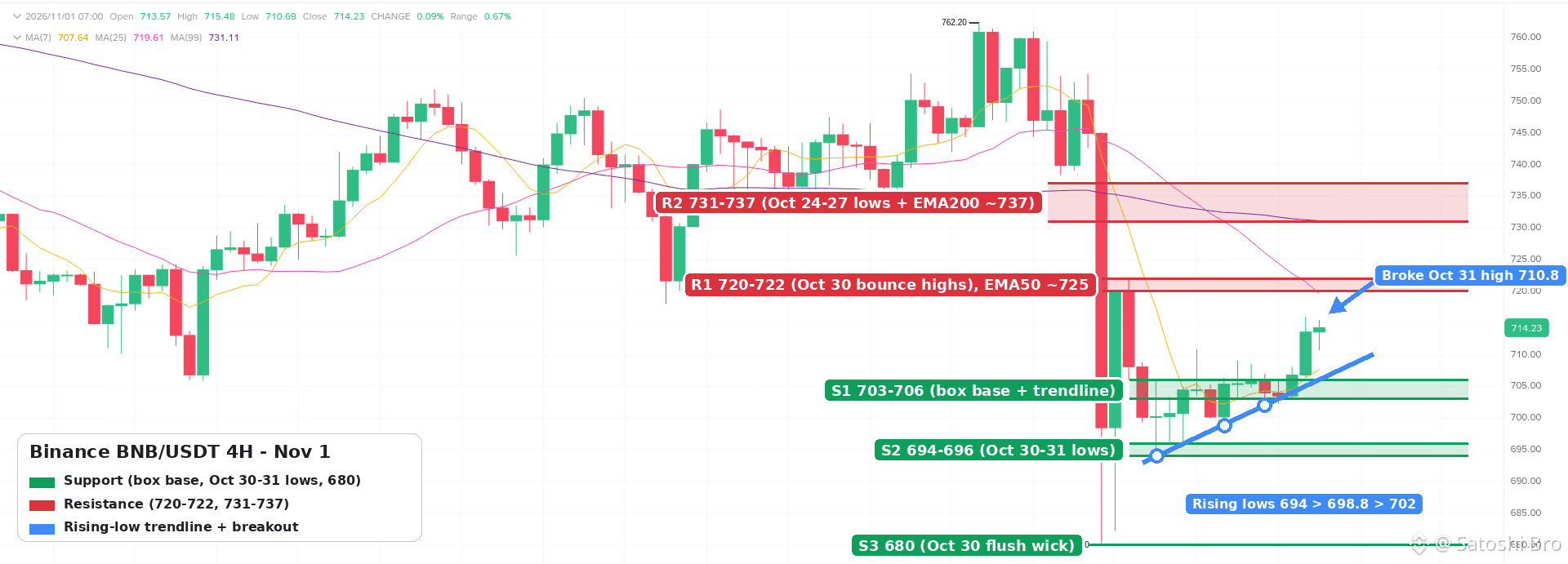
36
·
--
Article
Binance Ukraine UAH P2P FAQ After Fiat Trade ClosureSince 28 September 2026 there is no hryvnia balance on Binance, no USDT/UAH order book and no direct UAH deposit or withdrawal through Fiat Trade UAH. P2P in hryvnia was not part of that announcement and still runs every day, so for most people in Ukraine it is now the main way to move between UAH and crypto on Binance.
👉 [Open a Binance account with code GETREWARD](https://www.binance.com/join?ref=GETREWARD)
The questions below are the ones people asked most in the weeks after the change: what exactly closed, where leftover hryvnia went, how a P2P trade works without the old gateway, how Ukrainian bank limits fit in, and what the legal position is. Menus and limits differ by account and change over time, so check your own app before acting on any detail here.
What exactly closed on 28 September?
Binance announced the change on 22 September 2026. It covered two products and one automatic step, nothing more.
Fiat Trade UAH: Deposits and withdrawals of hryvnia through this service stopped at 09:00 UTC+2 on 28 September, which was 10:00 in Kyiv because Ukraine was still on summer time.The USDT/UAH spot pair: Trading on the pair ended at the same minute. Any open orders on it were removed automatically.Leftover hryvnia: Eligible UAH balances still sitting in accounts were converted to USDT by 18:00 UTC+2 on 30 September at a fixed rate of 46.5 UAH per USDT.
The notice gave no reason for the decision and said nothing about closing accounts, crypto trading or P2P. Ukrainian outlets such as ThePublic and dev.ua read it the same way: the gateway and the pair are gone, the rest of the account works as before.
Where did the hryvnia left in my account go?
If you had UAH on the balance after the deadline and it met the conversion conditions, it now shows as USDT. The math is a single division. 4,650 UAH ÷ 46.5 = 100 USDT. A balance of 1,200 UAH became about 25.81 USDT.
To find the entry, look through the wallet history around 30 September rather than your order history, because the conversion was done by Binance and not by an order you placed. If you still see a hryvnia amount, or the USDT figure looks wrong, open a support chat from the app and quote the date and the amount. Do not answer anyone who contacts you first offering to recover a missing conversion. Those messages are a common trick after any delisting.
Is hryvnia P2P still running?
Yes. Binance did not list P2P among the closed services, and UAH ads stayed live through October. A count published by the Ukrainian site InsidePC on 20 October 2026 found between 185 and 327 ads to buy USDT for hryvnia and between 377 and 740 ads to sell, depending on the amount entered. Those numbers move daily, but the market is clearly active.
Keep in mind what P2P is. You are dealing with another user, not with Binance. The platform locks the seller's coins in escrow while the order is open, which protects the crypto side, while the hryvnia side moves through your own bank. If you have never used P2P before, this longer guide to [buying and selling crypto safely on P2P](https://www.binance.com/en/square/post/381644669847043) covers advertiser checks and appeals in more detail.
The market looks like the screen below. The capture was taken with USD selected; with UAH chosen the columns are the same, and the bank list shows Ukrainian banks.
How does a hryvnia buy work now, step by step?
Finish identity verification and turn on your P2P profile. Add a card or IBAN that is in your own name.Open P2P, choose Buy, select USDT and set the currency to UAH.Enter the amount in hryvnia and filter by your bank. Ads on 20 October listed Monobank, PrivatBank, PUMB, A-Bank, Oschadbank, Raiffeisen, OTP and Sense among others, both by card number and by IBAN.Pick an advertiser by record first and price second: number of orders, completion rate, time limit and the minimum and maximum order size.Open the order. The seller's USDT is now locked and a timer starts, usually 15 minutes.Send the exact amount from your own account to the details shown inside the order, then mark the order as transferred.When the seller confirms, the USDT lands in your Funding wallet.
Run the first order with a small sum. A slow interbank transfer or a typo in the card number then costs you a little time and nothing else.
Do Ukrainian bank limits apply to P2P transfers?
Yes, and they come from your bank, not from Binance. Under the memorandum on transparency in the market for transfers that Ukrainian banks signed with the support of the National Bank of Ukraine, outgoing person-to-person transfers have a monthly cap for clients without confirmed income.
Standard cap: Since 1 June 2025 it is 100,000 UAH a month for low and medium risk clients and 50,000 UAH for clients the bank rates as high risk.What counts: Transfers by card number, phone number and IBAN to other people all add up toward the same cap. Moves between your own accounts do not.Raising it: Banks set individual limits for people who confirm a higher income. The Association of Ukrainian Banks has pointed to the OK-5 and OK-7 income certificates in the Diia app as the usual way to do this.
Two practical effects follow. If you plan a large purchase, split it over time or confirm your income with the bank first. And expect questions: a run of transfers to different people that looks like crypto trading can trigger a source-of-funds request or a temporary card block. Answer honestly, and have your Binance order history ready to show where the money went.
Where do the coins arrive after a P2P buy?
In the Funding wallet. To trade them on Spot, open Transfer, set Funding as the source and Spot as the target, pick USDT and confirm. When you sell later, do the reverse first, since P2P sells only from Funding. The dialog looks like this:
How do I sell USDT for hryvnia without the old withdrawal?
The sale is now the cash-out route, and the release step is where people lose money.
Prepare the coins: Make sure the USDT sits in Funding. An empty amount field usually means it is still in Spot.Choose the buyer: Open P2P, tap Sell, pick USDT and UAH, add your bank in the filter and read the buyer's record before the price.Open the order: Your USDT goes into escrow. It stays there until you release it or the order is cancelled.Check your bank app: Wait until the full hryvnia amount is credited, from an account in the buyer's verified name. Screenshots, forwarded SMS messages and "it's on the way" chat messages prove nothing.Release: Only then tap Release and confirm with your two-factor code. A released order cannot be pulled back by the platform.
Incoming transfers count toward your bank's risk checks too, even though the monthly cap above is about outgoing transfers. Selling often to many strangers is the pattern banks look at most closely.
What other ways in and out are left?
Besides P2P, the simplest route is moving crypto you already hold elsewhere. Deposits of crypto to Binance have no Binance fee; you cover only the network fee on the sending side. The step that goes wrong is the network choice. The sending wallet and the Binance deposit page must use the same network, so a TRC20 transfer has to land on a TRC20 address. This explainer on [picking between TRC20, BEP20 and ERC20](https://www.binance.com/en/square/post/382058413294121) walks through the differences in cost and speed.
Some accounts also show other fiat options on the Deposit page. Which ones appear depends on your account and region, so look there instead of relying on a forum post written before September. The network list on the crypto deposit page looks like this:
How much does P2P cost compared with the official rate?
There is usually no separate fee for a taker. The cost sits inside the advertiser's price. On 20 October InsidePC measured P2P buy prices at 2.4 to 3.4% above the National Bank of Ukraine rate.
The figures below are made up to show the method, not a quote. Say the official rate is 41.50 UAH per dollar, buy ads sit at 42.70 and sell ads at 41.90.
Buying with 20,000 UAH: 20,000 ÷ 42.70 = about 468.38 USDT.Same sum at the official rate: 20,000 ÷ 41.50 = about 481.93. The gap of roughly 13.5 USDT is the real cost of the purchase.Selling straight back: 468.38 × 41.90 = about 19,625 UAH. A full round trip costs around 375 UAH, close to 1.9% of the starting sum, before any bank charges.
Add your bank's own tariff on top. Some banks charge for transfers to cards at other banks, so filtering ads by your own bank often saves a small fee on every order.
Is Binance regulated in Ukraine?
No exchange holds a Ukrainian crypto licence, because the licensing system does not exist yet. The Law on Virtual Assets No. 2074-IX was adopted in February 2022 but has not come into force; it starts only when matching amendments to the Tax Code take effect. Bill No. 10225-d, which would set up that regime and tax rules, was adopted at first reading on 3 September 2025 and is still being prepared for the second reading. In September 2026 the securities regulator NSSMC published proposals that would split supervision between itself and the National Bank, in line with the EU model.
For users this means P2P deals have no Ukrainian regulator behind them. Disputes go through Binance's own appeal and support process. It also means tax rules for crypto are not yet written into the Tax Code. The bill proposes 18% personal income tax plus a 5% military levy on the yearly result, but that is a draft and may change. Ask a Ukrainian tax adviser about your own case; nothing here is tax or financial advice.
Which warning signs should stop a trade?
Chat outside the order: A request to continue on Telegram or Viber, often with a better price as bait.New bank details: A card or IBAN different from the one shown in the order.A third party: Hryvnia arriving from someone other than the verified buyer.Time pressure: Repeated messages asking you to release before the money shows in your bank.Fake support: Anyone offering to restore your old UAH balance or unblock an order for a fee.
What if a P2P order goes wrong?
You sent money and the order expired: Do not send again. Open an appeal from the order page, attach the bank receipt and wait for the review.The bank froze your card: Answer the bank's questions with the order ID and amounts. Keep trading off until it is cleared.The buyer's money came from someone else: Do not release. Open an appeal and let the platform handle the return.You cannot find the bought USDT: Look in Funding, not Spot.
Keep the order ID, the date, both amounts and the bank statement line for every order. Five minutes of record keeping per month answers almost any question from a bank later.
A short routine for the new setup
Verified account, two-factor on, bank account in your own name. Watch the monthly bank cap. Small first order, advertiser record before price. Send hryvnia only to the details in the order, release only after your bank shows the full sum. Save the order ID with the receipt.
Opening your first account? You can [check the active Binance bonus event](https://www.binance.com/en/events/BESTBONUS) to see which welcome tasks currently apply to eligible new users.
Sign-up code: GETREWARD
FAQ
Can I still hold hryvnia on Binance?
No. The UAH balance was retired with Fiat Trade UAH, and eligible leftovers were converted to USDT at 46.5 UAH.
Will the USDT/UAH pair come back?
Binance has not said so. Treat P2P as the hryvnia route unless a new announcement appears.
Is the 46.5 rate used anywhere now?
No. It applied only to the automatic conversion at the end of September. P2P prices are set by each advertiser.
Do I need a separate P2P account?
No. P2P uses your verified Binance account and its Funding wallet; you only switch on the P2P profile and add a bank method.
Can I use a card in someone else's name?
No. Both sides must use accounts in their own verified names, and a mismatch is the most common reason for appeals.
Disclosure: this article includes a Binance sign-up link with the code GETREWARD. Crypto prices can fall. This is not financial or tax advice.
Binance Ukraine UAH P2P FAQ After Fiat Trade Closure
Since 28 September 2026 there is no hryvnia balance on Binance, no USDT/UAH order book and no direct UAH deposit or withdrawal through Fiat Trade UAH. P2P in hryvnia was not part of that announcement and still runs every day, so for most people in Ukraine it is now the main way to move between UAH and crypto on Binance.
👉 Open a Binance account with code GETREWARD
The questions below are the ones people asked most in the weeks after the change: what exactly closed, where leftover hryvnia went, how a P2P trade works without the old gateway, how Ukrainian bank limits fit in, and what the legal position is. Menus and limits differ by account and change over time, so check your own app before acting on any detail here.
What exactly closed on 28 September?
Binance announced the change on 22 September 2026. It covered two products and one automatic step, nothing more.
Fiat Trade UAH: Deposits and withdrawals of hryvnia through this service stopped at 09:00 UTC+2 on 28 September, which was 10:00 in Kyiv because Ukraine was still on summer time.The USDT/UAH spot pair: Trading on the pair ended at the same minute. Any open orders on it were removed automatically.Leftover hryvnia: Eligible UAH balances still sitting in accounts were converted to USDT by 18:00 UTC+2 on 30 September at a fixed rate of 46.5 UAH per USDT.
The notice gave no reason for the decision and said nothing about closing accounts, crypto trading or P2P. Ukrainian outlets such as ThePublic and dev.ua read it the same way: the gateway and the pair are gone, the rest of the account works as before.
Where did the hryvnia left in my account go?
If you had UAH on the balance after the deadline and it met the conversion conditions, it now shows as USDT. The math is a single division. 4,650 UAH ÷ 46.5 = 100 USDT. A balance of 1,200 UAH became about 25.81 USDT.
To find the entry, look through the wallet history around 30 September rather than your order history, because the conversion was done by Binance and not by an order you placed. If you still see a hryvnia amount, or the USDT figure looks wrong, open a support chat from the app and quote the date and the amount. Do not answer anyone who contacts you first offering to recover a missing conversion. Those messages are a common trick after any delisting.
Is hryvnia P2P still running?
Yes. Binance did not list P2P among the closed services, and UAH ads stayed live through October. A count published by the Ukrainian site InsidePC on 20 October 2026 found between 185 and 327 ads to buy USDT for hryvnia and between 377 and 740 ads to sell, depending on the amount entered. Those numbers move daily, but the market is clearly active.
Keep in mind what P2P is. You are dealing with another user, not with Binance. The platform locks the seller's coins in escrow while the order is open, which protects the crypto side, while the hryvnia side moves through your own bank. If you have never used P2P before, this longer guide to buying and selling crypto safely on P2P covers advertiser checks and appeals in more detail.
The market looks like the screen below. The capture was taken with USD selected; with UAH chosen the columns are the same, and the bank list shows Ukrainian banks.
How does a hryvnia buy work now, step by step?
Finish identity verification and turn on your P2P profile. Add a card or IBAN that is in your own name.Open P2P, choose Buy, select USDT and set the currency to UAH.Enter the amount in hryvnia and filter by your bank. Ads on 20 October listed Monobank, PrivatBank, PUMB, A-Bank, Oschadbank, Raiffeisen, OTP and Sense among others, both by card number and by IBAN.Pick an advertiser by record first and price second: number of orders, completion rate, time limit and the minimum and maximum order size.Open the order. The seller's USDT is now locked and a timer starts, usually 15 minutes.Send the exact amount from your own account to the details shown inside the order, then mark the order as transferred.When the seller confirms, the USDT lands in your Funding wallet.
Run the first order with a small sum. A slow interbank transfer or a typo in the card number then costs you a little time and nothing else.
Do Ukrainian bank limits apply to P2P transfers?
Yes, and they come from your bank, not from Binance. Under the memorandum on transparency in the market for transfers that Ukrainian banks signed with the support of the National Bank of Ukraine, outgoing person-to-person transfers have a monthly cap for clients without confirmed income.
Standard cap: Since 1 June 2025 it is 100,000 UAH a month for low and medium risk clients and 50,000 UAH for clients the bank rates as high risk.What counts: Transfers by card number, phone number and IBAN to other people all add up toward the same cap. Moves between your own accounts do not.Raising it: Banks set individual limits for people who confirm a higher income. The Association of Ukrainian Banks has pointed to the OK-5 and OK-7 income certificates in the Diia app as the usual way to do this.
Two practical effects follow. If you plan a large purchase, split it over time or confirm your income with the bank first. And expect questions: a run of transfers to different people that looks like crypto trading can trigger a source-of-funds request or a temporary card block. Answer honestly, and have your Binance order history ready to show where the money went.
Where do the coins arrive after a P2P buy?
In the Funding wallet. To trade them on Spot, open Transfer, set Funding as the source and Spot as the target, pick USDT and confirm. When you sell later, do the reverse first, since P2P sells only from Funding. The dialog looks like this:
How do I sell USDT for hryvnia without the old withdrawal?
The sale is now the cash-out route, and the release step is where people lose money.
Prepare the coins: Make sure the USDT sits in Funding. An empty amount field usually means it is still in Spot.Choose the buyer: Open P2P, tap Sell, pick USDT and UAH, add your bank in the filter and read the buyer's record before the price.Open the order: Your USDT goes into escrow. It stays there until you release it or the order is cancelled.Check your bank app: Wait until the full hryvnia amount is credited, from an account in the buyer's verified name. Screenshots, forwarded SMS messages and "it's on the way" chat messages prove nothing.Release: Only then tap Release and confirm with your two-factor code. A released order cannot be pulled back by the platform.
Incoming transfers count toward your bank's risk checks too, even though the monthly cap above is about outgoing transfers. Selling often to many strangers is the pattern banks look at most closely.
What other ways in and out are left?
Besides P2P, the simplest route is moving crypto you already hold elsewhere. Deposits of crypto to Binance have no Binance fee; you cover only the network fee on the sending side. The step that goes wrong is the network choice. The sending wallet and the Binance deposit page must use the same network, so a TRC20 transfer has to land on a TRC20 address. This explainer on picking between TRC20, BEP20 and ERC20 walks through the differences in cost and speed.
Some accounts also show other fiat options on the Deposit page. Which ones appear depends on your account and region, so look there instead of relying on a forum post written before September. The network list on the crypto deposit page looks like this:
How much does P2P cost compared with the official rate?
There is usually no separate fee for a taker. The cost sits inside the advertiser's price. On 20 October InsidePC measured P2P buy prices at 2.4 to 3.4% above the National Bank of Ukraine rate.
The figures below are made up to show the method, not a quote. Say the official rate is 41.50 UAH per dollar, buy ads sit at 42.70 and sell ads at 41.90.
Buying with 20,000 UAH: 20,000 ÷ 42.70 = about 468.38 USDT.Same sum at the official rate: 20,000 ÷ 41.50 = about 481.93. The gap of roughly 13.5 USDT is the real cost of the purchase.Selling straight back: 468.38 × 41.90 = about 19,625 UAH. A full round trip costs around 375 UAH, close to 1.9% of the starting sum, before any bank charges.
Add your bank's own tariff on top. Some banks charge for transfers to cards at other banks, so filtering ads by your own bank often saves a small fee on every order.
Is Binance regulated in Ukraine?
No exchange holds a Ukrainian crypto licence, because the licensing system does not exist yet. The Law on Virtual Assets No. 2074-IX was adopted in February 2022 but has not come into force; it starts only when matching amendments to the Tax Code take effect. Bill No. 10225-d, which would set up that regime and tax rules, was adopted at first reading on 3 September 2025 and is still being prepared for the second reading. In September 2026 the securities regulator NSSMC published proposals that would split supervision between itself and the National Bank, in line with the EU model.
For users this means P2P deals have no Ukrainian regulator behind them. Disputes go through Binance's own appeal and support process. It also means tax rules for crypto are not yet written into the Tax Code. The bill proposes 18% personal income tax plus a 5% military levy on the yearly result, but that is a draft and may change. Ask a Ukrainian tax adviser about your own case; nothing here is tax or financial advice.
Which warning signs should stop a trade?
Chat outside the order: A request to continue on Telegram or Viber, often with a better price as bait.New bank details: A card or IBAN different from the one shown in the order.A third party: Hryvnia arriving from someone other than the verified buyer.Time pressure: Repeated messages asking you to release before the money shows in your bank.Fake support: Anyone offering to restore your old UAH balance or unblock an order for a fee.
What if a P2P order goes wrong?
You sent money and the order expired: Do not send again. Open an appeal from the order page, attach the bank receipt and wait for the review.The bank froze your card: Answer the bank's questions with the order ID and amounts. Keep trading off until it is cleared.The buyer's money came from someone else: Do not release. Open an appeal and let the platform handle the return.You cannot find the bought USDT: Look in Funding, not Spot.
Keep the order ID, the date, both amounts and the bank statement line for every order. Five minutes of record keeping per month answers almost any question from a bank later.
A short routine for the new setup
Verified account, two-factor on, bank account in your own name. Watch the monthly bank cap. Small first order, advertiser record before price. Send hryvnia only to the details in the order, release only after your bank shows the full sum. Save the order ID with the receipt.
Opening your first account? You can check the active Binance bonus event to see which welcome tasks currently apply to eligible new users.
Sign-up code: GETREWARD
FAQ
Can I still hold hryvnia on Binance?
No. The UAH balance was retired with Fiat Trade UAH, and eligible leftovers were converted to USDT at 46.5 UAH.
Will the USDT/UAH pair come back?
Binance has not said so. Treat P2P as the hryvnia route unless a new announcement appears.
Is the 46.5 rate used anywhere now?
No. It applied only to the automatic conversion at the end of September. P2P prices are set by each advertiser.
Do I need a separate P2P account?
No. P2P uses your verified Binance account and its Funding wallet; you only switch on the P2P profile and add a bank method.
Can I use a card in someone else's name?
No. Both sides must use accounts in their own verified names, and a mismatch is the most common reason for appeals.
Disclosure: this article includes a Binance sign-up link with the code GETREWARD. Crypto prices can fall. This is not financial or tax advice.
👉 Open a Binance account with code GETREWARD
The questions below are the ones people asked most in the weeks after the change: what exactly closed, where leftover hryvnia went, how a P2P trade works without the old gateway, how Ukrainian bank limits fit in, and what the legal position is. Menus and limits differ by account and change over time, so check your own app before acting on any detail here.
What exactly closed on 28 September?
Binance announced the change on 22 September 2026. It covered two products and one automatic step, nothing more.
Fiat Trade UAH: Deposits and withdrawals of hryvnia through this service stopped at 09:00 UTC+2 on 28 September, which was 10:00 in Kyiv because Ukraine was still on summer time.The USDT/UAH spot pair: Trading on the pair ended at the same minute. Any open orders on it were removed automatically.Leftover hryvnia: Eligible UAH balances still sitting in accounts were converted to USDT by 18:00 UTC+2 on 30 September at a fixed rate of 46.5 UAH per USDT.
The notice gave no reason for the decision and said nothing about closing accounts, crypto trading or P2P. Ukrainian outlets such as ThePublic and dev.ua read it the same way: the gateway and the pair are gone, the rest of the account works as before.
Where did the hryvnia left in my account go?
If you had UAH on the balance after the deadline and it met the conversion conditions, it now shows as USDT. The math is a single division. 4,650 UAH ÷ 46.5 = 100 USDT. A balance of 1,200 UAH became about 25.81 USDT.
To find the entry, look through the wallet history around 30 September rather than your order history, because the conversion was done by Binance and not by an order you placed. If you still see a hryvnia amount, or the USDT figure looks wrong, open a support chat from the app and quote the date and the amount. Do not answer anyone who contacts you first offering to recover a missing conversion. Those messages are a common trick after any delisting.
Is hryvnia P2P still running?
Yes. Binance did not list P2P among the closed services, and UAH ads stayed live through October. A count published by the Ukrainian site InsidePC on 20 October 2026 found between 185 and 327 ads to buy USDT for hryvnia and between 377 and 740 ads to sell, depending on the amount entered. Those numbers move daily, but the market is clearly active.
Keep in mind what P2P is. You are dealing with another user, not with Binance. The platform locks the seller's coins in escrow while the order is open, which protects the crypto side, while the hryvnia side moves through your own bank. If you have never used P2P before, this longer guide to buying and selling crypto safely on P2P covers advertiser checks and appeals in more detail.
The market looks like the screen below. The capture was taken with USD selected; with UAH chosen the columns are the same, and the bank list shows Ukrainian banks.
How does a hryvnia buy work now, step by step?
Finish identity verification and turn on your P2P profile. Add a card or IBAN that is in your own name.Open P2P, choose Buy, select USDT and set the currency to UAH.Enter the amount in hryvnia and filter by your bank. Ads on 20 October listed Monobank, PrivatBank, PUMB, A-Bank, Oschadbank, Raiffeisen, OTP and Sense among others, both by card number and by IBAN.Pick an advertiser by record first and price second: number of orders, completion rate, time limit and the minimum and maximum order size.Open the order. The seller's USDT is now locked and a timer starts, usually 15 minutes.Send the exact amount from your own account to the details shown inside the order, then mark the order as transferred.When the seller confirms, the USDT lands in your Funding wallet.
Run the first order with a small sum. A slow interbank transfer or a typo in the card number then costs you a little time and nothing else.
Do Ukrainian bank limits apply to P2P transfers?
Yes, and they come from your bank, not from Binance. Under the memorandum on transparency in the market for transfers that Ukrainian banks signed with the support of the National Bank of Ukraine, outgoing person-to-person transfers have a monthly cap for clients without confirmed income.
Standard cap: Since 1 June 2025 it is 100,000 UAH a month for low and medium risk clients and 50,000 UAH for clients the bank rates as high risk.What counts: Transfers by card number, phone number and IBAN to other people all add up toward the same cap. Moves between your own accounts do not.Raising it: Banks set individual limits for people who confirm a higher income. The Association of Ukrainian Banks has pointed to the OK-5 and OK-7 income certificates in the Diia app as the usual way to do this.
Two practical effects follow. If you plan a large purchase, split it over time or confirm your income with the bank first. And expect questions: a run of transfers to different people that looks like crypto trading can trigger a source-of-funds request or a temporary card block. Answer honestly, and have your Binance order history ready to show where the money went.
Where do the coins arrive after a P2P buy?
In the Funding wallet. To trade them on Spot, open Transfer, set Funding as the source and Spot as the target, pick USDT and confirm. When you sell later, do the reverse first, since P2P sells only from Funding. The dialog looks like this:
How do I sell USDT for hryvnia without the old withdrawal?
The sale is now the cash-out route, and the release step is where people lose money.
Prepare the coins: Make sure the USDT sits in Funding. An empty amount field usually means it is still in Spot.Choose the buyer: Open P2P, tap Sell, pick USDT and UAH, add your bank in the filter and read the buyer's record before the price.Open the order: Your USDT goes into escrow. It stays there until you release it or the order is cancelled.Check your bank app: Wait until the full hryvnia amount is credited, from an account in the buyer's verified name. Screenshots, forwarded SMS messages and "it's on the way" chat messages prove nothing.Release: Only then tap Release and confirm with your two-factor code. A released order cannot be pulled back by the platform.
Incoming transfers count toward your bank's risk checks too, even though the monthly cap above is about outgoing transfers. Selling often to many strangers is the pattern banks look at most closely.
What other ways in and out are left?
Besides P2P, the simplest route is moving crypto you already hold elsewhere. Deposits of crypto to Binance have no Binance fee; you cover only the network fee on the sending side. The step that goes wrong is the network choice. The sending wallet and the Binance deposit page must use the same network, so a TRC20 transfer has to land on a TRC20 address. This explainer on picking between TRC20, BEP20 and ERC20 walks through the differences in cost and speed.
Some accounts also show other fiat options on the Deposit page. Which ones appear depends on your account and region, so look there instead of relying on a forum post written before September. The network list on the crypto deposit page looks like this:
How much does P2P cost compared with the official rate?
There is usually no separate fee for a taker. The cost sits inside the advertiser's price. On 20 October InsidePC measured P2P buy prices at 2.4 to 3.4% above the National Bank of Ukraine rate.
The figures below are made up to show the method, not a quote. Say the official rate is 41.50 UAH per dollar, buy ads sit at 42.70 and sell ads at 41.90.
Buying with 20,000 UAH: 20,000 ÷ 42.70 = about 468.38 USDT.Same sum at the official rate: 20,000 ÷ 41.50 = about 481.93. The gap of roughly 13.5 USDT is the real cost of the purchase.Selling straight back: 468.38 × 41.90 = about 19,625 UAH. A full round trip costs around 375 UAH, close to 1.9% of the starting sum, before any bank charges.
Add your bank's own tariff on top. Some banks charge for transfers to cards at other banks, so filtering ads by your own bank often saves a small fee on every order.
Is Binance regulated in Ukraine?
No exchange holds a Ukrainian crypto licence, because the licensing system does not exist yet. The Law on Virtual Assets No. 2074-IX was adopted in February 2022 but has not come into force; it starts only when matching amendments to the Tax Code take effect. Bill No. 10225-d, which would set up that regime and tax rules, was adopted at first reading on 3 September 2025 and is still being prepared for the second reading. In September 2026 the securities regulator NSSMC published proposals that would split supervision between itself and the National Bank, in line with the EU model.
For users this means P2P deals have no Ukrainian regulator behind them. Disputes go through Binance's own appeal and support process. It also means tax rules for crypto are not yet written into the Tax Code. The bill proposes 18% personal income tax plus a 5% military levy on the yearly result, but that is a draft and may change. Ask a Ukrainian tax adviser about your own case; nothing here is tax or financial advice.
Which warning signs should stop a trade?
Chat outside the order: A request to continue on Telegram or Viber, often with a better price as bait.New bank details: A card or IBAN different from the one shown in the order.A third party: Hryvnia arriving from someone other than the verified buyer.Time pressure: Repeated messages asking you to release before the money shows in your bank.Fake support: Anyone offering to restore your old UAH balance or unblock an order for a fee.
What if a P2P order goes wrong?
You sent money and the order expired: Do not send again. Open an appeal from the order page, attach the bank receipt and wait for the review.The bank froze your card: Answer the bank's questions with the order ID and amounts. Keep trading off until it is cleared.The buyer's money came from someone else: Do not release. Open an appeal and let the platform handle the return.You cannot find the bought USDT: Look in Funding, not Spot.
Keep the order ID, the date, both amounts and the bank statement line for every order. Five minutes of record keeping per month answers almost any question from a bank later.
A short routine for the new setup
Verified account, two-factor on, bank account in your own name. Watch the monthly bank cap. Small first order, advertiser record before price. Send hryvnia only to the details in the order, release only after your bank shows the full sum. Save the order ID with the receipt.
Opening your first account? You can check the active Binance bonus event to see which welcome tasks currently apply to eligible new users.
Sign-up code: GETREWARD
FAQ
Can I still hold hryvnia on Binance?
No. The UAH balance was retired with Fiat Trade UAH, and eligible leftovers were converted to USDT at 46.5 UAH.
Will the USDT/UAH pair come back?
Binance has not said so. Treat P2P as the hryvnia route unless a new announcement appears.
Is the 46.5 rate used anywhere now?
No. It applied only to the automatic conversion at the end of September. P2P prices are set by each advertiser.
Do I need a separate P2P account?
No. P2P uses your verified Binance account and its Funding wallet; you only switch on the P2P profile and add a bank method.
Can I use a card in someone else's name?
No. Both sides must use accounts in their own verified names, and a mismatch is the most common reason for appeals.
Disclosure: this article includes a Binance sign-up link with the code GETREWARD. Crypto prices can fall. This is not financial or tax advice.
13
·
--
Quick poll for the Sunday night crowd 🗳️
Charts are quiet. What's your plan for the week ahead?
1️⃣ DCA and don't look at the chart
2️⃣ Waiting for a clean breakout before I touch anything
3️⃣ Already in a position, just managing my stop
4️⃣ Parked in stables until volatility comes back
Drop your number below, and tell me why 👇
#poll #crypto #Binance #CryptoCommunity
Quick poll for the Sunday night crowd 🗳️
Charts are quiet. What's your plan for the week ahead?
1️⃣ DCA and don't look at the chart
2️⃣ Waiting for a clean breakout before I touch anything
3️⃣ Already in a position, just managing my stop
4️⃣ Parked in stables until volatility comes back
Drop your number below, and tell me why 👇
#poll #crypto #Binance #CryptoCommunity
Charts are quiet. What's your plan for the week ahead?
1️⃣ DCA and don't look at the chart
2️⃣ Waiting for a clean breakout before I touch anything
3️⃣ Already in a position, just managing my stop
4️⃣ Parked in stables until volatility comes back
Drop your number below, and tell me why 👇
#poll #crypto #Binance #CryptoCommunity
1
·
--
Article
Binance Kazakhstan KZT P2P Guide Under AIFC RulesCan you swap tenge for USDT person to person in Kazakhstan and stay inside the rules? Yes. Since July 2026 Binance Kazakhstan runs its own P2P service for KZT, where ads come only from approved professional partners, every buyer and seller has passed identity checks, and the tenge side moves by bank transfer to an IBAN.
👉 [Open a Binance account with code GETREWARD](https://www.binance.com/join?ref=GETREWARD)
This guide explains what makes that setup different from the open P2P many people in Almaty and Astana used for years, what to prepare before your first order, how a buy and a sale actually run, and which warning signs should make you cancel. Screens and limits vary by account and change often, so your own app has the final word.
What changed for tenge P2P in 2026
Four things happened in a short space of time, and together they explain why the KZT market looks the way it does now.
The law got enforced: Article 11(5) of the Law on Digital Assets bans organising the circulation of digital assets in Kazakhstan without a licence or authorisation under AIFC law or national law. The Astana Financial Services Authority (AFSA) repeated this in an April 2026 public warning that named P2P services on unlicensed platforms among the risks.AFSA set a P2P model: Its published rules allow P2P only on digital asset trading facilities licensed in the Astana International Financial Centre. The facility must hold custody permissions, lock the seller's coins until the deal settles, run KYC and anti-money-laundering checks, and move fiat only through banks AFSA has approved.Binance Kazakhstan launched under that model: The local platform is operated by BN KZ Technologies Limited, listed in the AFSA public register with licence number AFSA-A-LA-2024-0028. Its P2P service went live in mid-July 2026 with ads from licensed partners only and IBAN transfers for tenge at the first stage.Courts and app stores followed: In September 2026 the AIFC Court granted AFSA injunctions against several unlicensed crypto platforms, and the order was sent to Google and Apple so their apps can be geo-restricted in Kazakhstan.
For you as a user, the practical point is this. If a deal goes wrong on a platform without a local licence, there is no Kazakh authority that can step in. AFSA says as much in its warning: people dealing with unlicensed firms get none of the protections that apply to supervised ones.
Regulated P2P compared with the open model you may remember
The buttons look familiar, but several things behind them work differently.
Who posts the ads: On an open P2P market almost any verified user can become an advertiser. On Binance Kazakhstan only professional partners approved by the platform, called P2Pro or Makers, can post ads. You are always the taker.How tenge moves: Open markets list whatever the advertiser accepts, including card-to-card transfers and e-wallets. The regulated service settles by IBAN transfer through official bank channels.Escrow: Both models lock the seller's coins once an order opens. Under the AFSA rules this lock is a licence condition, not just a product feature.Identity: Both require verification. On the Kazakh side, tenge methods tie your account to your IIN, the 12-digit individual identification number, so the name and IIN on the bank account have to match the verified profile.Where you complain: A licensed operator answers to AFSA and has a formal complaints process. With an unlicensed platform you are left with its own support desk and nothing behind it.Choice and price: Fewer advertisers means fewer ads to pick from, especially in the first months. The gap between buy and sell prices can be wider than on a crowded open market, so compare before you commit.
Three things to set up before your first order
An identity check that includes your IIN: Binance's help page for tenge deposits through Freedom Bank says that if the document you verified with does not show your IIN, you have to reset verification and redo it with one that does. Doing this before you need tenge saves a wait of a day or more in the middle of a trade. If a check gets rejected, these notes on [fixing a rejected Binance KYC check](https://www.binance.com/en/square/post/381616035393917) cover the usual causes, from glare on the photo to a name mismatch.
An authenticator app: P2P means coins and money moving between strangers, and a hijacked account is the fastest way to lose both. Turn on the authenticator in Security before you trade, so a leaked password alone is not enough to open orders or release coins.
A tenge bank account in your own name: A Kazakh IBAN has 20 characters and starts with KZ. Keep it handy in your banking app, and make sure the account holder name matches your Binance profile letter for letter. Transfers from a spouse's or a friend's account are the classic reason an order ends up in appeal.
How a first tenge buy runs, step by step
Open P2P, choose Buy, pick USDT and set the currency to KZT.Read each ad before the price. Look at the order count, the completion rate, the time limit and the minimum and maximum order size.Type the amount in tenge. The order screen shows how much USDT you get at that ad's price, which is the number that matters.Open the order. The partner's USDT is now locked by the platform and the timer starts.Send the exact tenge amount by IBAN from your own account to the details shown inside the order. Add a reference only if the order asks for one.Tap the button that marks the transfer as done only after your bank shows it as sent.Wait for the partner to confirm receipt. The USDT then appears in your Funding wallet.
Two habits make this smoother. Do the first order small, well under any limit you plan to use later, so a slow bank or a typo costs you nothing but time. And keep the order ID with the bank receipt, because any appeal starts with those two items.
The market page looks like the capture below. It was taken on the global site with USD selected, but the tenge page lists the same details for every ad.
Selling USDT for tenge without surprises
A sale is the same flow in reverse, and the one step that matters most is the last one.
Move the coins first: P2P sells from the Funding wallet. If your USDT sits in Spot, transfer it across before opening the order, otherwise the amount field stays empty.Open the order: Your USDT is locked as soon as you do. It is not gone, it is held until you release it or the order is cancelled.Check your own bank app: Wait until the full tenge amount is credited, from an account in the partner's verified name. A screenshot or a forwarded SMS is not proof of anything.Release: Only then tap Release and confirm with your authenticator code. After release the platform cannot pull the coins back for you.
Coins you buy on P2P land in the Funding wallet, and coins you sell leave from there. The screen below shows where to find it and the Transfer button that moves USDT to Spot when you want to trade.
Illustrative tenge math before you tap Buy
The numbers here are made up to show the method. They are not a quote and not what you will see on any given day.
Say you want to put 100,000 KZT into USDT. Ad A shows 500 tenge per USDT and ad B shows 505.
Ad A: 100,000 ÷ 500 = 200 USDT.Ad B: 100,000 ÷ 505 = 198.02 USDT.The gap: About 1.98 USDT, close to 1,000 tenge, for picking the higher price. On a 1,000,000 KZT order the same gap is nearly 10,000 tenge.
Now look at the round trip. If the buy ads sit around 505 and the sell ads around 495, buying and selling straight back would cost about 10 tenge on every USDT, roughly 2%. That spread is the real cost of P2P for most takers, so check both sides of the market before treating P2P as a cheap in-and-out.
Two more lines belong in the sum. Your bank may charge for an interbank IBAN transfer, and that fee depends on your bank and plan, not on Binance. And check whether the order screen shows a separate fee line; on many P2P markets the taker's cost is built into the price rather than charged on top.
Warning signs that should stop the order
Most P2P losses follow a short list of patterns. Cancel, or refuse to release, if you see any of these.
A move off the platform: The other side wants to continue on Telegram or WhatsApp, or offers a better price if you deal outside the order.Changed bank details: You are asked to send tenge to a card number or a different IBAN from the one shown inside the order.A name that does not match: Money arrives from a third party rather than the partner's verified account.Pressure: Messages telling you to release quickly before the money shows, or threats of an appeal if you wait.Fake helpers: Someone claiming to be support or an AFSA officer who can unfreeze your order for a fee. Real support works inside the app.A platform you cannot find in the register: AFSA keeps a public list of licensed firms. A well-known name, a slick app or heavy advertising does not mean a platform is licensed.
For the everyday habits behind these rules, from reading advertiser stats to keeping records, see this guide to [buying and selling crypto safely on P2P](https://www.binance.com/en/square/post/381644669847043).
What to do if a tenge order stalls
You sent tenge but the timer is running out: Mark the transfer as done if you really sent it, then write in the order chat with the time of the transfer. If the partner does not respond, use the appeal button once it becomes active and upload the bank receipt.The bank holds the transfer: Banks sometimes ask about the purpose of a transfer to a crypto-related account. Answer truthfully and keep the order ID ready. Cancelling and resending to a different account only makes the trail harder to follow.The order was cancelled after you sent money: Do not send again. Open an appeal or contact support from the order page with the receipt, and wait for the partner's refund through the platform.The tenge method is greyed out: This usually means verification is missing the IIN or still under review. Check the verification page before contacting anyone.Coins did not show up: Look in the Funding wallet, not Spot. P2P purchases always arrive there first.
Records worth keeping
Save the order ID, the date, the amount in tenge and USDT, and the bank statement line for every P2P trade. It takes a minute per order and answers almost any question a bank or a tax adviser can ask later. Tax treatment of crypto in Kazakhstan has its own rules, so talk to a local adviser about your situation; nothing here is tax or financial advice.
A short routine for every tenge trade
Verified profile with your IIN, authenticator on, bank account in your own name. Small first order. Read the ad, then the price. Transfer only to the details inside the order. Release only when your bank app shows the money. Keep the order ID with the receipt.
New to Binance? You can [check the active Binance bonus event](https://www.binance.com/en/events/BESTBONUS) to see which welcome tasks currently apply to eligible new users.
Sign-up code: GETREWARD
FAQ
Is P2P on Binance Kazakhstan the same as P2P on the global site?
The buy and sell flow looks alike, but on the local platform ads come only from approved professional partners and tenge moves by IBAN through official bank channels.
Do I need an IIN to trade tenge?
For tenge methods, yes in practice. If your verified document does not show your IIN, Binance asks you to reset verification with one that does.
Can I use a card transfer instead of an IBAN?
At launch the service settled tenge by IBAN only. Other methods may be added later, so check the options shown inside the ad.
What if the partner never confirms my transfer?
Open an appeal from the order once the button is active and attach your bank receipt. The partner's USDT stays locked while the case is reviewed.
Are P2P prices fixed?
No. Each partner sets its own price and limits, and they move with the market through the day.
Disclosure: this article includes a Binance sign-up link with the code GETREWARD. Crypto prices can fall. This is not financial or tax advice.
Binance Kazakhstan KZT P2P Guide Under AIFC Rules
Can you swap tenge for USDT person to person in Kazakhstan and stay inside the rules? Yes. Since July 2026 Binance Kazakhstan runs its own P2P service for KZT, where ads come only from approved professional partners, every buyer and seller has passed identity checks, and the tenge side moves by bank transfer to an IBAN.
👉 Open a Binance account with code GETREWARD
This guide explains what makes that setup different from the open P2P many people in Almaty and Astana used for years, what to prepare before your first order, how a buy and a sale actually run, and which warning signs should make you cancel. Screens and limits vary by account and change often, so your own app has the final word.
What changed for tenge P2P in 2026
Four things happened in a short space of time, and together they explain why the KZT market looks the way it does now.
The law got enforced: Article 11(5) of the Law on Digital Assets bans organising the circulation of digital assets in Kazakhstan without a licence or authorisation under AIFC law or national law. The Astana Financial Services Authority (AFSA) repeated this in an April 2026 public warning that named P2P services on unlicensed platforms among the risks.AFSA set a P2P model: Its published rules allow P2P only on digital asset trading facilities licensed in the Astana International Financial Centre. The facility must hold custody permissions, lock the seller's coins until the deal settles, run KYC and anti-money-laundering checks, and move fiat only through banks AFSA has approved.Binance Kazakhstan launched under that model: The local platform is operated by BN KZ Technologies Limited, listed in the AFSA public register with licence number AFSA-A-LA-2024-0028. Its P2P service went live in mid-July 2026 with ads from licensed partners only and IBAN transfers for tenge at the first stage.Courts and app stores followed: In September 2026 the AIFC Court granted AFSA injunctions against several unlicensed crypto platforms, and the order was sent to Google and Apple so their apps can be geo-restricted in Kazakhstan.
For you as a user, the practical point is this. If a deal goes wrong on a platform without a local licence, there is no Kazakh authority that can step in. AFSA says as much in its warning: people dealing with unlicensed firms get none of the protections that apply to supervised ones.
Regulated P2P compared with the open model you may remember
The buttons look familiar, but several things behind them work differently.
Who posts the ads: On an open P2P market almost any verified user can become an advertiser. On Binance Kazakhstan only professional partners approved by the platform, called P2Pro or Makers, can post ads. You are always the taker.How tenge moves: Open markets list whatever the advertiser accepts, including card-to-card transfers and e-wallets. The regulated service settles by IBAN transfer through official bank channels.Escrow: Both models lock the seller's coins once an order opens. Under the AFSA rules this lock is a licence condition, not just a product feature.Identity: Both require verification. On the Kazakh side, tenge methods tie your account to your IIN, the 12-digit individual identification number, so the name and IIN on the bank account have to match the verified profile.Where you complain: A licensed operator answers to AFSA and has a formal complaints process. With an unlicensed platform you are left with its own support desk and nothing behind it.Choice and price: Fewer advertisers means fewer ads to pick from, especially in the first months. The gap between buy and sell prices can be wider than on a crowded open market, so compare before you commit.
Three things to set up before your first order
An identity check that includes your IIN: Binance's help page for tenge deposits through Freedom Bank says that if the document you verified with does not show your IIN, you have to reset verification and redo it with one that does. Doing this before you need tenge saves a wait of a day or more in the middle of a trade. If a check gets rejected, these notes on fixing a rejected Binance KYC check cover the usual causes, from glare on the photo to a name mismatch.
An authenticator app: P2P means coins and money moving between strangers, and a hijacked account is the fastest way to lose both. Turn on the authenticator in Security before you trade, so a leaked password alone is not enough to open orders or release coins.
A tenge bank account in your own name: A Kazakh IBAN has 20 characters and starts with KZ. Keep it handy in your banking app, and make sure the account holder name matches your Binance profile letter for letter. Transfers from a spouse's or a friend's account are the classic reason an order ends up in appeal.
How a first tenge buy runs, step by step
Open P2P, choose Buy, pick USDT and set the currency to KZT.Read each ad before the price. Look at the order count, the completion rate, the time limit and the minimum and maximum order size.Type the amount in tenge. The order screen shows how much USDT you get at that ad's price, which is the number that matters.Open the order. The partner's USDT is now locked by the platform and the timer starts.Send the exact tenge amount by IBAN from your own account to the details shown inside the order. Add a reference only if the order asks for one.Tap the button that marks the transfer as done only after your bank shows it as sent.Wait for the partner to confirm receipt. The USDT then appears in your Funding wallet.
Two habits make this smoother. Do the first order small, well under any limit you plan to use later, so a slow bank or a typo costs you nothing but time. And keep the order ID with the bank receipt, because any appeal starts with those two items.
The market page looks like the capture below. It was taken on the global site with USD selected, but the tenge page lists the same details for every ad.
Selling USDT for tenge without surprises
A sale is the same flow in reverse, and the one step that matters most is the last one.
Move the coins first: P2P sells from the Funding wallet. If your USDT sits in Spot, transfer it across before opening the order, otherwise the amount field stays empty.Open the order: Your USDT is locked as soon as you do. It is not gone, it is held until you release it or the order is cancelled.Check your own bank app: Wait until the full tenge amount is credited, from an account in the partner's verified name. A screenshot or a forwarded SMS is not proof of anything.Release: Only then tap Release and confirm with your authenticator code. After release the platform cannot pull the coins back for you.
Coins you buy on P2P land in the Funding wallet, and coins you sell leave from there. The screen below shows where to find it and the Transfer button that moves USDT to Spot when you want to trade.
Illustrative tenge math before you tap Buy
The numbers here are made up to show the method. They are not a quote and not what you will see on any given day.
Say you want to put 100,000 KZT into USDT. Ad A shows 500 tenge per USDT and ad B shows 505.
Ad A: 100,000 ÷ 500 = 200 USDT.Ad B: 100,000 ÷ 505 = 198.02 USDT.The gap: About 1.98 USDT, close to 1,000 tenge, for picking the higher price. On a 1,000,000 KZT order the same gap is nearly 10,000 tenge.
Now look at the round trip. If the buy ads sit around 505 and the sell ads around 495, buying and selling straight back would cost about 10 tenge on every USDT, roughly 2%. That spread is the real cost of P2P for most takers, so check both sides of the market before treating P2P as a cheap in-and-out.
Two more lines belong in the sum. Your bank may charge for an interbank IBAN transfer, and that fee depends on your bank and plan, not on Binance. And check whether the order screen shows a separate fee line; on many P2P markets the taker's cost is built into the price rather than charged on top.
Warning signs that should stop the order
Most P2P losses follow a short list of patterns. Cancel, or refuse to release, if you see any of these.
A move off the platform: The other side wants to continue on Telegram or WhatsApp, or offers a better price if you deal outside the order.Changed bank details: You are asked to send tenge to a card number or a different IBAN from the one shown inside the order.A name that does not match: Money arrives from a third party rather than the partner's verified account.Pressure: Messages telling you to release quickly before the money shows, or threats of an appeal if you wait.Fake helpers: Someone claiming to be support or an AFSA officer who can unfreeze your order for a fee. Real support works inside the app.A platform you cannot find in the register: AFSA keeps a public list of licensed firms. A well-known name, a slick app or heavy advertising does not mean a platform is licensed.
For the everyday habits behind these rules, from reading advertiser stats to keeping records, see this guide to buying and selling crypto safely on P2P.
What to do if a tenge order stalls
You sent tenge but the timer is running out: Mark the transfer as done if you really sent it, then write in the order chat with the time of the transfer. If the partner does not respond, use the appeal button once it becomes active and upload the bank receipt.The bank holds the transfer: Banks sometimes ask about the purpose of a transfer to a crypto-related account. Answer truthfully and keep the order ID ready. Cancelling and resending to a different account only makes the trail harder to follow.The order was cancelled after you sent money: Do not send again. Open an appeal or contact support from the order page with the receipt, and wait for the partner's refund through the platform.The tenge method is greyed out: This usually means verification is missing the IIN or still under review. Check the verification page before contacting anyone.Coins did not show up: Look in the Funding wallet, not Spot. P2P purchases always arrive there first.
Records worth keeping
Save the order ID, the date, the amount in tenge and USDT, and the bank statement line for every P2P trade. It takes a minute per order and answers almost any question a bank or a tax adviser can ask later. Tax treatment of crypto in Kazakhstan has its own rules, so talk to a local adviser about your situation; nothing here is tax or financial advice.
A short routine for every tenge trade
Verified profile with your IIN, authenticator on, bank account in your own name. Small first order. Read the ad, then the price. Transfer only to the details inside the order. Release only when your bank app shows the money. Keep the order ID with the receipt.
New to Binance? You can check the active Binance bonus event to see which welcome tasks currently apply to eligible new users.
Sign-up code: GETREWARD
FAQ
Is P2P on Binance Kazakhstan the same as P2P on the global site?
The buy and sell flow looks alike, but on the local platform ads come only from approved professional partners and tenge moves by IBAN through official bank channels.
Do I need an IIN to trade tenge?
For tenge methods, yes in practice. If your verified document does not show your IIN, Binance asks you to reset verification with one that does.
Can I use a card transfer instead of an IBAN?
At launch the service settled tenge by IBAN only. Other methods may be added later, so check the options shown inside the ad.
What if the partner never confirms my transfer?
Open an appeal from the order once the button is active and attach your bank receipt. The partner's USDT stays locked while the case is reviewed.
Are P2P prices fixed?
No. Each partner sets its own price and limits, and they move with the market through the day.
Disclosure: this article includes a Binance sign-up link with the code GETREWARD. Crypto prices can fall. This is not financial or tax advice.
👉 Open a Binance account with code GETREWARD
This guide explains what makes that setup different from the open P2P many people in Almaty and Astana used for years, what to prepare before your first order, how a buy and a sale actually run, and which warning signs should make you cancel. Screens and limits vary by account and change often, so your own app has the final word.
What changed for tenge P2P in 2026
Four things happened in a short space of time, and together they explain why the KZT market looks the way it does now.
The law got enforced: Article 11(5) of the Law on Digital Assets bans organising the circulation of digital assets in Kazakhstan without a licence or authorisation under AIFC law or national law. The Astana Financial Services Authority (AFSA) repeated this in an April 2026 public warning that named P2P services on unlicensed platforms among the risks.AFSA set a P2P model: Its published rules allow P2P only on digital asset trading facilities licensed in the Astana International Financial Centre. The facility must hold custody permissions, lock the seller's coins until the deal settles, run KYC and anti-money-laundering checks, and move fiat only through banks AFSA has approved.Binance Kazakhstan launched under that model: The local platform is operated by BN KZ Technologies Limited, listed in the AFSA public register with licence number AFSA-A-LA-2024-0028. Its P2P service went live in mid-July 2026 with ads from licensed partners only and IBAN transfers for tenge at the first stage.Courts and app stores followed: In September 2026 the AIFC Court granted AFSA injunctions against several unlicensed crypto platforms, and the order was sent to Google and Apple so their apps can be geo-restricted in Kazakhstan.
For you as a user, the practical point is this. If a deal goes wrong on a platform without a local licence, there is no Kazakh authority that can step in. AFSA says as much in its warning: people dealing with unlicensed firms get none of the protections that apply to supervised ones.
Regulated P2P compared with the open model you may remember
The buttons look familiar, but several things behind them work differently.
Who posts the ads: On an open P2P market almost any verified user can become an advertiser. On Binance Kazakhstan only professional partners approved by the platform, called P2Pro or Makers, can post ads. You are always the taker.How tenge moves: Open markets list whatever the advertiser accepts, including card-to-card transfers and e-wallets. The regulated service settles by IBAN transfer through official bank channels.Escrow: Both models lock the seller's coins once an order opens. Under the AFSA rules this lock is a licence condition, not just a product feature.Identity: Both require verification. On the Kazakh side, tenge methods tie your account to your IIN, the 12-digit individual identification number, so the name and IIN on the bank account have to match the verified profile.Where you complain: A licensed operator answers to AFSA and has a formal complaints process. With an unlicensed platform you are left with its own support desk and nothing behind it.Choice and price: Fewer advertisers means fewer ads to pick from, especially in the first months. The gap between buy and sell prices can be wider than on a crowded open market, so compare before you commit.
Three things to set up before your first order
An identity check that includes your IIN: Binance's help page for tenge deposits through Freedom Bank says that if the document you verified with does not show your IIN, you have to reset verification and redo it with one that does. Doing this before you need tenge saves a wait of a day or more in the middle of a trade. If a check gets rejected, these notes on fixing a rejected Binance KYC check cover the usual causes, from glare on the photo to a name mismatch.
An authenticator app: P2P means coins and money moving between strangers, and a hijacked account is the fastest way to lose both. Turn on the authenticator in Security before you trade, so a leaked password alone is not enough to open orders or release coins.
A tenge bank account in your own name: A Kazakh IBAN has 20 characters and starts with KZ. Keep it handy in your banking app, and make sure the account holder name matches your Binance profile letter for letter. Transfers from a spouse's or a friend's account are the classic reason an order ends up in appeal.
How a first tenge buy runs, step by step
Open P2P, choose Buy, pick USDT and set the currency to KZT.Read each ad before the price. Look at the order count, the completion rate, the time limit and the minimum and maximum order size.Type the amount in tenge. The order screen shows how much USDT you get at that ad's price, which is the number that matters.Open the order. The partner's USDT is now locked by the platform and the timer starts.Send the exact tenge amount by IBAN from your own account to the details shown inside the order. Add a reference only if the order asks for one.Tap the button that marks the transfer as done only after your bank shows it as sent.Wait for the partner to confirm receipt. The USDT then appears in your Funding wallet.
Two habits make this smoother. Do the first order small, well under any limit you plan to use later, so a slow bank or a typo costs you nothing but time. And keep the order ID with the bank receipt, because any appeal starts with those two items.
The market page looks like the capture below. It was taken on the global site with USD selected, but the tenge page lists the same details for every ad.
Selling USDT for tenge without surprises
A sale is the same flow in reverse, and the one step that matters most is the last one.
Move the coins first: P2P sells from the Funding wallet. If your USDT sits in Spot, transfer it across before opening the order, otherwise the amount field stays empty.Open the order: Your USDT is locked as soon as you do. It is not gone, it is held until you release it or the order is cancelled.Check your own bank app: Wait until the full tenge amount is credited, from an account in the partner's verified name. A screenshot or a forwarded SMS is not proof of anything.Release: Only then tap Release and confirm with your authenticator code. After release the platform cannot pull the coins back for you.
Coins you buy on P2P land in the Funding wallet, and coins you sell leave from there. The screen below shows where to find it and the Transfer button that moves USDT to Spot when you want to trade.
Illustrative tenge math before you tap Buy
The numbers here are made up to show the method. They are not a quote and not what you will see on any given day.
Say you want to put 100,000 KZT into USDT. Ad A shows 500 tenge per USDT and ad B shows 505.
Ad A: 100,000 ÷ 500 = 200 USDT.Ad B: 100,000 ÷ 505 = 198.02 USDT.The gap: About 1.98 USDT, close to 1,000 tenge, for picking the higher price. On a 1,000,000 KZT order the same gap is nearly 10,000 tenge.
Now look at the round trip. If the buy ads sit around 505 and the sell ads around 495, buying and selling straight back would cost about 10 tenge on every USDT, roughly 2%. That spread is the real cost of P2P for most takers, so check both sides of the market before treating P2P as a cheap in-and-out.
Two more lines belong in the sum. Your bank may charge for an interbank IBAN transfer, and that fee depends on your bank and plan, not on Binance. And check whether the order screen shows a separate fee line; on many P2P markets the taker's cost is built into the price rather than charged on top.
Warning signs that should stop the order
Most P2P losses follow a short list of patterns. Cancel, or refuse to release, if you see any of these.
A move off the platform: The other side wants to continue on Telegram or WhatsApp, or offers a better price if you deal outside the order.Changed bank details: You are asked to send tenge to a card number or a different IBAN from the one shown inside the order.A name that does not match: Money arrives from a third party rather than the partner's verified account.Pressure: Messages telling you to release quickly before the money shows, or threats of an appeal if you wait.Fake helpers: Someone claiming to be support or an AFSA officer who can unfreeze your order for a fee. Real support works inside the app.A platform you cannot find in the register: AFSA keeps a public list of licensed firms. A well-known name, a slick app or heavy advertising does not mean a platform is licensed.
For the everyday habits behind these rules, from reading advertiser stats to keeping records, see this guide to buying and selling crypto safely on P2P.
What to do if a tenge order stalls
You sent tenge but the timer is running out: Mark the transfer as done if you really sent it, then write in the order chat with the time of the transfer. If the partner does not respond, use the appeal button once it becomes active and upload the bank receipt.The bank holds the transfer: Banks sometimes ask about the purpose of a transfer to a crypto-related account. Answer truthfully and keep the order ID ready. Cancelling and resending to a different account only makes the trail harder to follow.The order was cancelled after you sent money: Do not send again. Open an appeal or contact support from the order page with the receipt, and wait for the partner's refund through the platform.The tenge method is greyed out: This usually means verification is missing the IIN or still under review. Check the verification page before contacting anyone.Coins did not show up: Look in the Funding wallet, not Spot. P2P purchases always arrive there first.
Records worth keeping
Save the order ID, the date, the amount in tenge and USDT, and the bank statement line for every P2P trade. It takes a minute per order and answers almost any question a bank or a tax adviser can ask later. Tax treatment of crypto in Kazakhstan has its own rules, so talk to a local adviser about your situation; nothing here is tax or financial advice.
A short routine for every tenge trade
Verified profile with your IIN, authenticator on, bank account in your own name. Small first order. Read the ad, then the price. Transfer only to the details inside the order. Release only when your bank app shows the money. Keep the order ID with the receipt.
New to Binance? You can check the active Binance bonus event to see which welcome tasks currently apply to eligible new users.
Sign-up code: GETREWARD
FAQ
Is P2P on Binance Kazakhstan the same as P2P on the global site?
The buy and sell flow looks alike, but on the local platform ads come only from approved professional partners and tenge moves by IBAN through official bank channels.
Do I need an IIN to trade tenge?
For tenge methods, yes in practice. If your verified document does not show your IIN, Binance asks you to reset verification with one that does.
Can I use a card transfer instead of an IBAN?
At launch the service settled tenge by IBAN only. Other methods may be added later, so check the options shown inside the ad.
What if the partner never confirms my transfer?
Open an appeal from the order once the button is active and attach your bank receipt. The partner's USDT stays locked while the case is reviewed.
Are P2P prices fixed?
No. Each partner sets its own price and limits, and they move with the market through the day.
Disclosure: this article includes a Binance sign-up link with the code GETREWARD. Crypto prices can fall. This is not financial or tax advice.
16
·
--
Binance Referral Code for Vietnam
New to Binance in Vietnam? Use promo code THEBESTCODE at sign-up for a flat 20% off Spot fees.
1. Start a new Binance account
2. Enter THEBESTCODE before you finish
3. Check the 20% cut on your fee rates
Welcome bonus up to $19,800 for eligible users.
[Sign up with code THEBESTCODE](https://www.binance.com/join?ref=THEBESTCODE)
[Welcome bonus terms](https://www.binance.com/en/events/BESTBONUS)
Not financial advice.
#Binance #BinancePromoCode #crypto
Binance Referral Code for Vietnam
New to Binance in Vietnam? Use promo code THEBESTCODE at sign-up for a flat 20% off Spot fees.
1. Start a new Binance account
2. Enter THEBESTCODE before you finish
3. Check the 20% cut on your fee rates
Welcome bonus up to $19,800 for eligible users.
Sign up with code THEBESTCODE
Welcome bonus terms
Not financial advice.
#Binance #BinancePromoCode #crypto
New to Binance in Vietnam? Use promo code THEBESTCODE at sign-up for a flat 20% off Spot fees.
1. Start a new Binance account
2. Enter THEBESTCODE before you finish
3. Check the 20% cut on your fee rates
Welcome bonus up to $19,800 for eligible users.
Sign up with code THEBESTCODE
Welcome bonus terms
Not financial advice.
#Binance #BinancePromoCode #crypto
194
·
--
Article
Binance ZAR Cash Out South Africa Bank vs P2P ComparedGetting rand out of Binance and into a South African bank account comes down to two routes. You can sell your crypto for ZAR on Binance and send it to your bank by EFT, or you can sell USDT on P2P to another user who sends rand straight to your account. Both end with money in your bank. They differ on speed, cost, who you deal with and what can go wrong. This guide puts the two side by side, then covers what to do when a cash-out stalls.
👉 [Create a Binance account with code GETREWARD](https://www.binance.com/join?ref=GETREWARD)
Menus, limits and fees on Binance change, so the screen in your own account is the final word on what is available to you.
The two routes at a glance
Bank route: Sell crypto for ZAR inside Binance, then withdraw the rand with Bank Transfer (EFT). Binance handles the bank side through its partner Stitch, and you deal with nobody else.P2P route: Put up an ad or take a buyer's ad to sell USDT for rand. Binance holds your USDT in escrow, the buyer sends rand from their bank to yours, and you release the coins once the money has landed.Third option: Send crypto to a South African exchange and sell there. That is a crypto withdrawal from Binance, not a rand cash-out on Binance, so it only gets a short section near the end.
How the bank route works today
The bank route has two steps, and people often stall on the first one without realising it.
Step one, turn crypto into rand: A rand withdrawal needs a ZAR balance, so the coins have to be sold first. Convert is the quickest way. You pick the coin in the From box and ZAR in the To box, and the screen shows the exact rand amount before you confirm. If ZAR does not appear in the list for your account, sell into USDT first and look again, or check whether a ZAR pair is listed on Spot for your coin.
Step two, send the rand to your bank: Go to Wallet, then Overview, then Withdraw. Pick ZAR and choose Bank Transfer (EFT). The first time, Binance asks you to add bank details, and you can save up to five bank accounts. Enter the amount, read the fee line the form shows before you continue, confirm, and finish the two-factor check.
Three rules decide whether the money arrives:
Same name: The bank account has to be in the same name as your verified Binance account. A partner's or family member's account will be refused.Banking hours: An order sent outside banking hours is processed on the next business day, so a Friday night request usually moves on Monday.Verified account: If identity verification is not finished, the form stops you and asks you to complete it before the withdrawal can go ahead.
The Withdraw button sits on the wallet overview, next to Deposit and Transfer.
The sell step looks like the Convert screen below. The capture shows USDT to BTC. For a cash-out you would put your coin in the From box and ZAR in the To box.
How the P2P route works today
On P2P you are selling USDT to a person, not to Binance. Choose the Sell tab, set the currency to ZAR and pick USDT. Each ad shows the buyer's price, the amount they want, their order limits, the bank methods they accept and their track record. When you open an order, your USDT is locked in escrow. The buyer then sends rand to the bank account you listed, and you release the USDT once you can see the money in your own banking app.
A sale on P2P runs in five moves:
Pick the ad: Look at the completion rate and order count as well as the price. A buyer with a few hundred finished orders and a high completion rate is a safer counterparty than a brand new profile with a slightly higher rate.Check the limits: The amount you want to sell has to sit inside the ad's minimum and maximum, or the order will not open.Open the order and wait: The timer starts. The buyer has a set number of minutes to send the rand and mark the order as done.Check your bank, not the chat: Log in to your bank app and confirm the full amount has arrived, from an account in the buyer's verified name. A screenshot, an SMS or a bank notification forwarded in the chat is not proof.Release the USDT: Only now do you tap Release. Once released, Binance cannot pull the coins back for you.
Here is the P2P market layout. This capture is set to USD, but a ZAR page uses the same columns, with South African banks in the method column.
Bank route vs P2P route side by side
Here is how the two compare on the points that matter for a normal cash-out.
Who you deal with: On the bank route only Binance and its bank partner. On P2P a private buyer whose money has to clear into your account before you release.Price: The bank route uses the Convert quote or the Spot price, plus any withdrawal fee shown on the form. On P2P the buyer sets the rate in the ad, and it can be above or below the Spot price depending on demand that day.Speed: An EFT sent in banking hours usually lands the same or next business day. P2P can finish in minutes if the buyer moves quickly and the banks clear instantly, but it can also stall if the buyer is slow.Weekends and holidays: The bank route waits for the next business day. P2P buyers trade at all hours, though bank clearing on their side can still be slow.Fraud risk: Low on the bank route, since there is no stranger involved. On P2P the main risk is releasing USDT for money that never arrived or that gets reversed later.Paper trail: The bank route leaves a clean line from Binance to your bank under one reference. A P2P sale lands as a transfer from a private person, which your bank may ask about.Size: Large amounts usually go more smoothly by bank, because a single P2P buyer's limit may be lower than the amount you want to sell, and splitting a sale across many strangers means many separate risks.
A worked example helps. Say you hold 1,000 USDT and the rand price is around R18 per USDT. On the bank route, Convert shows you a quote close to R18,000 before you confirm, and the EFT form shows any fee before you send. On P2P a buyer's ad might offer R17.90 or R18.20 per USDT, so the same sale could bring R17,900 or R18,200. These numbers are an illustration of how to compare, not a quote. Put the two final rand figures next to each other before you choose.
Which route suits which situation
First cash-out ever: Use the bank route. It has the fewest moving parts and no stranger to judge.A large amount: Use the bank route, or split P2P sales across buyers with long, clean track records.Weekend and you need rand today: P2P can be faster, as long as you only release after the rand shows in your own bank app.ZAR does not show for you in Withdraw: P2P may still be open, or you can move coins to a South African platform that lists the coin.
What to do if a cash out stalls
If ZAR is missing from the withdraw list: Confirm your account is verified and that South Africa is the country on your profile. Fiat options depend on the country and on what Binance supports at the moment, so look at the current fiat list in the app before assuming it is a fault.
If the EFT is still pending after two business days: Open View History in the withdrawal section and check the status. If it shows completed, ask your bank to trace the incoming transfer using the date and amount. If it still shows processing, contact Binance support from inside the account with the order details.
If the withdrawal is rejected: The usual reason is a name mismatch. The bank account must carry exactly the name on your Binance profile. Fix the saved bank details and send again.
If a P2P buyer marks the order as done but nothing arrived: Do not release. Wait for the bank to show the money, and if the timer runs out, open an appeal in the order so the Binance P2P team can review it. Keep every message inside the order chat.
If the rand came from a name that does not match the buyer: Do not release. Third-party transfers are a common setup for reversals. Appeal the order and ask for a refund to the original sender through the appeal process.
If your bank asks about the deposits: South African banks have to ask about the source of funds under FICA, and P2P rand coming in from several people is the kind of pattern that triggers questions. Have your Binance order history and statements ready. Our [bank statement troubleshooting for P2P and deposits](https://www.binance.com/en/square/post/382559210300656) goes through what banks usually want to see and how to pull it from Binance.
Sending crypto to a local exchange instead
Some people withdraw USDT or BTC to a South African exchange and sell there. Since 30 April 2025, FIC Directive 9 applies the travel rule to crypto transfers in, out of and within South Africa. Crypto platforms have to collect and pass on the sender's and the recipient's names with the transfer, and that covers amounts under R5,000 too, with lighter checks below that line. In practice, expect Binance and the receiving platform to ask who owns the destination, and make sure the name on both accounts is yours. Check the network carefully before you send, because a transfer on the wrong network can be lost.
Rules to keep in mind in South Africa
The FSCA declared crypto assets a financial product under FAIS in October 2022, and crypto platforms that serve South Africans have to deal with that framework. Binance's own legal page says Futures and Options in South Africa are offered by Brickhouse Trading Ltd as a juristic representative of FiveWest OTC Desk (Pty) Ltd, FSP 51619. That arrangement is about derivatives. The wider rules for crypto platforms in South Africa are still being filled in, so read the terms in your account and decide how much you keep on any one platform.
On tax, moving rand from Binance to your bank is not itself a taxable event. The sale of crypto for rand, or a swap of one coin for another, is the disposal SARS looks at. Keep the trade date, the rand value and the fees for each sale. Our guide to [South Africa SARS tax mistakes to avoid](https://www.binance.com/en/square/post/383445413430248) covers the records and deadlines in detail. This is not tax advice, and a registered tax practitioner can look at your own figures.
A quick routine for every cash out
Before selling: Check the rand figure in Convert or on Spot, and compare it with two or three P2P ads for the same amount.Bank route: Same-name bank account saved, request sent in banking hours, fee line read, reference kept.P2P route: Buyer with a long record, money confirmed in your own bank app, sender name matches, then release.Afterwards: Save the order history and the bank entry together for SARS.
If you are opening an account for this, [see the current Binance welcome bonus rules](https://www.binance.com/en/events/BESTBONUS) before you deposit, and check which tasks apply in South Africa.
👉 Code for the sign-up form: GETREWARD
This article is for information only and is not financial or tax advice. Crypto prices move, P2P rates are set by individual users, and Binance fees, limits and fiat options can change.
FAQ
Can I withdraw ZAR from Binance to Capitec or FNB?
Bank Transfer (EFT) sends rand to a South African bank account in your own name. Add the account in the withdraw form and check the fee line before you confirm.
How long does a ZAR withdrawal take?
An EFT sent in banking hours usually arrives within one to two business days. Requests outside banking hours start on the next business day.
Is P2P cheaper than the bank route?
Sometimes. It depends on the rate in the ad compared with the Convert quote plus the withdrawal fee. Compare the final rand amounts each time.
Is a rand withdrawal to my bank taxed?
The withdrawal itself is not the taxable event. The earlier sale of crypto for rand is the disposal you report to SARS.
Disclosure: the sign-up link at the top contains my own code, GETREWARD. The rand figures above are worked examples, not quotes or forecasts.
Binance ZAR Cash Out South Africa Bank vs P2P Compared
Getting rand out of Binance and into a South African bank account comes down to two routes. You can sell your crypto for ZAR on Binance and send it to your bank by EFT, or you can sell USDT on P2P to another user who sends rand straight to your account. Both end with money in your bank. They differ on speed, cost, who you deal with and what can go wrong. This guide puts the two side by side, then covers what to do when a cash-out stalls.
👉 Create a Binance account with code GETREWARD
Menus, limits and fees on Binance change, so the screen in your own account is the final word on what is available to you.
The two routes at a glance
Bank route: Sell crypto for ZAR inside Binance, then withdraw the rand with Bank Transfer (EFT). Binance handles the bank side through its partner Stitch, and you deal with nobody else.P2P route: Put up an ad or take a buyer's ad to sell USDT for rand. Binance holds your USDT in escrow, the buyer sends rand from their bank to yours, and you release the coins once the money has landed.Third option: Send crypto to a South African exchange and sell there. That is a crypto withdrawal from Binance, not a rand cash-out on Binance, so it only gets a short section near the end.
How the bank route works today
The bank route has two steps, and people often stall on the first one without realising it.
Step one, turn crypto into rand: A rand withdrawal needs a ZAR balance, so the coins have to be sold first. Convert is the quickest way. You pick the coin in the From box and ZAR in the To box, and the screen shows the exact rand amount before you confirm. If ZAR does not appear in the list for your account, sell into USDT first and look again, or check whether a ZAR pair is listed on Spot for your coin.
Step two, send the rand to your bank: Go to Wallet, then Overview, then Withdraw. Pick ZAR and choose Bank Transfer (EFT). The first time, Binance asks you to add bank details, and you can save up to five bank accounts. Enter the amount, read the fee line the form shows before you continue, confirm, and finish the two-factor check.
Three rules decide whether the money arrives:
Same name: The bank account has to be in the same name as your verified Binance account. A partner's or family member's account will be refused.Banking hours: An order sent outside banking hours is processed on the next business day, so a Friday night request usually moves on Monday.Verified account: If identity verification is not finished, the form stops you and asks you to complete it before the withdrawal can go ahead.
The Withdraw button sits on the wallet overview, next to Deposit and Transfer.
The sell step looks like the Convert screen below. The capture shows USDT to BTC. For a cash-out you would put your coin in the From box and ZAR in the To box.
How the P2P route works today
On P2P you are selling USDT to a person, not to Binance. Choose the Sell tab, set the currency to ZAR and pick USDT. Each ad shows the buyer's price, the amount they want, their order limits, the bank methods they accept and their track record. When you open an order, your USDT is locked in escrow. The buyer then sends rand to the bank account you listed, and you release the USDT once you can see the money in your own banking app.
A sale on P2P runs in five moves:
Pick the ad: Look at the completion rate and order count as well as the price. A buyer with a few hundred finished orders and a high completion rate is a safer counterparty than a brand new profile with a slightly higher rate.Check the limits: The amount you want to sell has to sit inside the ad's minimum and maximum, or the order will not open.Open the order and wait: The timer starts. The buyer has a set number of minutes to send the rand and mark the order as done.Check your bank, not the chat: Log in to your bank app and confirm the full amount has arrived, from an account in the buyer's verified name. A screenshot, an SMS or a bank notification forwarded in the chat is not proof.Release the USDT: Only now do you tap Release. Once released, Binance cannot pull the coins back for you.
Here is the P2P market layout. This capture is set to USD, but a ZAR page uses the same columns, with South African banks in the method column.
Bank route vs P2P route side by side
Here is how the two compare on the points that matter for a normal cash-out.
Who you deal with: On the bank route only Binance and its bank partner. On P2P a private buyer whose money has to clear into your account before you release.Price: The bank route uses the Convert quote or the Spot price, plus any withdrawal fee shown on the form. On P2P the buyer sets the rate in the ad, and it can be above or below the Spot price depending on demand that day.Speed: An EFT sent in banking hours usually lands the same or next business day. P2P can finish in minutes if the buyer moves quickly and the banks clear instantly, but it can also stall if the buyer is slow.Weekends and holidays: The bank route waits for the next business day. P2P buyers trade at all hours, though bank clearing on their side can still be slow.Fraud risk: Low on the bank route, since there is no stranger involved. On P2P the main risk is releasing USDT for money that never arrived or that gets reversed later.Paper trail: The bank route leaves a clean line from Binance to your bank under one reference. A P2P sale lands as a transfer from a private person, which your bank may ask about.Size: Large amounts usually go more smoothly by bank, because a single P2P buyer's limit may be lower than the amount you want to sell, and splitting a sale across many strangers means many separate risks.
A worked example helps. Say you hold 1,000 USDT and the rand price is around R18 per USDT. On the bank route, Convert shows you a quote close to R18,000 before you confirm, and the EFT form shows any fee before you send. On P2P a buyer's ad might offer R17.90 or R18.20 per USDT, so the same sale could bring R17,900 or R18,200. These numbers are an illustration of how to compare, not a quote. Put the two final rand figures next to each other before you choose.
Which route suits which situation
First cash-out ever: Use the bank route. It has the fewest moving parts and no stranger to judge.A large amount: Use the bank route, or split P2P sales across buyers with long, clean track records.Weekend and you need rand today: P2P can be faster, as long as you only release after the rand shows in your own bank app.ZAR does not show for you in Withdraw: P2P may still be open, or you can move coins to a South African platform that lists the coin.
What to do if a cash out stalls
If ZAR is missing from the withdraw list: Confirm your account is verified and that South Africa is the country on your profile. Fiat options depend on the country and on what Binance supports at the moment, so look at the current fiat list in the app before assuming it is a fault.
If the EFT is still pending after two business days: Open View History in the withdrawal section and check the status. If it shows completed, ask your bank to trace the incoming transfer using the date and amount. If it still shows processing, contact Binance support from inside the account with the order details.
If the withdrawal is rejected: The usual reason is a name mismatch. The bank account must carry exactly the name on your Binance profile. Fix the saved bank details and send again.
If a P2P buyer marks the order as done but nothing arrived: Do not release. Wait for the bank to show the money, and if the timer runs out, open an appeal in the order so the Binance P2P team can review it. Keep every message inside the order chat.
If the rand came from a name that does not match the buyer: Do not release. Third-party transfers are a common setup for reversals. Appeal the order and ask for a refund to the original sender through the appeal process.
If your bank asks about the deposits: South African banks have to ask about the source of funds under FICA, and P2P rand coming in from several people is the kind of pattern that triggers questions. Have your Binance order history and statements ready. Our bank statement troubleshooting for P2P and deposits goes through what banks usually want to see and how to pull it from Binance.
Sending crypto to a local exchange instead
Some people withdraw USDT or BTC to a South African exchange and sell there. Since 30 April 2025, FIC Directive 9 applies the travel rule to crypto transfers in, out of and within South Africa. Crypto platforms have to collect and pass on the sender's and the recipient's names with the transfer, and that covers amounts under R5,000 too, with lighter checks below that line. In practice, expect Binance and the receiving platform to ask who owns the destination, and make sure the name on both accounts is yours. Check the network carefully before you send, because a transfer on the wrong network can be lost.
Rules to keep in mind in South Africa
The FSCA declared crypto assets a financial product under FAIS in October 2022, and crypto platforms that serve South Africans have to deal with that framework. Binance's own legal page says Futures and Options in South Africa are offered by Brickhouse Trading Ltd as a juristic representative of FiveWest OTC Desk (Pty) Ltd, FSP 51619. That arrangement is about derivatives. The wider rules for crypto platforms in South Africa are still being filled in, so read the terms in your account and decide how much you keep on any one platform.
On tax, moving rand from Binance to your bank is not itself a taxable event. The sale of crypto for rand, or a swap of one coin for another, is the disposal SARS looks at. Keep the trade date, the rand value and the fees for each sale. Our guide to South Africa SARS tax mistakes to avoid covers the records and deadlines in detail. This is not tax advice, and a registered tax practitioner can look at your own figures.
A quick routine for every cash out
Before selling: Check the rand figure in Convert or on Spot, and compare it with two or three P2P ads for the same amount.Bank route: Same-name bank account saved, request sent in banking hours, fee line read, reference kept.P2P route: Buyer with a long record, money confirmed in your own bank app, sender name matches, then release.Afterwards: Save the order history and the bank entry together for SARS.
If you are opening an account for this, see the current Binance welcome bonus rules before you deposit, and check which tasks apply in South Africa.
👉 Code for the sign-up form: GETREWARD
This article is for information only and is not financial or tax advice. Crypto prices move, P2P rates are set by individual users, and Binance fees, limits and fiat options can change.
FAQ
Can I withdraw ZAR from Binance to Capitec or FNB?
Bank Transfer (EFT) sends rand to a South African bank account in your own name. Add the account in the withdraw form and check the fee line before you confirm.
How long does a ZAR withdrawal take?
An EFT sent in banking hours usually arrives within one to two business days. Requests outside banking hours start on the next business day.
Is P2P cheaper than the bank route?
Sometimes. It depends on the rate in the ad compared with the Convert quote plus the withdrawal fee. Compare the final rand amounts each time.
Is a rand withdrawal to my bank taxed?
The withdrawal itself is not the taxable event. The earlier sale of crypto for rand is the disposal you report to SARS.
Disclosure: the sign-up link at the top contains my own code, GETREWARD. The rand figures above are worked examples, not quotes or forecasts.
👉 Create a Binance account with code GETREWARD
Menus, limits and fees on Binance change, so the screen in your own account is the final word on what is available to you.
The two routes at a glance
Bank route: Sell crypto for ZAR inside Binance, then withdraw the rand with Bank Transfer (EFT). Binance handles the bank side through its partner Stitch, and you deal with nobody else.P2P route: Put up an ad or take a buyer's ad to sell USDT for rand. Binance holds your USDT in escrow, the buyer sends rand from their bank to yours, and you release the coins once the money has landed.Third option: Send crypto to a South African exchange and sell there. That is a crypto withdrawal from Binance, not a rand cash-out on Binance, so it only gets a short section near the end.
How the bank route works today
The bank route has two steps, and people often stall on the first one without realising it.
Step one, turn crypto into rand: A rand withdrawal needs a ZAR balance, so the coins have to be sold first. Convert is the quickest way. You pick the coin in the From box and ZAR in the To box, and the screen shows the exact rand amount before you confirm. If ZAR does not appear in the list for your account, sell into USDT first and look again, or check whether a ZAR pair is listed on Spot for your coin.
Step two, send the rand to your bank: Go to Wallet, then Overview, then Withdraw. Pick ZAR and choose Bank Transfer (EFT). The first time, Binance asks you to add bank details, and you can save up to five bank accounts. Enter the amount, read the fee line the form shows before you continue, confirm, and finish the two-factor check.
Three rules decide whether the money arrives:
Same name: The bank account has to be in the same name as your verified Binance account. A partner's or family member's account will be refused.Banking hours: An order sent outside banking hours is processed on the next business day, so a Friday night request usually moves on Monday.Verified account: If identity verification is not finished, the form stops you and asks you to complete it before the withdrawal can go ahead.
The Withdraw button sits on the wallet overview, next to Deposit and Transfer.
The sell step looks like the Convert screen below. The capture shows USDT to BTC. For a cash-out you would put your coin in the From box and ZAR in the To box.
How the P2P route works today
On P2P you are selling USDT to a person, not to Binance. Choose the Sell tab, set the currency to ZAR and pick USDT. Each ad shows the buyer's price, the amount they want, their order limits, the bank methods they accept and their track record. When you open an order, your USDT is locked in escrow. The buyer then sends rand to the bank account you listed, and you release the USDT once you can see the money in your own banking app.
A sale on P2P runs in five moves:
Pick the ad: Look at the completion rate and order count as well as the price. A buyer with a few hundred finished orders and a high completion rate is a safer counterparty than a brand new profile with a slightly higher rate.Check the limits: The amount you want to sell has to sit inside the ad's minimum and maximum, or the order will not open.Open the order and wait: The timer starts. The buyer has a set number of minutes to send the rand and mark the order as done.Check your bank, not the chat: Log in to your bank app and confirm the full amount has arrived, from an account in the buyer's verified name. A screenshot, an SMS or a bank notification forwarded in the chat is not proof.Release the USDT: Only now do you tap Release. Once released, Binance cannot pull the coins back for you.
Here is the P2P market layout. This capture is set to USD, but a ZAR page uses the same columns, with South African banks in the method column.
Bank route vs P2P route side by side
Here is how the two compare on the points that matter for a normal cash-out.
Who you deal with: On the bank route only Binance and its bank partner. On P2P a private buyer whose money has to clear into your account before you release.Price: The bank route uses the Convert quote or the Spot price, plus any withdrawal fee shown on the form. On P2P the buyer sets the rate in the ad, and it can be above or below the Spot price depending on demand that day.Speed: An EFT sent in banking hours usually lands the same or next business day. P2P can finish in minutes if the buyer moves quickly and the banks clear instantly, but it can also stall if the buyer is slow.Weekends and holidays: The bank route waits for the next business day. P2P buyers trade at all hours, though bank clearing on their side can still be slow.Fraud risk: Low on the bank route, since there is no stranger involved. On P2P the main risk is releasing USDT for money that never arrived or that gets reversed later.Paper trail: The bank route leaves a clean line from Binance to your bank under one reference. A P2P sale lands as a transfer from a private person, which your bank may ask about.Size: Large amounts usually go more smoothly by bank, because a single P2P buyer's limit may be lower than the amount you want to sell, and splitting a sale across many strangers means many separate risks.
A worked example helps. Say you hold 1,000 USDT and the rand price is around R18 per USDT. On the bank route, Convert shows you a quote close to R18,000 before you confirm, and the EFT form shows any fee before you send. On P2P a buyer's ad might offer R17.90 or R18.20 per USDT, so the same sale could bring R17,900 or R18,200. These numbers are an illustration of how to compare, not a quote. Put the two final rand figures next to each other before you choose.
Which route suits which situation
First cash-out ever: Use the bank route. It has the fewest moving parts and no stranger to judge.A large amount: Use the bank route, or split P2P sales across buyers with long, clean track records.Weekend and you need rand today: P2P can be faster, as long as you only release after the rand shows in your own bank app.ZAR does not show for you in Withdraw: P2P may still be open, or you can move coins to a South African platform that lists the coin.
What to do if a cash out stalls
If ZAR is missing from the withdraw list: Confirm your account is verified and that South Africa is the country on your profile. Fiat options depend on the country and on what Binance supports at the moment, so look at the current fiat list in the app before assuming it is a fault.
If the EFT is still pending after two business days: Open View History in the withdrawal section and check the status. If it shows completed, ask your bank to trace the incoming transfer using the date and amount. If it still shows processing, contact Binance support from inside the account with the order details.
If the withdrawal is rejected: The usual reason is a name mismatch. The bank account must carry exactly the name on your Binance profile. Fix the saved bank details and send again.
If a P2P buyer marks the order as done but nothing arrived: Do not release. Wait for the bank to show the money, and if the timer runs out, open an appeal in the order so the Binance P2P team can review it. Keep every message inside the order chat.
If the rand came from a name that does not match the buyer: Do not release. Third-party transfers are a common setup for reversals. Appeal the order and ask for a refund to the original sender through the appeal process.
If your bank asks about the deposits: South African banks have to ask about the source of funds under FICA, and P2P rand coming in from several people is the kind of pattern that triggers questions. Have your Binance order history and statements ready. Our bank statement troubleshooting for P2P and deposits goes through what banks usually want to see and how to pull it from Binance.
Sending crypto to a local exchange instead
Some people withdraw USDT or BTC to a South African exchange and sell there. Since 30 April 2025, FIC Directive 9 applies the travel rule to crypto transfers in, out of and within South Africa. Crypto platforms have to collect and pass on the sender's and the recipient's names with the transfer, and that covers amounts under R5,000 too, with lighter checks below that line. In practice, expect Binance and the receiving platform to ask who owns the destination, and make sure the name on both accounts is yours. Check the network carefully before you send, because a transfer on the wrong network can be lost.
Rules to keep in mind in South Africa
The FSCA declared crypto assets a financial product under FAIS in October 2022, and crypto platforms that serve South Africans have to deal with that framework. Binance's own legal page says Futures and Options in South Africa are offered by Brickhouse Trading Ltd as a juristic representative of FiveWest OTC Desk (Pty) Ltd, FSP 51619. That arrangement is about derivatives. The wider rules for crypto platforms in South Africa are still being filled in, so read the terms in your account and decide how much you keep on any one platform.
On tax, moving rand from Binance to your bank is not itself a taxable event. The sale of crypto for rand, or a swap of one coin for another, is the disposal SARS looks at. Keep the trade date, the rand value and the fees for each sale. Our guide to South Africa SARS tax mistakes to avoid covers the records and deadlines in detail. This is not tax advice, and a registered tax practitioner can look at your own figures.
A quick routine for every cash out
Before selling: Check the rand figure in Convert or on Spot, and compare it with two or three P2P ads for the same amount.Bank route: Same-name bank account saved, request sent in banking hours, fee line read, reference kept.P2P route: Buyer with a long record, money confirmed in your own bank app, sender name matches, then release.Afterwards: Save the order history and the bank entry together for SARS.
If you are opening an account for this, see the current Binance welcome bonus rules before you deposit, and check which tasks apply in South Africa.
👉 Code for the sign-up form: GETREWARD
This article is for information only and is not financial or tax advice. Crypto prices move, P2P rates are set by individual users, and Binance fees, limits and fiat options can change.
FAQ
Can I withdraw ZAR from Binance to Capitec or FNB?
Bank Transfer (EFT) sends rand to a South African bank account in your own name. Add the account in the withdraw form and check the fee line before you confirm.
How long does a ZAR withdrawal take?
An EFT sent in banking hours usually arrives within one to two business days. Requests outside banking hours start on the next business day.
Is P2P cheaper than the bank route?
Sometimes. It depends on the rate in the ad compared with the Convert quote plus the withdrawal fee. Compare the final rand amounts each time.
Is a rand withdrawal to my bank taxed?
The withdrawal itself is not the taxable event. The earlier sale of crypto for rand is the disposal you report to SARS.
Disclosure: the sign-up link at the top contains my own code, GETREWARD. The rand figures above are worked examples, not quotes or forecasts.
8
·
--
Fun fact: the first 50 BTC ever mined can never be spent 🔒
Bitcoin's genesis block went live on January 3, 2009. Its 50 BTC reward was never added to the list of spendable coins, so those coins are stuck forever.
The block also carries a line of text:
"The Times 03/Jan/2009 Chancellor on brink of second bailout for banks"
A newspaper headline about bank bailouts, written into block #0. People still send small amounts to that address as a tribute, and those coins are stuck too.
Did you know this one? 👇
$BTC #bitcoin #CryptoHistory #crypto #Binance
Fun fact: the first 50 BTC ever mined can never be spent 🔒
Bitcoin's genesis block went live on January 3, 2009. Its 50 BTC reward was never added to the list of spendable coins, so those coins are stuck forever.
The block also carries a line of text:
"The Times 03/Jan/2009 Chancellor on brink of second bailout for banks"
A newspaper headline about bank bailouts, written into block #0. People still send small amounts to that address as a tribute, and those coins are stuck too.
Did you know this one? 👇
$BTC #bitcoin #CryptoHistory #crypto #Binance
Bitcoin's genesis block went live on January 3, 2009. Its 50 BTC reward was never added to the list of spendable coins, so those coins are stuck forever.
The block also carries a line of text:
"The Times 03/Jan/2009 Chancellor on brink of second bailout for banks"
A newspaper headline about bank bailouts, written into block #0. People still send small amounts to that address as a tribute, and those coins are stuck too.
Did you know this one? 👇
$BTC #bitcoin #CryptoHistory #crypto #Binance
17
·
--
Article
Binance Futures Referral Code Checklist for 20% Off FeesMost people go looking for a Binance futures referral code after they have already decided to try perpetual contracts. The thing to know is that this code isn't entered on the Futures screen. It goes into the sign-up form, once, before the account exists. Register with 20LESSFEES and every Futures and Spot trade on that account is charged a flat 20% less in trading fees. The welcome bonus of up to $19,800 for eligible users is a separate extra on top.
👉 [Create a Binance account with 20LESSFEES](https://www.binance.com/join?ref=20LESSFEES)
Below is a ten-point checklist that runs from the moment before you register to the moment you confirm the lower rate on a real order. Tick the points off in order. Skipping one of the first three is the usual reason people end up on the standard rate without noticing.
What the code changes on a new account
Futures fees: On USDⓈ-M contracts the Regular User rate of 0.0200% maker and 0.0500% taker becomes 0.0160% and 0.0400%.Spot fees as well: The standard 0.1% Spot rate becomes 0.08%, so the same account is cheaper if you also buy or sell coins outright.No start target: There is no deposit minimum or volume goal before the lower rate applies. It starts with the first order.No end date: The 20% stays on the account for as long as you keep trading on it.Welcome tasks stay open: Registering with a code doesn't take you out of the new-user campaign.
Part one covers the three checks before you register
Check 1, Futures is open where you live: Binance limits derivatives in a number of countries, and the list changes. Look at the Futures section of the app in your region before you plan a strategy around it. If Futures is closed to you, the code still lowers your Spot fees, so it isn't wasted, but the main reason for reading this checklist is gone.
Check 2, You are creating a brand new account: The code is read only at registration. An account that already exists can't add one later, and opening a second account just to get a lower rate breaks the platform rules. If you already have an account, keep it and skip to the fee checks in part two to see what you are on today.
Check 3, The code is in the form before you tap Register: Open the sign-up page through the link above and the code is filled in for you. If you register in the app instead, look for the code line under the email or phone box, type 20LESSFEES in capitals with no space at either end, and only then tap Register. Signing up with Google, Apple or Telegram works the same way, as long as the code line is filled first.
The screenshot below shows the sign-up form. Box 1 takes your email or phone number, and box 2 is the button that locks the code onto the account.
👉 Not registered yet? Make sure 20LESSFEES is in the code line, then tap Register.
Part two covers the checks before your first Futures order
Check 4, Verification is finished: Identity verification is needed to trade normally, to withdraw and for most welcome tasks. Do it straight after registering so it isn't holding you up later when the market is moving.
Check 5, The Futures account is switched on: A new account has to open a Futures account separately. Binance usually asks a short set of questions about how contracts, margin and liquidation work before it lets you trade. Read them properly rather than clicking through, because every answer describes something that can cost you money later.
Check 6, You know the two numbers that matter: Futures charges a maker fee when your order rests on the book and a taker fee when it fills straight away. For a Regular User on USDT-margined contracts those are 0.0200% and 0.0500%. With the code they are 0.0160% and 0.0400%. The gap between maker and taker is bigger than the 20% itself, so the order type you use moves your costs more than anything else on this list.
Here is the USDⓈ-M fee table. Row 1 is the Regular User level, which is where every new account starts.
Check 7, You work out fees on the position, not the margin: This is the point new Futures traders miss most. The fee is charged on the full size of the position. Put $300 of margin into a trade at 10x and the position is $3,000, so that is the number the fee rate multiplies.
Open with a market order: $3,000 x 0.0500% is $1.50 on the standard rate and $1.20 with the code.Close with a limit order: $3,000 x 0.0200% is $0.60 on the standard rate and $0.48 with the code.Round trip: $2.10 against $1.68, so $0.42 kept on one trade that only needed $300 of margin.
Scale that to a month and the line starts to matter. Three examples, all on USDT-margined contracts at the Regular User level:
Occasional trader: 10 round trips on $1,000 positions, market orders both ways. That is $20,000 of taker volume, $10.00 in fees on the standard rate and $8.00 with the code.Regular trader, market orders only: 40 round trips on $3,000 positions. $240,000 of taker volume costs $120.00 standard and $96.00 with the code, $24.00 a month apart.Same trader, limit orders to close: $120,000 of taker volume plus $120,000 of maker volume comes to $84.00 standard and $67.20 with the code. The order type alone cut the bill by $36 before the code took off another $16.80.
These are lower costs on trades you were going to place anyway, not profit. A losing position still loses, and trading more often to collect fee savings works against you. For a trade-by-trade version that also covers Spot, see our [20% fee savings worked out order by order](https://www.binance.com/en/square/post/382706745306481).
Check 8, You know what the code doesn't touch: Funding fees on perpetual contracts are swapped between long and short traders every few hours, and their size depends on the market, not on your fee level. Liquidation charges and the spread you cross with a market order aren't covered either. The 20% applies to trading fees only.
Check 9, Your risk settings are set before the order: Pick isolated margin for a first trade so a loss stays inside that position. Start with low leverage. At 10x, a move of a little under 10% against you can be enough to liquidate the position, and at 20x it is about half that. Decide where the stop goes before you open, not after the price has moved. A lower fee rate is useless if one bad trade empties the account.
Check 10, You confirm the rate on a real order: After your first fill, open the order history in the Futures section and look at the fee column. A $1,000 market order should show $0.40, not $0.50. If it shows the standard figure, compare the order type and the contract first. If the numbers still don't match, contact Binance support from inside the account. Futures traders who want the bonus side explained next to the fees can read [what the Binance futures bonus really includes](https://www.binance.com/en/square/post/381852885575249).
Part three covers the welcome tasks
The welcome campaign runs next to the lower fees and has its own rules. Each tier asks for a net deposit and a trading volume inside a set number of days, and lists a reward for finishing it. The top tiers need very large volume, and the total of up to $19,800 is only within reach for eligible users who complete the biggest tiers. Pick the tier that fits money you were already planning to trade with, and check whether Futures volume counts toward the task you choose, since some tasks only count Spot.
The image below is one past version of the task table, with net deposit, required volume, reward and the number of days for each tier.
Three doubts people raise
The savings look small: On one trade they are. The effort is typing ten characters once, and for anyone who trades Futures every week the gap adds up over a year on trades that would happen anyway.
A code might come with strings attached: It doesn't change what you can trade, it adds no subscription and it costs nothing. It only sets the fee rate the account starts with.
Futures is too risky for a beginner: It can be, and nothing in this checklist changes that. If you aren't comfortable with liquidation, start on Spot. The same account and the same code cover Spot fees too, and Futures can wait until you are ready.
Your ten checks in one list
Before registering: Futures open in your region, a new account, the code in the form before Register.Before the first order: Verification done, Futures account switched on, maker and taker rates known.On every order: Fee worked out on the position size, funding understood, isolated margin and low leverage, fee column checked after the fill.
Before you register, [see the current Binance welcome bonus tiers and rules](https://www.binance.com/en/events/BESTBONUS) and choose a tier that matches a budget you set yourself.
👉 Code for the sign-up form: 20LESSFEES, a flat 20% off Futures and Spot trading fees.
This article is for information only and is not financial advice. Futures trading with leverage can lose your whole margin quickly, and fee rates, tasks and rewards are set by Binance and can change.
FAQ
Does the code lower funding fees?
No. Funding moves between long and short traders and depends on the market. The code lowers maker and taker trading fees only.
Can I add the code to the account I already have?
No. The code is read once, at registration, and the form has a single code line.
Is Futures open to every new user?
No. It depends on your country, and Binance asks a short set of questions before the Futures account opens.
Do I need to hold BNB for the lower rate?
No. The 20% applies without BNB. Settling fees in BNB is a separate Binance setting, so check your fee page if you switch it on.
Does the lower rate stop after a few months?
No. It has no end date and keeps applying to Futures and Spot fees on the account.
Disclosure: the sign-up link at the top contains my own code. The dollar amounts above are worked examples, not quotes or forecasts.
Binance Futures Referral Code Checklist for 20% Off Fees
Most people go looking for a Binance futures referral code after they have already decided to try perpetual contracts. The thing to know is that this code isn't entered on the Futures screen. It goes into the sign-up form, once, before the account exists. Register with 20LESSFEES and every Futures and Spot trade on that account is charged a flat 20% less in trading fees. The welcome bonus of up to $19,800 for eligible users is a separate extra on top.
👉 Create a Binance account with 20LESSFEES
Below is a ten-point checklist that runs from the moment before you register to the moment you confirm the lower rate on a real order. Tick the points off in order. Skipping one of the first three is the usual reason people end up on the standard rate without noticing.
What the code changes on a new account
Futures fees: On USDⓈ-M contracts the Regular User rate of 0.0200% maker and 0.0500% taker becomes 0.0160% and 0.0400%.Spot fees as well: The standard 0.1% Spot rate becomes 0.08%, so the same account is cheaper if you also buy or sell coins outright.No start target: There is no deposit minimum or volume goal before the lower rate applies. It starts with the first order.No end date: The 20% stays on the account for as long as you keep trading on it.Welcome tasks stay open: Registering with a code doesn't take you out of the new-user campaign.
Part one covers the three checks before you register
Check 1, Futures is open where you live: Binance limits derivatives in a number of countries, and the list changes. Look at the Futures section of the app in your region before you plan a strategy around it. If Futures is closed to you, the code still lowers your Spot fees, so it isn't wasted, but the main reason for reading this checklist is gone.
Check 2, You are creating a brand new account: The code is read only at registration. An account that already exists can't add one later, and opening a second account just to get a lower rate breaks the platform rules. If you already have an account, keep it and skip to the fee checks in part two to see what you are on today.
Check 3, The code is in the form before you tap Register: Open the sign-up page through the link above and the code is filled in for you. If you register in the app instead, look for the code line under the email or phone box, type 20LESSFEES in capitals with no space at either end, and only then tap Register. Signing up with Google, Apple or Telegram works the same way, as long as the code line is filled first.
The screenshot below shows the sign-up form. Box 1 takes your email or phone number, and box 2 is the button that locks the code onto the account.
👉 Not registered yet? Make sure 20LESSFEES is in the code line, then tap Register.
Part two covers the checks before your first Futures order
Check 4, Verification is finished: Identity verification is needed to trade normally, to withdraw and for most welcome tasks. Do it straight after registering so it isn't holding you up later when the market is moving.
Check 5, The Futures account is switched on: A new account has to open a Futures account separately. Binance usually asks a short set of questions about how contracts, margin and liquidation work before it lets you trade. Read them properly rather than clicking through, because every answer describes something that can cost you money later.
Check 6, You know the two numbers that matter: Futures charges a maker fee when your order rests on the book and a taker fee when it fills straight away. For a Regular User on USDT-margined contracts those are 0.0200% and 0.0500%. With the code they are 0.0160% and 0.0400%. The gap between maker and taker is bigger than the 20% itself, so the order type you use moves your costs more than anything else on this list.
Here is the USDⓈ-M fee table. Row 1 is the Regular User level, which is where every new account starts.
Check 7, You work out fees on the position, not the margin: This is the point new Futures traders miss most. The fee is charged on the full size of the position. Put $300 of margin into a trade at 10x and the position is $3,000, so that is the number the fee rate multiplies.
Open with a market order: $3,000 x 0.0500% is $1.50 on the standard rate and $1.20 with the code.Close with a limit order: $3,000 x 0.0200% is $0.60 on the standard rate and $0.48 with the code.Round trip: $2.10 against $1.68, so $0.42 kept on one trade that only needed $300 of margin.
Scale that to a month and the line starts to matter. Three examples, all on USDT-margined contracts at the Regular User level:
Occasional trader: 10 round trips on $1,000 positions, market orders both ways. That is $20,000 of taker volume, $10.00 in fees on the standard rate and $8.00 with the code.Regular trader, market orders only: 40 round trips on $3,000 positions. $240,000 of taker volume costs $120.00 standard and $96.00 with the code, $24.00 a month apart.Same trader, limit orders to close: $120,000 of taker volume plus $120,000 of maker volume comes to $84.00 standard and $67.20 with the code. The order type alone cut the bill by $36 before the code took off another $16.80.
These are lower costs on trades you were going to place anyway, not profit. A losing position still loses, and trading more often to collect fee savings works against you. For a trade-by-trade version that also covers Spot, see our 20% fee savings worked out order by order.
Check 8, You know what the code doesn't touch: Funding fees on perpetual contracts are swapped between long and short traders every few hours, and their size depends on the market, not on your fee level. Liquidation charges and the spread you cross with a market order aren't covered either. The 20% applies to trading fees only.
Check 9, Your risk settings are set before the order: Pick isolated margin for a first trade so a loss stays inside that position. Start with low leverage. At 10x, a move of a little under 10% against you can be enough to liquidate the position, and at 20x it is about half that. Decide where the stop goes before you open, not after the price has moved. A lower fee rate is useless if one bad trade empties the account.
Check 10, You confirm the rate on a real order: After your first fill, open the order history in the Futures section and look at the fee column. A $1,000 market order should show $0.40, not $0.50. If it shows the standard figure, compare the order type and the contract first. If the numbers still don't match, contact Binance support from inside the account. Futures traders who want the bonus side explained next to the fees can read what the Binance futures bonus really includes.
Part three covers the welcome tasks
The welcome campaign runs next to the lower fees and has its own rules. Each tier asks for a net deposit and a trading volume inside a set number of days, and lists a reward for finishing it. The top tiers need very large volume, and the total of up to $19,800 is only within reach for eligible users who complete the biggest tiers. Pick the tier that fits money you were already planning to trade with, and check whether Futures volume counts toward the task you choose, since some tasks only count Spot.
The image below is one past version of the task table, with net deposit, required volume, reward and the number of days for each tier.
Three doubts people raise
The savings look small: On one trade they are. The effort is typing ten characters once, and for anyone who trades Futures every week the gap adds up over a year on trades that would happen anyway.
A code might come with strings attached: It doesn't change what you can trade, it adds no subscription and it costs nothing. It only sets the fee rate the account starts with.
Futures is too risky for a beginner: It can be, and nothing in this checklist changes that. If you aren't comfortable with liquidation, start on Spot. The same account and the same code cover Spot fees too, and Futures can wait until you are ready.
Your ten checks in one list
Before registering: Futures open in your region, a new account, the code in the form before Register.Before the first order: Verification done, Futures account switched on, maker and taker rates known.On every order: Fee worked out on the position size, funding understood, isolated margin and low leverage, fee column checked after the fill.
Before you register, see the current Binance welcome bonus tiers and rules and choose a tier that matches a budget you set yourself.
👉 Code for the sign-up form: 20LESSFEES, a flat 20% off Futures and Spot trading fees.
This article is for information only and is not financial advice. Futures trading with leverage can lose your whole margin quickly, and fee rates, tasks and rewards are set by Binance and can change.
FAQ
Does the code lower funding fees?
No. Funding moves between long and short traders and depends on the market. The code lowers maker and taker trading fees only.
Can I add the code to the account I already have?
No. The code is read once, at registration, and the form has a single code line.
Is Futures open to every new user?
No. It depends on your country, and Binance asks a short set of questions before the Futures account opens.
Do I need to hold BNB for the lower rate?
No. The 20% applies without BNB. Settling fees in BNB is a separate Binance setting, so check your fee page if you switch it on.
Does the lower rate stop after a few months?
No. It has no end date and keeps applying to Futures and Spot fees on the account.
Disclosure: the sign-up link at the top contains my own code. The dollar amounts above are worked examples, not quotes or forecasts.
👉 Create a Binance account with 20LESSFEES
Below is a ten-point checklist that runs from the moment before you register to the moment you confirm the lower rate on a real order. Tick the points off in order. Skipping one of the first three is the usual reason people end up on the standard rate without noticing.
What the code changes on a new account
Futures fees: On USDⓈ-M contracts the Regular User rate of 0.0200% maker and 0.0500% taker becomes 0.0160% and 0.0400%.Spot fees as well: The standard 0.1% Spot rate becomes 0.08%, so the same account is cheaper if you also buy or sell coins outright.No start target: There is no deposit minimum or volume goal before the lower rate applies. It starts with the first order.No end date: The 20% stays on the account for as long as you keep trading on it.Welcome tasks stay open: Registering with a code doesn't take you out of the new-user campaign.
Part one covers the three checks before you register
Check 1, Futures is open where you live: Binance limits derivatives in a number of countries, and the list changes. Look at the Futures section of the app in your region before you plan a strategy around it. If Futures is closed to you, the code still lowers your Spot fees, so it isn't wasted, but the main reason for reading this checklist is gone.
Check 2, You are creating a brand new account: The code is read only at registration. An account that already exists can't add one later, and opening a second account just to get a lower rate breaks the platform rules. If you already have an account, keep it and skip to the fee checks in part two to see what you are on today.
Check 3, The code is in the form before you tap Register: Open the sign-up page through the link above and the code is filled in for you. If you register in the app instead, look for the code line under the email or phone box, type 20LESSFEES in capitals with no space at either end, and only then tap Register. Signing up with Google, Apple or Telegram works the same way, as long as the code line is filled first.
The screenshot below shows the sign-up form. Box 1 takes your email or phone number, and box 2 is the button that locks the code onto the account.
👉 Not registered yet? Make sure 20LESSFEES is in the code line, then tap Register.
Part two covers the checks before your first Futures order
Check 4, Verification is finished: Identity verification is needed to trade normally, to withdraw and for most welcome tasks. Do it straight after registering so it isn't holding you up later when the market is moving.
Check 5, The Futures account is switched on: A new account has to open a Futures account separately. Binance usually asks a short set of questions about how contracts, margin and liquidation work before it lets you trade. Read them properly rather than clicking through, because every answer describes something that can cost you money later.
Check 6, You know the two numbers that matter: Futures charges a maker fee when your order rests on the book and a taker fee when it fills straight away. For a Regular User on USDT-margined contracts those are 0.0200% and 0.0500%. With the code they are 0.0160% and 0.0400%. The gap between maker and taker is bigger than the 20% itself, so the order type you use moves your costs more than anything else on this list.
Here is the USDⓈ-M fee table. Row 1 is the Regular User level, which is where every new account starts.
Check 7, You work out fees on the position, not the margin: This is the point new Futures traders miss most. The fee is charged on the full size of the position. Put $300 of margin into a trade at 10x and the position is $3,000, so that is the number the fee rate multiplies.
Open with a market order: $3,000 x 0.0500% is $1.50 on the standard rate and $1.20 with the code.Close with a limit order: $3,000 x 0.0200% is $0.60 on the standard rate and $0.48 with the code.Round trip: $2.10 against $1.68, so $0.42 kept on one trade that only needed $300 of margin.
Scale that to a month and the line starts to matter. Three examples, all on USDT-margined contracts at the Regular User level:
Occasional trader: 10 round trips on $1,000 positions, market orders both ways. That is $20,000 of taker volume, $10.00 in fees on the standard rate and $8.00 with the code.Regular trader, market orders only: 40 round trips on $3,000 positions. $240,000 of taker volume costs $120.00 standard and $96.00 with the code, $24.00 a month apart.Same trader, limit orders to close: $120,000 of taker volume plus $120,000 of maker volume comes to $84.00 standard and $67.20 with the code. The order type alone cut the bill by $36 before the code took off another $16.80.
These are lower costs on trades you were going to place anyway, not profit. A losing position still loses, and trading more often to collect fee savings works against you. For a trade-by-trade version that also covers Spot, see our 20% fee savings worked out order by order.
Check 8, You know what the code doesn't touch: Funding fees on perpetual contracts are swapped between long and short traders every few hours, and their size depends on the market, not on your fee level. Liquidation charges and the spread you cross with a market order aren't covered either. The 20% applies to trading fees only.
Check 9, Your risk settings are set before the order: Pick isolated margin for a first trade so a loss stays inside that position. Start with low leverage. At 10x, a move of a little under 10% against you can be enough to liquidate the position, and at 20x it is about half that. Decide where the stop goes before you open, not after the price has moved. A lower fee rate is useless if one bad trade empties the account.
Check 10, You confirm the rate on a real order: After your first fill, open the order history in the Futures section and look at the fee column. A $1,000 market order should show $0.40, not $0.50. If it shows the standard figure, compare the order type and the contract first. If the numbers still don't match, contact Binance support from inside the account. Futures traders who want the bonus side explained next to the fees can read what the Binance futures bonus really includes.
Part three covers the welcome tasks
The welcome campaign runs next to the lower fees and has its own rules. Each tier asks for a net deposit and a trading volume inside a set number of days, and lists a reward for finishing it. The top tiers need very large volume, and the total of up to $19,800 is only within reach for eligible users who complete the biggest tiers. Pick the tier that fits money you were already planning to trade with, and check whether Futures volume counts toward the task you choose, since some tasks only count Spot.
The image below is one past version of the task table, with net deposit, required volume, reward and the number of days for each tier.
Three doubts people raise
The savings look small: On one trade they are. The effort is typing ten characters once, and for anyone who trades Futures every week the gap adds up over a year on trades that would happen anyway.
A code might come with strings attached: It doesn't change what you can trade, it adds no subscription and it costs nothing. It only sets the fee rate the account starts with.
Futures is too risky for a beginner: It can be, and nothing in this checklist changes that. If you aren't comfortable with liquidation, start on Spot. The same account and the same code cover Spot fees too, and Futures can wait until you are ready.
Your ten checks in one list
Before registering: Futures open in your region, a new account, the code in the form before Register.Before the first order: Verification done, Futures account switched on, maker and taker rates known.On every order: Fee worked out on the position size, funding understood, isolated margin and low leverage, fee column checked after the fill.
Before you register, see the current Binance welcome bonus tiers and rules and choose a tier that matches a budget you set yourself.
👉 Code for the sign-up form: 20LESSFEES, a flat 20% off Futures and Spot trading fees.
This article is for information only and is not financial advice. Futures trading with leverage can lose your whole margin quickly, and fee rates, tasks and rewards are set by Binance and can change.
FAQ
Does the code lower funding fees?
No. Funding moves between long and short traders and depends on the market. The code lowers maker and taker trading fees only.
Can I add the code to the account I already have?
No. The code is read once, at registration, and the form has a single code line.
Is Futures open to every new user?
No. It depends on your country, and Binance asks a short set of questions before the Futures account opens.
Do I need to hold BNB for the lower rate?
No. The 20% applies without BNB. Settling fees in BNB is a separate Binance setting, so check your fee page if you switch it on.
Does the lower rate stop after a few months?
No. It has no end date and keeps applying to Futures and Spot fees on the account.
Disclosure: the sign-up link at the top contains my own code. The dollar amounts above are worked examples, not quotes or forecasts.
10
·
--
Beginner tip 💡 Size the trade by how much you can lose, not by how much you want to buy.
Quick example:
💰 Account: $1,000
🎯 Max risk per trade: 1% = $10
🛑 Entry $50, stop $48 = $2 risk per coin
📦 Position: $10 / $2 = 5 coins ($250)
If the stop hits, you lose $10 and live to trade tomorrow. Ten losers in a row still leave you with about $900.
Go all-in on "this one feels right" and one bad candle can wipe out a month.
What % do you risk per trade? 👇
#tradingtips #RiskManagement #crypto #Binance
Beginner tip 💡 Size the trade by how much you can lose, not by how much you want to buy.
Quick example:
💰 Account: $1,000
🎯 Max risk per trade: 1% = $10
🛑 Entry $50, stop $48 = $2 risk per coin
📦 Position: $10 / $2 = 5 coins ($250)
If the stop hits, you lose $10 and live to trade tomorrow. Ten losers in a row still leave you with about $900.
Go all-in on "this one feels right" and one bad candle can wipe out a month.
What % do you risk per trade? 👇
#tradingtips #RiskManagement #crypto #Binance
Quick example:
💰 Account: $1,000
🎯 Max risk per trade: 1% = $10
🛑 Entry $50, stop $48 = $2 risk per coin
📦 Position: $10 / $2 = 5 coins ($250)
If the stop hits, you lose $10 and live to trade tomorrow. Ten losers in a row still leave you with about $900.
Go all-in on "this one feels right" and one bad candle can wipe out a month.
What % do you risk per trade? 👇
#tradingtips #RiskManagement #crypto #Binance
2
·
--
Article
Binance South Africa SARS Tax Mistakes to Avoid in 2026If you live in South Africa and trade on Binance, SARS expects you to declare the results on your ITR12 like any other income or capital gain. There is no special crypto tax. Normal income tax rules apply, and the question SARS asks is whether your gains are revenue (taxed in full at your marginal rate) or capital (taxed through capital gains tax).
👉 [Create a Binance account with code GETREWARD](https://www.binance.com/join?ref=GETREWARD)
Below are ten of them, with what SARS has said and what to do instead. This is general information, not tax advice. If your situation is complicated, speak to a registered tax practitioner.
The figures this guide works with
These numbers come from SARS and the 2026 Budget tax guide. Check them again before you file, since amounts change with each Budget.
Tax year: 1 March to the last day of February. The 2027 year of assessment runs from 1 March 2026 to 28 February 2027.Annual exclusion: R50,000 of net capital gain or loss for individuals in the 2027 year, up from R40,000 for the 2017 to 2026 years.Inclusion rate: 40% of your net capital gain, after the exclusion, is added to taxable income.Top marginal rate: 45% on taxable income above R1,878,600, which puts the maximum effective CGT rate for individuals at 18%.Trading income code: the 2026 Budget FAQ gives 4522 as the ITR12 source code for income from crypto trading.
Mistake 1 thinking the rand withdrawal is the taxable moment
Plenty of people believe nothing happens for tax until money lands in their bank account. That gets it backwards. The tax event is the disposal of the crypto, which happens when you sell BTC for rand or USDT, or swap one coin for another. Moving rand that is already rand from an exchange balance to your bank is not a crypto disposal at all.
So a trader who sold ETH in January, left the proceeds sitting as stablecoins and only withdrew to a bank in May has a disposal in January, in the tax year that ends in February. The withdrawal date does not move the gain into the next year.
Mistake 2 choosing capital treatment because it is cheaper
Capital gains tax is lighter than full income tax, so it is tempting to tick that box for everything. SARS does not let you choose. Whether a gain is revenue or capital is decided by existing case law: your intention when you bought, how often you trade, how long you hold, and whether you run it like a business. The Budget 2026 FAQ puts it in two lines. Frequent or business-like trading is ordinary income at your marginal rate. Long-term investment is capital.
The SARS draft guide on crypto assets, published for comment on 1 July 2026, gives an example of an employee who made 200 disposals across 10 coins in one year and 800 across 30 coins the next, checking the market most evenings. Even though the long-term goal was retirement savings, SARS treats those profits as revenue. Holding one coin for years with a clear investment intention points the other way.
Signs of revenue: many trades, short holding periods, the profit itself is the only return, time spent watching charts daily.Signs of capital: few disposals, long holding periods, a stated long-term reason for buying, no change in behaviour after the purchase.
Mistake 3 believing small personal amounts are exempt
Under CGT, most personal-use assets are left out, so a car or furniture sold at a gain is ignored. Crypto does not get that treatment. The draft guide says crypto assets are financial instruments and are specifically excluded from the personal-use asset rule. Every disposal counts, even a few hundred rand. The R50,000 annual exclusion is what keeps small gains out of the tax, and it only works if you add your gains and losses up first.
Mistake 4 averaging your purchase prices
Many portfolio trackers show a weighted average cost per coin, and people carry that number straight onto their return. For crypto held on capital account, SARS does not accept it. Units of the same coin count as identical assets, and the base cost has to be worked out with either specific identification or first in, first out (FIFO). The weighted average method is not available because crypto exchanges are not currently recognised exchanges under the Eighth Schedule.
A quick illustration. You buy 0.1 BTC for R100,000 in April and another 0.1 BTC for R140,000 in August, then sell 0.1 BTC in December for R150,000. Under FIFO the April lot goes first, so the capital gain is R50,000. An average cost of R120,000 would show R30,000, which is the figure SARS rejects.
Mistake 5 using the wrong rand rate
Binance shows most values in USDT or US dollars, but your return is in rand. The draft guide explains that when a crypto value is expressed in a foreign currency, that amount has to be translated to rand under section 25D (revenue) or paragraph 43 (capital), generally at the spot rate on the date of the transaction. Using one year-end exchange rate for a whole year of trades, or forgetting to convert at all, gives a number SARS can easily challenge.
What to record: the date and time of each trade, the USDT or dollar value Binance showed, and the USD to ZAR rate on that date.Where the rate comes from: pick one dated, published USD to ZAR source and use the same one for every trade, so your figures can be checked.Stablecoin balances: holding USDT is still holding a crypto asset. Swapping it back to BTC or selling it for rand is another disposal to value.
Mistake 6 ignoring swaps between coins
Swapping SOL for ETH, or BTC for USDT, never touches rand, so it feels like nothing happened. SARS treats it as a barter. You have disposed of the first coin, and the amount you received is the market value of the coin you got. That same value becomes the cost of the new coin. Two trades on a busy day can mean two disposals and two new base costs to track.
Either way, every swap needs a rand value on the day it happened. For more examples of how one trade turns into a tax line, see our [eight worked Binance tax scenarios](https://www.binance.com/en/square/post/382501158206499).
Mistake 7 leaving fees out of the numbers
Trading fees are a real cost, and leaving them out overstates your gain. If you hold on capital account, fees on the purchase form part of base cost and fees on the sale reduce your proceeds. If you are on revenue account, SARS allows expenditure incurred in the production of income, and the draft guide says the cost of acquiring the crypto is generally deductible under section 11(a).
On Binance, the fee on each fill shows in your trade and order history, and the rate you are charged depends on your fee level and whether you settle fees in BNB. A fee charged in BNB can itself be a small disposal of BNB, so very active traders who settle fees that way should keep those entries in their records too.
Mistake 8 treating staking and airdrops as free money
Coins that arrive without you selling anything still have tax consequences. The draft guide says staking rewards follow the same logic as mining: the market value of the reward when you receive it goes into gross income, and that value is the starting point when you later sell. In its example, a validator receives a reward worth R50,000 on the last day of year one, which is income in that year, and a sale at R65,000 the following year adds R15,000. SARS also says staking arrangements differ, so the exact outcome depends on the facts of each one.
Airdrops depend on the facts. SARS distinguishes between an airdrop you did nothing to get, which in its example is not income and carries a cost of zero, and one you worked for by doing promotional tasks, which is revenue at market value. Either way you need a record of what arrived, when, and what it was worth.
Mistake 9 selling at a loss and buying straight back
Selling a coin at a loss near year end to cut your gain, then buying it back a few days later, is a well-known move elsewhere. In South Africa, paragraph 42 of the Eighth Schedule blocks it for financial instruments held on capital account. The draft guide confirms crypto falls under it: if you sell at a capital loss and you or a connected person acquire the same coin within 45 days before or after the sale, the loss is not allowed at that point. It is added to the cost of the replacement coin instead.
Mistake 10 assuming SARS cannot see your trades
SARS already has wide powers to request data from third parties. On top of that, the Crypto-Asset Reporting Framework (CARF) took effect in South Africa on 1 March 2026. Crypto-asset service providers now collect user details and transaction data, the first reporting period runs to 28 February 2027, and the first returns are due to SARS by 31 May 2027. Data from foreign providers is set to flow between countries from September 2027. Individuals do not report under CARF themselves, but you still declare everything on your own return.
If you left crypto off past returns, the Voluntary Disclosure Programme is the route SARS points to. It is applied for on eFiling and only works before SARS opens an audit or inquiry into you. SARS describes 100% relief from understatement penalties where there was no intent to evade, while interest stays due.
Records that make the return easy
SARS expects records of every crypto transaction, kept for at least five years from the date you submit the return. That applies even if a threshold such as the annual exclusion means you end up owing nothing. On Binance, the Wallet History and the export options are the starting point. For a step-by-step method to download and check those files, follow our [statement checklist from download to final check](https://www.binance.com/en/square/post/382531217540378).
Trades: date, pair, side, amount, price and fee for every fill.Swaps: Convert history with the rate you accepted, since that is the market value of each barter.Deposits and withdrawals: to show which coins came in from outside and which were moved between your own wallets.Rewards: staking rewards and airdrop credits with their rand value at the date received.Rand rates: the USD to ZAR rate you applied for each date, from one consistent source.
Wallet transfers between accounts in your own name are not automatically tax free or taxable. The draft guide says the answer depends on the specific facts, such as the asset, the platform and how the transfer was done, so keep the transaction IDs.
A worked number from start to finish
Illustration only: Thandi holds BTC and ETH as long-term investments. In the 2027 year she has capital gains of R95,000 and a capital loss of R15,000, both worked out with FIFO, rand rates on each date and fees included.
Net capital gain: R95,000 minus R15,000 is R80,000.After the annual exclusion: R80,000 minus R50,000 leaves R30,000.Taxable capital gain: 40% of R30,000 is R12,000, added to her other taxable income.Tax on it: if her salary puts her in the 31% bracket, the extra tax is about R3,720.
If Thandi instead traded daily and SARS saw her as a trader, the full R80,000 profit would be income at her marginal rate, with no exclusion and no 40% inclusion. That gap is why the revenue or capital decision in mistake 2 matters more than anything else on this list.
Deadlines and provisional tax
For the 2026 year of assessment, returns for non-provisional individuals were due by 23 October 2026. Provisional taxpayers have until 22 January 2027. If your crypto income is not taxed through PAYE, you may count as a provisional taxpayer, which means estimating your income and settling tax in at least two instalments during the year. The draft guide says those estimates must take crypto transactions into account.
Regulation and risk
The Financial Sector Conduct Authority declared crypto assets a financial product under the FAIS Act on 19 October 2022, so firms offering crypto financial services in South Africa need FSCA authorisation. Before you use any platform, check its status on the FSCA register yourself. Crypto prices can fall sharply, and nothing in this guide is a forecast. Tax law and SARS guidance can change, and the crypto guide quoted here is still a draft. This is not tax advice.
Setting up an account
If you are opening an account for the first time, check that sign-up is open where you live, use code GETREWARD, and complete identity verification in the same name that appears on your tax return so your records line up. New users can also look at the [current Binance welcome bonus event](https://www.binance.com/en/events/BESTBONUS) to see which tasks are open. Disclosure: GETREWARD is my own sign-up code.
FAQ
Do I owe tax if I never withdraw rand to my bank?
Possibly yes. The disposal of the crypto is the event, whether you sell for rand, sell for a stablecoin or swap for another coin. Withdrawing rand you already hold is not a disposal.
Is the R50,000 exclusion available to traders?
No. The annual exclusion is part of capital gains tax. If SARS treats your activity as trading, the profit is ordinary income and the exclusion does not apply.
Where does crypto go on the ITR12?
Trading income uses source code 4522 according to the SARS Budget 2026 FAQ. Capital gains and losses go in the capital gains section of the return.
What if I forgot to declare crypto in earlier years?
Look at the Voluntary Disclosure Programme on eFiling before SARS contacts you. Once SARS has started an audit or inquiry, the programme is no longer open to you for that matter.
Binance South Africa SARS Tax Mistakes to Avoid in 2026
If you live in South Africa and trade on Binance, SARS expects you to declare the results on your ITR12 like any other income or capital gain. There is no special crypto tax. Normal income tax rules apply, and the question SARS asks is whether your gains are revenue (taxed in full at your marginal rate) or capital (taxed through capital gains tax).
👉 Create a Binance account with code GETREWARD
Below are ten of them, with what SARS has said and what to do instead. This is general information, not tax advice. If your situation is complicated, speak to a registered tax practitioner.
The figures this guide works with
These numbers come from SARS and the 2026 Budget tax guide. Check them again before you file, since amounts change with each Budget.
Tax year: 1 March to the last day of February. The 2027 year of assessment runs from 1 March 2026 to 28 February 2027.Annual exclusion: R50,000 of net capital gain or loss for individuals in the 2027 year, up from R40,000 for the 2017 to 2026 years.Inclusion rate: 40% of your net capital gain, after the exclusion, is added to taxable income.Top marginal rate: 45% on taxable income above R1,878,600, which puts the maximum effective CGT rate for individuals at 18%.Trading income code: the 2026 Budget FAQ gives 4522 as the ITR12 source code for income from crypto trading.
Mistake 1 thinking the rand withdrawal is the taxable moment
Plenty of people believe nothing happens for tax until money lands in their bank account. That gets it backwards. The tax event is the disposal of the crypto, which happens when you sell BTC for rand or USDT, or swap one coin for another. Moving rand that is already rand from an exchange balance to your bank is not a crypto disposal at all.
So a trader who sold ETH in January, left the proceeds sitting as stablecoins and only withdrew to a bank in May has a disposal in January, in the tax year that ends in February. The withdrawal date does not move the gain into the next year.
Mistake 2 choosing capital treatment because it is cheaper
Capital gains tax is lighter than full income tax, so it is tempting to tick that box for everything. SARS does not let you choose. Whether a gain is revenue or capital is decided by existing case law: your intention when you bought, how often you trade, how long you hold, and whether you run it like a business. The Budget 2026 FAQ puts it in two lines. Frequent or business-like trading is ordinary income at your marginal rate. Long-term investment is capital.
The SARS draft guide on crypto assets, published for comment on 1 July 2026, gives an example of an employee who made 200 disposals across 10 coins in one year and 800 across 30 coins the next, checking the market most evenings. Even though the long-term goal was retirement savings, SARS treats those profits as revenue. Holding one coin for years with a clear investment intention points the other way.
Signs of revenue: many trades, short holding periods, the profit itself is the only return, time spent watching charts daily.Signs of capital: few disposals, long holding periods, a stated long-term reason for buying, no change in behaviour after the purchase.
Mistake 3 believing small personal amounts are exempt
Under CGT, most personal-use assets are left out, so a car or furniture sold at a gain is ignored. Crypto does not get that treatment. The draft guide says crypto assets are financial instruments and are specifically excluded from the personal-use asset rule. Every disposal counts, even a few hundred rand. The R50,000 annual exclusion is what keeps small gains out of the tax, and it only works if you add your gains and losses up first.
Mistake 4 averaging your purchase prices
Many portfolio trackers show a weighted average cost per coin, and people carry that number straight onto their return. For crypto held on capital account, SARS does not accept it. Units of the same coin count as identical assets, and the base cost has to be worked out with either specific identification or first in, first out (FIFO). The weighted average method is not available because crypto exchanges are not currently recognised exchanges under the Eighth Schedule.
A quick illustration. You buy 0.1 BTC for R100,000 in April and another 0.1 BTC for R140,000 in August, then sell 0.1 BTC in December for R150,000. Under FIFO the April lot goes first, so the capital gain is R50,000. An average cost of R120,000 would show R30,000, which is the figure SARS rejects.
Mistake 5 using the wrong rand rate
Binance shows most values in USDT or US dollars, but your return is in rand. The draft guide explains that when a crypto value is expressed in a foreign currency, that amount has to be translated to rand under section 25D (revenue) or paragraph 43 (capital), generally at the spot rate on the date of the transaction. Using one year-end exchange rate for a whole year of trades, or forgetting to convert at all, gives a number SARS can easily challenge.
What to record: the date and time of each trade, the USDT or dollar value Binance showed, and the USD to ZAR rate on that date.Where the rate comes from: pick one dated, published USD to ZAR source and use the same one for every trade, so your figures can be checked.Stablecoin balances: holding USDT is still holding a crypto asset. Swapping it back to BTC or selling it for rand is another disposal to value.
Mistake 6 ignoring swaps between coins
Swapping SOL for ETH, or BTC for USDT, never touches rand, so it feels like nothing happened. SARS treats it as a barter. You have disposed of the first coin, and the amount you received is the market value of the coin you got. That same value becomes the cost of the new coin. Two trades on a busy day can mean two disposals and two new base costs to track.
Either way, every swap needs a rand value on the day it happened. For more examples of how one trade turns into a tax line, see our eight worked Binance tax scenarios.
Mistake 7 leaving fees out of the numbers
Trading fees are a real cost, and leaving them out overstates your gain. If you hold on capital account, fees on the purchase form part of base cost and fees on the sale reduce your proceeds. If you are on revenue account, SARS allows expenditure incurred in the production of income, and the draft guide says the cost of acquiring the crypto is generally deductible under section 11(a).
On Binance, the fee on each fill shows in your trade and order history, and the rate you are charged depends on your fee level and whether you settle fees in BNB. A fee charged in BNB can itself be a small disposal of BNB, so very active traders who settle fees that way should keep those entries in their records too.
Mistake 8 treating staking and airdrops as free money
Coins that arrive without you selling anything still have tax consequences. The draft guide says staking rewards follow the same logic as mining: the market value of the reward when you receive it goes into gross income, and that value is the starting point when you later sell. In its example, a validator receives a reward worth R50,000 on the last day of year one, which is income in that year, and a sale at R65,000 the following year adds R15,000. SARS also says staking arrangements differ, so the exact outcome depends on the facts of each one.
Airdrops depend on the facts. SARS distinguishes between an airdrop you did nothing to get, which in its example is not income and carries a cost of zero, and one you worked for by doing promotional tasks, which is revenue at market value. Either way you need a record of what arrived, when, and what it was worth.
Mistake 9 selling at a loss and buying straight back
Selling a coin at a loss near year end to cut your gain, then buying it back a few days later, is a well-known move elsewhere. In South Africa, paragraph 42 of the Eighth Schedule blocks it for financial instruments held on capital account. The draft guide confirms crypto falls under it: if you sell at a capital loss and you or a connected person acquire the same coin within 45 days before or after the sale, the loss is not allowed at that point. It is added to the cost of the replacement coin instead.
Mistake 10 assuming SARS cannot see your trades
SARS already has wide powers to request data from third parties. On top of that, the Crypto-Asset Reporting Framework (CARF) took effect in South Africa on 1 March 2026. Crypto-asset service providers now collect user details and transaction data, the first reporting period runs to 28 February 2027, and the first returns are due to SARS by 31 May 2027. Data from foreign providers is set to flow between countries from September 2027. Individuals do not report under CARF themselves, but you still declare everything on your own return.
If you left crypto off past returns, the Voluntary Disclosure Programme is the route SARS points to. It is applied for on eFiling and only works before SARS opens an audit or inquiry into you. SARS describes 100% relief from understatement penalties where there was no intent to evade, while interest stays due.
Records that make the return easy
SARS expects records of every crypto transaction, kept for at least five years from the date you submit the return. That applies even if a threshold such as the annual exclusion means you end up owing nothing. On Binance, the Wallet History and the export options are the starting point. For a step-by-step method to download and check those files, follow our statement checklist from download to final check.
Trades: date, pair, side, amount, price and fee for every fill.Swaps: Convert history with the rate you accepted, since that is the market value of each barter.Deposits and withdrawals: to show which coins came in from outside and which were moved between your own wallets.Rewards: staking rewards and airdrop credits with their rand value at the date received.Rand rates: the USD to ZAR rate you applied for each date, from one consistent source.
Wallet transfers between accounts in your own name are not automatically tax free or taxable. The draft guide says the answer depends on the specific facts, such as the asset, the platform and how the transfer was done, so keep the transaction IDs.
A worked number from start to finish
Illustration only: Thandi holds BTC and ETH as long-term investments. In the 2027 year she has capital gains of R95,000 and a capital loss of R15,000, both worked out with FIFO, rand rates on each date and fees included.
Net capital gain: R95,000 minus R15,000 is R80,000.After the annual exclusion: R80,000 minus R50,000 leaves R30,000.Taxable capital gain: 40% of R30,000 is R12,000, added to her other taxable income.Tax on it: if her salary puts her in the 31% bracket, the extra tax is about R3,720.
If Thandi instead traded daily and SARS saw her as a trader, the full R80,000 profit would be income at her marginal rate, with no exclusion and no 40% inclusion. That gap is why the revenue or capital decision in mistake 2 matters more than anything else on this list.
Deadlines and provisional tax
For the 2026 year of assessment, returns for non-provisional individuals were due by 23 October 2026. Provisional taxpayers have until 22 January 2027. If your crypto income is not taxed through PAYE, you may count as a provisional taxpayer, which means estimating your income and settling tax in at least two instalments during the year. The draft guide says those estimates must take crypto transactions into account.
Regulation and risk
The Financial Sector Conduct Authority declared crypto assets a financial product under the FAIS Act on 19 October 2022, so firms offering crypto financial services in South Africa need FSCA authorisation. Before you use any platform, check its status on the FSCA register yourself. Crypto prices can fall sharply, and nothing in this guide is a forecast. Tax law and SARS guidance can change, and the crypto guide quoted here is still a draft. This is not tax advice.
Setting up an account
If you are opening an account for the first time, check that sign-up is open where you live, use code GETREWARD, and complete identity verification in the same name that appears on your tax return so your records line up. New users can also look at the current Binance welcome bonus event to see which tasks are open. Disclosure: GETREWARD is my own sign-up code.
FAQ
Do I owe tax if I never withdraw rand to my bank?
Possibly yes. The disposal of the crypto is the event, whether you sell for rand, sell for a stablecoin or swap for another coin. Withdrawing rand you already hold is not a disposal.
Is the R50,000 exclusion available to traders?
No. The annual exclusion is part of capital gains tax. If SARS treats your activity as trading, the profit is ordinary income and the exclusion does not apply.
Where does crypto go on the ITR12?
Trading income uses source code 4522 according to the SARS Budget 2026 FAQ. Capital gains and losses go in the capital gains section of the return.
What if I forgot to declare crypto in earlier years?
Look at the Voluntary Disclosure Programme on eFiling before SARS contacts you. Once SARS has started an audit or inquiry, the programme is no longer open to you for that matter.
👉 Create a Binance account with code GETREWARD
Below are ten of them, with what SARS has said and what to do instead. This is general information, not tax advice. If your situation is complicated, speak to a registered tax practitioner.
The figures this guide works with
These numbers come from SARS and the 2026 Budget tax guide. Check them again before you file, since amounts change with each Budget.
Tax year: 1 March to the last day of February. The 2027 year of assessment runs from 1 March 2026 to 28 February 2027.Annual exclusion: R50,000 of net capital gain or loss for individuals in the 2027 year, up from R40,000 for the 2017 to 2026 years.Inclusion rate: 40% of your net capital gain, after the exclusion, is added to taxable income.Top marginal rate: 45% on taxable income above R1,878,600, which puts the maximum effective CGT rate for individuals at 18%.Trading income code: the 2026 Budget FAQ gives 4522 as the ITR12 source code for income from crypto trading.
Mistake 1 thinking the rand withdrawal is the taxable moment
Plenty of people believe nothing happens for tax until money lands in their bank account. That gets it backwards. The tax event is the disposal of the crypto, which happens when you sell BTC for rand or USDT, or swap one coin for another. Moving rand that is already rand from an exchange balance to your bank is not a crypto disposal at all.
So a trader who sold ETH in January, left the proceeds sitting as stablecoins and only withdrew to a bank in May has a disposal in January, in the tax year that ends in February. The withdrawal date does not move the gain into the next year.
Mistake 2 choosing capital treatment because it is cheaper
Capital gains tax is lighter than full income tax, so it is tempting to tick that box for everything. SARS does not let you choose. Whether a gain is revenue or capital is decided by existing case law: your intention when you bought, how often you trade, how long you hold, and whether you run it like a business. The Budget 2026 FAQ puts it in two lines. Frequent or business-like trading is ordinary income at your marginal rate. Long-term investment is capital.
The SARS draft guide on crypto assets, published for comment on 1 July 2026, gives an example of an employee who made 200 disposals across 10 coins in one year and 800 across 30 coins the next, checking the market most evenings. Even though the long-term goal was retirement savings, SARS treats those profits as revenue. Holding one coin for years with a clear investment intention points the other way.
Signs of revenue: many trades, short holding periods, the profit itself is the only return, time spent watching charts daily.Signs of capital: few disposals, long holding periods, a stated long-term reason for buying, no change in behaviour after the purchase.
Mistake 3 believing small personal amounts are exempt
Under CGT, most personal-use assets are left out, so a car or furniture sold at a gain is ignored. Crypto does not get that treatment. The draft guide says crypto assets are financial instruments and are specifically excluded from the personal-use asset rule. Every disposal counts, even a few hundred rand. The R50,000 annual exclusion is what keeps small gains out of the tax, and it only works if you add your gains and losses up first.
Mistake 4 averaging your purchase prices
Many portfolio trackers show a weighted average cost per coin, and people carry that number straight onto their return. For crypto held on capital account, SARS does not accept it. Units of the same coin count as identical assets, and the base cost has to be worked out with either specific identification or first in, first out (FIFO). The weighted average method is not available because crypto exchanges are not currently recognised exchanges under the Eighth Schedule.
A quick illustration. You buy 0.1 BTC for R100,000 in April and another 0.1 BTC for R140,000 in August, then sell 0.1 BTC in December for R150,000. Under FIFO the April lot goes first, so the capital gain is R50,000. An average cost of R120,000 would show R30,000, which is the figure SARS rejects.
Mistake 5 using the wrong rand rate
Binance shows most values in USDT or US dollars, but your return is in rand. The draft guide explains that when a crypto value is expressed in a foreign currency, that amount has to be translated to rand under section 25D (revenue) or paragraph 43 (capital), generally at the spot rate on the date of the transaction. Using one year-end exchange rate for a whole year of trades, or forgetting to convert at all, gives a number SARS can easily challenge.
What to record: the date and time of each trade, the USDT or dollar value Binance showed, and the USD to ZAR rate on that date.Where the rate comes from: pick one dated, published USD to ZAR source and use the same one for every trade, so your figures can be checked.Stablecoin balances: holding USDT is still holding a crypto asset. Swapping it back to BTC or selling it for rand is another disposal to value.
Mistake 6 ignoring swaps between coins
Swapping SOL for ETH, or BTC for USDT, never touches rand, so it feels like nothing happened. SARS treats it as a barter. You have disposed of the first coin, and the amount you received is the market value of the coin you got. That same value becomes the cost of the new coin. Two trades on a busy day can mean two disposals and two new base costs to track.
Either way, every swap needs a rand value on the day it happened. For more examples of how one trade turns into a tax line, see our eight worked Binance tax scenarios.
Mistake 7 leaving fees out of the numbers
Trading fees are a real cost, and leaving them out overstates your gain. If you hold on capital account, fees on the purchase form part of base cost and fees on the sale reduce your proceeds. If you are on revenue account, SARS allows expenditure incurred in the production of income, and the draft guide says the cost of acquiring the crypto is generally deductible under section 11(a).
On Binance, the fee on each fill shows in your trade and order history, and the rate you are charged depends on your fee level and whether you settle fees in BNB. A fee charged in BNB can itself be a small disposal of BNB, so very active traders who settle fees that way should keep those entries in their records too.
Mistake 8 treating staking and airdrops as free money
Coins that arrive without you selling anything still have tax consequences. The draft guide says staking rewards follow the same logic as mining: the market value of the reward when you receive it goes into gross income, and that value is the starting point when you later sell. In its example, a validator receives a reward worth R50,000 on the last day of year one, which is income in that year, and a sale at R65,000 the following year adds R15,000. SARS also says staking arrangements differ, so the exact outcome depends on the facts of each one.
Airdrops depend on the facts. SARS distinguishes between an airdrop you did nothing to get, which in its example is not income and carries a cost of zero, and one you worked for by doing promotional tasks, which is revenue at market value. Either way you need a record of what arrived, when, and what it was worth.
Mistake 9 selling at a loss and buying straight back
Selling a coin at a loss near year end to cut your gain, then buying it back a few days later, is a well-known move elsewhere. In South Africa, paragraph 42 of the Eighth Schedule blocks it for financial instruments held on capital account. The draft guide confirms crypto falls under it: if you sell at a capital loss and you or a connected person acquire the same coin within 45 days before or after the sale, the loss is not allowed at that point. It is added to the cost of the replacement coin instead.
Mistake 10 assuming SARS cannot see your trades
SARS already has wide powers to request data from third parties. On top of that, the Crypto-Asset Reporting Framework (CARF) took effect in South Africa on 1 March 2026. Crypto-asset service providers now collect user details and transaction data, the first reporting period runs to 28 February 2027, and the first returns are due to SARS by 31 May 2027. Data from foreign providers is set to flow between countries from September 2027. Individuals do not report under CARF themselves, but you still declare everything on your own return.
If you left crypto off past returns, the Voluntary Disclosure Programme is the route SARS points to. It is applied for on eFiling and only works before SARS opens an audit or inquiry into you. SARS describes 100% relief from understatement penalties where there was no intent to evade, while interest stays due.
Records that make the return easy
SARS expects records of every crypto transaction, kept for at least five years from the date you submit the return. That applies even if a threshold such as the annual exclusion means you end up owing nothing. On Binance, the Wallet History and the export options are the starting point. For a step-by-step method to download and check those files, follow our statement checklist from download to final check.
Trades: date, pair, side, amount, price and fee for every fill.Swaps: Convert history with the rate you accepted, since that is the market value of each barter.Deposits and withdrawals: to show which coins came in from outside and which were moved between your own wallets.Rewards: staking rewards and airdrop credits with their rand value at the date received.Rand rates: the USD to ZAR rate you applied for each date, from one consistent source.
Wallet transfers between accounts in your own name are not automatically tax free or taxable. The draft guide says the answer depends on the specific facts, such as the asset, the platform and how the transfer was done, so keep the transaction IDs.
A worked number from start to finish
Illustration only: Thandi holds BTC and ETH as long-term investments. In the 2027 year she has capital gains of R95,000 and a capital loss of R15,000, both worked out with FIFO, rand rates on each date and fees included.
Net capital gain: R95,000 minus R15,000 is R80,000.After the annual exclusion: R80,000 minus R50,000 leaves R30,000.Taxable capital gain: 40% of R30,000 is R12,000, added to her other taxable income.Tax on it: if her salary puts her in the 31% bracket, the extra tax is about R3,720.
If Thandi instead traded daily and SARS saw her as a trader, the full R80,000 profit would be income at her marginal rate, with no exclusion and no 40% inclusion. That gap is why the revenue or capital decision in mistake 2 matters more than anything else on this list.
Deadlines and provisional tax
For the 2026 year of assessment, returns for non-provisional individuals were due by 23 October 2026. Provisional taxpayers have until 22 January 2027. If your crypto income is not taxed through PAYE, you may count as a provisional taxpayer, which means estimating your income and settling tax in at least two instalments during the year. The draft guide says those estimates must take crypto transactions into account.
Regulation and risk
The Financial Sector Conduct Authority declared crypto assets a financial product under the FAIS Act on 19 October 2022, so firms offering crypto financial services in South Africa need FSCA authorisation. Before you use any platform, check its status on the FSCA register yourself. Crypto prices can fall sharply, and nothing in this guide is a forecast. Tax law and SARS guidance can change, and the crypto guide quoted here is still a draft. This is not tax advice.
Setting up an account
If you are opening an account for the first time, check that sign-up is open where you live, use code GETREWARD, and complete identity verification in the same name that appears on your tax return so your records line up. New users can also look at the current Binance welcome bonus event to see which tasks are open. Disclosure: GETREWARD is my own sign-up code.
FAQ
Do I owe tax if I never withdraw rand to my bank?
Possibly yes. The disposal of the crypto is the event, whether you sell for rand, sell for a stablecoin or swap for another coin. Withdrawing rand you already hold is not a disposal.
Is the R50,000 exclusion available to traders?
No. The annual exclusion is part of capital gains tax. If SARS treats your activity as trading, the profit is ordinary income and the exclusion does not apply.
Where does crypto go on the ITR12?
Trading income uses source code 4522 according to the SARS Budget 2026 FAQ. Capital gains and losses go in the capital gains section of the return.
What if I forgot to declare crypto in earlier years?
Look at the Voluntary Disclosure Programme on eFiling before SARS contacts you. Once SARS has started an audit or inquiry, the programme is no longer open to you for that matter.
17
·
--
Binance Welcome Bonus Code 2026 Sign Up Offer
Opening a new Binance account? Add a promo code at sign-up for a flat 20% off Spot and Futures fees.
1. Start a new Binance account
2. Enter the code before you finish registration
3. Check the 20% off Spot and Futures fees
Promo code: 20LESSFEES
[Sign up with code 20LESSFEES](https://www.binance.com/join?ref=20LESSFEES)
Welcome bonus up to $19,800 for eligible users.
[Welcome bonus terms](https://www.binance.com/en/events/BESTBONUS)
Not financial advice. Terms can change; check the live pages.
#BinancePromoCode #crypto #Binance
Binance Welcome Bonus Code 2026 Sign Up Offer
Opening a new Binance account? Add a promo code at sign-up for a flat 20% off Spot and Futures fees.
1. Start a new Binance account
2. Enter the code before you finish registration
3. Check the 20% off Spot and Futures fees
Promo code: 20LESSFEES
Sign up with code 20LESSFEES
Welcome bonus up to $19,800 for eligible users.
Welcome bonus terms
Not financial advice. Terms can change; check the live pages.
#BinancePromoCode #crypto #Binance
Opening a new Binance account? Add a promo code at sign-up for a flat 20% off Spot and Futures fees.
1. Start a new Binance account
2. Enter the code before you finish registration
3. Check the 20% off Spot and Futures fees
Promo code: 20LESSFEES
Sign up with code 20LESSFEES
Welcome bonus up to $19,800 for eligible users.
Welcome bonus terms
Not financial advice. Terms can change; check the live pages.
#BinancePromoCode #crypto #Binance
127
·
--
Article
Binance USDT AED Spot Pair First Trade Worked ExampleOn Binance, the USDT/AED Spot pair lets a verified user in the Emirates swap dirhams for USDT and back on the regular order book, with no P2P step. It opened on 4 June 2026. The price is quoted in AED per 1 USDT, so it sits close to the dirham's dollar peg of 3.6725. Your real cost on a first trade comes from three things: the gap between the bid and the ask, the order type you choose, and the trading fee shown for your account.
👉 [Open a Binance account with code GETREWARD](https://www.binance.com/join?ref=GETREWARD)
Instead of a list of menu taps, this piece follows one trade from start to finish. Say you deposit AED 3,670 from your bank in Dubai and want USDT. Below you will see what a market order, a limit order and a stop limit order would each do with that money, where the spread hides, and which numbers to read before you press Buy.
What the pair is and who can trade it
Binance listed USDT/AED on 4 June 2026 at 08:00 UTC, which was noon in the Emirates. Spot Algo Orders for the pair were switched on at the same moment, so larger buyers can split an order over time instead of hitting the book all at once.
Base asset: USDT, the coin you are buying or selling. The Amount field is counted in USDT.Quote asset: AED. The Price and Total fields are counted in dirhams.Who can fund it with dirhams: the AED bank rail is limited to verified users living in the Emirates.Who cannot trade it: the listing notice named residents of Canada, the Netherlands, the United States and a few other places as excluded. Identity verification is required for everyone else.
Because one USDT is meant to track one US dollar and the dirham has been pegged at 3.6725 per dollar since 1997, the pair usually trades in a narrow band around 3.67. Small moves in the fourth decimal place are what you are watching, not big swings. That changes the way you think about order types, as the example shows.
The starting point for this example
Every number from here on is an illustration. The order book, prices and fee rate are made up to keep the arithmetic easy to follow. Check live figures in your own app before you trade.
Cash in: AED 3,670 sent by bank transfer. At the June 2026 launch, AED deposits carried no Binance fee and the minimum was AED 10.Goal: turn it into as much USDT as possible, then later turn the USDT back into dirhams.Fee rate used: 0.1% on each fill, the standard Spot rate for a regular account. Your own rate may differ.
Here is the order book we will work with. The lowest ask is the cheapest seller, the top bid is the highest buyer.
Asks, sellers of USDT: 400 USDT at 3.6740, 600 USDT at 3.6750, 2,000 USDT at 3.6760.Bids, buyers of USDT: 900 USDT at 3.6720, 1,500 USDT at 3.6715, 3,000 USDT at 3.6700.
Reading the spread before you buy
The spread is the gap between the lowest ask and the top bid. In our book that is 3.6740 minus 3.6720, so AED 0.0020 per USDT. The midpoint is 3.6730, which puts the spread at about 0.054% of the price.
That looks tiny, and on a stablecoin pair it usually is. Still, on 1,000 USDT a 0.0020 gap is AED 2.00 of value that changes hands just for crossing from one side to the other. If you buy at the ask and sell straight back at the bid, you lose those two dirhams before any fee.
A few habits help you read it properly:
Look at size as well as price: the lowest ask in our book only holds 400 USDT. Anything above that spills into the next level.Compare with the peg: if the midpoint drifts far from 3.6725, ask yourself why before you trade. A wide gap on a quiet pair is often just thin liquidity at that hour.Check the time: spreads on fiat pairs can widen late at night and over weekends, when fewer people quote prices.
Three ways to place the same buy
The order panel on the Spot page gives you Limit, Market and Stop Limit tabs. Here is what each one does with the same AED 3,670.
Market order: You type 3,670 into Total and hit Buy. The engine takes all 400 USDT at 3.6740, which uses AED 1,469.60. The remaining AED 2,200.40 buys about 598.75 USDT at 3.6750. You end up with about 998.75 USDT at an average price near 3.6746. The 0.1% fee comes off the USDT you receive, about 1.00 USDT, so roughly 997.75 USDT lands in your Spot wallet.
Limit order inside the spread: You set Price to 3.6725 and Total to 3,670. That price is better than every current ask, so the order waits in the book as the new top bid. If a seller fills it, you get about 999.32 USDT before the fee and about 998.32 USDT after it. That is roughly 0.57 USDT, or about AED 2.09, more than the market order. The catch: it may fill slowly, partly, or not at all.
Limit order at the ask: Set Price to 3.6740 and the order fills at once against the first level, but only for 400 USDT. The rest waits at 3.6740 until new sellers arrive. It behaves like a market order with a ceiling, which protects you from paying 3.6750 or 3.6760 on a thin book.
Stop Limit: This one is not for a first purchase. It sits idle until the price touches your stop, then places a limit order. On this pair it is mostly useful later, when you already hold USDT and want an exit plan.
Which order type suits which situation
You need the USDT within the next minute: a market order, or a limit at the lowest ask if you want a price cap.You are happy to wait an hour or a day: a limit near the peg or inside the spread, and check back on it.The book looks thin: split the order into two or three limits rather than sweeping several levels with one market order.Your amount is very large: look at Spot Algo Orders, which spread a big order over time, or at least read the depth on both sides first.
Setting a stop limit on a stablecoin pair
Most people never need a stop on USDT/AED, since the pair barely moves. The one case where it can make sense is protection against USDT slipping below its dollar value. Those episodes have been rare and short, but they do happen with stablecoins.
Worked example (illustration only): You hold the 998.32 USDT from the limit buy. You set Stop to 3.6650 and Limit to 3.6640 for the full amount. If the last price falls to 3.6650, a sell order at 3.6640 goes into the book. Filled in full, that returns about AED 3,657.84 before the 0.1% fee.
Keep a gap between stop and limit: if the limit equals the stop, a fast drop can jump past it and leave the order unfilled.Remember it locks the coins: USDT tied to an open stop order cannot be withdrawn or used elsewhere until you cancel it.Do not set it too close: a stop at 3.6715 could trigger on normal noise and sell you out for no reason.
The fee line and the numbers to read before you confirm
On the order panel, Fee Level sits in the top right corner. Open it once before your first trade so you know which rate applies to you. Then, right before you press Buy or Sell, read these items in order:
Price: is it the number you meant? On a pair near 3.67, typing 36.73 or 0.3673 by mistake is easy, and the panel will happily accept a silly limit.Amount in USDT and Total in AED: one should be roughly 3.67 times the other. If not, a field is wrong.Minimum: the Total field shows the smallest order the pair accepts. Very small test trades may be refused.Fee: where your app version shows an estimated fee, check it against your rate. Where it does not, work it out yourself: 0.1% of 3,670 is AED 3.67, or about 1 USDT on a buy.Which side the fee comes from: by default it is taken from the asset you receive. Buy USDT and it comes out of the USDT; sell USDT and it comes out of the dirhams.
If you switch on paying fees with BNB, the schedule shows a 25% lower rate, 0.075% for a regular account, charged in BNB instead. On this example that would be about 0.75 USDT worth of BNB rather than about 1 USDT. You need BNB in the account for it to apply.
For a wider view of trading, deposit and withdrawal costs across the platform, here are [Binance fees and charges compared side by side](https://www.binance.com/en/square/post/382471034198840).
A checklist to run before every confirm
Pair: the header reads USDT/AED, not USDT/TRY or another fiat pair you used before.Side: the green Buy panel to get USDT, the red Sell panel to get dirhams.Order type: Limit, Market or Stop Limit, chosen on purpose rather than left on the last tab you used.Price against the book: your limit sits where you expect relative to the top bid and the lowest ask. The BBO button can fill in the price at the top of the book for you.Size against depth: a market order does not sweep more levels than you planned.Fee rate: matches what Fee Level shows, and BNB fees are on or off as you intended.Wallet: the dirhams are in your Spot wallet. If the panel shows zero AED, move the funds there with Transfer.
Selling the USDT back to dirhams
Worked example (illustration only): A week later the book looks the same and you want your money back in the bank. You sell 998.32 USDT at market and fill at the top bid of 3.6720, receiving about AED 3,665.83. The 0.1% fee takes about AED 3.67, leaving AED 3,662.17. The launch withdrawal fee of a flat AED 10 then leaves AED 3,652.17 arriving at your Emirati bank.
If you want the step-by-step side of moving dirhams in and out, including what to do when a transfer stalls, read this [AED bank deposit and withdrawal walkthrough](https://www.binance.com/en/square/post/383357785856469).
Where the AED 17.83 went
From AED 3,670 in to AED 3,652.17 out, the example lost about AED 17.83 with the USDT price unchanged. Broken down:
Buy fee: about 1 USDT, worth about AED 3.67.Sell fee: about AED 3.67.Price gap: bought at 3.6725, sold at 3.6720, about AED 0.50 on 998 USDT.Bank withdrawal: AED 10.
Two lessons come out of that. First, the flat withdrawal charge is the largest single item at this size, so cashing out in fewer, larger amounts keeps more of your money. Second, the order type is the part you control most. Had both legs been market orders crossing a wider spread, the total would have been higher.
Risks before your first trade
USDT is a privately issued stablecoin, and its link to the dollar is not something a bank deposit scheme protects. Exchange fees, limits and eligibility can change, and the pair can be thin at quiet hours. Nothing here is a forecast or a price quote. This is general information, not financial or tax advice.
Getting an account ready
If you are new, sign up with code GETREWARD, then finish identity verification with your Emirati address so the AED options show up. New users who qualify can also look at the [current Binance welcome bonus event](https://www.binance.com/en/events/BESTBONUS), where finishing the listed tasks can lead to rewards of up to $19,800.
FAQ
Why is the USDT/AED price always near 3.67?
The dirham is pegged at 3.6725 per US dollar and USDT aims to track one dollar, so the pair stays close to that level unless one side of the link comes under strain.
Is a market order or a limit order cheaper on USDT/AED?
A limit order placed inside the spread usually gets a better price, as in the example above, but it may not fill. A market order fills at once and takes whatever the book offers.
Can I trade USDT/AED without depositing dirhams by bank?
Yes, if your account is eligible you can sell USDT for AED on the pair. Moving those dirhams to a bank still needs the AED withdrawal rail, which is for verified Emirates residents.
Where do I see the fee I was charged?
Open your order history and the trade history tab. Each fill lists the fee and the asset it was taken in.
Disclosure: the sign-up link near the top carries GETREWARD, a code that belongs to me. All prices and dirham amounts in this article are examples, not quotes or forecasts.
Binance USDT AED Spot Pair First Trade Worked Example
On Binance, the USDT/AED Spot pair lets a verified user in the Emirates swap dirhams for USDT and back on the regular order book, with no P2P step. It opened on 4 June 2026. The price is quoted in AED per 1 USDT, so it sits close to the dirham's dollar peg of 3.6725. Your real cost on a first trade comes from three things: the gap between the bid and the ask, the order type you choose, and the trading fee shown for your account.
👉 Open a Binance account with code GETREWARD
Instead of a list of menu taps, this piece follows one trade from start to finish. Say you deposit AED 3,670 from your bank in Dubai and want USDT. Below you will see what a market order, a limit order and a stop limit order would each do with that money, where the spread hides, and which numbers to read before you press Buy.
What the pair is and who can trade it
Binance listed USDT/AED on 4 June 2026 at 08:00 UTC, which was noon in the Emirates. Spot Algo Orders for the pair were switched on at the same moment, so larger buyers can split an order over time instead of hitting the book all at once.
Base asset: USDT, the coin you are buying or selling. The Amount field is counted in USDT.Quote asset: AED. The Price and Total fields are counted in dirhams.Who can fund it with dirhams: the AED bank rail is limited to verified users living in the Emirates.Who cannot trade it: the listing notice named residents of Canada, the Netherlands, the United States and a few other places as excluded. Identity verification is required for everyone else.
Because one USDT is meant to track one US dollar and the dirham has been pegged at 3.6725 per dollar since 1997, the pair usually trades in a narrow band around 3.67. Small moves in the fourth decimal place are what you are watching, not big swings. That changes the way you think about order types, as the example shows.
The starting point for this example
Every number from here on is an illustration. The order book, prices and fee rate are made up to keep the arithmetic easy to follow. Check live figures in your own app before you trade.
Cash in: AED 3,670 sent by bank transfer. At the June 2026 launch, AED deposits carried no Binance fee and the minimum was AED 10.Goal: turn it into as much USDT as possible, then later turn the USDT back into dirhams.Fee rate used: 0.1% on each fill, the standard Spot rate for a regular account. Your own rate may differ.
Here is the order book we will work with. The lowest ask is the cheapest seller, the top bid is the highest buyer.
Asks, sellers of USDT: 400 USDT at 3.6740, 600 USDT at 3.6750, 2,000 USDT at 3.6760.Bids, buyers of USDT: 900 USDT at 3.6720, 1,500 USDT at 3.6715, 3,000 USDT at 3.6700.
Reading the spread before you buy
The spread is the gap between the lowest ask and the top bid. In our book that is 3.6740 minus 3.6720, so AED 0.0020 per USDT. The midpoint is 3.6730, which puts the spread at about 0.054% of the price.
That looks tiny, and on a stablecoin pair it usually is. Still, on 1,000 USDT a 0.0020 gap is AED 2.00 of value that changes hands just for crossing from one side to the other. If you buy at the ask and sell straight back at the bid, you lose those two dirhams before any fee.
A few habits help you read it properly:
Look at size as well as price: the lowest ask in our book only holds 400 USDT. Anything above that spills into the next level.Compare with the peg: if the midpoint drifts far from 3.6725, ask yourself why before you trade. A wide gap on a quiet pair is often just thin liquidity at that hour.Check the time: spreads on fiat pairs can widen late at night and over weekends, when fewer people quote prices.
Three ways to place the same buy
The order panel on the Spot page gives you Limit, Market and Stop Limit tabs. Here is what each one does with the same AED 3,670.
Market order: You type 3,670 into Total and hit Buy. The engine takes all 400 USDT at 3.6740, which uses AED 1,469.60. The remaining AED 2,200.40 buys about 598.75 USDT at 3.6750. You end up with about 998.75 USDT at an average price near 3.6746. The 0.1% fee comes off the USDT you receive, about 1.00 USDT, so roughly 997.75 USDT lands in your Spot wallet.
Limit order inside the spread: You set Price to 3.6725 and Total to 3,670. That price is better than every current ask, so the order waits in the book as the new top bid. If a seller fills it, you get about 999.32 USDT before the fee and about 998.32 USDT after it. That is roughly 0.57 USDT, or about AED 2.09, more than the market order. The catch: it may fill slowly, partly, or not at all.
Limit order at the ask: Set Price to 3.6740 and the order fills at once against the first level, but only for 400 USDT. The rest waits at 3.6740 until new sellers arrive. It behaves like a market order with a ceiling, which protects you from paying 3.6750 or 3.6760 on a thin book.
Stop Limit: This one is not for a first purchase. It sits idle until the price touches your stop, then places a limit order. On this pair it is mostly useful later, when you already hold USDT and want an exit plan.
Which order type suits which situation
You need the USDT within the next minute: a market order, or a limit at the lowest ask if you want a price cap.You are happy to wait an hour or a day: a limit near the peg or inside the spread, and check back on it.The book looks thin: split the order into two or three limits rather than sweeping several levels with one market order.Your amount is very large: look at Spot Algo Orders, which spread a big order over time, or at least read the depth on both sides first.
Setting a stop limit on a stablecoin pair
Most people never need a stop on USDT/AED, since the pair barely moves. The one case where it can make sense is protection against USDT slipping below its dollar value. Those episodes have been rare and short, but they do happen with stablecoins.
Worked example (illustration only): You hold the 998.32 USDT from the limit buy. You set Stop to 3.6650 and Limit to 3.6640 for the full amount. If the last price falls to 3.6650, a sell order at 3.6640 goes into the book. Filled in full, that returns about AED 3,657.84 before the 0.1% fee.
Keep a gap between stop and limit: if the limit equals the stop, a fast drop can jump past it and leave the order unfilled.Remember it locks the coins: USDT tied to an open stop order cannot be withdrawn or used elsewhere until you cancel it.Do not set it too close: a stop at 3.6715 could trigger on normal noise and sell you out for no reason.
The fee line and the numbers to read before you confirm
On the order panel, Fee Level sits in the top right corner. Open it once before your first trade so you know which rate applies to you. Then, right before you press Buy or Sell, read these items in order:
Price: is it the number you meant? On a pair near 3.67, typing 36.73 or 0.3673 by mistake is easy, and the panel will happily accept a silly limit.Amount in USDT and Total in AED: one should be roughly 3.67 times the other. If not, a field is wrong.Minimum: the Total field shows the smallest order the pair accepts. Very small test trades may be refused.Fee: where your app version shows an estimated fee, check it against your rate. Where it does not, work it out yourself: 0.1% of 3,670 is AED 3.67, or about 1 USDT on a buy.Which side the fee comes from: by default it is taken from the asset you receive. Buy USDT and it comes out of the USDT; sell USDT and it comes out of the dirhams.
If you switch on paying fees with BNB, the schedule shows a 25% lower rate, 0.075% for a regular account, charged in BNB instead. On this example that would be about 0.75 USDT worth of BNB rather than about 1 USDT. You need BNB in the account for it to apply.
For a wider view of trading, deposit and withdrawal costs across the platform, here are Binance fees and charges compared side by side.
A checklist to run before every confirm
Pair: the header reads USDT/AED, not USDT/TRY or another fiat pair you used before.Side: the green Buy panel to get USDT, the red Sell panel to get dirhams.Order type: Limit, Market or Stop Limit, chosen on purpose rather than left on the last tab you used.Price against the book: your limit sits where you expect relative to the top bid and the lowest ask. The BBO button can fill in the price at the top of the book for you.Size against depth: a market order does not sweep more levels than you planned.Fee rate: matches what Fee Level shows, and BNB fees are on or off as you intended.Wallet: the dirhams are in your Spot wallet. If the panel shows zero AED, move the funds there with Transfer.
Selling the USDT back to dirhams
Worked example (illustration only): A week later the book looks the same and you want your money back in the bank. You sell 998.32 USDT at market and fill at the top bid of 3.6720, receiving about AED 3,665.83. The 0.1% fee takes about AED 3.67, leaving AED 3,662.17. The launch withdrawal fee of a flat AED 10 then leaves AED 3,652.17 arriving at your Emirati bank.
If you want the step-by-step side of moving dirhams in and out, including what to do when a transfer stalls, read this AED bank deposit and withdrawal walkthrough.
Where the AED 17.83 went
From AED 3,670 in to AED 3,652.17 out, the example lost about AED 17.83 with the USDT price unchanged. Broken down:
Buy fee: about 1 USDT, worth about AED 3.67.Sell fee: about AED 3.67.Price gap: bought at 3.6725, sold at 3.6720, about AED 0.50 on 998 USDT.Bank withdrawal: AED 10.
Two lessons come out of that. First, the flat withdrawal charge is the largest single item at this size, so cashing out in fewer, larger amounts keeps more of your money. Second, the order type is the part you control most. Had both legs been market orders crossing a wider spread, the total would have been higher.
Risks before your first trade
USDT is a privately issued stablecoin, and its link to the dollar is not something a bank deposit scheme protects. Exchange fees, limits and eligibility can change, and the pair can be thin at quiet hours. Nothing here is a forecast or a price quote. This is general information, not financial or tax advice.
Getting an account ready
If you are new, sign up with code GETREWARD, then finish identity verification with your Emirati address so the AED options show up. New users who qualify can also look at the current Binance welcome bonus event, where finishing the listed tasks can lead to rewards of up to $19,800.
FAQ
Why is the USDT/AED price always near 3.67?
The dirham is pegged at 3.6725 per US dollar and USDT aims to track one dollar, so the pair stays close to that level unless one side of the link comes under strain.
Is a market order or a limit order cheaper on USDT/AED?
A limit order placed inside the spread usually gets a better price, as in the example above, but it may not fill. A market order fills at once and takes whatever the book offers.
Can I trade USDT/AED without depositing dirhams by bank?
Yes, if your account is eligible you can sell USDT for AED on the pair. Moving those dirhams to a bank still needs the AED withdrawal rail, which is for verified Emirates residents.
Where do I see the fee I was charged?
Open your order history and the trade history tab. Each fill lists the fee and the asset it was taken in.
Disclosure: the sign-up link near the top carries GETREWARD, a code that belongs to me. All prices and dirham amounts in this article are examples, not quotes or forecasts.
👉 Open a Binance account with code GETREWARD
Instead of a list of menu taps, this piece follows one trade from start to finish. Say you deposit AED 3,670 from your bank in Dubai and want USDT. Below you will see what a market order, a limit order and a stop limit order would each do with that money, where the spread hides, and which numbers to read before you press Buy.
What the pair is and who can trade it
Binance listed USDT/AED on 4 June 2026 at 08:00 UTC, which was noon in the Emirates. Spot Algo Orders for the pair were switched on at the same moment, so larger buyers can split an order over time instead of hitting the book all at once.
Base asset: USDT, the coin you are buying or selling. The Amount field is counted in USDT.Quote asset: AED. The Price and Total fields are counted in dirhams.Who can fund it with dirhams: the AED bank rail is limited to verified users living in the Emirates.Who cannot trade it: the listing notice named residents of Canada, the Netherlands, the United States and a few other places as excluded. Identity verification is required for everyone else.
Because one USDT is meant to track one US dollar and the dirham has been pegged at 3.6725 per dollar since 1997, the pair usually trades in a narrow band around 3.67. Small moves in the fourth decimal place are what you are watching, not big swings. That changes the way you think about order types, as the example shows.
The starting point for this example
Every number from here on is an illustration. The order book, prices and fee rate are made up to keep the arithmetic easy to follow. Check live figures in your own app before you trade.
Cash in: AED 3,670 sent by bank transfer. At the June 2026 launch, AED deposits carried no Binance fee and the minimum was AED 10.Goal: turn it into as much USDT as possible, then later turn the USDT back into dirhams.Fee rate used: 0.1% on each fill, the standard Spot rate for a regular account. Your own rate may differ.
Here is the order book we will work with. The lowest ask is the cheapest seller, the top bid is the highest buyer.
Asks, sellers of USDT: 400 USDT at 3.6740, 600 USDT at 3.6750, 2,000 USDT at 3.6760.Bids, buyers of USDT: 900 USDT at 3.6720, 1,500 USDT at 3.6715, 3,000 USDT at 3.6700.
Reading the spread before you buy
The spread is the gap between the lowest ask and the top bid. In our book that is 3.6740 minus 3.6720, so AED 0.0020 per USDT. The midpoint is 3.6730, which puts the spread at about 0.054% of the price.
That looks tiny, and on a stablecoin pair it usually is. Still, on 1,000 USDT a 0.0020 gap is AED 2.00 of value that changes hands just for crossing from one side to the other. If you buy at the ask and sell straight back at the bid, you lose those two dirhams before any fee.
A few habits help you read it properly:
Look at size as well as price: the lowest ask in our book only holds 400 USDT. Anything above that spills into the next level.Compare with the peg: if the midpoint drifts far from 3.6725, ask yourself why before you trade. A wide gap on a quiet pair is often just thin liquidity at that hour.Check the time: spreads on fiat pairs can widen late at night and over weekends, when fewer people quote prices.
Three ways to place the same buy
The order panel on the Spot page gives you Limit, Market and Stop Limit tabs. Here is what each one does with the same AED 3,670.
Market order: You type 3,670 into Total and hit Buy. The engine takes all 400 USDT at 3.6740, which uses AED 1,469.60. The remaining AED 2,200.40 buys about 598.75 USDT at 3.6750. You end up with about 998.75 USDT at an average price near 3.6746. The 0.1% fee comes off the USDT you receive, about 1.00 USDT, so roughly 997.75 USDT lands in your Spot wallet.
Limit order inside the spread: You set Price to 3.6725 and Total to 3,670. That price is better than every current ask, so the order waits in the book as the new top bid. If a seller fills it, you get about 999.32 USDT before the fee and about 998.32 USDT after it. That is roughly 0.57 USDT, or about AED 2.09, more than the market order. The catch: it may fill slowly, partly, or not at all.
Limit order at the ask: Set Price to 3.6740 and the order fills at once against the first level, but only for 400 USDT. The rest waits at 3.6740 until new sellers arrive. It behaves like a market order with a ceiling, which protects you from paying 3.6750 or 3.6760 on a thin book.
Stop Limit: This one is not for a first purchase. It sits idle until the price touches your stop, then places a limit order. On this pair it is mostly useful later, when you already hold USDT and want an exit plan.
Which order type suits which situation
You need the USDT within the next minute: a market order, or a limit at the lowest ask if you want a price cap.You are happy to wait an hour or a day: a limit near the peg or inside the spread, and check back on it.The book looks thin: split the order into two or three limits rather than sweeping several levels with one market order.Your amount is very large: look at Spot Algo Orders, which spread a big order over time, or at least read the depth on both sides first.
Setting a stop limit on a stablecoin pair
Most people never need a stop on USDT/AED, since the pair barely moves. The one case where it can make sense is protection against USDT slipping below its dollar value. Those episodes have been rare and short, but they do happen with stablecoins.
Worked example (illustration only): You hold the 998.32 USDT from the limit buy. You set Stop to 3.6650 and Limit to 3.6640 for the full amount. If the last price falls to 3.6650, a sell order at 3.6640 goes into the book. Filled in full, that returns about AED 3,657.84 before the 0.1% fee.
Keep a gap between stop and limit: if the limit equals the stop, a fast drop can jump past it and leave the order unfilled.Remember it locks the coins: USDT tied to an open stop order cannot be withdrawn or used elsewhere until you cancel it.Do not set it too close: a stop at 3.6715 could trigger on normal noise and sell you out for no reason.
The fee line and the numbers to read before you confirm
On the order panel, Fee Level sits in the top right corner. Open it once before your first trade so you know which rate applies to you. Then, right before you press Buy or Sell, read these items in order:
Price: is it the number you meant? On a pair near 3.67, typing 36.73 or 0.3673 by mistake is easy, and the panel will happily accept a silly limit.Amount in USDT and Total in AED: one should be roughly 3.67 times the other. If not, a field is wrong.Minimum: the Total field shows the smallest order the pair accepts. Very small test trades may be refused.Fee: where your app version shows an estimated fee, check it against your rate. Where it does not, work it out yourself: 0.1% of 3,670 is AED 3.67, or about 1 USDT on a buy.Which side the fee comes from: by default it is taken from the asset you receive. Buy USDT and it comes out of the USDT; sell USDT and it comes out of the dirhams.
If you switch on paying fees with BNB, the schedule shows a 25% lower rate, 0.075% for a regular account, charged in BNB instead. On this example that would be about 0.75 USDT worth of BNB rather than about 1 USDT. You need BNB in the account for it to apply.
For a wider view of trading, deposit and withdrawal costs across the platform, here are Binance fees and charges compared side by side.
A checklist to run before every confirm
Pair: the header reads USDT/AED, not USDT/TRY or another fiat pair you used before.Side: the green Buy panel to get USDT, the red Sell panel to get dirhams.Order type: Limit, Market or Stop Limit, chosen on purpose rather than left on the last tab you used.Price against the book: your limit sits where you expect relative to the top bid and the lowest ask. The BBO button can fill in the price at the top of the book for you.Size against depth: a market order does not sweep more levels than you planned.Fee rate: matches what Fee Level shows, and BNB fees are on or off as you intended.Wallet: the dirhams are in your Spot wallet. If the panel shows zero AED, move the funds there with Transfer.
Selling the USDT back to dirhams
Worked example (illustration only): A week later the book looks the same and you want your money back in the bank. You sell 998.32 USDT at market and fill at the top bid of 3.6720, receiving about AED 3,665.83. The 0.1% fee takes about AED 3.67, leaving AED 3,662.17. The launch withdrawal fee of a flat AED 10 then leaves AED 3,652.17 arriving at your Emirati bank.
If you want the step-by-step side of moving dirhams in and out, including what to do when a transfer stalls, read this AED bank deposit and withdrawal walkthrough.
Where the AED 17.83 went
From AED 3,670 in to AED 3,652.17 out, the example lost about AED 17.83 with the USDT price unchanged. Broken down:
Buy fee: about 1 USDT, worth about AED 3.67.Sell fee: about AED 3.67.Price gap: bought at 3.6725, sold at 3.6720, about AED 0.50 on 998 USDT.Bank withdrawal: AED 10.
Two lessons come out of that. First, the flat withdrawal charge is the largest single item at this size, so cashing out in fewer, larger amounts keeps more of your money. Second, the order type is the part you control most. Had both legs been market orders crossing a wider spread, the total would have been higher.
Risks before your first trade
USDT is a privately issued stablecoin, and its link to the dollar is not something a bank deposit scheme protects. Exchange fees, limits and eligibility can change, and the pair can be thin at quiet hours. Nothing here is a forecast or a price quote. This is general information, not financial or tax advice.
Getting an account ready
If you are new, sign up with code GETREWARD, then finish identity verification with your Emirati address so the AED options show up. New users who qualify can also look at the current Binance welcome bonus event, where finishing the listed tasks can lead to rewards of up to $19,800.
FAQ
Why is the USDT/AED price always near 3.67?
The dirham is pegged at 3.6725 per US dollar and USDT aims to track one dollar, so the pair stays close to that level unless one side of the link comes under strain.
Is a market order or a limit order cheaper on USDT/AED?
A limit order placed inside the spread usually gets a better price, as in the example above, but it may not fill. A market order fills at once and takes whatever the book offers.
Can I trade USDT/AED without depositing dirhams by bank?
Yes, if your account is eligible you can sell USDT for AED on the pair. Moving those dirhams to a bank still needs the AED withdrawal rail, which is for verified Emirates residents.
Where do I see the fee I was charged?
Open your order history and the trade history tab. Each fill lists the fee and the asset it was taken in.
Disclosure: the sign-up link near the top carries GETREWARD, a code that belongs to me. All prices and dirham amounts in this article are examples, not quotes or forecasts.
41
Log in to explore more content
Join global crypto users on Binance Square
⚡️ Get latest and useful information about crypto.
💬 Trusted by the world’s largest crypto exchange.
👍 Discover real insights from verified creators.
Email / Phone number
Trending Topics
BinanceProcesses$4.65BWithdrawals
22,740 views
116 Discussing
Binance Processes $4.65 Billion in Withdrawals After Reopening, Net Outflow of $3.64 Billion Equals 2.1% of Its $171 Billion in Assets
Binance News
·40 Likes
·11.7k views
WithdrawalsBack: 15 networks live
7,680 views
129 Discussing
BinanceUpdatesProofofReservesAddresses
124,101 views
1,549 Discussing