

#cryptoverification
cryptoverification
7,205 views
21 Discussing
Hot
Latest

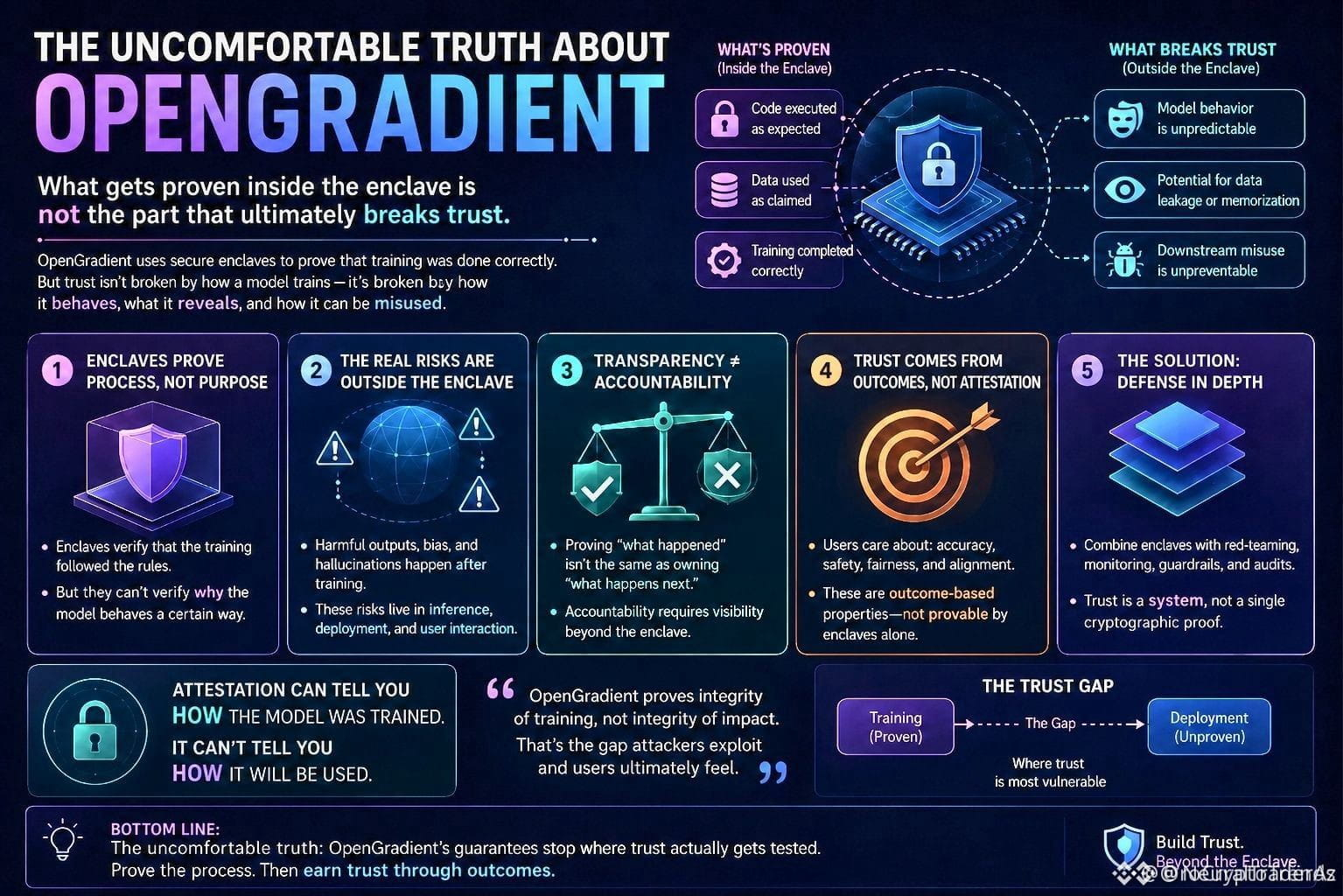
Analyzing the $OPG ecosystem reveals a complex interplay between verification and interpretation 🚀
The issue at hand is not the technical verification process itself, but rather how the output is reinterpreted and reweighted downstream, potentially leading to a drift in context and meaning.
Not financial advice. Manage your risk.
#OPG #CryptoVerification #InterpretationMatters
⚠️
Analyzing the $OPG ecosystem reveals a complex interplay between verification and interpretation 🚀
The issue at hand is not the technical verification process itself, but rather how the output is reinterpreted and reweighted downstream, potentially leading to a drift in context and meaning.
Not financial advice. Manage your risk.
#OPG #CryptoVerification #InterpretationMatters
⚠️
The issue at hand is not the technical verification process itself, but rather how the output is reinterpreted and reweighted downstream, potentially leading to a drift in context and meaning.
Not financial advice. Manage your risk.
#OPG #CryptoVerification #InterpretationMatters
⚠️
1
43

·
--

Article
Step-by-Step Guide to Completing Pi Network's KYC Verification and Unlocking Full Benefits🚀 Complete Your Pi Network KYC Like a Pro! 🚀
Ready to unlock the full potential of your Pi Network account? 🌐 Here’s your step-by-step guide to easily completing Pi Network’s KYC (Know Your Customer) Verification:
⭐ Pre-Requisites
✅ Have your valid government-issued ID ready
✅ Ensure your Pi Network phone number is verified
KYC Verification Steps:
👉 Step 1: Access KYC Section
1️⃣ Open the Pi Network app
2️⃣ Tap on "KYC"
3️⃣ Click "Start KYC Verification"
👉 Step 2: Choose ID Type
Select your ID type (e.g., passport, driver’s license, national ID), then tap "Next".
👉 Step 3: Upload ID Document
📸 Take a clear photo of your ID
⬆️ Upload it, making sure it’s fully visible and readable.
👉 Step 4: Selfie Verification
🤳 Take a selfie holding your ID—ensure both your face and ID are clearly visible.
👉 Step 5: Address Verification
📜 Upload a proof of address (e.g., utility bill, bank statement), ensuring your name and address are visible.
👉 Step 6: Phone Number Verification
📲 Confirm your phone number and enter the verification code.
👉 Step 7: Review and Submit
🧐 Double-check everything for accuracy and hit "Submit"! 🎉
👉 Step 8: Wait for Verification
⏳ Your KYC application will be reviewed within 1-3 business days.
⭐ Post-Verification Benefits
🎉 Get a confirmation email and unlock enhanced perks, including faster mining rates!
💡 Tips & Reminders
Ensure all documents are clear and legible
Provide accurate information
Be patient during the review process!
🚩 Common Issues
Blurry ID or selfie?
Invalid address document?
Phone number verification failed?
Don’t worry—reach out for help!
📞 Support Resources
1. Pi Network Support: support@pi.network
2. Pi Network Community Forum: forum.pi.network
3. More help in the app!
#PiNetworkKYC #CryptoVerification #PiCommunity #BNB #CryptoMining!
Step-by-Step Guide to Completing Pi Network's KYC Verification and Unlocking Full Benefits
🚀 Complete Your Pi Network KYC Like a Pro! 🚀
Ready to unlock the full potential of your Pi Network account? 🌐 Here’s your step-by-step guide to easily completing Pi Network’s KYC (Know Your Customer) Verification:
⭐ Pre-Requisites
✅ Have your valid government-issued ID ready
✅ Ensure your Pi Network phone number is verified
KYC Verification Steps:
👉 Step 1: Access KYC Section
1️⃣ Open the Pi Network app
2️⃣ Tap on "KYC"
3️⃣ Click "Start KYC Verification"
👉 Step 2: Choose ID Type
Select your ID type (e.g., passport, driver’s license, national ID), then tap "Next".
👉 Step 3: Upload ID Document
📸 Take a clear photo of your ID
⬆️ Upload it, making sure it’s fully visible and readable.
👉 Step 4: Selfie Verification
🤳 Take a selfie holding your ID—ensure both your face and ID are clearly visible.
👉 Step 5: Address Verification
📜 Upload a proof of address (e.g., utility bill, bank statement), ensuring your name and address are visible.
👉 Step 6: Phone Number Verification
📲 Confirm your phone number and enter the verification code.
👉 Step 7: Review and Submit
🧐 Double-check everything for accuracy and hit "Submit"! 🎉
👉 Step 8: Wait for Verification
⏳ Your KYC application will be reviewed within 1-3 business days.
⭐ Post-Verification Benefits
🎉 Get a confirmation email and unlock enhanced perks, including faster mining rates!
💡 Tips & Reminders
Ensure all documents are clear and legible
Provide accurate information
Be patient during the review process!
🚩 Common Issues
Blurry ID or selfie?
Invalid address document?
Phone number verification failed?
Don’t worry—reach out for help!
📞 Support Resources
1. Pi Network Support: support@pi.network
2. Pi Network Community Forum: forum.pi.network
3. More help in the app!
#PiNetworkKYC #CryptoVerification #PiCommunity #BNB #CryptoMining!
Ready to unlock the full potential of your Pi Network account? 🌐 Here’s your step-by-step guide to easily completing Pi Network’s KYC (Know Your Customer) Verification:
⭐ Pre-Requisites
✅ Have your valid government-issued ID ready
✅ Ensure your Pi Network phone number is verified
KYC Verification Steps:
👉 Step 1: Access KYC Section
1️⃣ Open the Pi Network app
2️⃣ Tap on "KYC"
3️⃣ Click "Start KYC Verification"
👉 Step 2: Choose ID Type
Select your ID type (e.g., passport, driver’s license, national ID), then tap "Next".
👉 Step 3: Upload ID Document
📸 Take a clear photo of your ID
⬆️ Upload it, making sure it’s fully visible and readable.
👉 Step 4: Selfie Verification
🤳 Take a selfie holding your ID—ensure both your face and ID are clearly visible.
👉 Step 5: Address Verification
📜 Upload a proof of address (e.g., utility bill, bank statement), ensuring your name and address are visible.
👉 Step 6: Phone Number Verification
📲 Confirm your phone number and enter the verification code.
👉 Step 7: Review and Submit
🧐 Double-check everything for accuracy and hit "Submit"! 🎉
👉 Step 8: Wait for Verification
⏳ Your KYC application will be reviewed within 1-3 business days.
⭐ Post-Verification Benefits
🎉 Get a confirmation email and unlock enhanced perks, including faster mining rates!
💡 Tips & Reminders
Ensure all documents are clear and legible
Provide accurate information
Be patient during the review process!
🚩 Common Issues
Blurry ID or selfie?
Invalid address document?
Phone number verification failed?
Don’t worry—reach out for help!
📞 Support Resources
1. Pi Network Support: support@pi.network
2. Pi Network Community Forum: forum.pi.network
3. More help in the app!
#PiNetworkKYC #CryptoVerification #PiCommunity #BNB #CryptoMining!
6
28
7.6k
Log in to explore more content
Join global crypto users on Binance Square
⚡️ Get latest and useful information about crypto.
💬 Trusted by the world’s largest crypto exchange.
👍 Discover real insights from verified creators.
Email / Phone number
Trending Topics
1
#CircleMints500MUSDCOnSolana
35,133 views
960 Discussing
2
#PolymarketBankFailureBetsDrawFDICConcern
49,790 views
1,088 Discussing
3
#BlackRockBuildsTokenizedPortfoliosForOndo
39,934 views
726 Discussing
4
#BitwiseFilesToListNEARETFOnNYSEArca
37,718 views
652 Discussing
5
#SECCommissionerPeirceToLeaveOct2
36,060 views
525 Discussing
6
#SECSaysBuybacksUpgradesDontMakeTokenSecurity
34,000 views
437 Discussing
7
#StrategyProposesDailyDividendsForPreferreds
5,319 views
130 Discussing
8
#CircleTetherFreezeBitgetHackerWallet
4,946 views
78 Discussing
9
#CoinMarketCapCompletesCoinglassAcquisition
7,981 views
111 Discussing
10
#QNTRises39%
93,757 views
1,510 Discussing