

ChainSector
47 Posts
ChainSector
Report
Block User
21 Following
25 Followers
64 Liked
Posts
All
Quotes
·
--
5 Things I Check Before a Polygon Cross-Chain Swap
Cross-chain swaps can make moving assets between networks much simpler.
But I still don't like going straight from selecting a token to pressing confirm.
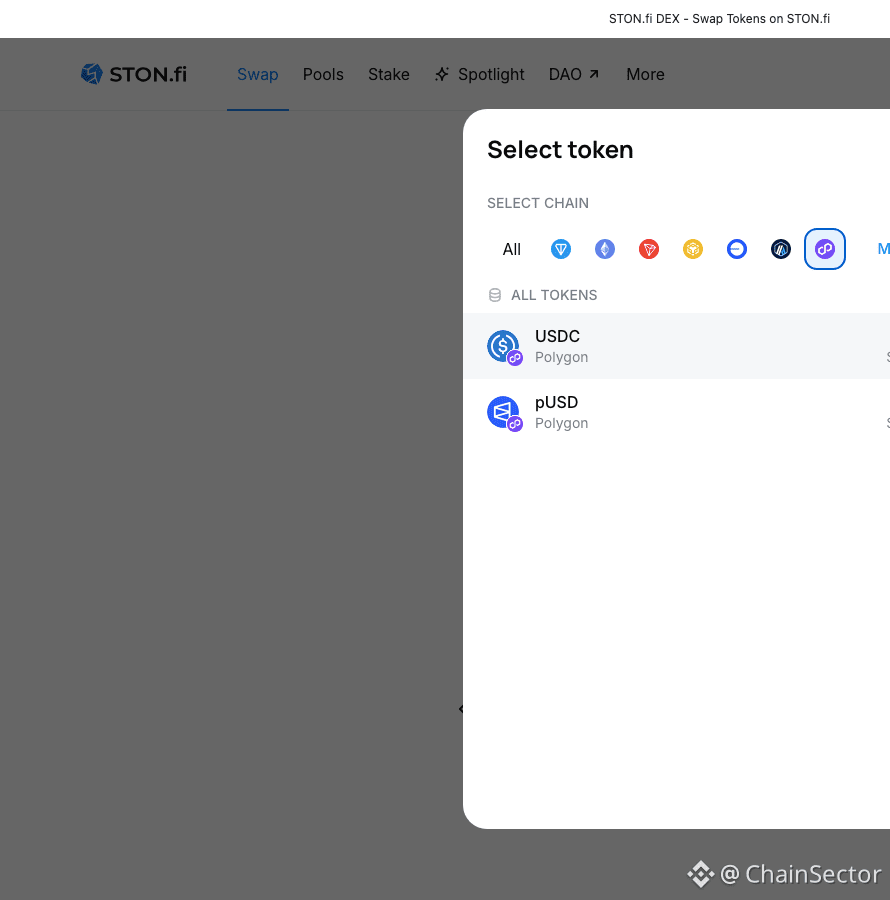
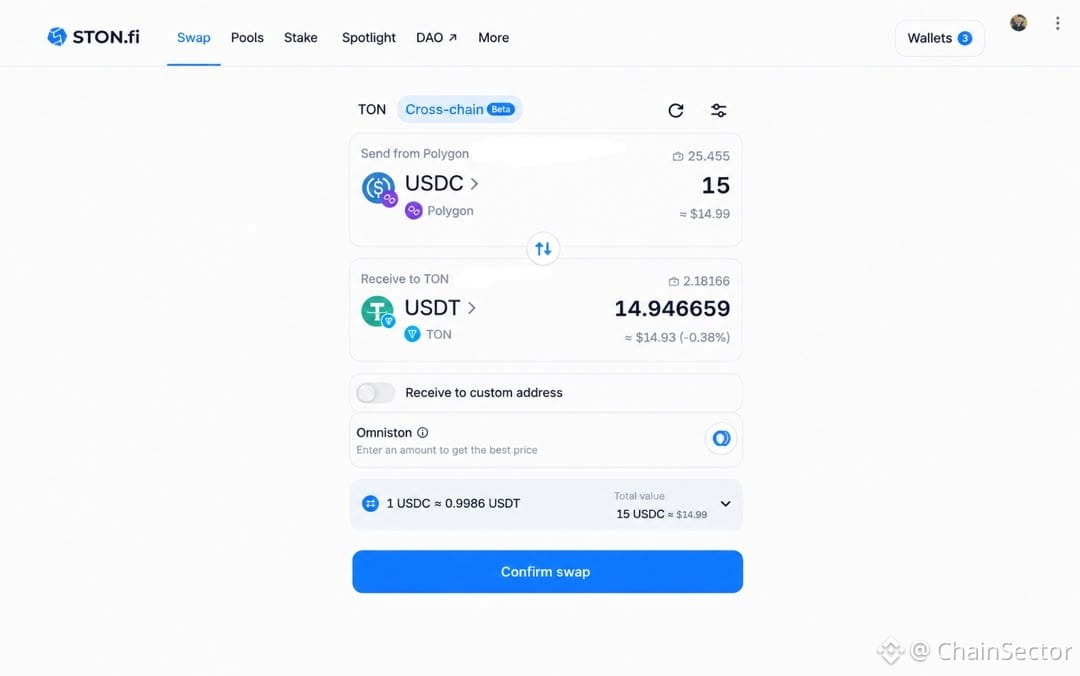
When looking at a USDC on Polygon → USDT on TON route, these are the five things I check.
1. Source network
First, I confirm that the USDC I'm using is actually on Polygon.
I check the token + network, not just the token name.
2. Destination
Next, I confirm where I want the asset to arrive.
USDC on Polygon → USDT on TON
Both networks should be obvious before I continue.
3. Expected output
Then I check the quote.
I want to know what I'm expected to receive and what transaction or fee information is being displayed.
4. Final review
Before confirmation, I go through the transaction one more time.
Source.
Destination.
Expected output.
Fees.
Transaction details.
5. Don't rush
The fact that a cross-chain swap looks simple doesn't mean I should skip the checks.
The interface should make the process easier, but I still want to understand what I'm confirming.
My quick checklist:
Source network ✓
Destination ✓
Expected output ✓
Fees/details ✓
Final review ✓
A few seconds of checking can make a big difference.
If you want to explore the route yourself:
5 Things I Check Before a Polygon Cross-Chain Swap
Cross-chain swaps can make moving assets between networks much simpler.
But I still don't like going straight from selecting a token to pressing confirm.
When looking at a USDC on Polygon → USDT on TON route, these are the five things I check.
1. Source network
First, I confirm that the USDC I'm using is actually on Polygon.
I check the token + network, not just the token name.
2. Destination
Next, I confirm where I want the asset to arrive.
USDC on Polygon → USDT on TON
Both networks should be obvious before I continue.
3. Expected output
Then I check the quote.
I want to know what I'm expected to receive and what transaction or fee information is being displayed.
4. Final review
Before confirmation, I go through the transaction one more time.
Source.
Destination.
Expected output.
Fees.
Transaction details.
5. Don't rush
The fact that a cross-chain swap looks simple doesn't mean I should skip the checks.
The interface should make the process easier, but I still want to understand what I'm confirming.
My quick checklist:
Source network ✓
Destination ✓
Expected output ✓
Fees/details ✓
Final review ✓
A few seconds of checking can make a big difference.
If you want to explore the route yourself:
Cross-chain swaps can make moving assets between networks much simpler.
But I still don't like going straight from selecting a token to pressing confirm.
When looking at a USDC on Polygon → USDT on TON route, these are the five things I check.
1. Source network
First, I confirm that the USDC I'm using is actually on Polygon.
I check the token + network, not just the token name.
2. Destination
Next, I confirm where I want the asset to arrive.
USDC on Polygon → USDT on TON
Both networks should be obvious before I continue.
3. Expected output
Then I check the quote.
I want to know what I'm expected to receive and what transaction or fee information is being displayed.
4. Final review
Before confirmation, I go through the transaction one more time.
Source.
Destination.
Expected output.
Fees.
Transaction details.
5. Don't rush
The fact that a cross-chain swap looks simple doesn't mean I should skip the checks.
The interface should make the process easier, but I still want to understand what I'm confirming.
My quick checklist:
Source network ✓
Destination ✓
Expected output ✓
Fees/details ✓
Final review ✓
A few seconds of checking can make a big difference.
If you want to explore the route yourself:
66
·
--
Bullish
How to Swap a TON Token by Contract Address on STON.fi
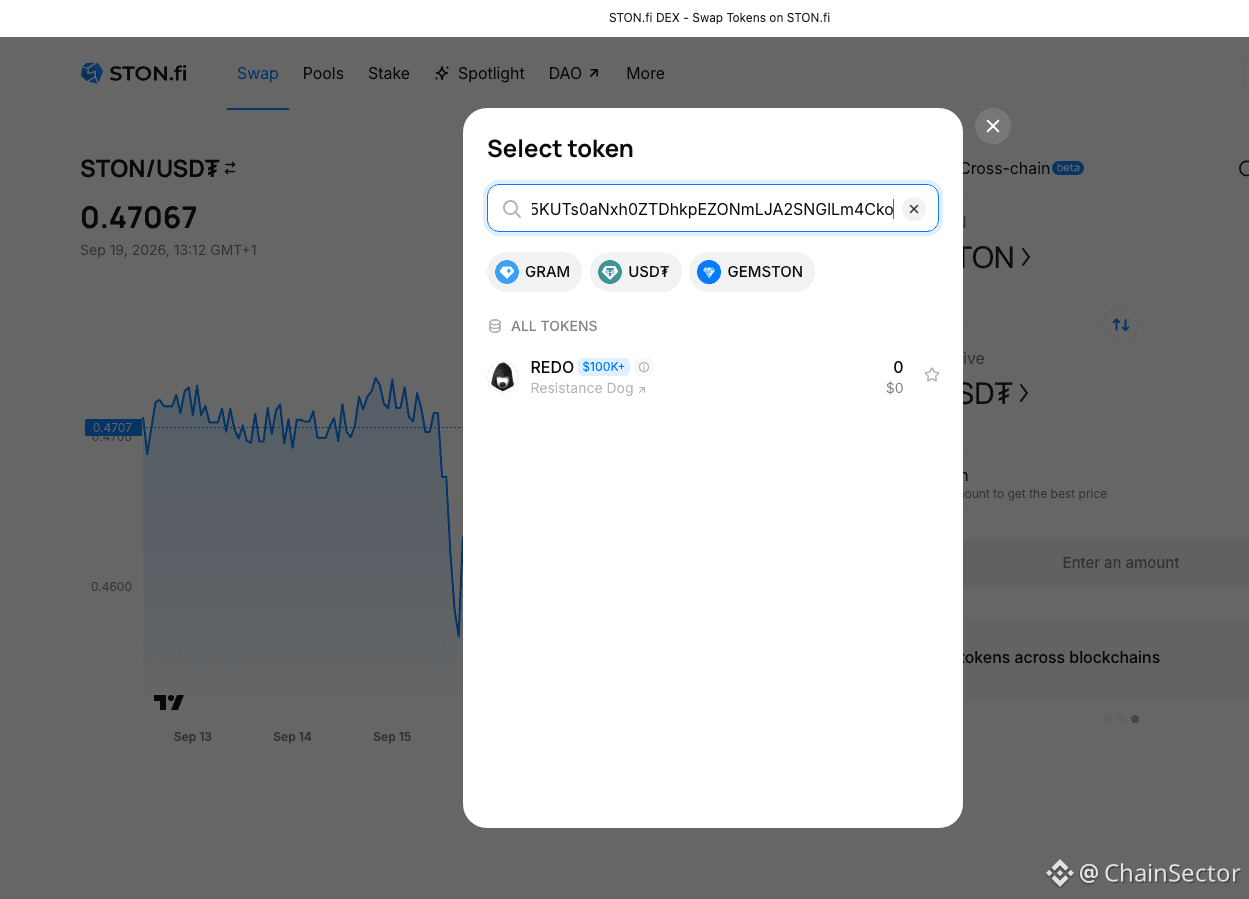
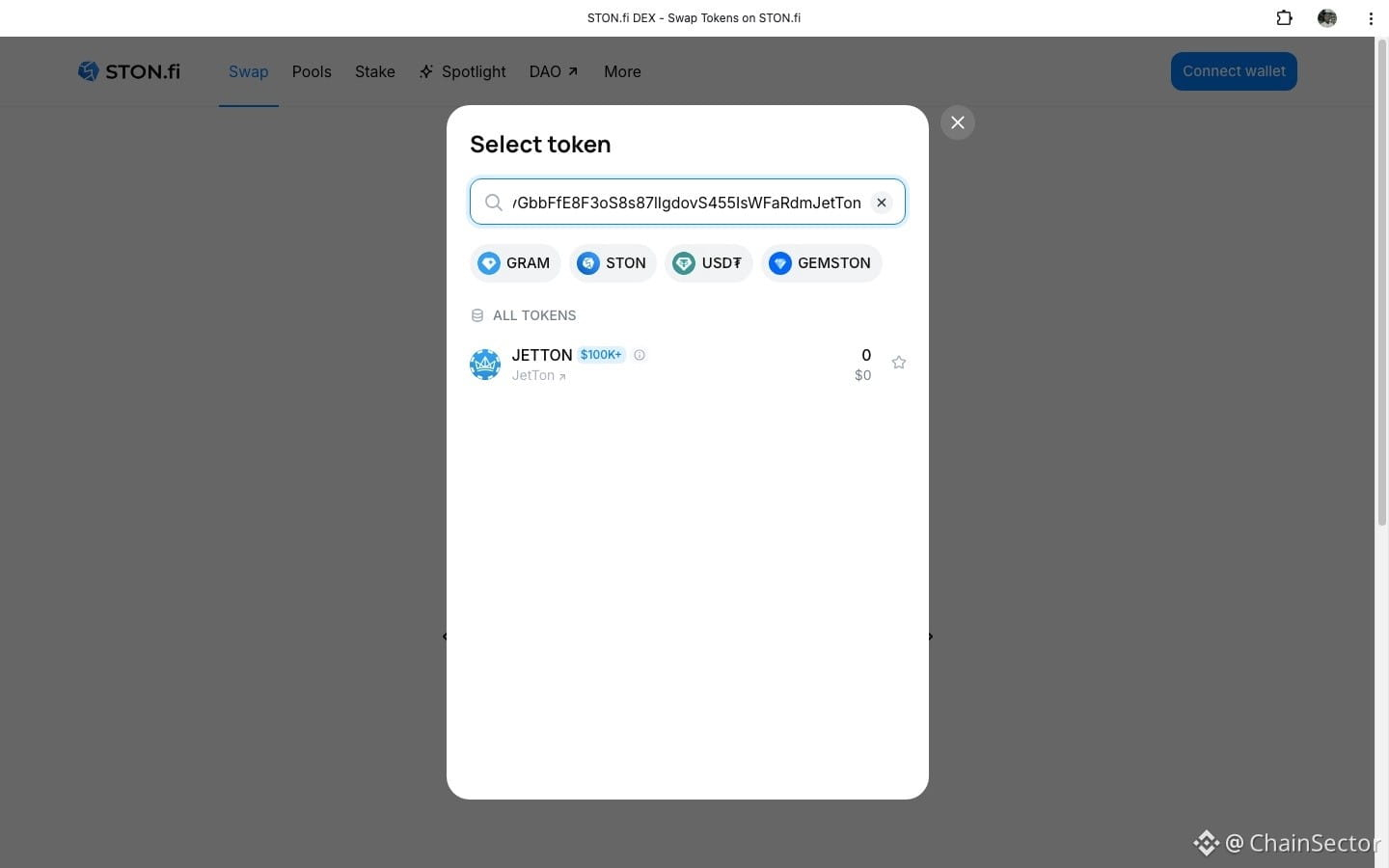
Not every TON token is easy to find by simply searching its name.
If I already have the official contract address, I can use that address directly on STON.fi.
Here's the process I follow:
1. Open the Ston_fi.
2. Open the token selector.
3. Paste the token's official contract address into the search field.
4. Check the detected name, symbol and decimals.
5. Import the token.
6. Enter the amount and review the swap details before confirming.
STON.fi's current documentation specifically recommends verifying the official contract address because scam tokens can copy popular token names.
That's the part I wouldn't skip.
A familiar name or logo isn't enough for me when dealing with an unfamiliar token.
I want to confirm the contract → token details → swap details before interacting with it.
STON.fi also has interface flags for certain risky tokens, including Fake, Honeypot and Taxable classifications.
So if you're trying to swap a less familiar TON token, the contract address can be a much more precise starting point than searching by name alone.
@ston_fi
How to Swap a TON Token by Contract Address on STON.fi
Not every TON token is easy to find by simply searching its name.
If I already have the official contract address, I can use that address directly on STON.fi.
Here's the process I follow:
1. Open the Ston_fi.
2. Open the token selector.
3. Paste the token's official contract address into the search field.
4. Check the detected name, symbol and decimals.
5. Import the token.
6. Enter the amount and review the swap details before confirming.
STON.fi's current documentation specifically recommends verifying the official contract address because scam tokens can copy popular token names.
That's the part I wouldn't skip.
A familiar name or logo isn't enough for me when dealing with an unfamiliar token.
I want to confirm the contract → token details → swap details before interacting with it.
STON.fi also has interface flags for certain risky tokens, including Fake, Honeypot and Taxable classifications.
So if you're trying to swap a less familiar TON token, the contract address can be a much more precise starting point than searching by name alone.
@ston_fi
Not every TON token is easy to find by simply searching its name.
If I already have the official contract address, I can use that address directly on STON.fi.
Here's the process I follow:
1. Open the Ston_fi.
2. Open the token selector.
3. Paste the token's official contract address into the search field.
4. Check the detected name, symbol and decimals.
5. Import the token.
6. Enter the amount and review the swap details before confirming.
STON.fi's current documentation specifically recommends verifying the official contract address because scam tokens can copy popular token names.
That's the part I wouldn't skip.
A familiar name or logo isn't enough for me when dealing with an unfamiliar token.
I want to confirm the contract → token details → swap details before interacting with it.
STON.fi also has interface flags for certain risky tokens, including Fake, Honeypot and Taxable classifications.
So if you're trying to swap a less familiar TON token, the contract address can be a much more precise starting point than searching by name alone.
@ston_fi
137
·
--
How to Swap USDT on TON to USDT on Ethereum
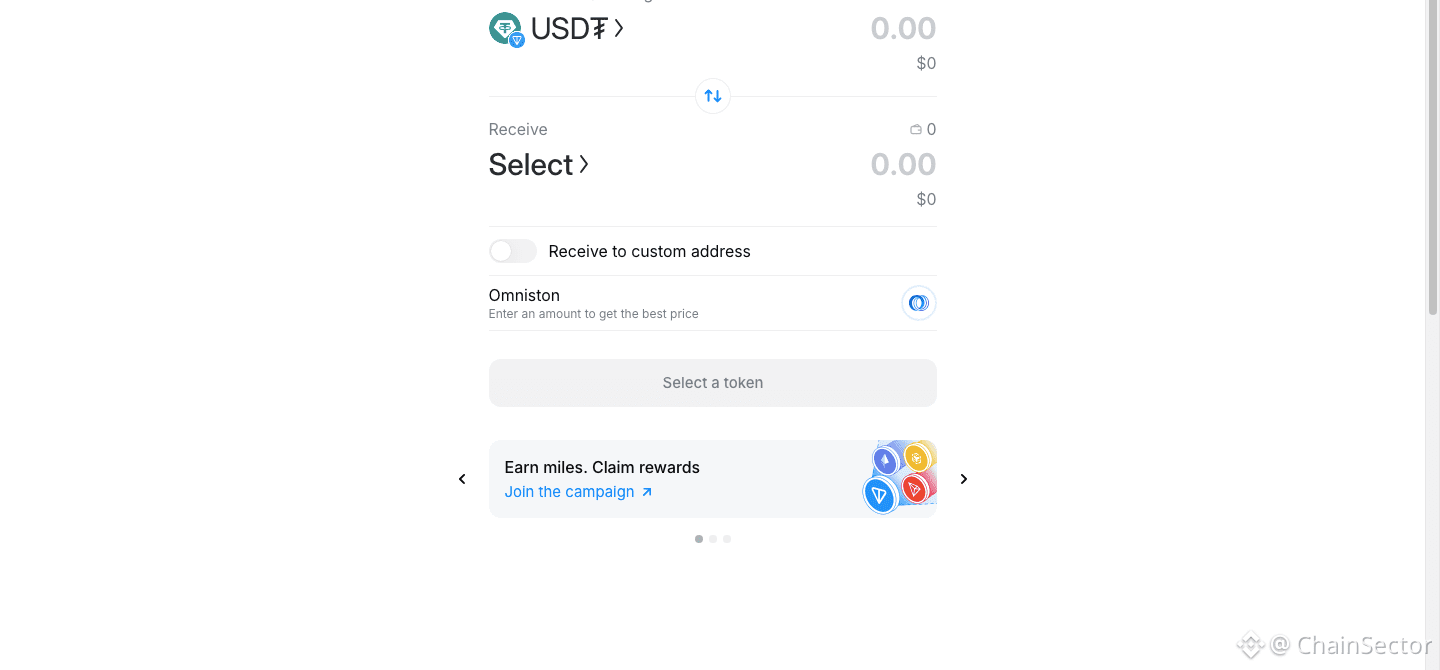
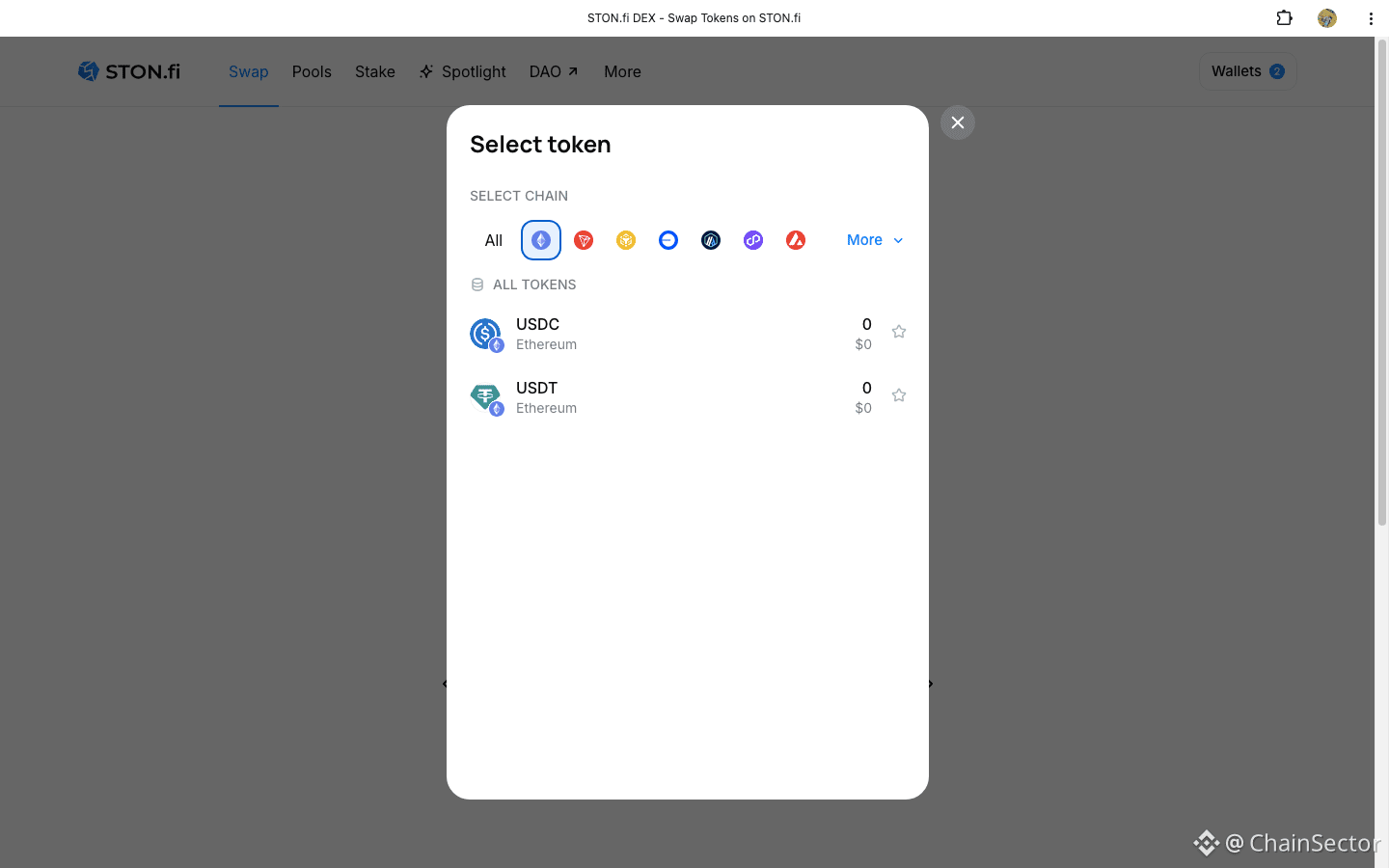
If you have USDT on TON and need USDT on Ethereum, you can use STON.fi's cross-chain swap flow.
The process is:
USDT (TON) → USDT (Ethereum)
Open the STON.fi cross-chain interface and select USDT on TON as the asset you're sending.
Then select Ethereum as the destination network and USDT as the receiving asset.
Before confirming, check the actual receive amount, fees, route and other swap details.
STON.fi's current cross-chain interface supports Ethereum alongside TON and several other networks, with Omniston handling the cross-chain execution layer.
The important thing is not to treat the two USDTs as if they're on the same network.
USDT on TON ≠ USDT on Ethereum.
The network selection on the receiving side is therefore something I would always verify before confirming.
How to Swap USDT on TON to USDT on Ethereum
If you have USDT on TON and need USDT on Ethereum, you can use STON.fi's cross-chain swap flow.
The process is:
USDT (TON) → USDT (Ethereum)
Open the STON.fi cross-chain interface and select USDT on TON as the asset you're sending.
Then select Ethereum as the destination network and USDT as the receiving asset.
Before confirming, check the actual receive amount, fees, route and other swap details.
STON.fi's current cross-chain interface supports Ethereum alongside TON and several other networks, with Omniston handling the cross-chain execution layer.
The important thing is not to treat the two USDTs as if they're on the same network.
USDT on TON ≠ USDT on Ethereum.
The network selection on the receiving side is therefore something I would always verify before confirming.
If you have USDT on TON and need USDT on Ethereum, you can use STON.fi's cross-chain swap flow.
The process is:
USDT (TON) → USDT (Ethereum)
Open the STON.fi cross-chain interface and select USDT on TON as the asset you're sending.
Then select Ethereum as the destination network and USDT as the receiving asset.
Before confirming, check the actual receive amount, fees, route and other swap details.
STON.fi's current cross-chain interface supports Ethereum alongside TON and several other networks, with Omniston handling the cross-chain execution layer.
The important thing is not to treat the two USDTs as if they're on the same network.
USDT on TON ≠ USDT on Ethereum.
The network selection on the receiving side is therefore something I would always verify before confirming.

83
·
--
I stopped looking at the amount alone before swapping
When I use a DEX now, I don't immediately press Confirm after seeing the expected amount
.
I check a few other things first.
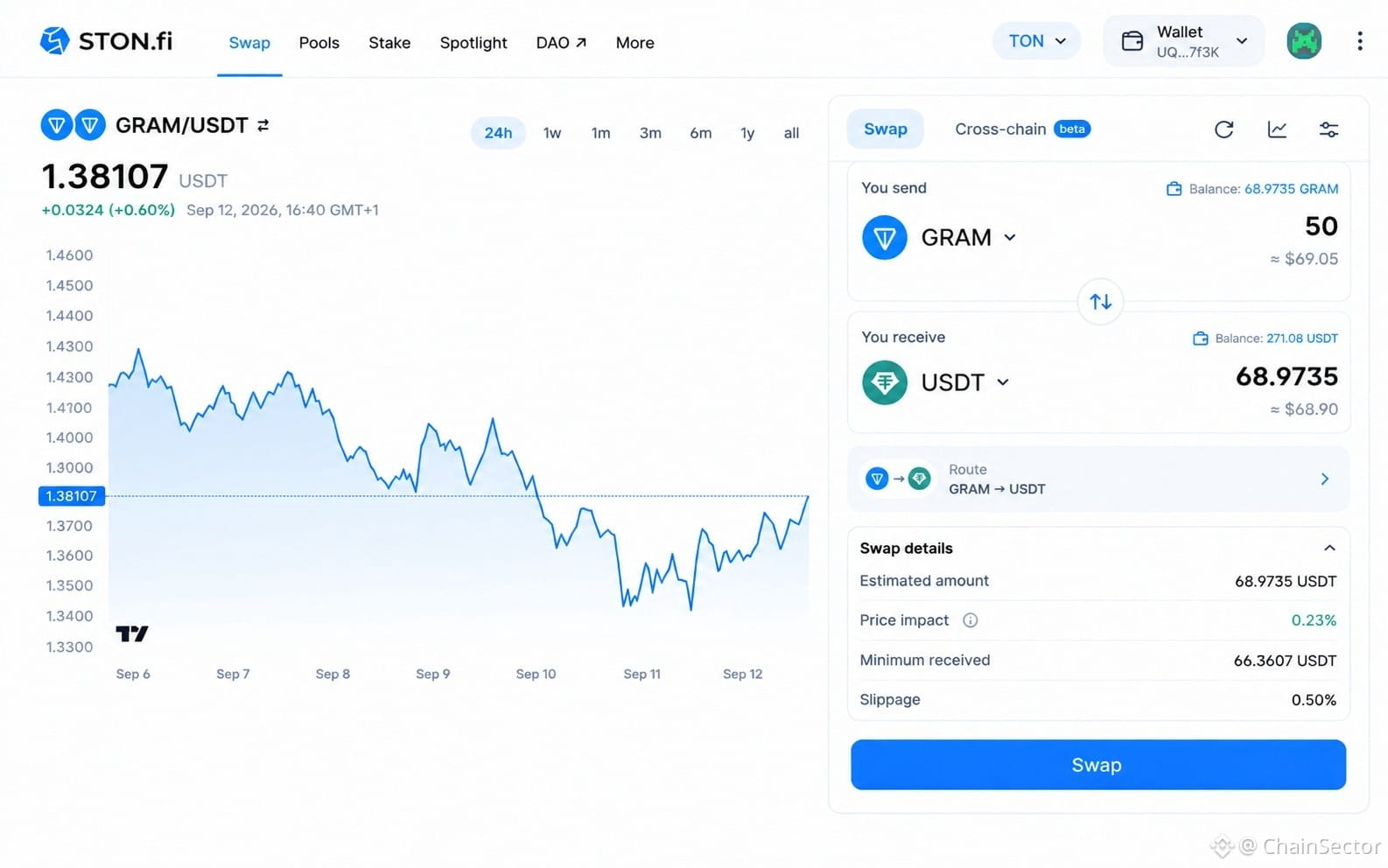
On STON.fi, my quick routine is:
1. Estimated Amount
What am I expected to receive?
2. Price Impact
How much could my own trade affect the execution price?
3. Minimum Received
What's the minimum amount shown before I confirm?
4. Slippage
What execution movement am I allowing?
I don't think these numbers should be treated individually.
Looking at them together gives me a much better picture of the swap I'm about to execute.
That's now my habit:
Don't just look at what you're getting. Look at the conditions under which you're getting it.
I stopped looking at the amount alone before swapping
When I use a DEX now, I don't immediately press Confirm after seeing the expected amount
.
I check a few other things first.
On STON.fi, my quick routine is:
1. Estimated Amount
What am I expected to receive?
2. Price Impact
How much could my own trade affect the execution price?
3. Minimum Received
What's the minimum amount shown before I confirm?
4. Slippage
What execution movement am I allowing?
I don't think these numbers should be treated individually.
Looking at them together gives me a much better picture of the swap I'm about to execute.
That's now my habit:
Don't just look at what you're getting. Look at the conditions under which you're getting it.
When I use a DEX now, I don't immediately press Confirm after seeing the expected amount
.
I check a few other things first.
On STON.fi, my quick routine is:
1. Estimated Amount
What am I expected to receive?
2. Price Impact
How much could my own trade affect the execution price?
3. Minimum Received
What's the minimum amount shown before I confirm?
4. Slippage
What execution movement am I allowing?
I don't think these numbers should be treated individually.
Looking at them together gives me a much better picture of the swap I'm about to execute.
That's now my habit:
Don't just look at what you're getting. Look at the conditions under which you're getting it.
217
·
--
I Tried Looking at Cross-Chain Swaps From the User Side
When a new chain gets added to a cross-chain system, it's easy to focus on the announcement and forget about the actual user experience.
So I looked at it differently.
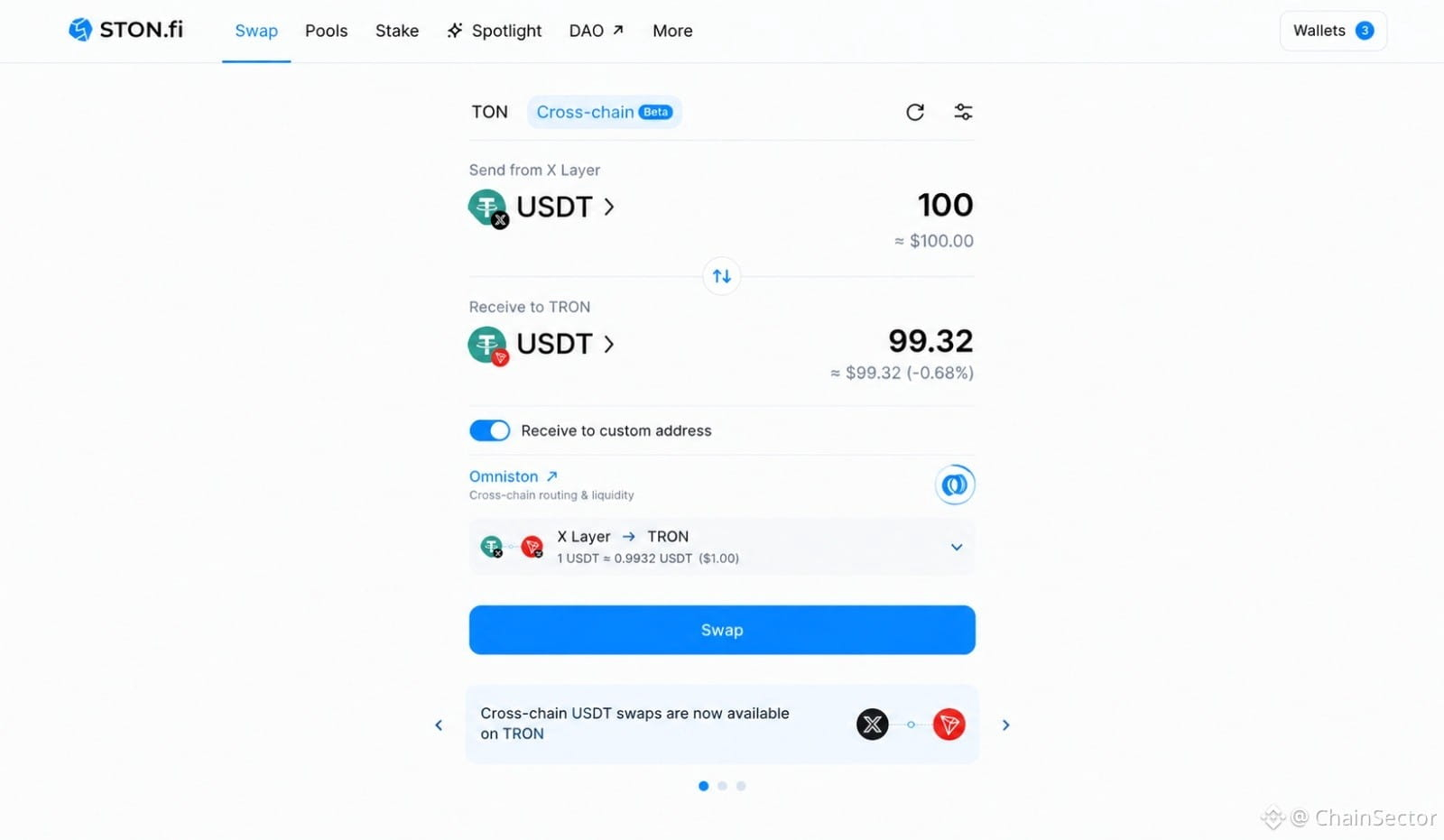
I wanted to see what it feels like to move USDT from X Layer to TRON through STON.fi.
The interesting part is that Omniston is working underneath the interface.
Instead of manually figuring out how to connect the two networks, the user gets a single swap flow where the route and expected output can be reviewed before confirming.
That's the part I think matters as more networks get connected.
More chains shouldn't necessarily mean more complexity for users.
Ideally, it should mean more destinations from the same simple interface.
That's the direction STON.fi appears to be pushing with Omniston.
Try the cross-chain swap:
STON.fi Cross-Chain Swap
I Tried Looking at Cross-Chain Swaps From the User Side
When a new chain gets added to a cross-chain system, it's easy to focus on the announcement and forget about the actual user experience.
So I looked at it differently.
I wanted to see what it feels like to move USDT from X Layer to TRON through STON.fi.
The interesting part is that Omniston is working underneath the interface.
Instead of manually figuring out how to connect the two networks, the user gets a single swap flow where the route and expected output can be reviewed before confirming.
That's the part I think matters as more networks get connected.
More chains shouldn't necessarily mean more complexity for users.
Ideally, it should mean more destinations from the same simple interface.
That's the direction STON.fi appears to be pushing with Omniston.
Try the cross-chain swap:
STON.fi Cross-Chain Swap
When a new chain gets added to a cross-chain system, it's easy to focus on the announcement and forget about the actual user experience.
So I looked at it differently.
I wanted to see what it feels like to move USDT from X Layer to TRON through STON.fi.
The interesting part is that Omniston is working underneath the interface.
Instead of manually figuring out how to connect the two networks, the user gets a single swap flow where the route and expected output can be reviewed before confirming.
That's the part I think matters as more networks get connected.
More chains shouldn't necessarily mean more complexity for users.
Ideally, it should mean more destinations from the same simple interface.
That's the direction STON.fi appears to be pushing with Omniston.
Try the cross-chain swap:
STON.fi Cross-Chain Swap
69
·
--
I Looked at WenLong Inside Telegram, The UX Is What Caught My Attention
I came across WenLong and decided to look through the interface rather than just reposting the announcement.
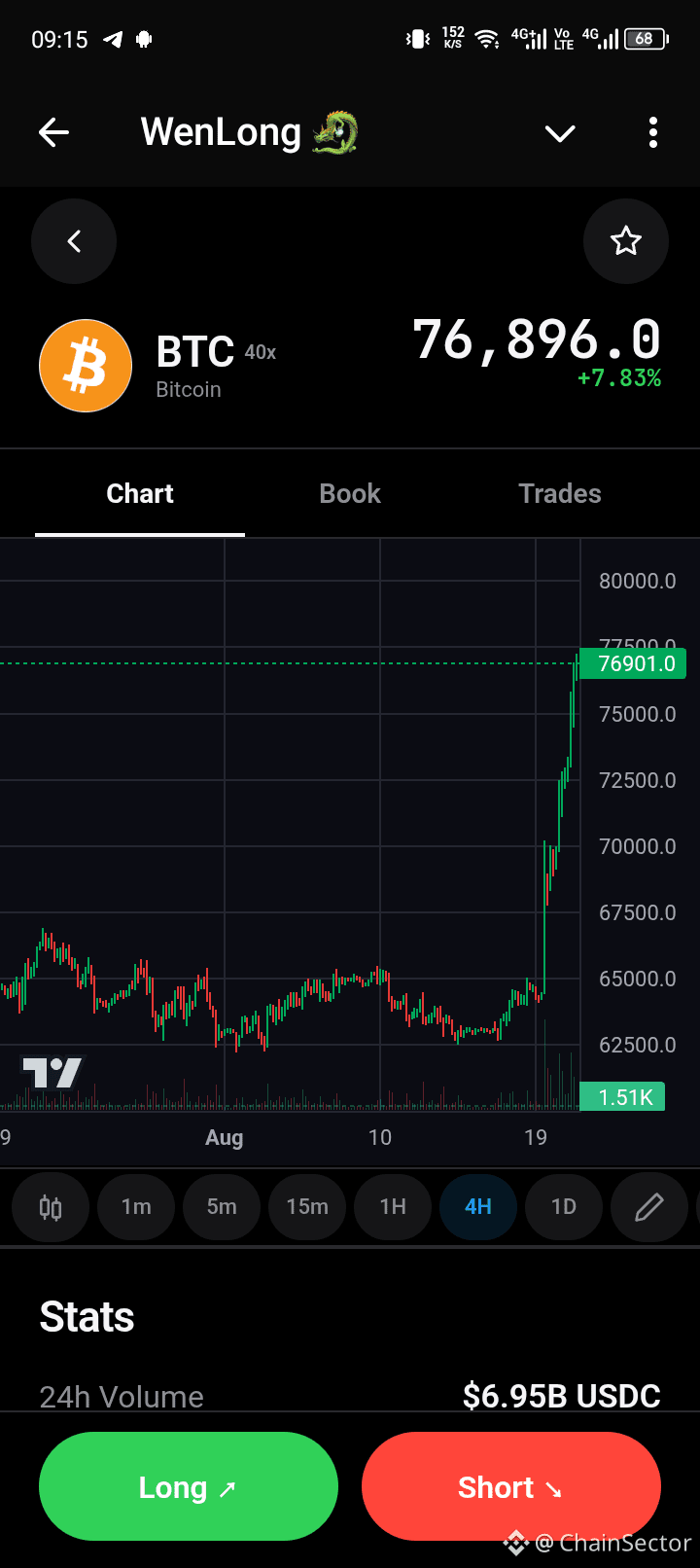
The first thing you see is pretty familiar if you've used a perpetual trading platform before:
📊 Chart
💰 Market price
📈 Position information
⚡ Leverage
🟢 Long / 🔴 Short
But what interested me more was the infrastructure behind that simple screen.
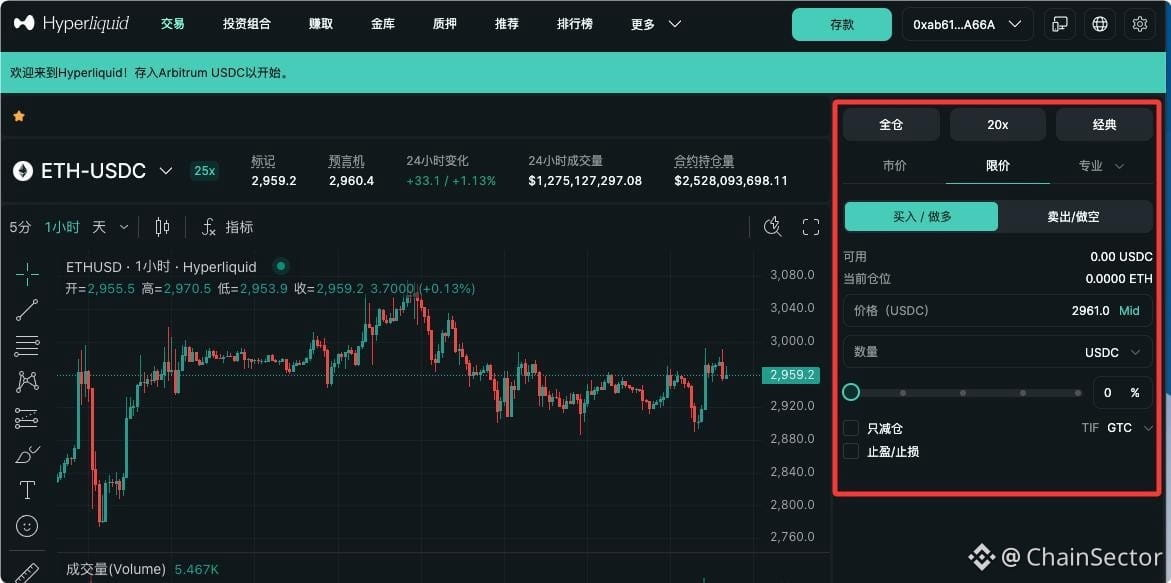
WenLong brings Hyperliquid perpetual trading into Telegram, while the funding flow can start from the TON ecosystem. WenLong's own site describes the experience as a Telegram-native Hyperliquid terminal funded from TON.
That's where cross-chain infrastructure becomes important.
The user doesn't necessarily want to think about:
TON → bridge → destination network → swap → deposit → Hyperliquid
They just want to get from their starting asset to the application.
Omniston is interesting here because it provides liquidity aggregation and routing infrastructure that applications can integrate rather than building the entire liquidity-routing layer themselves.
That got me thinking about where DeFi UX is heading.
The infrastructure can become more complicated while the interface becomes simpler.
And honestly, I think that's a good thing.
The average user shouldn't need to understand every network involved in a transaction just to use an application.
The complexity can stay underneath.
The experience can stay simple.
That's what stood out to me while exploring WenLong.
Not the leverage.
The abstraction.
@ston_fi
DYOR. Leveraged trading carries significant risk.
I Looked at WenLong Inside Telegram, The UX Is What Caught My Attention
I came across WenLong and decided to look through the interface rather than just reposting the announcement.
The first thing you see is pretty familiar if you've used a perpetual trading platform before:
📊 Chart
💰 Market price
📈 Position information
⚡ Leverage
🟢 Long / 🔴 Short
But what interested me more was the infrastructure behind that simple screen.
WenLong brings Hyperliquid perpetual trading into Telegram, while the funding flow can start from the TON ecosystem. WenLong's own site describes the experience as a Telegram-native Hyperliquid terminal funded from TON.
That's where cross-chain infrastructure becomes important.
The user doesn't necessarily want to think about:
TON → bridge → destination network → swap → deposit → Hyperliquid
They just want to get from their starting asset to the application.
Omniston is interesting here because it provides liquidity aggregation and routing infrastructure that applications can integrate rather than building the entire liquidity-routing layer themselves.
That got me thinking about where DeFi UX is heading.
The infrastructure can become more complicated while the interface becomes simpler.
And honestly, I think that's a good thing.
The average user shouldn't need to understand every network involved in a transaction just to use an application.
The complexity can stay underneath.
The experience can stay simple.
That's what stood out to me while exploring WenLong.
Not the leverage.
The abstraction.
@ston_fi
DYOR. Leveraged trading carries significant risk.
I came across WenLong and decided to look through the interface rather than just reposting the announcement.
The first thing you see is pretty familiar if you've used a perpetual trading platform before:
📊 Chart
💰 Market price
📈 Position information
⚡ Leverage
🟢 Long / 🔴 Short
But what interested me more was the infrastructure behind that simple screen.
WenLong brings Hyperliquid perpetual trading into Telegram, while the funding flow can start from the TON ecosystem. WenLong's own site describes the experience as a Telegram-native Hyperliquid terminal funded from TON.
That's where cross-chain infrastructure becomes important.
The user doesn't necessarily want to think about:
TON → bridge → destination network → swap → deposit → Hyperliquid
They just want to get from their starting asset to the application.
Omniston is interesting here because it provides liquidity aggregation and routing infrastructure that applications can integrate rather than building the entire liquidity-routing layer themselves.
That got me thinking about where DeFi UX is heading.
The infrastructure can become more complicated while the interface becomes simpler.
And honestly, I think that's a good thing.
The average user shouldn't need to understand every network involved in a transaction just to use an application.
The complexity can stay underneath.
The experience can stay simple.
That's what stood out to me while exploring WenLong.
Not the leverage.
The abstraction.
@ston_fi
DYOR. Leveraged trading carries significant risk.
1
107
·
--
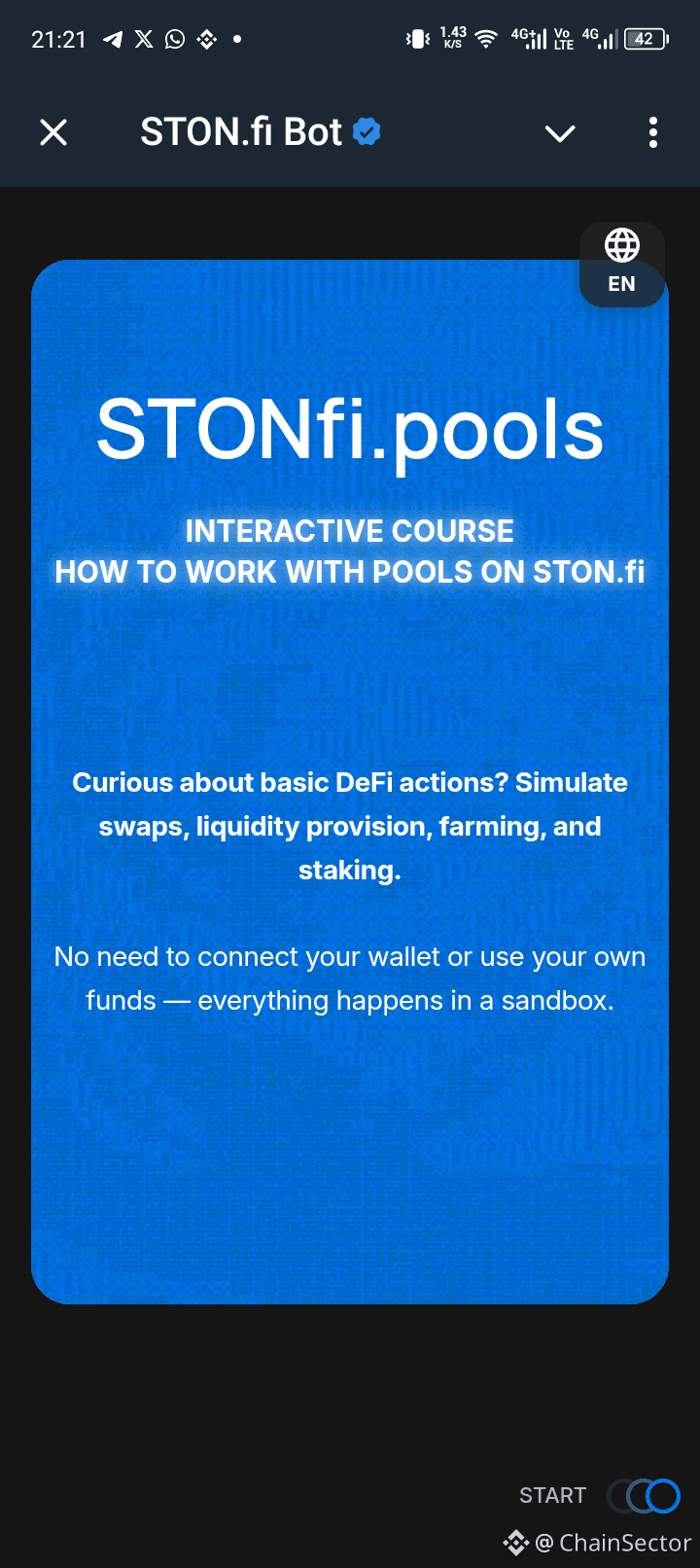
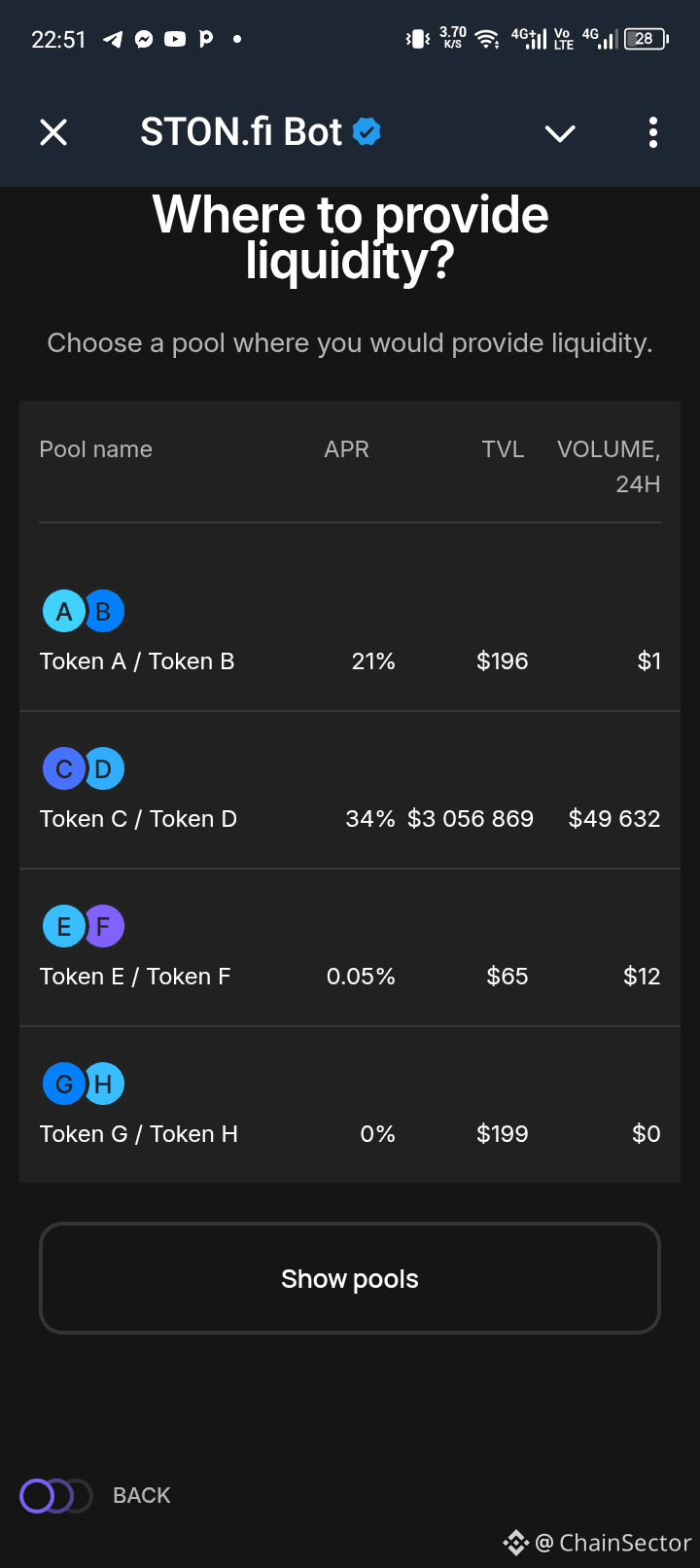
I Tried STON.fi's DeFi Simulator Before Using Real Funds
I recently came across the STONfi.pools interactive course and decided to try it.
What made me interested was pretty simple:
I didn't need to connect my wallet.
Everything happens inside a simulator, so I could explore the process without using my own funds.
The course lets you practice:
• Swaps
• Providing liquidity
• Farming
• Staking
I found the approach useful because DeFi can feel very different once you're actually looking at the interface.
You can understand what a liquidity pool is, for example, but still hesitate when you're seeing the actual buttons and steps for the first time.
The simulator gives you somewhere to get familiar with that process.
And if you make a mistake?
You haven't lost anything.
You can simply try again.
Of course, I'd still do proper research before using real funds. A simulator doesn't remove the risks involved in real DeFi.
But as a learning tool, I think the idea makes sense:
Get comfortable with the process before putting money behind it.
@ston_fi
I Tried STON.fi's DeFi Simulator Before Using Real Funds
I recently came across the STONfi.pools interactive course and decided to try it.
What made me interested was pretty simple:
I didn't need to connect my wallet.
Everything happens inside a simulator, so I could explore the process without using my own funds.
The course lets you practice:
• Swaps
• Providing liquidity
• Farming
• Staking
I found the approach useful because DeFi can feel very different once you're actually looking at the interface.
You can understand what a liquidity pool is, for example, but still hesitate when you're seeing the actual buttons and steps for the first time.
The simulator gives you somewhere to get familiar with that process.
And if you make a mistake?
You haven't lost anything.
You can simply try again.
Of course, I'd still do proper research before using real funds. A simulator doesn't remove the risks involved in real DeFi.
But as a learning tool, I think the idea makes sense:
Get comfortable with the process before putting money behind it.
@ston_fi
I recently came across the STONfi.pools interactive course and decided to try it.
What made me interested was pretty simple:
I didn't need to connect my wallet.
Everything happens inside a simulator, so I could explore the process without using my own funds.
The course lets you practice:
• Swaps
• Providing liquidity
• Farming
• Staking
I found the approach useful because DeFi can feel very different once you're actually looking at the interface.
You can understand what a liquidity pool is, for example, but still hesitate when you're seeing the actual buttons and steps for the first time.
The simulator gives you somewhere to get familiar with that process.
And if you make a mistake?
You haven't lost anything.
You can simply try again.
Of course, I'd still do proper research before using real funds. A simulator doesn't remove the risks involved in real DeFi.
But as a learning tool, I think the idea makes sense:
Get comfortable with the process before putting money behind it.
@ston_fi
1
73
·
--
This STON.fi Feature Makes More Sense After Trying It
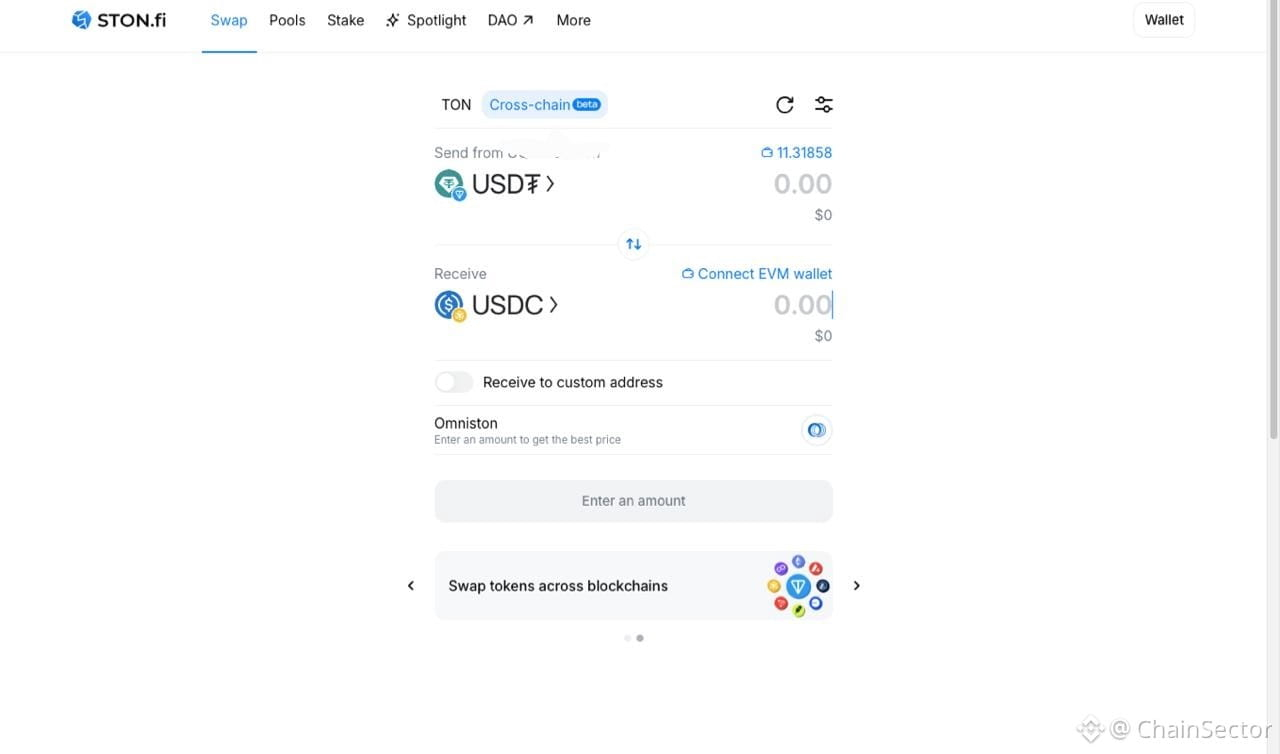
I tried STON.fi’s new custom-address option today.
Instead of connecting a wallet on both sides of the swap, I kept my source wallet connected and entered a different wallet as the destination.
That means you can swap from one wallet while having the resulting tokens sent somewhere else.
I think that’s useful if you separate your trading and holding wallets, or simply need to send the output to another address.
The only part I’d slow down on is the final check. When you’re entering a destination address yourself, make sure the address and network are correct before confirming.
Small feature, but a useful one.
@ston_fi
#STONfi #TON #CrossChain
This STON.fi Feature Makes More Sense After Trying It
I tried STON.fi’s new custom-address option today.
Instead of connecting a wallet on both sides of the swap, I kept my source wallet connected and entered a different wallet as the destination.
That means you can swap from one wallet while having the resulting tokens sent somewhere else.
I think that’s useful if you separate your trading and holding wallets, or simply need to send the output to another address.
The only part I’d slow down on is the final check. When you’re entering a destination address yourself, make sure the address and network are correct before confirming.
Small feature, but a useful one.
@ston_fi
#STONfi #TON #CrossChain
I tried STON.fi’s new custom-address option today.
Instead of connecting a wallet on both sides of the swap, I kept my source wallet connected and entered a different wallet as the destination.
That means you can swap from one wallet while having the resulting tokens sent somewhere else.
I think that’s useful if you separate your trading and holding wallets, or simply need to send the output to another address.
The only part I’d slow down on is the final check. When you’re entering a destination address yourself, make sure the address and network are correct before confirming.
Small feature, but a useful one.
@ston_fi
#STONfi #TON #CrossChain
1
77
·
--
I Tested STON.fi’s Three New DeFi Tools Before Looking at Liquidity Pools
Whenever I look at liquidity pools, my first instinct is usually to compare APR.
This time I decided to slow down and test STON.fi’s three new DeFi tools first.
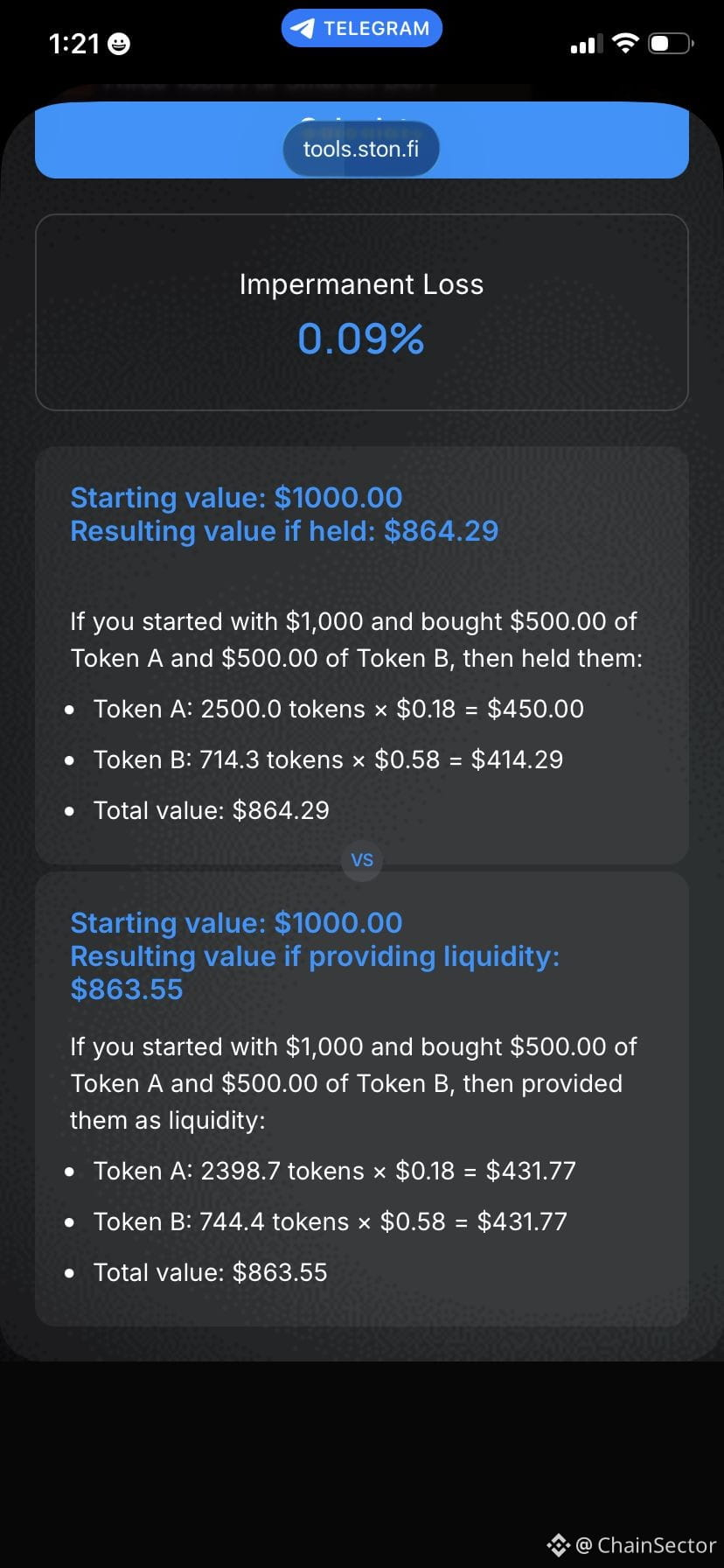
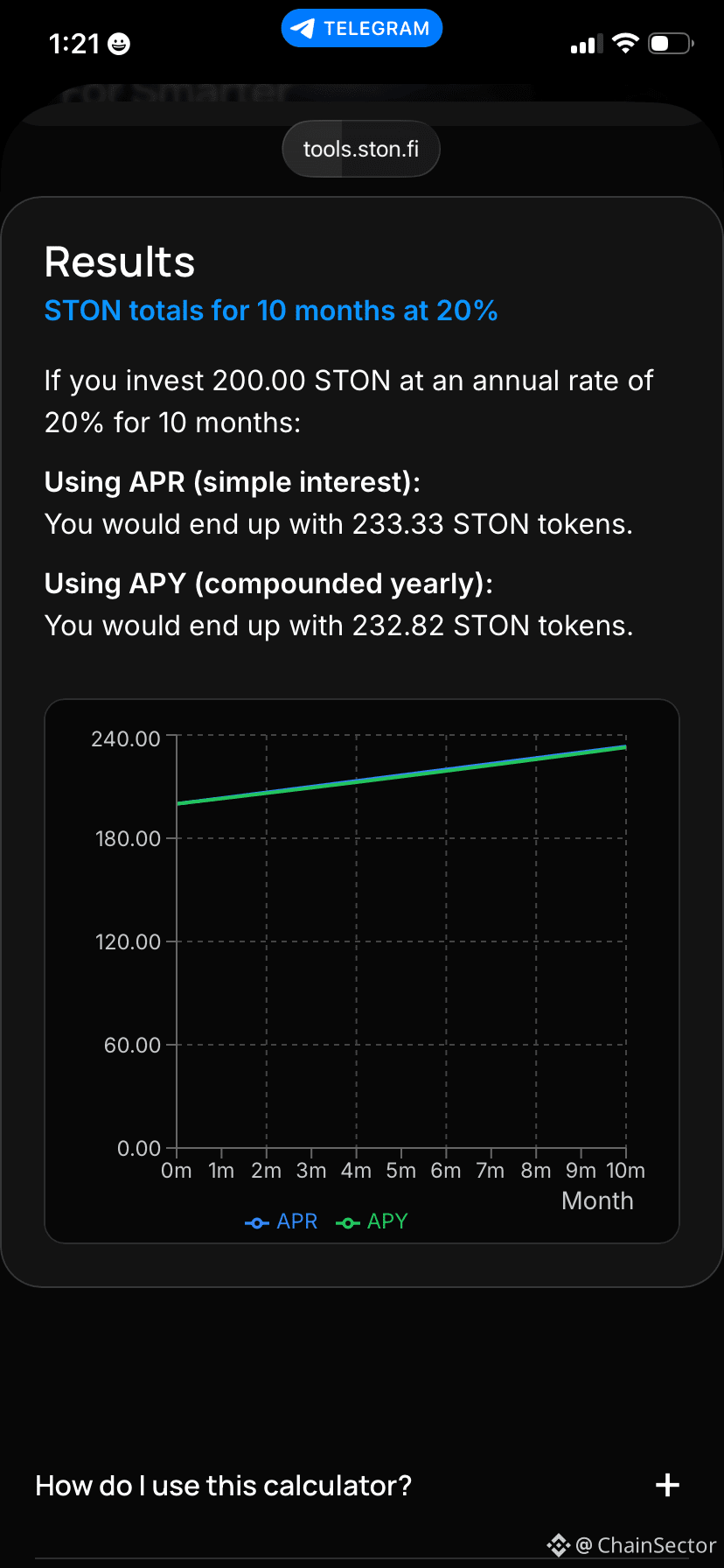
I started with the APR Calculator, changing deposit amounts, APR values and investment duration to see how different scenarios affected projected returns.
After that I moved to the Impermanent Loss Calculator.
What I found most useful wasn’t the impermanent loss percentage itself, but the comparison between simply holding the assets and providing them as liquidity.
Seeing both outcomes together made the concept much easier to understand.
Finally, I joined the STON.fi Pools Updates channel.
Instead of opening different pools every day, it keeps me informed through regular APR updates.
After using all three tools together, I don’t think of them as separate features anymore.
They’ve become part of my own process before evaluating liquidity opportunities.
They’re not investment advice, but they’re definitely useful for making more informed decisions.
@ston_fi
#STONfi #TON #DeFi
I Tested STON.fi’s Three New DeFi Tools Before Looking at Liquidity Pools
Whenever I look at liquidity pools, my first instinct is usually to compare APR.
This time I decided to slow down and test STON.fi’s three new DeFi tools first.
I started with the APR Calculator, changing deposit amounts, APR values and investment duration to see how different scenarios affected projected returns.
After that I moved to the Impermanent Loss Calculator.
What I found most useful wasn’t the impermanent loss percentage itself, but the comparison between simply holding the assets and providing them as liquidity.
Seeing both outcomes together made the concept much easier to understand.
Finally, I joined the STON.fi Pools Updates channel.
Instead of opening different pools every day, it keeps me informed through regular APR updates.
After using all three tools together, I don’t think of them as separate features anymore.
They’ve become part of my own process before evaluating liquidity opportunities.
They’re not investment advice, but they’re definitely useful for making more informed decisions.
@ston_fi
#STONfi #TON #DeFi
Whenever I look at liquidity pools, my first instinct is usually to compare APR.
This time I decided to slow down and test STON.fi’s three new DeFi tools first.
I started with the APR Calculator, changing deposit amounts, APR values and investment duration to see how different scenarios affected projected returns.
After that I moved to the Impermanent Loss Calculator.
What I found most useful wasn’t the impermanent loss percentage itself, but the comparison between simply holding the assets and providing them as liquidity.
Seeing both outcomes together made the concept much easier to understand.
Finally, I joined the STON.fi Pools Updates channel.
Instead of opening different pools every day, it keeps me informed through regular APR updates.
After using all three tools together, I don’t think of them as separate features anymore.
They’ve become part of my own process before evaluating liquidity opportunities.
They’re not investment advice, but they’re definitely useful for making more informed decisions.
@ston_fi
#STONfi #TON #DeFi
2
58
·
--
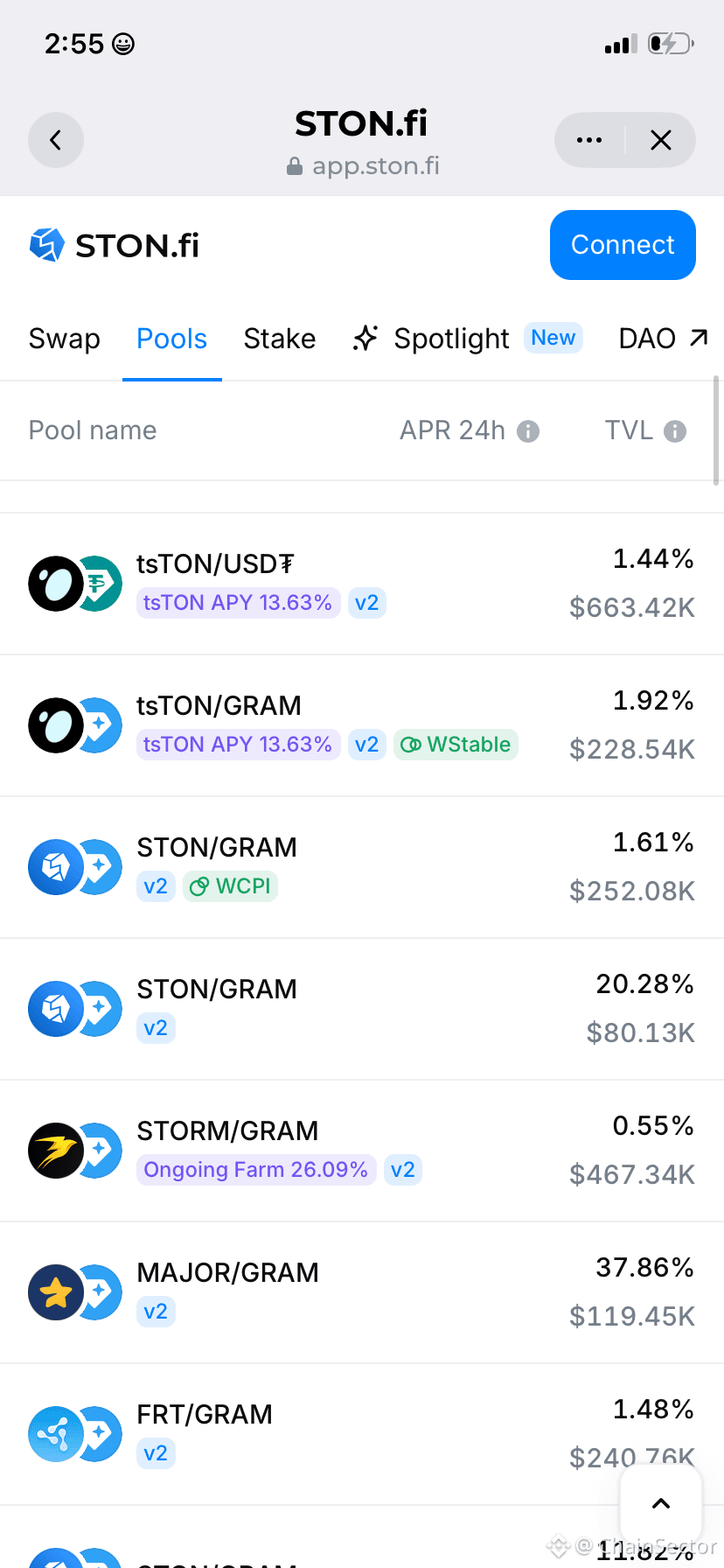
Today I compared two liquidity pools on STON.fi just to see how they differed.
It wasn’t about choosing one immediately.
It was about learning how different projects appear across the platform and becoming more familiar with the interface.
Sometimes spending a few extra minutes exploring teaches more than rushing straight into a transaction.
Today I compared two liquidity pools on STON.fi just to see how they differed.
It wasn’t about choosing one immediately.
It was about learning how different projects appear across the platform and becoming more familiar with the interface.
Sometimes spending a few extra minutes exploring teaches more than rushing straight into a transaction.
It wasn’t about choosing one immediately.
It was about learning how different projects appear across the platform and becoming more familiar with the interface.
Sometimes spending a few extra minutes exploring teaches more than rushing straight into a transaction.
2
167
·
--
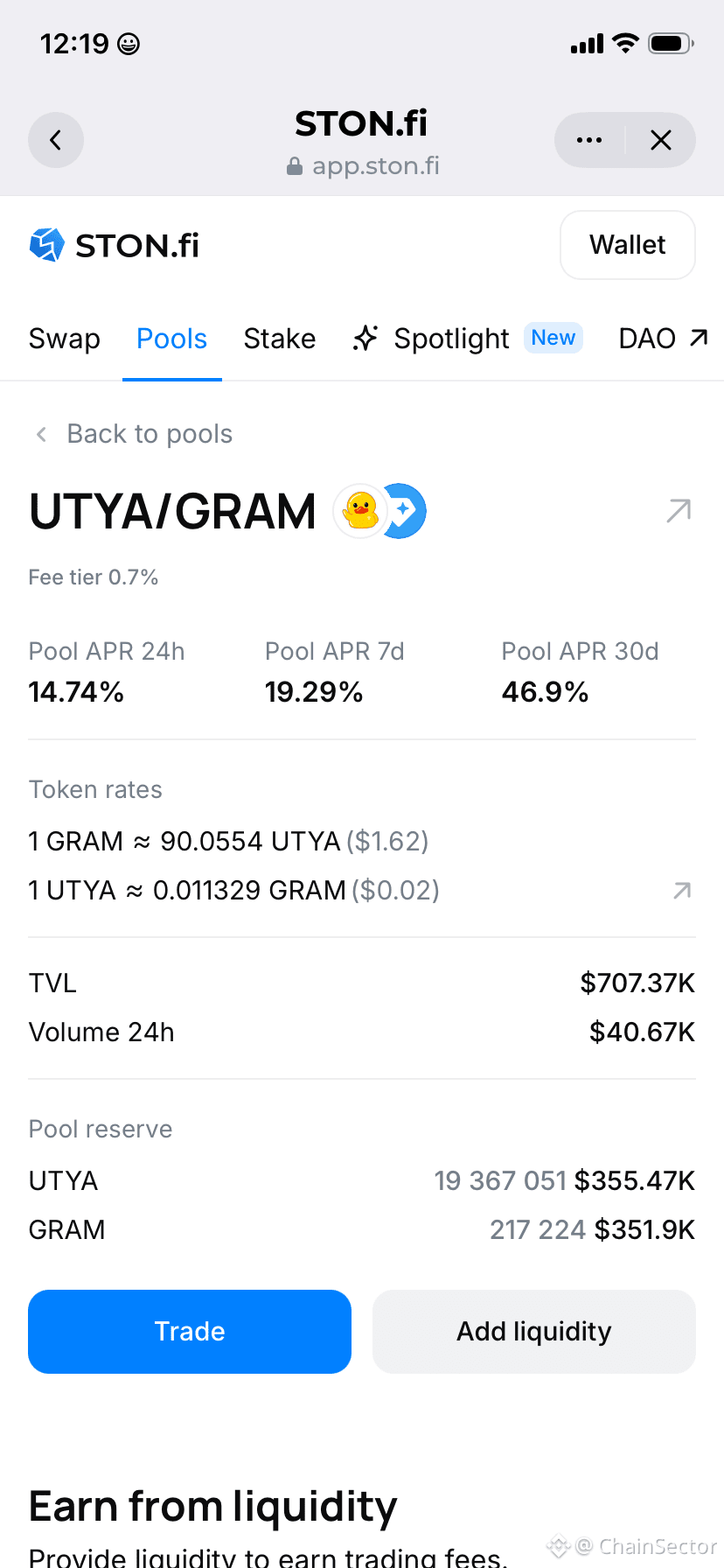
Today I spent a few minutes exploring pools on STON.fi and ended up staying much longer than expected.
One thing that caught my attention was seeing certain assets appear repeatedly in different pool combinations.
It turned a simple browsing session into a small ecosystem discovery exercise.
Sometimes the most interesting things on a DEX are the things you weren’t originally looking for.
Today I spent a few minutes exploring pools on STON.fi and ended up staying much longer than expected.
One thing that caught my attention was seeing certain assets appear repeatedly in different pool combinations.
It turned a simple browsing session into a small ecosystem discovery exercise.
Sometimes the most interesting things on a DEX are the things you weren’t originally looking for.
One thing that caught my attention was seeing certain assets appear repeatedly in different pool combinations.
It turned a simple browsing session into a small ecosystem discovery exercise.
Sometimes the most interesting things on a DEX are the things you weren’t originally looking for.
2
108
·
--
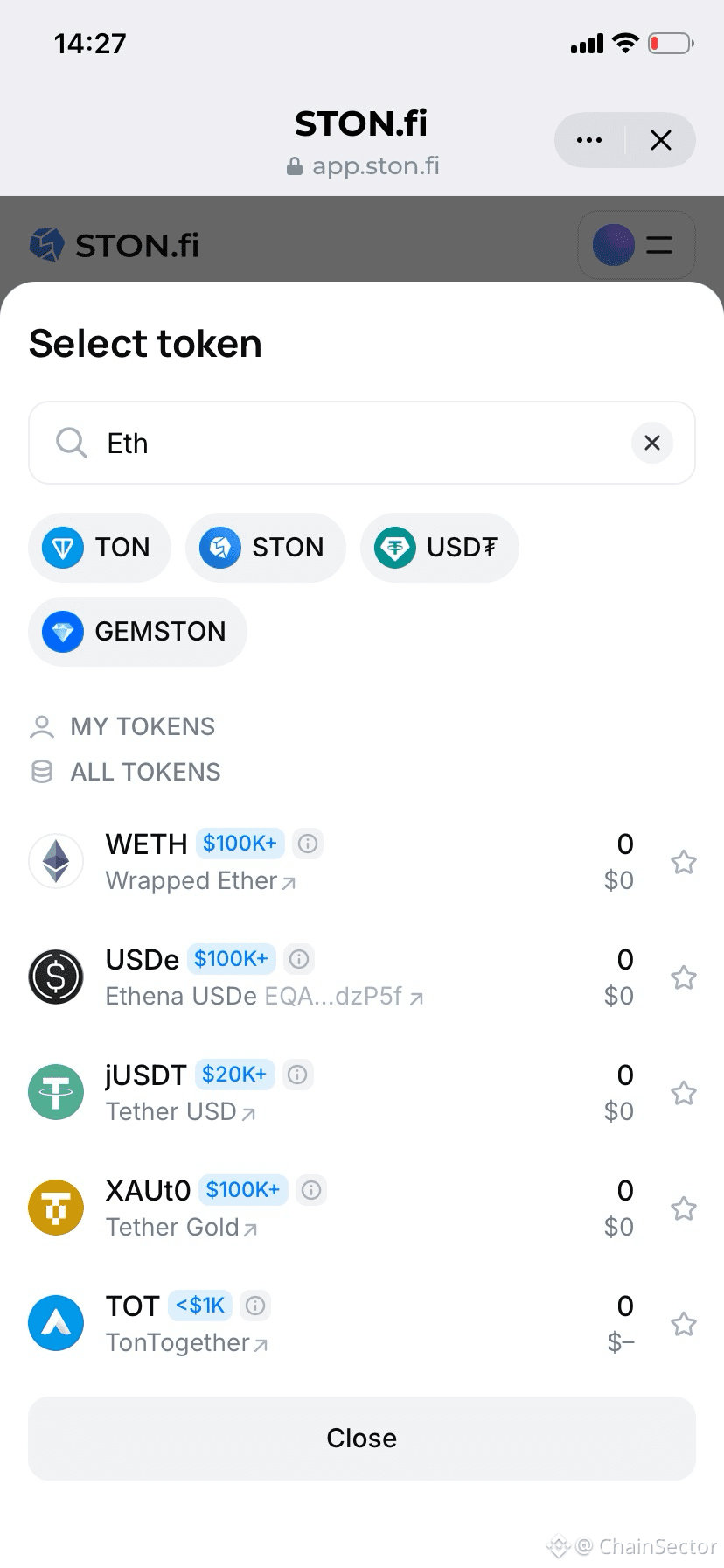
Exploring different assets on Ston_fi has made me realize that discovery inside a DEX doesn’t always feel intentional.
Sometimes you open the interface just to perform a simple swap, and end up noticing completely different tokens and activity you weren’t initially looking for.
That small shift is interesting because it turns the platform from a simple tool into something closer to an exploration environment.
Even when you’re not actively researching, you still end up learning something new about the ecosystem just by interacting with it.
That’s something I didn’t expect when I first started using it.
Exploring different assets on Ston_fi has made me realize that discovery inside a DEX doesn’t always feel intentional.
Sometimes you open the interface just to perform a simple swap, and end up noticing completely different tokens and activity you weren’t initially looking for.
That small shift is interesting because it turns the platform from a simple tool into something closer to an exploration environment.
Even when you’re not actively researching, you still end up learning something new about the ecosystem just by interacting with it.
That’s something I didn’t expect when I first started using it.
Sometimes you open the interface just to perform a simple swap, and end up noticing completely different tokens and activity you weren’t initially looking for.
That small shift is interesting because it turns the platform from a simple tool into something closer to an exploration environment.
Even when you’re not actively researching, you still end up learning something new about the ecosystem just by interacting with it.
That’s something I didn’t expect when I first started using it.
1
115
·
--
Bullish
Communities Behind Tokens
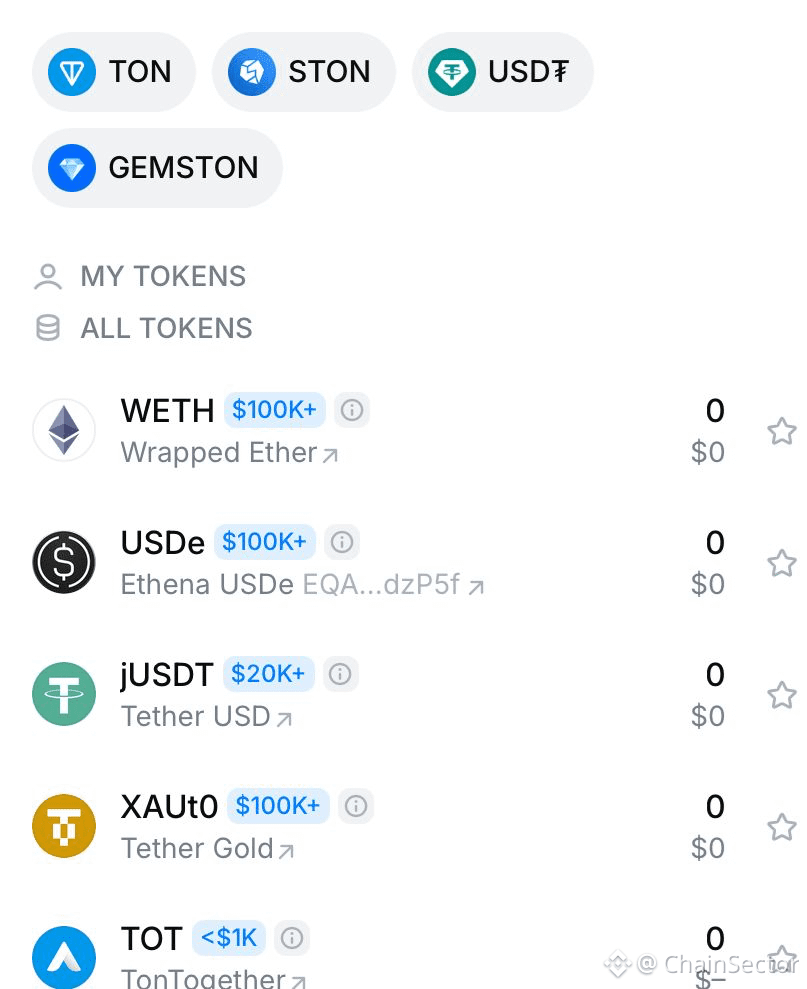
One thing I didn’t expect when exploring assets on STON.fi was how much I would end up learning from the communities behind them.
Every token seems to attract a different type of audience.
Watching those differences has been a surprisingly interesting part of exploring the TON ecosystem.
Not every lesson comes from charts.
Sometimes it comes from the people building and supporting projects.
Communities Behind Tokens
One thing I didn’t expect when exploring assets on STON.fi was how much I would end up learning from the communities behind them.
Every token seems to attract a different type of audience.
Watching those differences has been a surprisingly interesting part of exploring the TON ecosystem.
Not every lesson comes from charts.
Sometimes it comes from the people building and supporting projects.
One thing I didn’t expect when exploring assets on STON.fi was how much I would end up learning from the communities behind them.
Every token seems to attract a different type of audience.
Watching those differences has been a surprisingly interesting part of exploring the TON ecosystem.
Not every lesson comes from charts.
Sometimes it comes from the people building and supporting projects.
1
84
·
--
Bullish
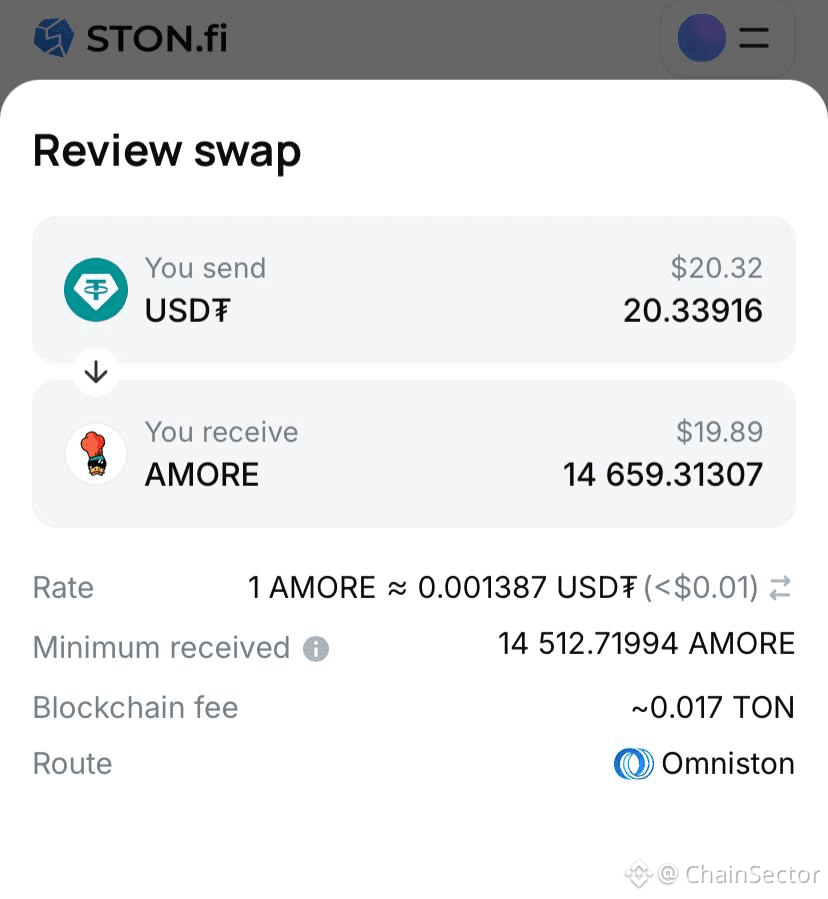
One thing I enjoy about browsing STON.fi is that it occasionally leads to unexpected discoveries.
You start by searching for one asset.
A few minutes later you’re reading about projects you’ve never encountered before.
That’s one of the underrated benefits of a growing ecosystem.
Exploration becomes part of the experience.
And honestly, learning what different communities are building on TON has been just as interesting as the transactions themselves.
One thing I enjoy about browsing STON.fi is that it occasionally leads to unexpected discoveries.
You start by searching for one asset.
A few minutes later you’re reading about projects you’ve never encountered before.
That’s one of the underrated benefits of a growing ecosystem.
Exploration becomes part of the experience.
And honestly, learning what different communities are building on TON has been just as interesting as the transactions themselves.
You start by searching for one asset.
A few minutes later you’re reading about projects you’ve never encountered before.
That’s one of the underrated benefits of a growing ecosystem.
Exploration becomes part of the experience.
And honestly, learning what different communities are building on TON has been just as interesting as the transactions themselves.
1
169
·
--
Bullish
One thing I didn’t expect while using STON.fi repeatedly:
How much repeated interaction naturally reduces hesitation over time.
At first I was carefully rechecking almost every step before confirming actions.
Now a lot of the interaction flow feels much more comfortable and predictable.
One thing I didn’t expect while using STON.fi repeatedly:
How much repeated interaction naturally reduces hesitation over time.
At first I was carefully rechecking almost every step before confirming actions.
Now a lot of the interaction flow feels much more comfortable and predictable.
How much repeated interaction naturally reduces hesitation over time.
At first I was carefully rechecking almost every step before confirming actions.
Now a lot of the interaction flow feels much more comfortable and predictable.
1
253
·
--
Bullish
One thing I didn’t expect while spending more time around STON.fi:
How much smoother navigation changes the overall feeling of interaction.
At first I barely thought about it.
But repeated use made me realize simpler movement around the platform reduces hesitation a lot more than I originally expected.
One thing I didn’t expect while spending more time around STON.fi:
How much smoother navigation changes the overall feeling of interaction.
At first I barely thought about it.
But repeated use made me realize simpler movement around the platform reduces hesitation a lot more than I originally expected.
How much smoother navigation changes the overall feeling of interaction.
At first I barely thought about it.
But repeated use made me realize simpler movement around the platform reduces hesitation a lot more than I originally expected.
1
175
·
--
Bullish
One thing I didn’t expect while using STON.fi more consistently:
How much small interface details affect the overall feeling of interaction.
At first I barely noticed things like layout flow or information placement.
But over time, cleaner interaction started making the experience feel much more comfortable than I expected.
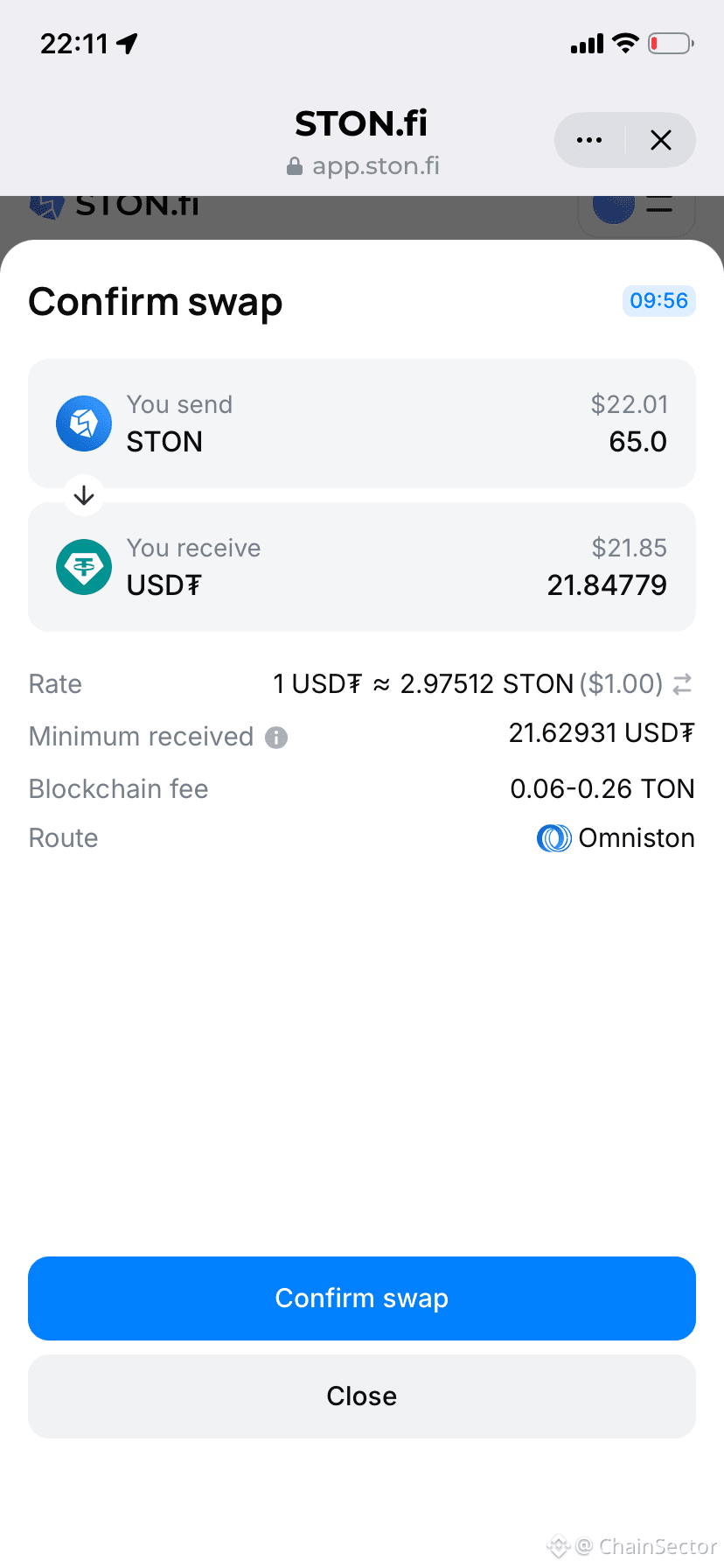
One thing I didn’t expect while using STON.fi more consistently:
How much small interface details affect the overall feeling of interaction.
At first I barely noticed things like layout flow or information placement.
But over time, cleaner interaction started making the experience feel much more comfortable than I expected.
How much small interface details affect the overall feeling of interaction.
At first I barely noticed things like layout flow or information placement.
But over time, cleaner interaction started making the experience feel much more comfortable than I expected.
1
149
·
--
Something I appreciated after using STON.fi more consistently:
The interaction flow starts feeling smoother the more familiar you become with it.
Small usability details matter more over time than they do during the first visit.
Something I appreciated after using STON.fi more consistently:
The interaction flow starts feeling smoother the more familiar you become with it.
Small usability details matter more over time than they do during the first visit.
The interaction flow starts feeling smoother the more familiar you become with it.
Small usability details matter more over time than they do during the first visit.
1
147
·
--
One thing I didn’t expect while using STON.fi repeatedly:
How much more comfortable everything starts feeling over time.
Not because DeFi suddenly becomes easy…
But because repeated interaction slowly removes hesitation.#
One thing I didn’t expect while using STON.fi repeatedly:
How much more comfortable everything starts feeling over time.
Not because DeFi suddenly becomes easy…
But because repeated interaction slowly removes hesitation.#
How much more comfortable everything starts feeling over time.
Not because DeFi suddenly becomes easy…
But because repeated interaction slowly removes hesitation.#
1
1
103
·
--
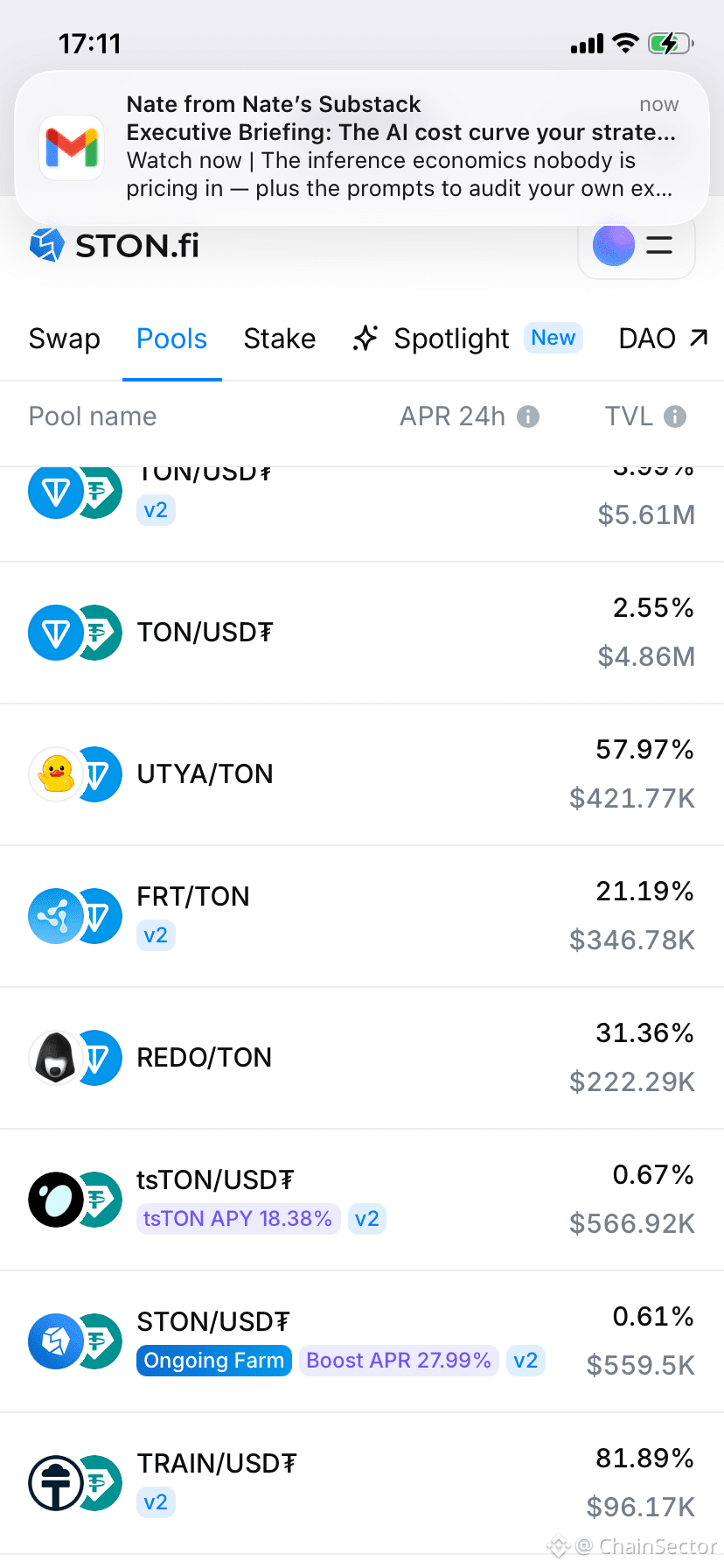
Something I noticed while using STON.fi:
At first, most pools looked the same to me.
But after using it more, I started seeing small differences in how they behave.
Some feel more stable.
Some change more over time.
It’s subtle… but once you notice it, you start approaching things differently.
Something I noticed while using STON.fi:
At first, most pools looked the same to me.
But after using it more, I started seeing small differences in how they behave.
Some feel more stable.
Some change more over time.
It’s subtle… but once you notice it, you start approaching things differently.
At first, most pools looked the same to me.
But after using it more, I started seeing small differences in how they behave.
Some feel more stable.
Some change more over time.
It’s subtle… but once you notice it, you start approaching things differently.
1
1
312
Log in to explore more content
Join global crypto users on Binance Square
⚡️ Get latest and useful information about crypto.
💬 Trusted by the world’s largest crypto exchange.
👍 Discover real insights from verified creators.
Email / Phone number