
Preparation before opening a Binance account: what information is needed to register?
If you don’t need trading features, Binance registration only requires an email address or a mobile phone number—this step takes only a few minutes to complete. However, to enable full trading permissions, you’ll need the following materials:
Email address
Mobile phone number
Proof of identity (ID card, passport, or driver’s license)
An Android/iOS phone with a camera, or a computer with a camera (a browser is sufficient)
Proof of address (utility bills such as water/electricity/gas, or credit card statements). If your daily fiat deposits/withdrawals do not exceed USD 50,000, you do not need this item.
💡 Registration bonus: Click to register on Binance or enter the referral code BNB33, then click to enter the login page to enjoy up to 20% off trading fees!
Binance exchange account registration and opening: specific step-by-step graphic tutorial
Opening a Binance account is easy. Registration takes only a few minutes. Next, we’ll share the detailed account opening steps on the desktop.
Basic registration
Start via the registration guide on the Binance homepage, or directly click the Binance registration page.
When choosing how to register an account, you can use an email address and a mobile number, or you can directly use a Google or Apple account. (We recommend choosing an email address or phone number to keep your account independent as much as possible.)
After clicking “Create Personal Account,” you’ll receive a verification code. Enter it after it is accepted and the registration is completed.
Basic identity verification (KYC)
After completing basic registration, you can unlock some account functions, including:
Fiat deposit and withdrawal limit of 50,000 USD per day.
You can buy crypto via C2C.
Permissions for spot trading, contract trading, etc.
Next, proceed with verification of your basic identity:
Step 1 Go to the identity verification entry: After finishing registration, click “Verify Now,” or after logging in, find the identity verification entry in Personal Center.
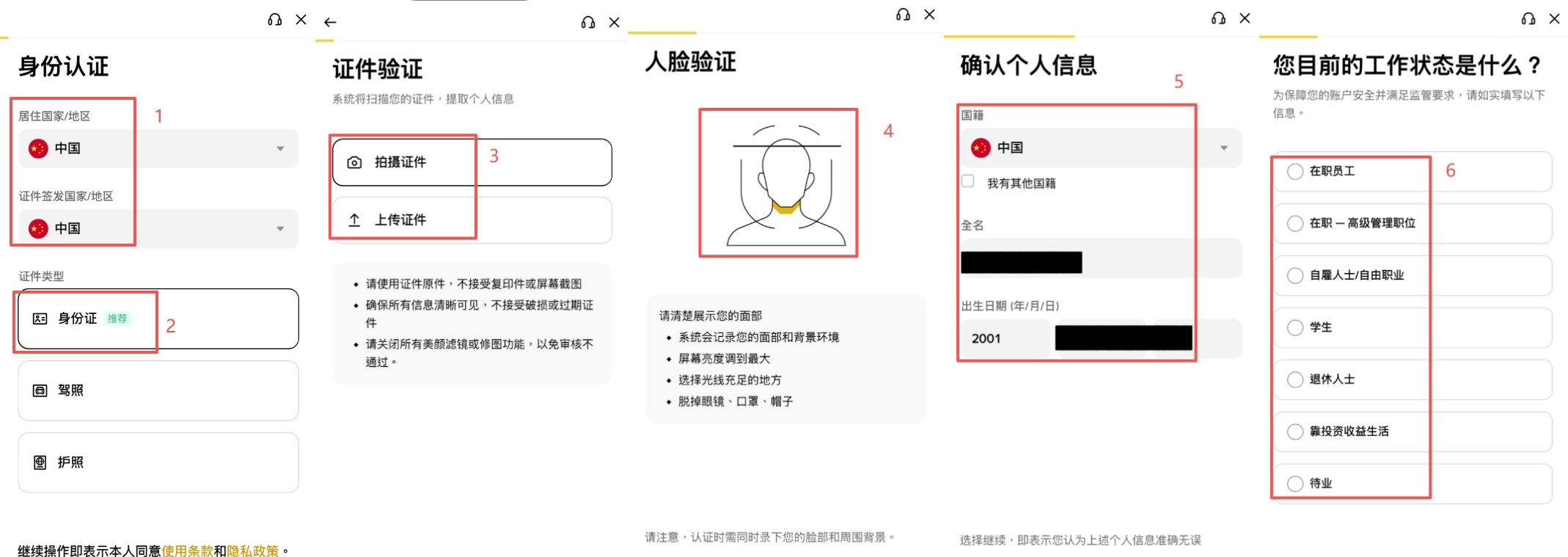
Step 2 Fill in identity verification information: To complete KYC verification, you need to provide personal information to the exchange. It only takes five steps to finish easily:
Fill in your nationality, basic identity information, and residential address step by step (it’s fine to enter all information in Chinese directly).
Select the type of document to upload.
Upload the front and back of the document.
Take and submit a selfie photo (note: both the document and the selfie need to be taken live. They cannot be photocopies or photos from your album).
Complete the face recognition process and record the required actions of opening your mouth and moving your head.
After that, most trading functions can meet your daily needs. For example, buying and selling crypto, and fiat deposit and withdrawal limits can reach up to 50,000 USD per day.
Upgraded verification / Proof of address
If you feel the fiat deposit and withdrawal limits of basic verification are not enough, you can submit proof of address to upgrade your verification. After upgrading, your account can have the following permissions:
Enjoy the permissions included with all basic verification.
Increase fiat deposit and withdrawal limits to 2 million USD per day.
You can apply for the Binance Card.
The specific upgrade steps are as follows:
Step 1 Find the entry for upgrading verification: In “Personal Center” - “Identity Verification,” find the entry for upgrading verification.
Step 2 Fill in your detailed residential address: Fill in your detailed home address according to the system prompt, then go to the next step.
Step 3 Upload proof of address: Documents that can prove your address, such as utility bills (water, electricity, gas) or credit card statements, are all acceptable. After you submit, the webpage will show an estimated time for approval—usually you’ll receive feedback within 1 day.
Enable two-factor authentication (2FA)
If you want to improve your account security more effectively, we strongly recommend enabling two-factor authentication (2FA). Set up multiple layers of protection for your account as comprehensively as possible.
Tip: Two-factor authentication (2FA) works by requiring users to provide multiple forms of confirmation during login to ensure that the person logging in is actually the account owner, reducing the risk of account hijacking. In simple terms, it adds several extra locks to your account. Although unlocking may be a bit more troublesome, it greatly improves security.
Currently, Binance supports Security Keys, Binance/Google Authenticator, mobile verification codes, and email verification codes. Enabling two or more of these constitutes two-factor authentication. If you registered using email/phone number, you will generally need to enter the correct verification code to log in by default. It is recommended to further enable Google Authenticator.
Tutorial: Enable Google Authenticator (Google Authenticator)
Step 1 Enable permissions: After logging in, in Personal Center, find “Account Security,” and click the enable button next to Google Authenticator.
Step 2 Download the app: Use the link on the webpage to download the authenticator app (Google Authenticator), or download it yourself from the App Store / Android app market.
Step 3 Scan the QR code and verify: Open the authenticator and scan the QR code shown on the webpage. After scanning, the app will display the corresponding account. Please make sure to store the key string yourself—this is very important! Then enter the verification code shown in the authenticator to successfully enable it.
After you complete the setup, when you log in to your Binance account, besides entering your password, you also need to open Google Authenticator to get real-time verification codes. Once 2FA is enabled, the risk of account theft is greatly reduced!
Binance account opening: How long does it take for approval after registration?
Basic account registration is completed instantly and does not require review.
After submitting basic identity verification, the webpage will pop up the latest expected review response date—usually it is extended by 2 business days, but in most cases the result is available the same day if things go quickly.
Upgrading address verification will similarly show that it takes 2 business days; however, in actual operation, as long as your materials are fine, it usually gets approved within 1 day.
Account opening details Timing Basic account registration Completed instantly KYC identity verification Within 24 hours (based only on measured test results) Upgraded address verification Within 24 hours (based only on measured test results)
Binance exchange account opening promotion
Open an account via a referral link or invitation code to get 20% off trading fees~
Fee discount summary Detailed information 20% fee discount [Click here to register] 20% fee registration promo code BNB33
Common questions about Binance exchange account registration: quick Q&A
Q: What benefits do you get from investing in cryptocurrencies on the Binance exchange? A: By opening an account via a referral link or invitation code, you can get 20% off trading fees.
Q: I don’t happen to have the original documents on hand. Can I still pass verification? A: The documents need to be photographed live, so you must upload the original. Photos or photocopies will be rejected by the platform.
Q: What should I do if face recognition keeps failing? A: If you use a laptop for face recognition, we recommend switching to your phone, because laptop cameras usually don’t have sufficient clarity, which may prevent the system from recognizing you. Also, make sure there is enough light and do not perform the verification at a backlit angle.
Q: Is 2FA useful? Do I really need to enable it? A: It is extremely useful—it greatly improves account security and reduces the risk of theft. Strongly recommend using Google Authenticator.
Q: Are there requirements for the proof-of-residence timeframe? A: You need to provide proof materials within the last 3 months. If it’s older, it will be rejected.
Q: Can I successfully register and open an account without a phone number? A: Yes. You can complete registration using an email address. A phone number is not required.
Q: Does the address filled in during basic verification need to be the same as the address used when providing proof of residence? A: No. The address filled in for basic verification is only used as personal information and is not checked. However, when providing proof of address, the address you fill in must match the content on the uploaded proof document.
Q: Can a medical insurance card be used for verification? A: No, medical insurance cards are not supported. Currently, only ID cards, passports, and driver’s licenses are supported for verification.
Q: Does Google Authenticator require network support? A: Besides needing network to download the app, Google Authenticator itself can be used offline. Generating verification codes does not require a network connection.
Q: After completing registration on a computer, I can’t receive the verification code. When I click to get the code, the page is blank. A: First check whether your network connection is smooth. Next, you can check browser extensions and try disabling any suspicious ones, such as auto-translation or reading apps. If it still doesn’t work, try switching to receiving the verification code on your phone.
Q: What should I do if the ID KYC fails during registration? A: Check the feedback information for the rejection. In general, you can simply resubmit according to Binance’s review feedback. Also, based on user reports, using a passport for verification may have a relatively higher pass rate!
Written at the end
You can complete Binance account opening in 5 steps. Identity verification responses are also fast—if things are quick, you can deposit/withdraw and start trading on the same day. If review takes longer, it generally won’t exceed 2 business days.
In addition, Binance has optimized its verification system. Compared with the previous “basic verification, intermediate verification, and advanced verification,” it is now simplified to “basic verification and upgraded verification.” It meets users’ needs while reducing verification steps and lowering the learning cost.
Moreover, for two-factor authentication (2FA), Binance keeps introducing new verification methods for you to choose. SMS verification or email verification is necessary. It is also recommended that you enable an additional Google Authenticator or Binance Security Key, so your account basically won’t be at risk of theft. In summary, Binance’s account opening is very convenient and provides plenty of assurance in terms of security—no wonder it is the industry leader! #币安注册 #返佣