

The screenshot source tag is a convenient sharing feature launched by Binance Square. Users can take screenshots of various pages such as trading, assets, profit and loss analysis, etc., within the Binance App and directly share them to Binance Square. The images will automatically carry the 'Shared from Binance App screenshot' identification. This way, everyone can easily see: this image was directly shared from a screenshot of the Binance App.
In the content stream of Binance Square, images marked with screenshot source tags and regular screenshots are clearly distinguishable.
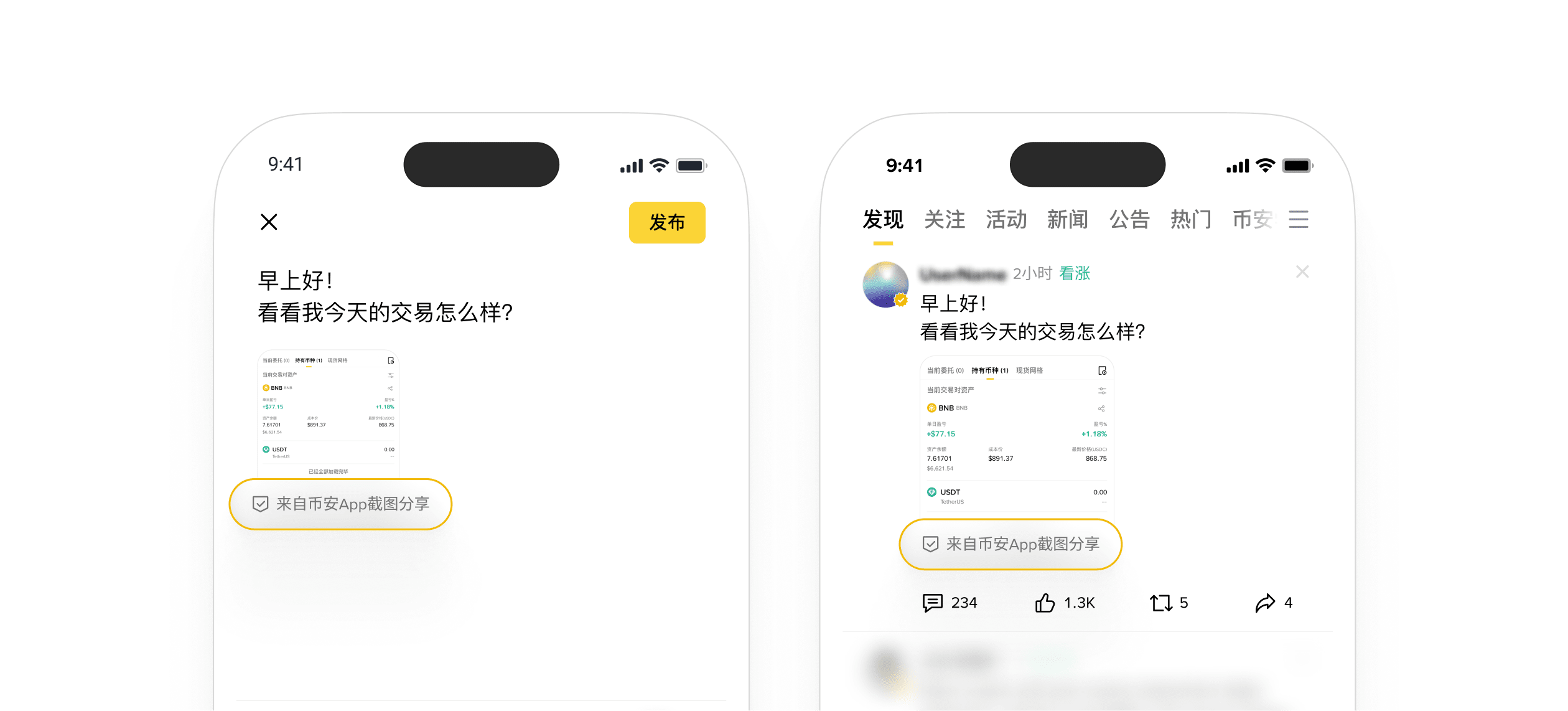
Note:
Images marked with 'Shared from Binance App screenshot' tags are sourced from users taking screenshots on specific pages of the Binance App or generated through downloads from Binance. Binance has not verified the authenticity and accuracy of the images and cannot guarantee that the images have not been modified. This label is for reference only; users must make their own judgments, conduct thorough research, and make investment or trading decisions cautiously.
Please upgrade your Binance App to the latest version (V3.7 or above) to experience this feature.
Feature Highlights
One-click original image sharing, simpler operation
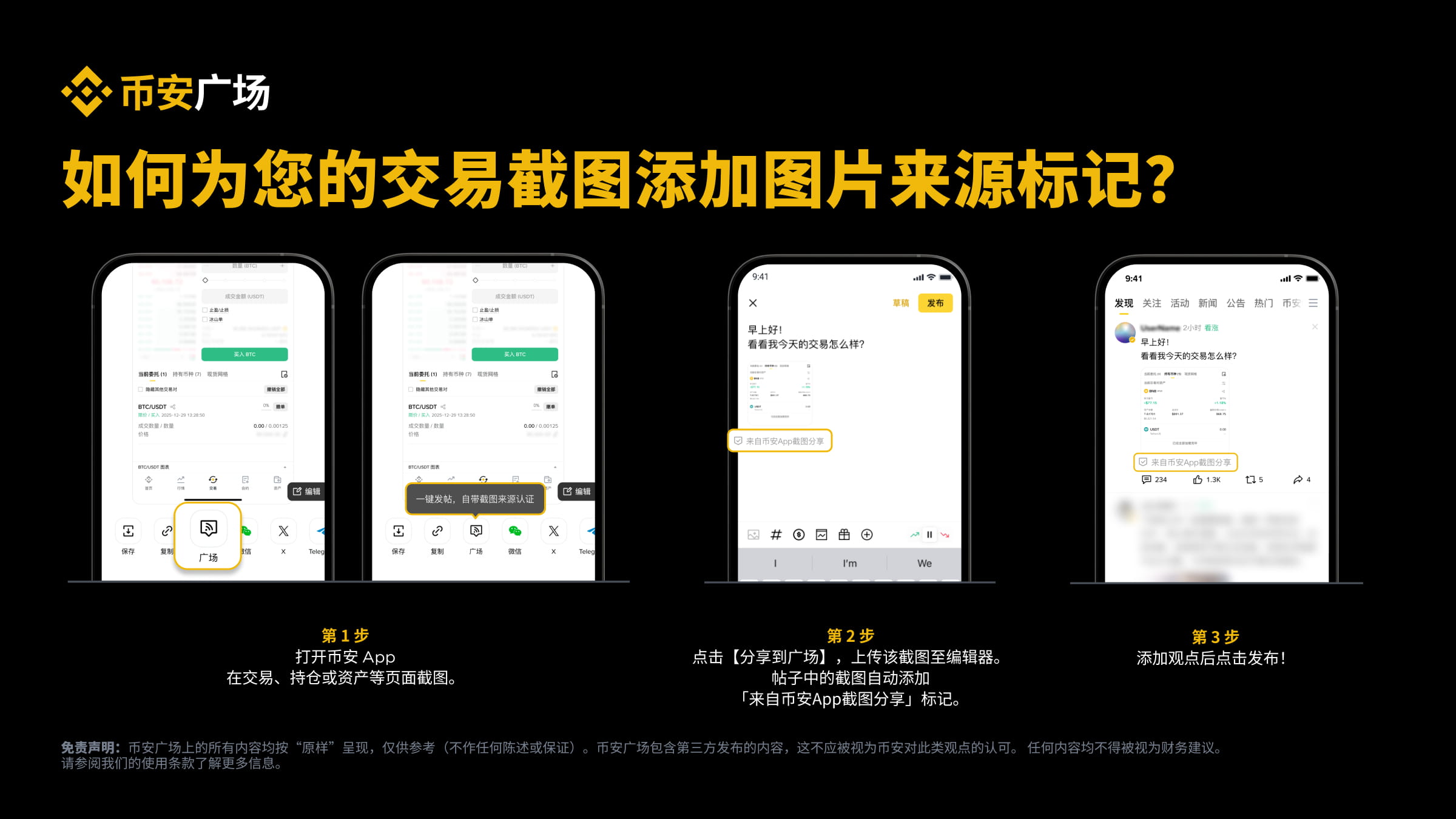
After taking screenshots on trading, asset, profit and loss analysis, etc., select to directly share to [Square], and the system will automatically add the 'Shared from Binance App screenshot' tag to the screenshot.
Screenshot source tags bring trust naturally
Posts with screenshot source tags help users quickly identify screenshots from the Binance App, enhance information transparency, and increase readers' trust. This not only facilitates users to discover trading experts and quality creators but also helps enhance the credibility of their content, attracting followers and fostering an active community to establish a solid social group.
How to use the screenshot source tag feature?
Automatically triggered when sharing screenshots
Whether you are taking screenshots on the trading page (including spot, contracts, Alpha, etc.), displaying current orders, positions, or historical operation records; or taking screenshots on the asset page, showing position distribution; or taking screenshots on the profit and loss analysis page, showcasing the profit curve, after you complete the screenshot, the system will automatically pop up the sharing option, making it convenient for you to directly share to the Binance Square, with screenshot source tags.
Choose to share to 'Square'
In the sharing options, click [Square], enter the Square editor, and the system will automatically recognize the screenshot source and label it as 'Shared from Binance App screenshot'.
Publish to display image sources
After adding personal views, click [Publish], and your screenshot content will display the 'Shared from Binance App screenshot' tag in the Square stream, standing out among numerous images.
Frequently Asked Questions (FAQ)
Will all screenshots automatically receive the screenshot source tag?
No. Only content captured by taking screenshots on specific pages within the Binance APP (such as trading, asset, profit and loss analysis, etc.) and choosing to share to Square will automatically receive the 'Shared from Binance App screenshot' tag.
*Please refer to the online version for specific supported original image certification pages; some detail pages do not currently support screenshot source tags. Binance Square is committed to continuously adding pages that support this feature.
If I upload or modify screenshots myself, can I still get the screenshot source tag?
No. Only images captured by taking screenshots on specific pages within the Binance App or directly sharing images after downloading Binance will trigger the screenshot source tag. Self-edited, spliced, or uploaded non-native screenshots will not display the 'Shared from Binance App screenshot' tag.
Please note: Binance does not verify the authenticity and accuracy of images and cannot guarantee that images have not been altered. This label is for reference only; users must make their own judgments, conduct thorough research, and carefully make investment or trading decisions.
Will the screenshot source tag affect my trading privacy?
No. The screenshot source tag only verifies the source of the image. You can remove sensitive information using the default image editing tool in the screenshot sharing component. This feature will not disclose or store your account information or other personal privacy.