









Binance P2P Order Feedback Feature Guide
How to use the feedback feature?
Binance P2P now added a feedback feature, allowing you to provide feedback on your trading experience. This feature enables you to leave feedback on your trading counterparties, helping other users in selecting P2P ads.
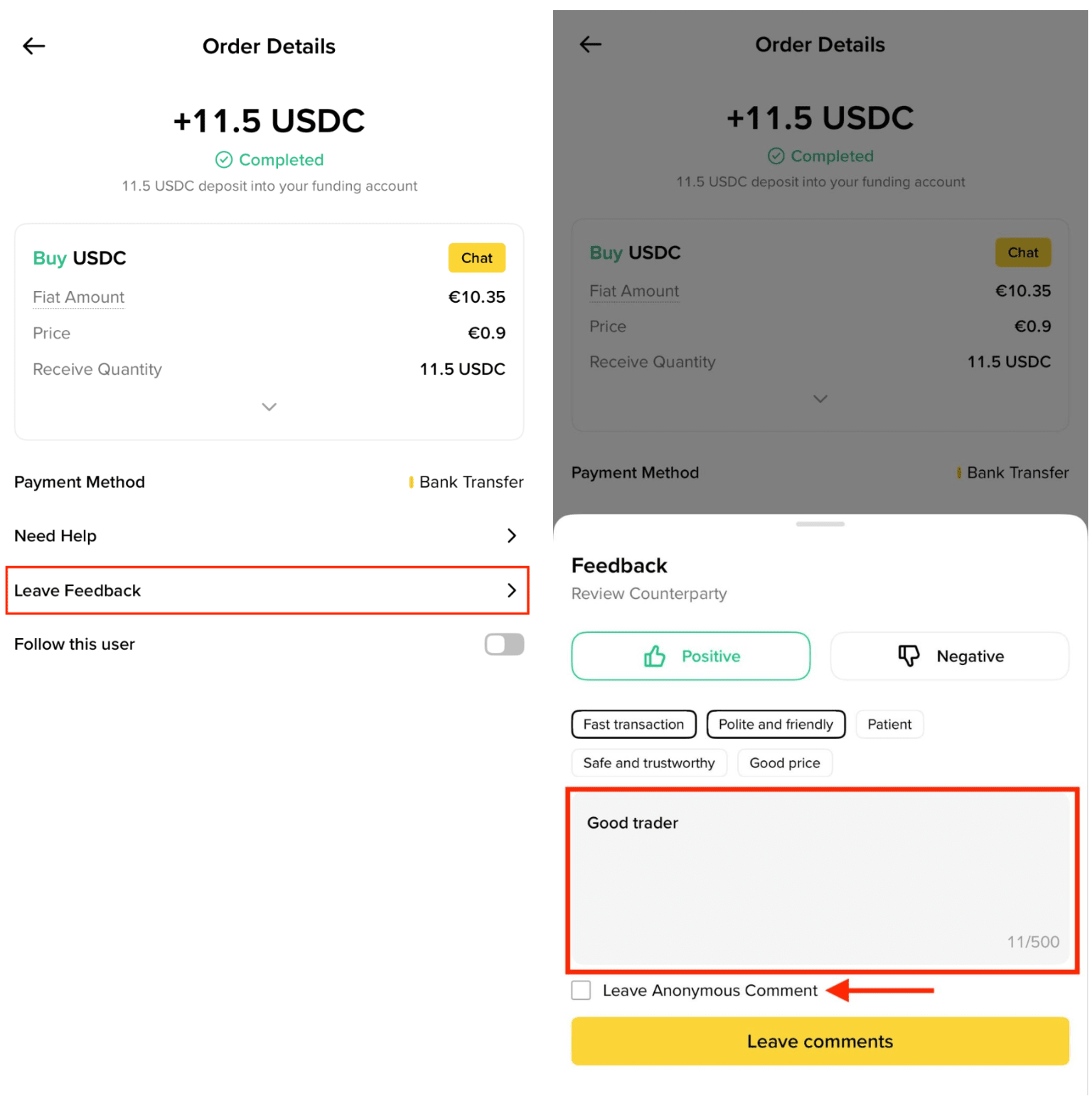
Once your order is completed, simply click on the [Leave Feedback] tab to rate your trading experience.
Afterwards, you can leave a feedback on your trading partner. You have the option to leave a feedback anonymously, ensuring that your identity remains confidential from your counterparties.
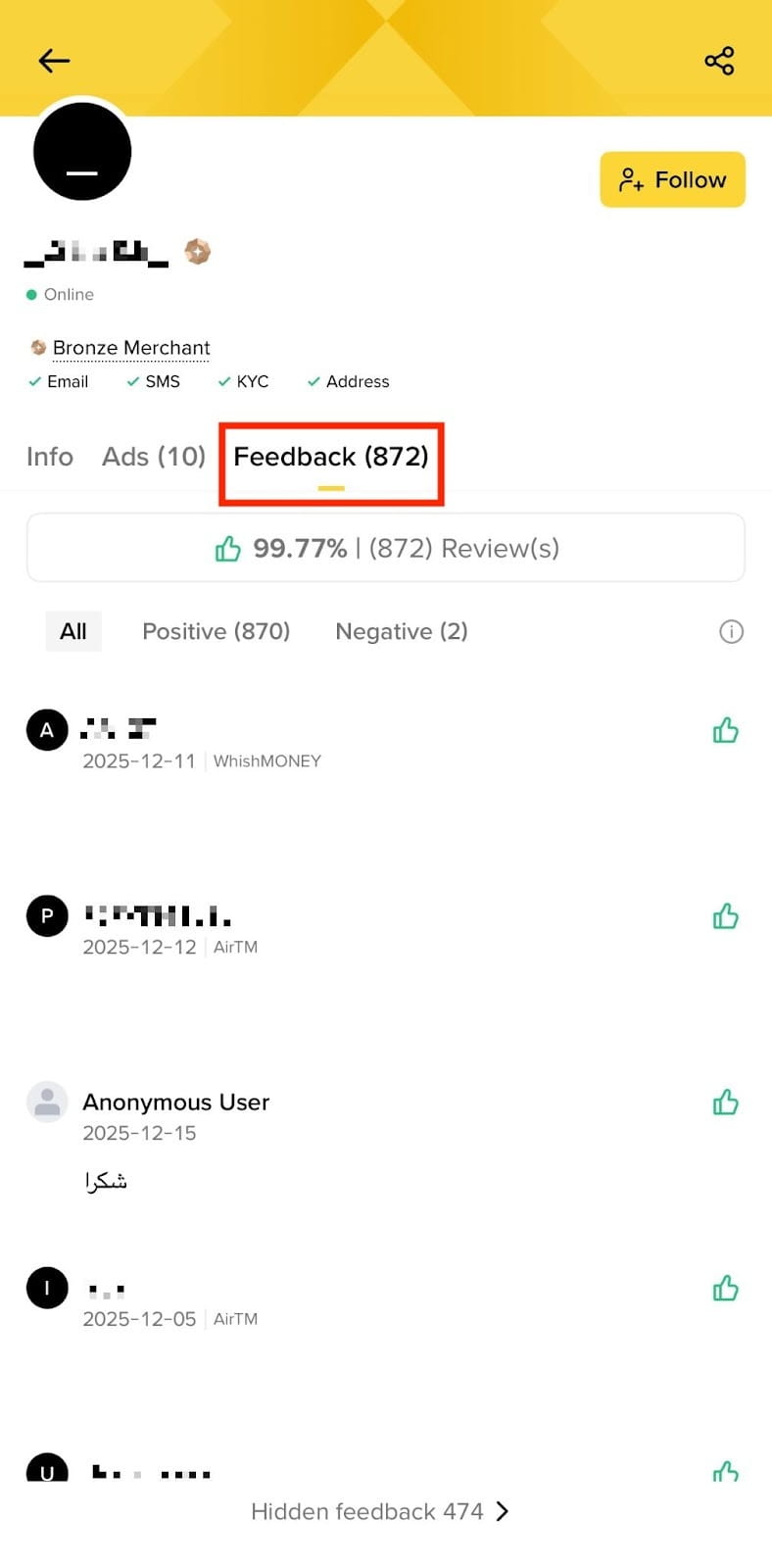
You can browse through feedback from other users on the counterparty’s P2P profile page.
Frequently Asked Questions
1. Can I provide feedback to other users?
You can only leave feedback for a user once you have completed a P2P order with them. Each user is limited to one feedback based on their trading experience.
Please note: Both advertisers and users can provide feedback to each other based on their trading experience.
2. Can I change or delete my feedback?
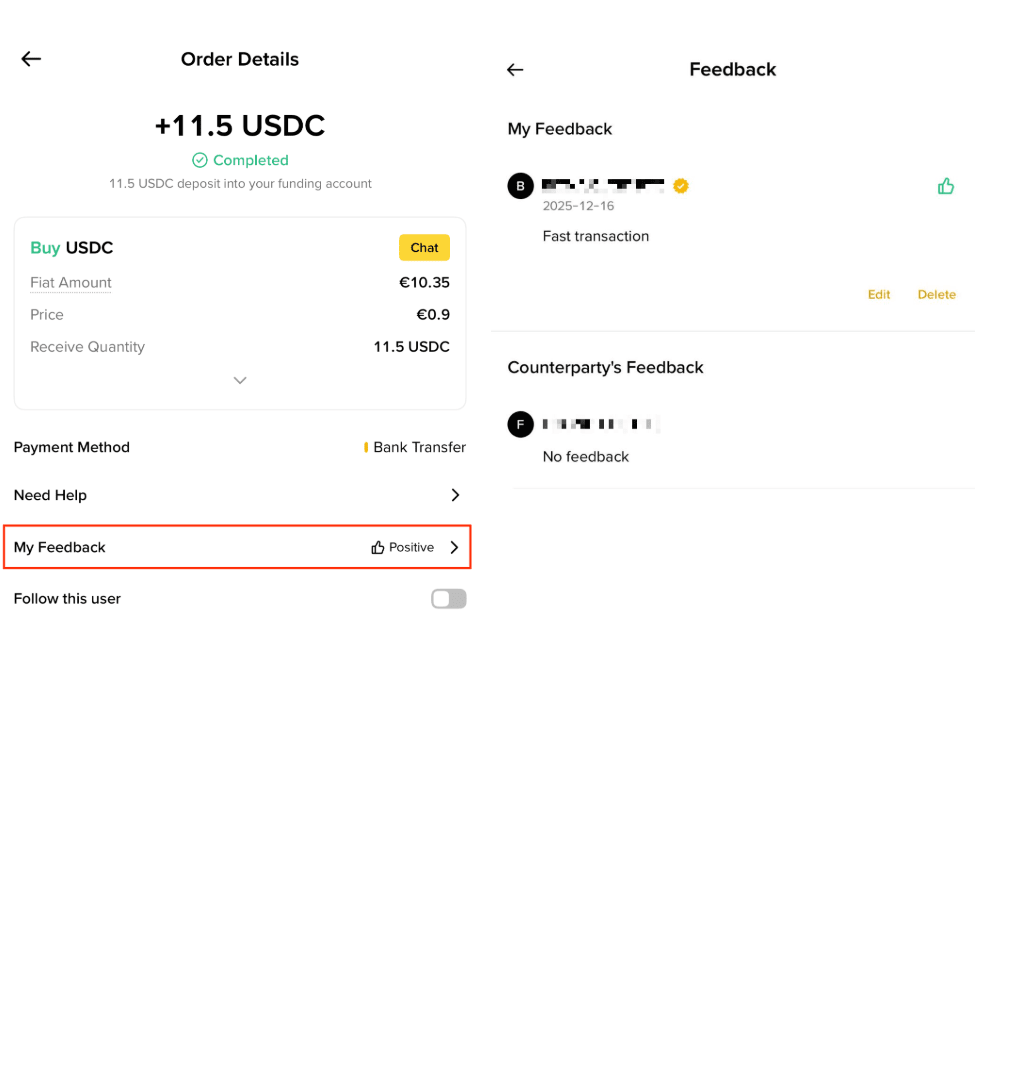
Yes, you can enter your order history, choose your order, and click on the [My Feedback] tab to update your rating and feedback.
3. Can users reply to and leave a feedback on their trading counterparts’ feedback?
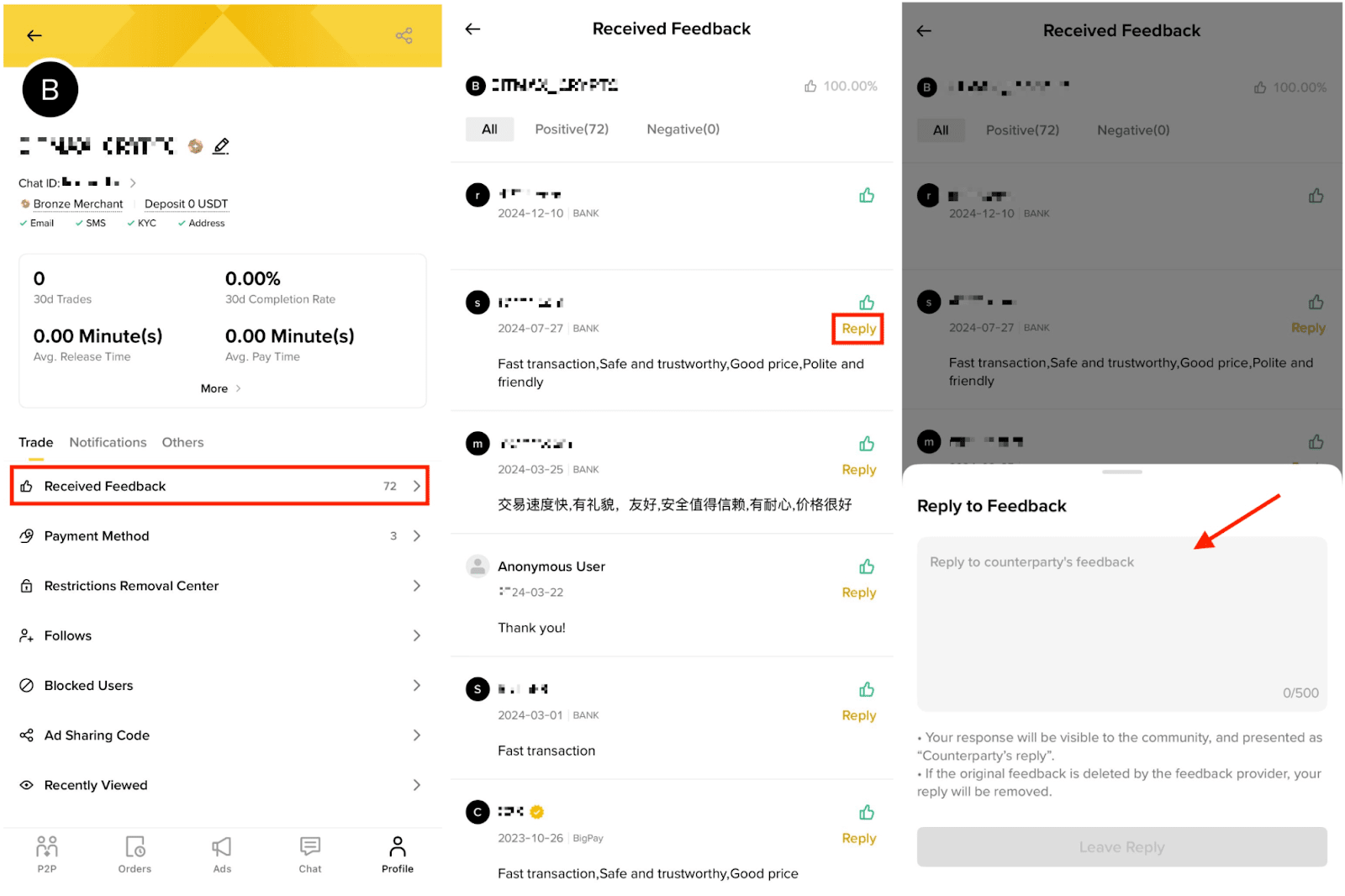
Yes, you can access the user center by clicking on the [Received Feedback] tab. From there, they can select the feedback they wish to reply to. Their reply will also be displayed on their user profile page.
4. Is it compulsory to leave feedback on my trading counterparty?
No, it is not mandatory to leave feedback. However, your feedback can provide helpful suggestions for your counterparty’s improvement and serve as a reference for other users.
5. What if my trading counterparty leaves a malicious feedback on me?
If your trading counterparty leaves a malicious feedback on you, you can submit a request via the self-service appeal portal for the Customer Support team to review your case. They will remove the malicious or negative feedback if it is ill-intended. For more information, please refer to the How to Remove Negative Reviews/Revert Completion Rate for My Binance P2P Account.
6. How to calculate my positive feedback rating?
To calculate your positive feedback rating, use the following formula:
Positive Feedback Rate = Total Number of Positive Feedback Received / Total Number of Feedback Received
7. Can I edit or delete my feedback after submitting it?
Yes. You can go to your order history, choose your order, and click on the [My Feedback] tab to update your rating and feedback text.
8. Can I leave feedback for a cancelled order?
No. Feedback is only available for orders that reached a completed or disputed state. Cancelled orders before payment are not eligible for feedback.
9. How long do I have to leave feedback after a trade?
You can leave feedback at any time after the order is completed or enters a disputed state. There is no expiration deadline, but we encourage you to leave feedback as soon as possible while the experience is fresh.
10. Can I leave feedback for the same user on multiple orders?
Yes. Each completed order allows you to leave one piece of feedback specific to that trade.
11. Will my feedback be visible to the other party?
Yes. Feedback is visible to both parties. However, you can choose to leave anonymous feedback if you wish to stay anonymous.
12. Can I leave feedback without selecting any tags?
Tags are optional but encouraged. They help other users quickly understand the nature of your experience.
13. Why does negative feedback require a minimum of 10 characters?
The minimum character requirement ensures that negative feedback provides enough context to be useful to other users. Brief, one-word negative feedback without explanation is less helpful and more prone to abuse.
14. What should I include in my negative feedback?
Describe what actually happened during the trade, for example, delayed payment, unresponsiveness, or failure to follow agreed terms. Stick to facts and avoid personal opinions or assumptions about the other party.
15. Can the other party force me to change my negative feedback?
No. No one should pressure, threaten, or offer incentives to change your feedback. If this happens, report it through the P2P Appeal process immediately.
16. I received negative feedback unfairly. What can I do?
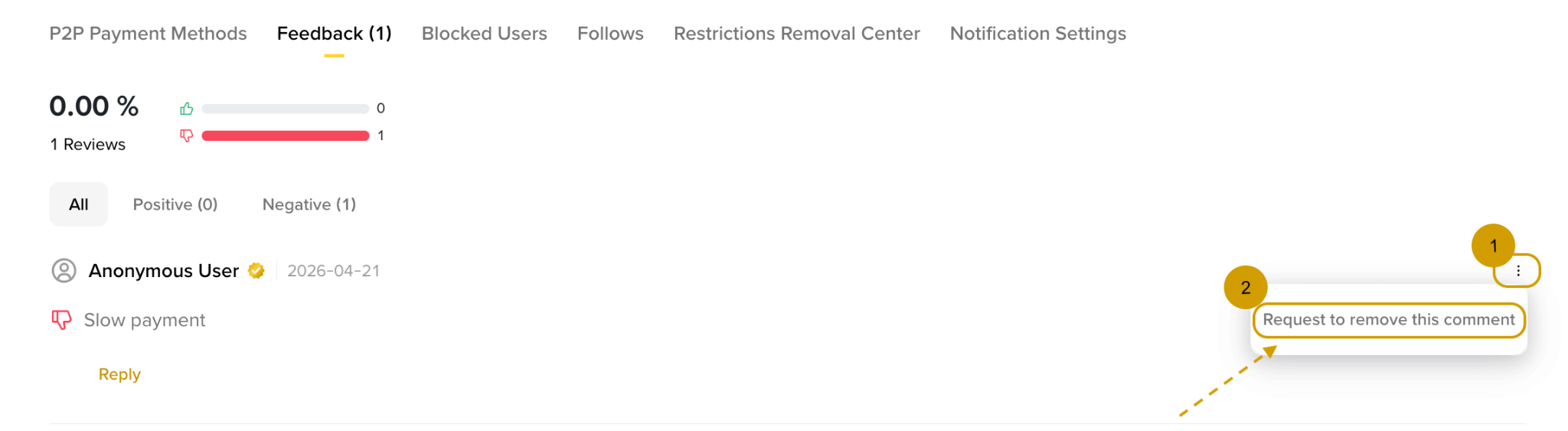
You can appeal the feedback through the P2P Appeal process. Go to [Trade] - [P2P] - [User Center] - [Feedback], click [...] next to the feedback, and select [Request to remove this comment]. Provide supporting evidence for your case.
17. Will negative feedback affect my P2P account?
Repeated negative feedback may affect your merchant rating and visibility on the platform. However, individual pieces of honest feedback are not penalized - only feedback that violates this policy is subject to removal or enforcement action.