









What Are Binance Event Contracts and How to Use It?
Disclaimer: In compliance with MiCA requirements, unauthorized stablecoins are subject to certain restrictions for EEA users. For more information, please click here.
Binance Event Contracts allow traders to predict specific outcomes of upcoming crypto prices. Each contract represents a "yes" or "no" outlook on an event outcome with a payout if correct and a limited loss of the Premium paid if incorrect.
Currently, you can trade Event Contracts on call and put contracts on the Binance app. The range of symbols available may be adjusted from time to time, taking into account trader interest and regulatory requirements.
How to use Binance Event Contracts?
Step 1: Transfer assets to your Spot or Futures Account
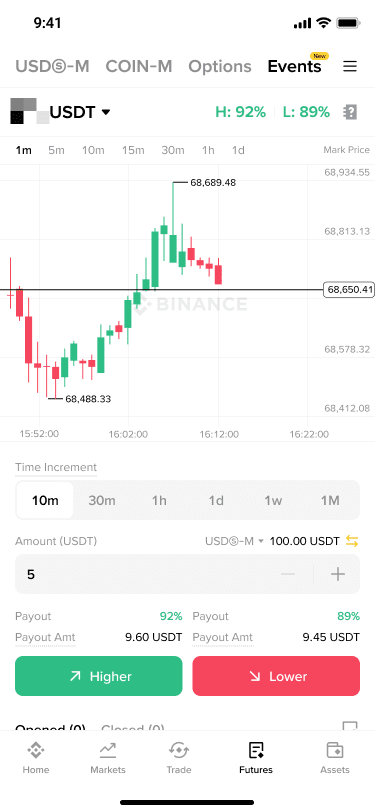
Log in to your Binance app and go to [Futures] - [Events]. Transfer funds to your Spot or USDⓈ-M Futures Account. Event Contracts supports assets from both Spot and USDⓈ-M Futures Accounts.
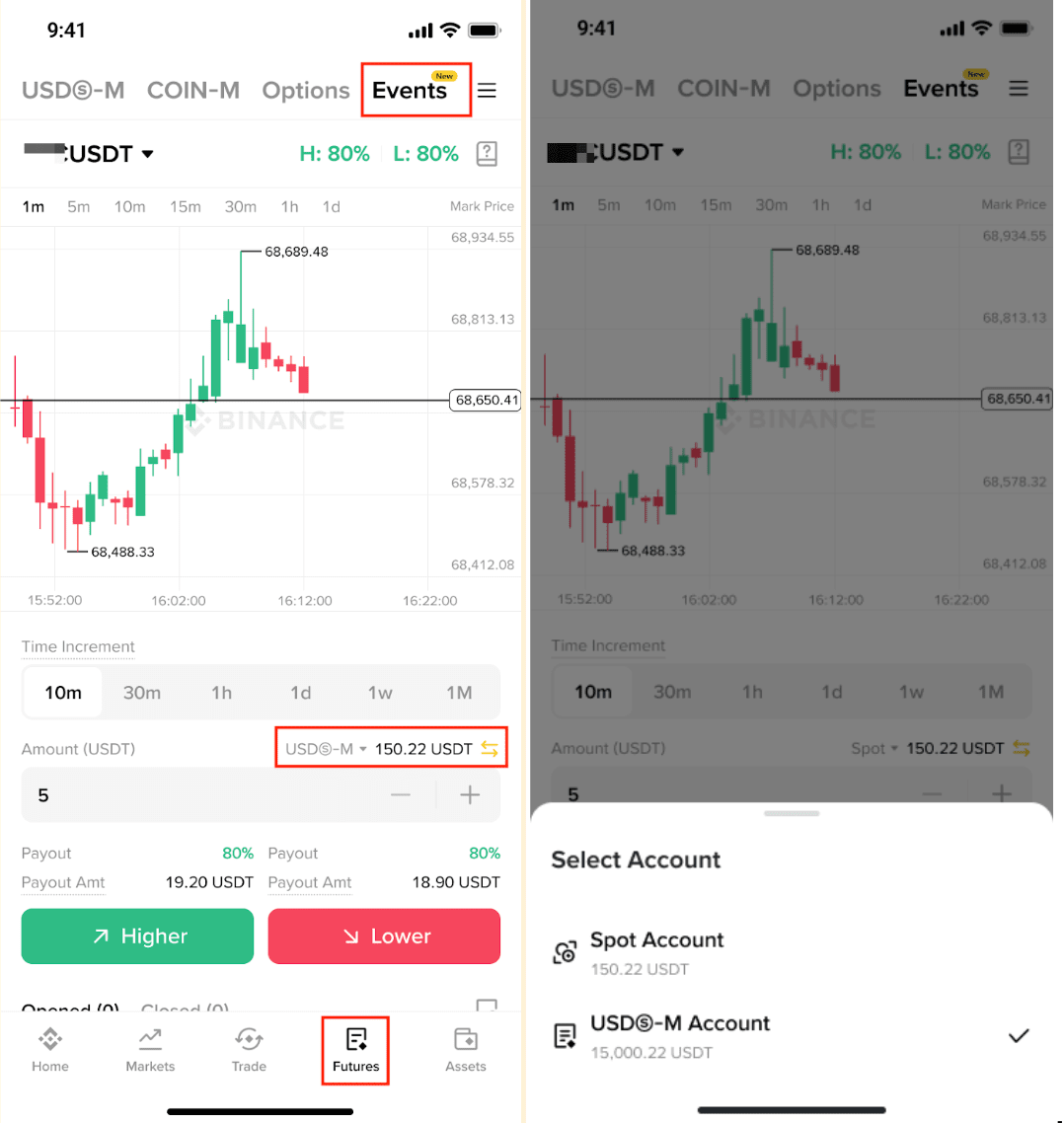
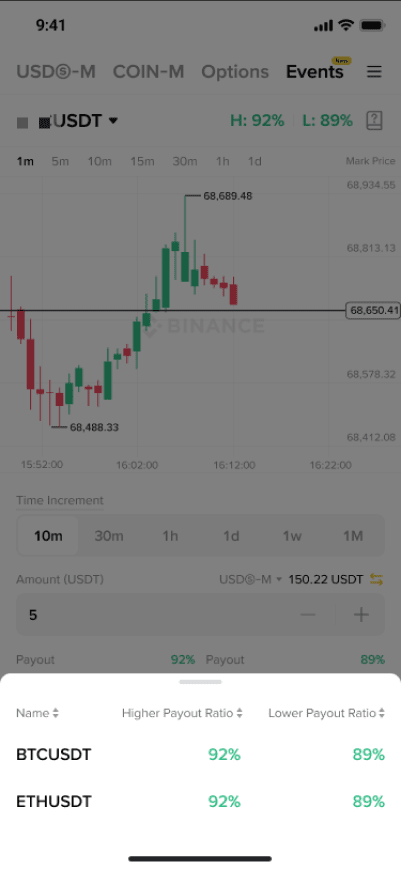
Step 2: Select an underlying asset
Choose the asset you want to trade.
Step 3: Set the expiration time
Select when you want the contract to expire:
- 10 minutes;
- 30 minutes;
- 1 hour;
- 1 day.
Please note: At 00:00, 08:00, and 16:00 (UTC), some orders may experience a short time delay in the status or lag in the update. If you encounter this, please wait approximately 10 seconds before retrying, and prioritize checking your order history and current positions to avoid duplicate orders. Please make trading decisions carefully based on actual conditions. The platform is not liable for any trading gains or losses that may result. We are continuously working to improve your experience. Thank you for your understanding and support.
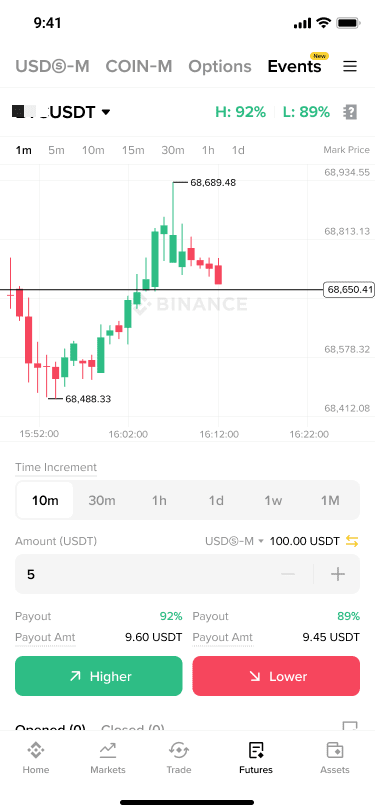
Step 4: Enter the trade amount
Enter the amount you wish to trade (the minimum order amount is 5 USDT).
After that you’ll see the payout amount in USDT, which represents the potential payout for the Event Contract.
The Premium you need to pay to enter the Event Contract will be equal to the trade amount, which is the amount at risk.
Step 5: Choose the direction
Decide whether you expect the price to go higher or lower at expiration:
- Choose [Higher] if you believe the Price Index will be higher at expiration; or
- Choose [Lower] if you believe the Price Index will be lower at expiration.
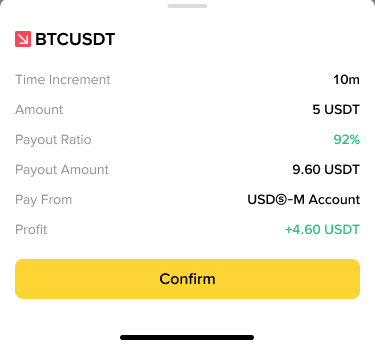
Step 6: Review and confirm the trade
Review the trade details and click [Confirm] to submit your trade.
Step 7: Wait for expiration
After successfully submitted, wait for the contract to reach its expiration time. You can monitor the candlestick chart for real-time updates.
Step 8: Manage your trades
View open orders
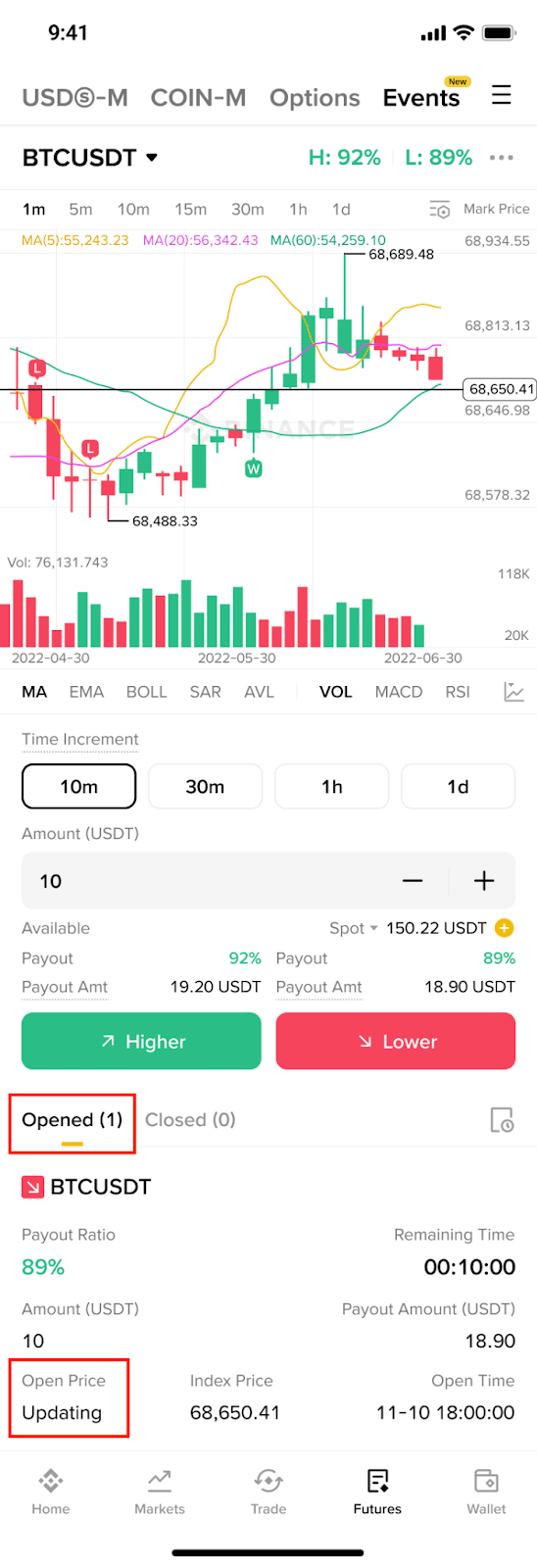
Starting from 2026-01-28, orders placed will gradually have their open time set to the next second after placement, and the open price will correspond to the index price at that next second. While the price is being retrieved, a notice saying “Updating” will be displayed on your Binance App. Please update your app to the latest version to stay informed about any changes related to Event Contracts.
For example, if a user places a 10-minute trade at 17:59:59 (UTC), the order’s open time will be 18:00:00 (UTC), the open price will be the index price at 18:00:00 (UTC), and the expiry time will be 18:10:00 (UTC).
Review closed trades (post expiration)
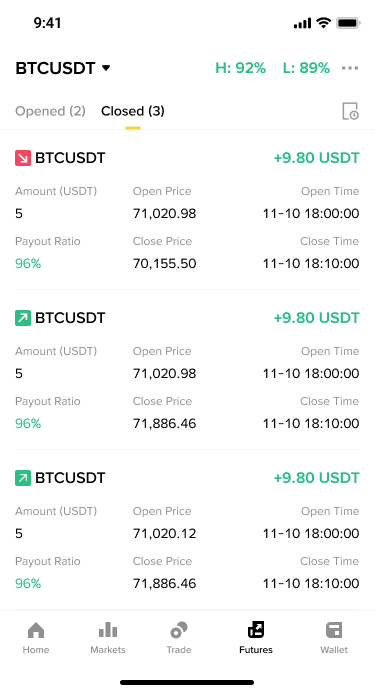
After the trade expires, go to [Closed Trades] to review the outcome:
- Open Price: The Index Price when the trade was opened.
- Close Price: The Index Price at expiration.
- Payout ratio and PnL: Your trade results.
- Trade Times: Track when the trade was opened and closed.
Step 9: View your transaction history
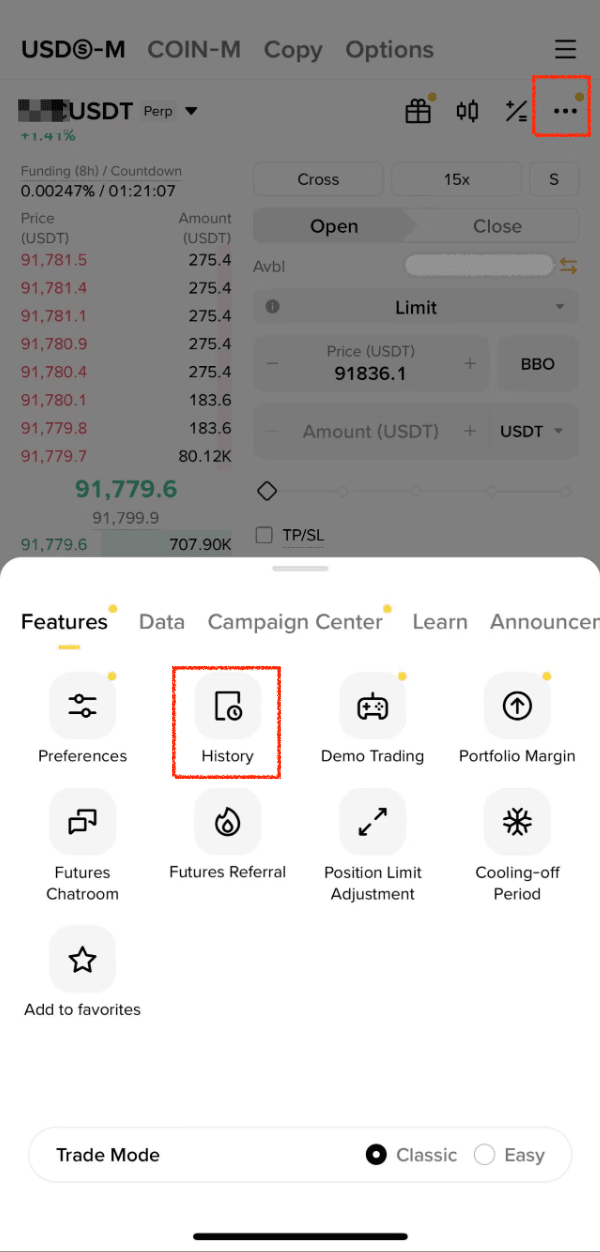
Trades made using funds from Spot and Futures Accounts are recorded separately. To view your transaction history:
Transaction history can be accessed on the app by going to [Futures] - [USDⓈ-M] - [...] - [History] - [Transaction History].
Transaction history can be accessed on the app by going to [Assets] - [Spot] - [USDT] - [History].
Disclaimers:
- These Event Contract FAQs may have been translated and published in different languages. In the event of any inconsistency, misstatements, omissions, or errors appearing in any translated version, the English language version shall prevail.
- These Event Contract FAQs should be read in conjunction with the Event Contract Terms (and any documents incorporated by reference in the Event Contract Terms). The Event Contract Terms are a legally binding agreement, the terms of which you must read, understand and accept before trading Event Contracts. The content of these Event Contract FAQs is for information only, and does not form part of the Event Contract Terms.
- Trading in event contracts is subject to significant risk and price volatility, and may not be suitable for all investors. You are solely responsible for your investment decisions and Binance is not liable for any losses you may incur. Movements in the underlying asset/market price can be unstable and unpredictable, and this has a direct result on the performance of the event contract. Past performance is not a reliable predictor of future performance. Before trading, you should make an independent assessment of the appropriateness of the transaction in light of your own objectives and circumstances, including the risks and potential benefits. Consult your own advisers, where appropriate. Binance encourages all users to trade responsibly. You must not trade with funds that you cannot afford to lose. This information should not be construed as financial or investment advice. To learn more about how to protect yourself, visit our Responsible Trading page. For more information, see our Terms of Use, Event Contract Terms and Risk Warning.